Tabela de conteúdo
Como as marcas podem rastrear hashtags no X (Twitter)? Guia e ferramentas para 2026
Quando Taylor Swift lança um novo álbum, hashtags como #TS11 podem gerar milhares de publicações no X em apenas algumas horas. E enquanto você pode rastrear uma hashtag no X, a plataforma não informará quantas vezes ela foi usada ou como a conversa evoluiu.
Isso dificulta que as marcas avaliem o desempenho da campanha ou mantenham o controle das hashtags de marca.
Neste guia, você aprenderá a rastrear hashtags no X e quais ferramentas podem ajudá-lo a analisá-las da maneira correta.
Principais conclusões:
-
O X não fornece análises completas de hashtag nativamente
Você pode pesquisar hashtags no X, mas a plataforma não mostra quantas vezes uma hashtag foi usada, como ela se comportou ao longo do tempo ou quem conduziu a conversa. A análise nativa se concentra principalmente no desempenho de suas próprias postagens.
-
O X Premium fornece informações sobre hashtags em toda a plataforma?
Não. A análise premium pode mostrar métricas de engajamento, como cliques ou impressões de seus tweets, mas não revela o volume geral de hashtags, o sentimento ou o desempenho dos concorrentes na plataforma.
-
São necessárias ferramentas de terceiros para medir o desempenho da hashtag X
Ferramentas como Brand24, Tweet Binder, Twitonomy, TrackMyHashtag ou Fedica coletam publicações públicas usando uma hashtag e calculam métricas como alcance, sentimento, envolvimento e atividade do influenciador.
-
Diferentes ferramentas se concentram em diferentes tipos de análise
Algumas ferramentas são especializadas em relatórios de campanha e dados históricos, enquanto outras se concentram no monitoramento em tempo real, na identificação de influenciadores ou em insights sobre o público.
-
O rastreamento de hashtag ajuda a medir o impacto e as tendências da campanha
O rastreamento de hashtags no X permite que as marcas analisem o alcance da campanha, descubram influenciadores, acompanhem o sentimento e identifiquem picos de conversa durante eventos ou momentos de tendências.
Como rastrear hashtags diretamente no X
Antes de começar a usar ferramentas externas, vale a pena se familiarizar com o que você pode fazer diretamente no X.
Ele oferece algumas maneiras fáceis de navegar pelas hashtags e acompanhar conversas, embora o que você pode acessar dependa do fato de você estar em um conta gratuita ou uma assinatura do X Premium.
| Recurso | Conta X gratuita | Pago (X Prêmio) |
|---|---|---|
| Pesquisa manual de hashtag | ✅ Sim | ✅ Sim |
| Filtros de pesquisa | ⚠️ Sim, mas limitado | ✅ Sim |
| Hashtags e tópicos em alta (Explorar tab) | ✅ Sim | ✅ Sim |
| Métricas de engajamento pós-nível | ✅ Sim | ✅ Sim |
| Colunas de hashtag em tempo real (X Pro) | ❌ Não | ✅ Sim |
| Painel de análise X completo | ❌ Não | ✅ Sim |
| Resumos de tendências de hashtag de IA (Grok AI) | ⚠️ Sim, mas limitado | ✅ Sim (SuperGrok) |
Recursos da conta gratuita (básica)
Com uma conta X gratuita, o rastreamento de hashtag depende principalmente de observação manual e dados simples de engajamento.
Aqui estão as principais opções disponíveis:
1. Pesquisa manual de hashtag
A maneira mais fácil de verificar uma hashtag é por meio da barra de pesquisa do X.
- 1 Digite a hashtag (por exemplo, #YourCampaign) no campo de pesquisa.
- 2 Abra a página de resultados.
- 3 Alternar entre as postagens Principais e Mais recentes.
Topo mostra postagens que recebem forte engajamento:
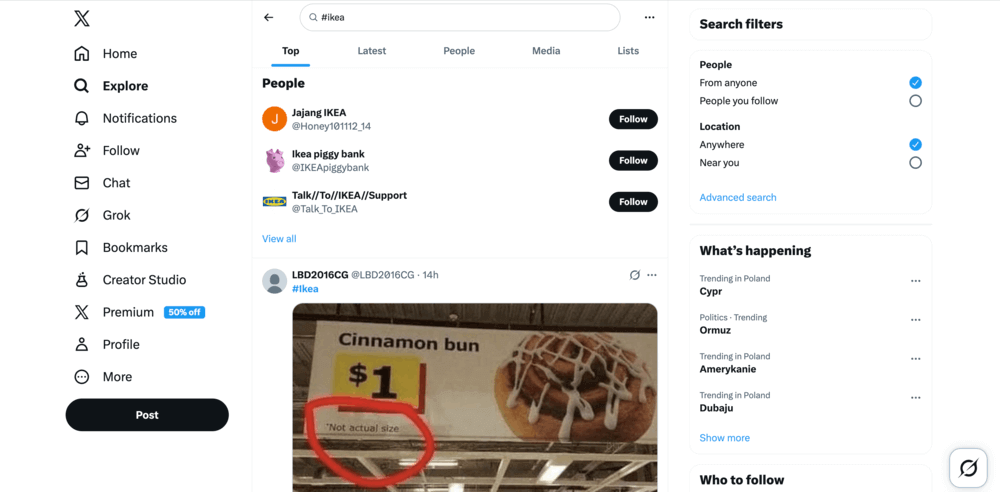
Enquanto Mais recentes exibe as postagens em ordem cronológica:
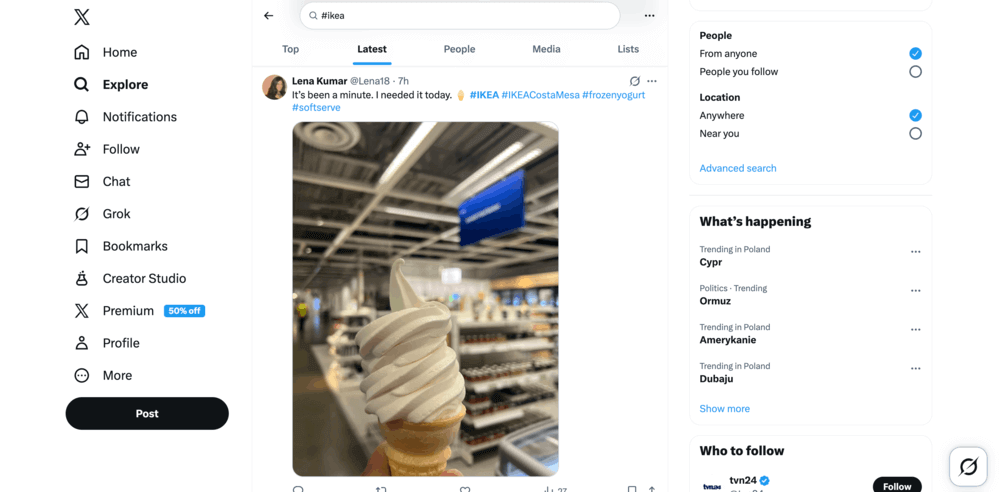
Esse método é útil para navegar rapidamente pelas conversas atuais e ver como as pessoas usam uma hashtag específica.
2. Seções Explorar e Tendências
O Explorar destaca tópicos e hashtags que são populares no momento na plataforma.
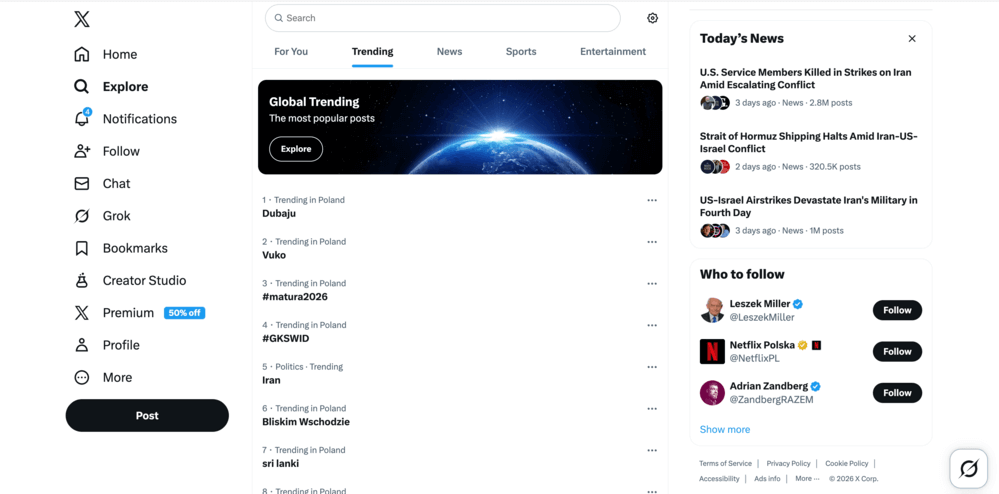
Você pode usá-lo para:
- detectar conversas emergentes,
- veja quais hashtags estão ganhando força no momento,
- encontrar tópicos relacionados ao setor que valham a pena acompanhar.
⚠️ Observação importante
As tendências mostradas no Explorar e Tendências As guias são frequentemente personalizado e baseado em localização, Portanto, os resultados podem variar de usuário para usuário.
3. Análise pós-nível
X oferece estatísticas básicas de engajamento para postagens individuais. Se você clicar no ícone de análise em uma de suas próprias postagens, poderá verificar métricas como:
- visualizações
- gostos
- republicações
- respostas
Lembre-se de que esses insights abrangem apenas seu próprio conteúdo, e não a conversa geral em torno de uma hashtag.
4. Listas X
Outra solução alternativa é criar Listas X:
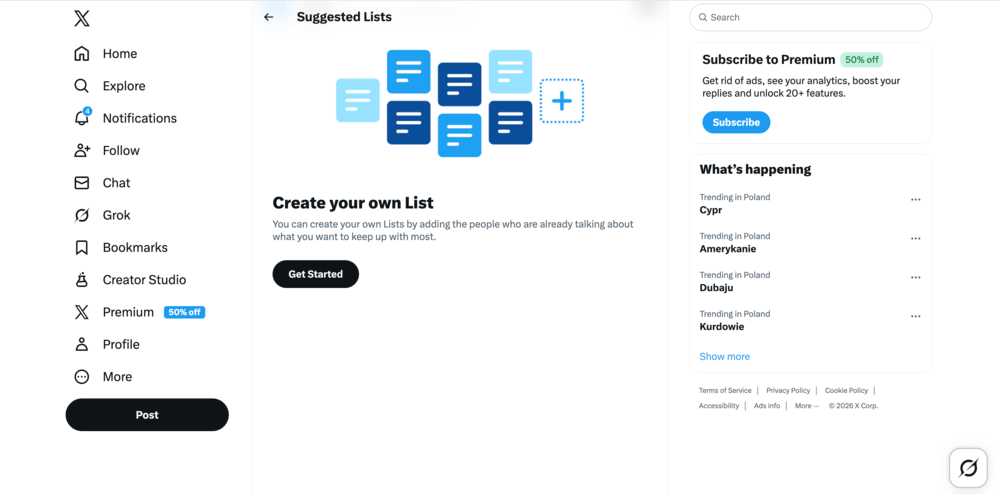
Você pode agrupar contas que usar frequentemente uma determinada hashtag e monitorar suas postagens em conjunto. Isso pode ajudá-lo a acompanhar manualmente as conversas relevantes.
Recursos disponíveis no X Premium
Algumas opções adicionais de monitoramento e análise estão disponíveis somente com X Assinaturas Premium (Basic, Premium ou Premium+).
1. Colunas de hashtag no X Pro (antigo TweetDeck)
Se você usar X Pro, Se você quiser criar uma coluna dedicada para uma hashtag, poderá criar uma coluna para ela.
Isso permite que você:
- monitorar publicações que usam uma hashtag em tempo real,
- manter várias hashtags visíveis ao mesmo tempo,
- observar conversas sem precisar fazer buscas repetidas.
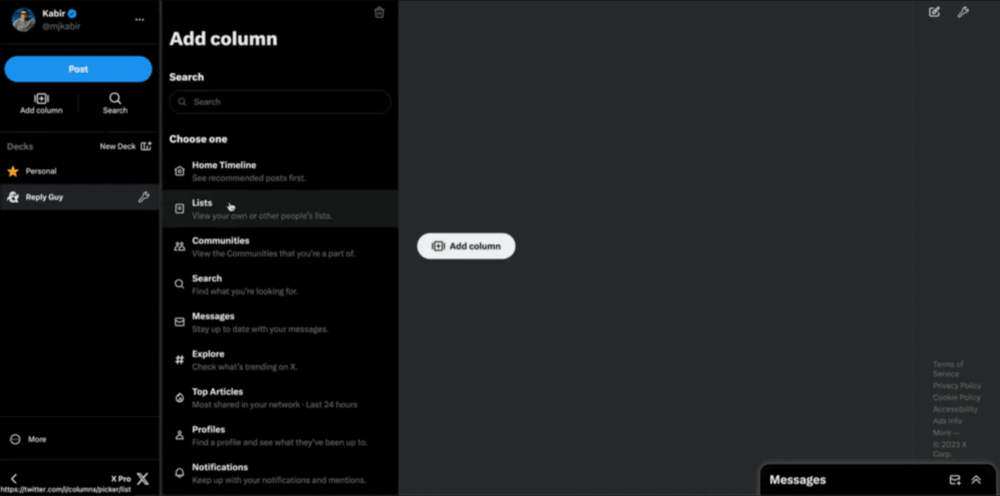
Para muitos gerentes de mídia social, essa é a maneira nativa mais conveniente de acompanhar as discussões em andamento.
2. Painel de controle completo do X Analytics
Os assinantes Premium podem acessar o X Painel de controle do Analytics, que fornece insights mais amplos em nível de conta e dados de público.
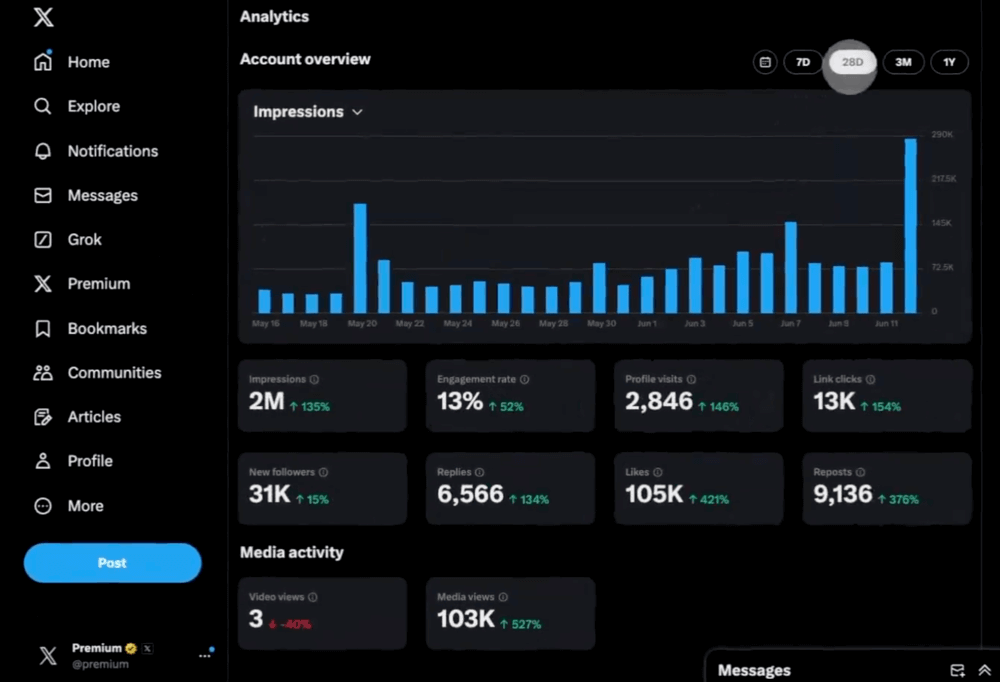
Embora isso possa ajudar a avaliar seu próprio desempenho, ele ainda se concentra principalmente em a atividade de sua conta em vez de análises de toda a hashtag.
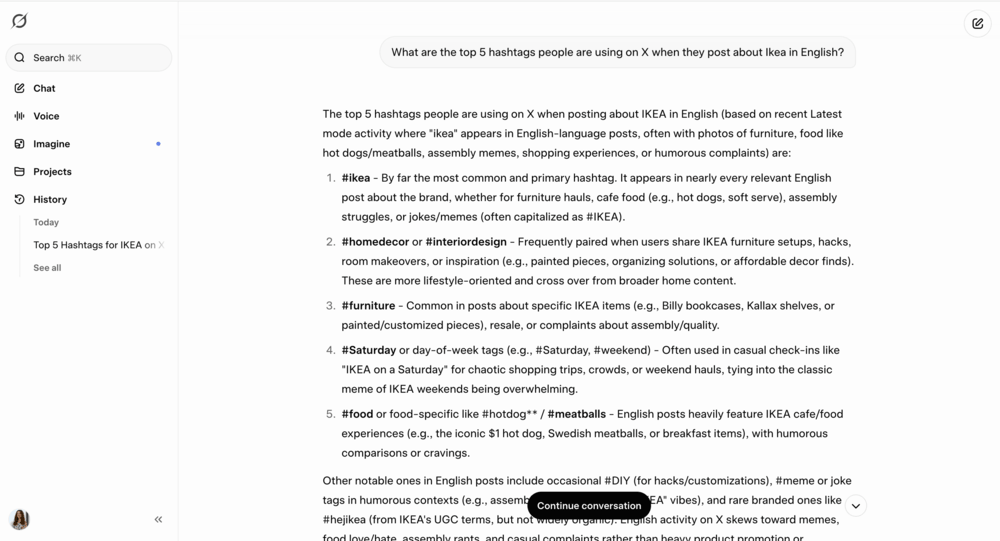
3. Grok AI
Os usuários Premium também podem usar Grok AI para resumir tópicos de tendências ou hashtags e explorar conversas por meio de prompts com tecnologia de IA.
⚠️ Observação importante
A partir de 2026, a Grok oferece acesso gratuito limitado com limites de uso, enquanto recursos avançados e limites de uso mais altos exigem uma assinatura X Premium.
O que o rastreamento nativo do X faz bem
Os recursos nativos são úteis para:
- navegar pelas conversas em torno de uma hashtag,
- detectar tópicos de tendências em tempo real,
- navegar pelas postagens em tempo real,
- verificar o engajamento em seu próprio conteúdo.
Quando o rastreamento nativo de hashtag se torna limitante
Essas opções X (Twitter) são ótimas para ficar de olho nas conversas, mas eles são projetados principalmente para navegar pelo conteúdo em vez de analisá-lo.
Por exemplo, o X não oferece ferramentas integradas para medir facilmente:
- alcance total de uma hashtag,
- quantas vezes uma hashtag foi usada,
- como o volume de postagens mudanças ao longo do tempo,
- sentimento em torno da conversa,
- quais autores geram o maior impacto,
- ou como uma hashtag compara-se com outro.
Se estiver executando uma campanha de hashtag, monitorando uma hashtag de marca ou preparando relatórios de desempenho, esses insights se tornarão importantes.
É por isso que os profissionais de marketing geralmente combinam os recursos da plataforma nativa com ferramentas de monitoramento que coletam e analisam dados de hashtag ao longo do tempo.
Ferramentas de rastreamento de hashtag X (Twitter)
Veja abaixo uma comparação das 5 ferramentas mais populares para rastrear hashtags no X.
| Ferramenta | Melhor para | Principais recursos de rastreamento de hashtag X | O que poderia ser melhor |
|---|---|---|---|
| Brand24 | Monitoramento com tecnologia de IA de campanhas de hashtag e conversas on-line | Monitoramento de hashtag em tempo real, análise de sentimentos e tendências, AI Brand Assistant | Profundidade histórica rasa |
| TweetBinder | Medição do desempenho da hashtag durante eventos e campanhas | Rastreamento de hashtag em tempo real e histórico, classificações de colaboradores | Limitado a X dados |
| Twitonomia | Explorar conversas sobre hashtags e identificar colaboradores influentes | Análise de pesquisa para hashtags, gráficos de análise visual, identificação de influenciadores | Análises avançadas e intervalos de datas personalizados requerem planos pagos |
| TrackMyHashtag | Análise profunda de hashtag e análise de histórico de campanha | Dados X históricos, rastreamento de hashtag em tempo real, classificação de influenciadores | Principalmente focado em X, monitoramento mais amplo e limitado |
| Fedica | Entender o público por trás das conversas com hashtags | Informações demográficas do público, mapeamento de conversas geográficas | Relatórios avançados e análises mais detalhadas requerem planos pagos |
⚠️ Metodologia de pesquisa
Ao selecionar essas ferramentas, priorizei cinco fatores principais: precisão dos dados e integração oficial da API, profundidade da análise, preço acessível e acesso a dados históricos. Também analisei o feedback dos usuários em duas grandes plataformas de avaliação: G2 e Capterra.
Em muitos casos, o uso de duas ferramentas juntas pode lhe proporcionar uma visão mais completa, portanto, sinta-se à vontade para misturar e combinar, desde que isso funcione para o seu fluxo de trabalho.
01 Brand24
4.6/5 - G2 (322 avaliações)
4.7/5 - Capterra (253 comentários)
14 dias Teste gratuito disponível
De $199/mês
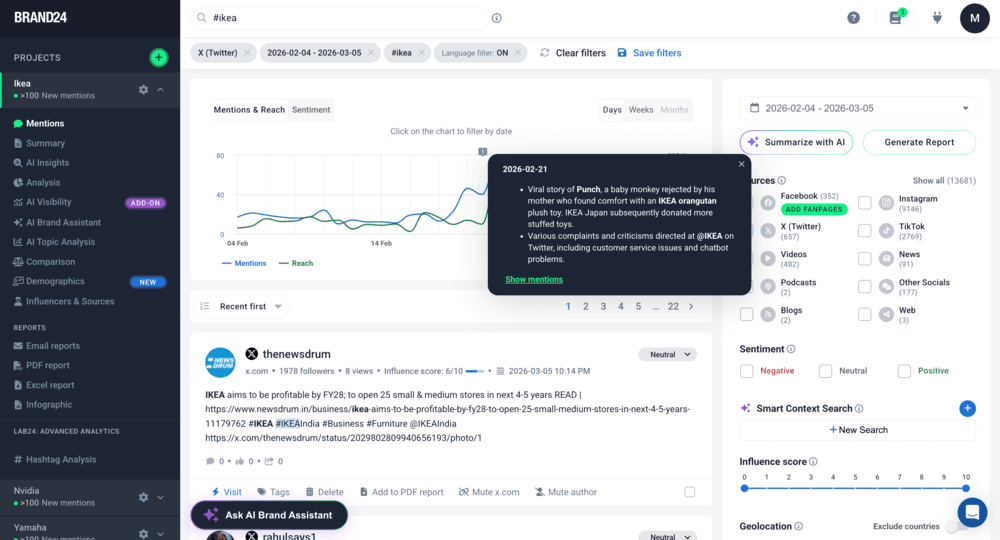
Brand24 é um escuta social e ferramenta de monitoramento de mídia que rastreia hashtags (e palavras-chave ou mentions de marca) no X e em outras plataformas sociais, bem como em fontes não sociais (como notícias, blogs ou fóruns).
Ele coleta hashtags mentions em tempo real e as transforma em insights estruturados e visualizações de dados. O Brand24 também usa Recursos com tecnologia de IA para resumir discussões, revelar tendências em torno de sua hashtag ou analisar sua visibilidade em chatbots com IA.
🔑 Principais recursos
- Monitoramento de hashtag em tempo real - Rastreie X postagens usando uma hashtag específica à medida que elas aparecem on-line.
- Análise de alcance de hashtag - Avalie o alcance potencial das postagens que usam uma hashtag.
- Análise de sentimento - Classificar automaticamente os mentions como positivos, neutros ou negativos.
- Alertas de tempestades - Receba notificações quando a atividade da hashtag tiver um pico inesperado.
- Identificação de influenciadores - Encontre contas que geram o maior engajamento em torno de uma hashtag.
- Insights de IA e assistente de marca - Resuma rapidamente as conversas e tendências X em torno das hashtags rastreadas.
Melhor para
- Marcas que realizam campanhas de hashtag
- Equipes de RP monitorando conversas sobre a marca
- Equipes de marketing analisando o desempenho da campanha
- Agências que rastreiam hashtags de concorrentes
Pontos fortes
- Rastreia hashtags e mentions em várias plataformas, não apenas no X
- Os resumos de IA facilitam a compreensão de grandes conversas
- Os alertas em tempo real ajudam as equipes a reagir rapidamente a picos de discussão
O que poderia ser melhor
- Falta de dados históricos profundos
- A definição das palavras-chave e dos filtros corretos pode exigir um pouco de configuração inicial
02 TweetBinder
4.4/5 - G2 (15 avaliações)
Fteste de ré disponível
De $62.99/mês
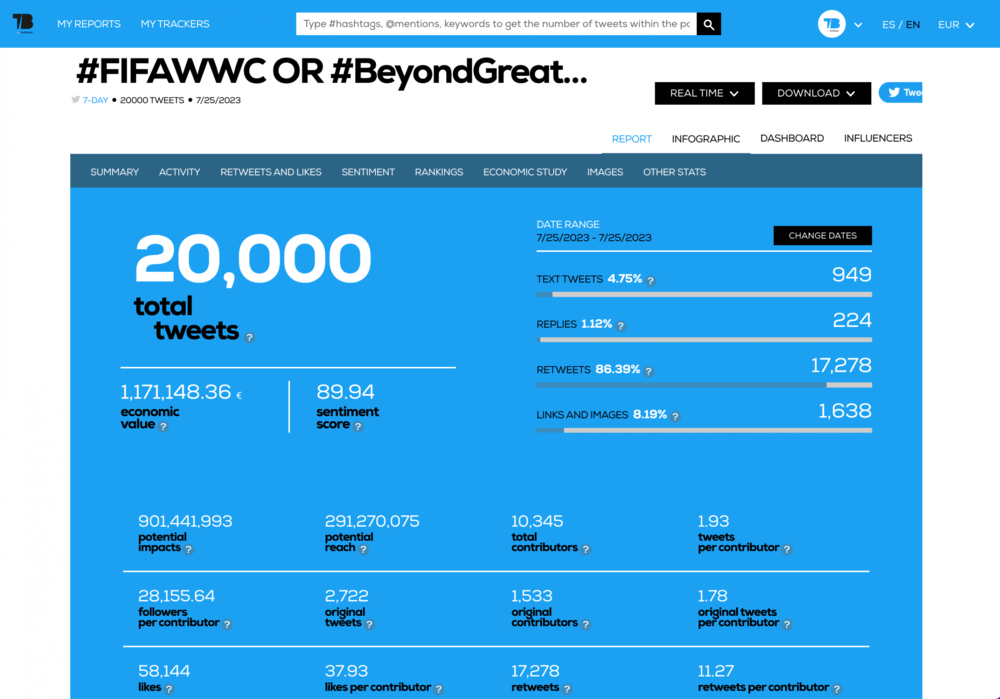
O TweetBinder é uma ferramenta de análise de hashtag e palavra-chave criada especificamente para o X (Twitter). Ela é comumente usada para monitorar o desempenho da hashtag durante eventos, campanhas ou discussões ao vivo.
Em vez de navegar manualmente pelas postagens, o TweetBinder reúne X postagens em relatórios estruturados que mostram a atividade, o envolvimento e os principais colaboradores.
🔑 Principais recursos
- Relatórios de análise de hashtag - analisar tweets usando uma hashtag específica
- Coleta de tweets em tempo real - monitorar as postagens conforme elas aparecem no X
- Classificação dos principais colaboradores - identificar os usuários que geram mais engajamento
- Métricas de engajamento - rastrear curtidas, repostagens e respostas relacionadas a uma hashtag
- Relatórios de hashtag de eventos - medir a atividade de hashtag durante conferências ou campanhas
- Relatórios exportáveis - faça o download da análise de hashtag para apresentações ou relatórios
- Gráficos de atividades - visualizar quando uma hashtag está mais ativa
Melhor para
- Profissionais de marketing analisando o desempenho da hashtag no X
- Organizadores de eventos que rastreiam hashtags de conferências ou eventos
- Agências que preparam relatórios de desempenho de campanha
- As equipes de mídia social medem o envolvimento em conversas específicas
Pontos fortes
- Análise sólida de hashtag especificamente para campanhas e eventos X
- Relatórios visuais claros e classificações de colaboradores que destacam os principais participantes da conversa
O que poderia ser melhor
- Focado principalmente em dados X, com monitoramento limitado entre plataformas
- Os relatórios gratuitos são limitados quanto ao número de tweets e ao intervalo de tempo analisado
03 Twitonomia
4.0/5 - G2 (12 avaliações)
Fversão gratuita disponível
De $19/mês
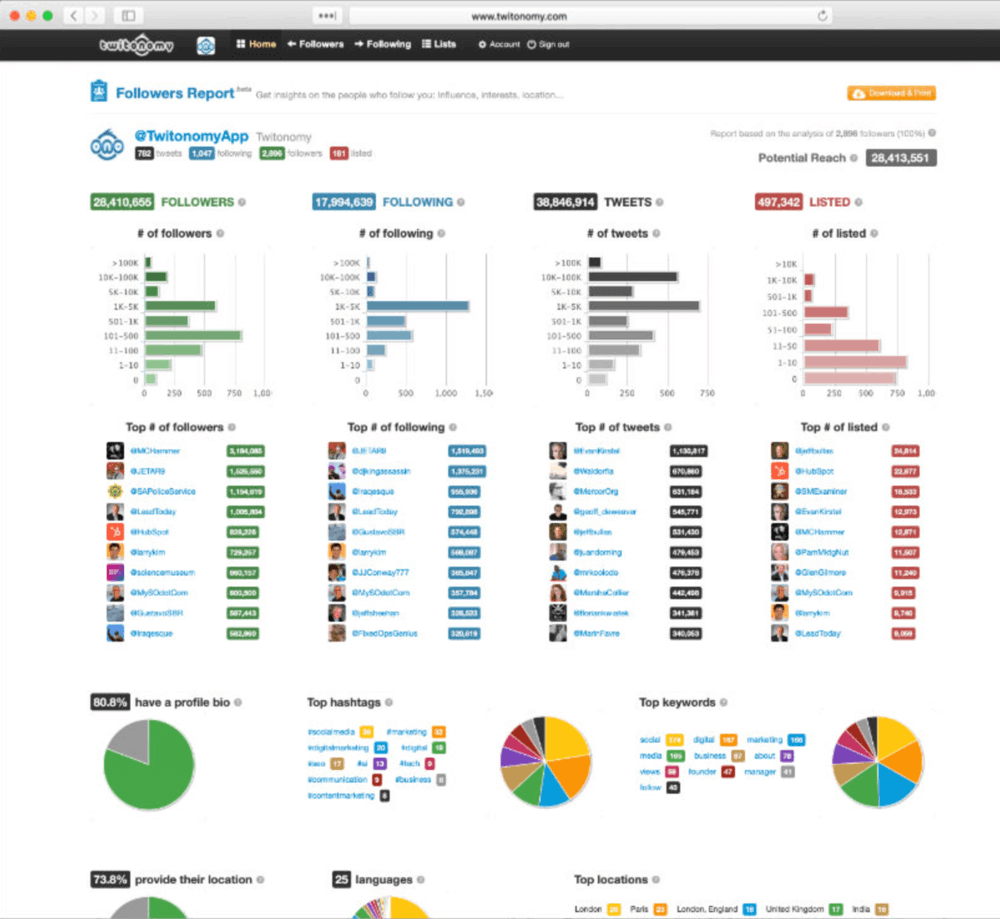
O Twitonomy é uma ferramenta de análise do X (Twitter) que permite que você se aprofunde em publicações, hashtags e atividades de usuários mais do que os insights incorporados. Ela é especialmente forte em análises baseadas em pesquisa e relatórios visuais que mostram a tendência e o desempenho das hashtags ao longo do tempo.
Para muitos profissionais de marketing, é uma maneira fácil de monitorar hashtags de campanhas e exportar relatórios analíticos limpos e estruturados.
🔑 Principais recursos
- Análise de pesquisa para hashtags e palavras-chave - analisar conversas sobre hashtags, palavras-chave ou URLs específicos
- Análises visuais e gráficos - ver como a atividade e o engajamento da hashtag mudam ao longo do tempo
- Identificação de influenciadores - identificar os colaboradores mais influentes que participam de uma conversa de hashtag
- Mapa interativo mentions - visualizar geograficamente onde os tweets que usam uma hashtag são postados
- Análise de hashtag de concorrentes - analisar as hashtags usadas pelos concorrentes e comparar os padrões de engajamento
Melhor para
- Profissionais de marketing exploram o desempenho da hashtag no X
- Gerentes de mídia social analisando conversas de campanha
- Equipes que identificam colaboradores influentes em discussões de hashtag
- Agências que preparam relatórios de análise de mídia social
Pontos fortes
- Análises visuais claras que ajudam a entender a atividade da hashtag ao longo do tempo
- Recursos úteis de identificação de influenciadores para conversas com hashtags
O que poderia ser melhor
- A análise de pesquisa avançada e os intervalos de datas personalizados normalmente exigem um assinatura paga
- Focado principalmente em Análise X, com monitoramento limitado fora da plataforma
04 TrackMyHashtag
5.0/5 - G2 (2 avaliações)
4.7/5 - Capterra (42 avaliações)
5 dias Teste gratuito disponível
De $149.99/mês
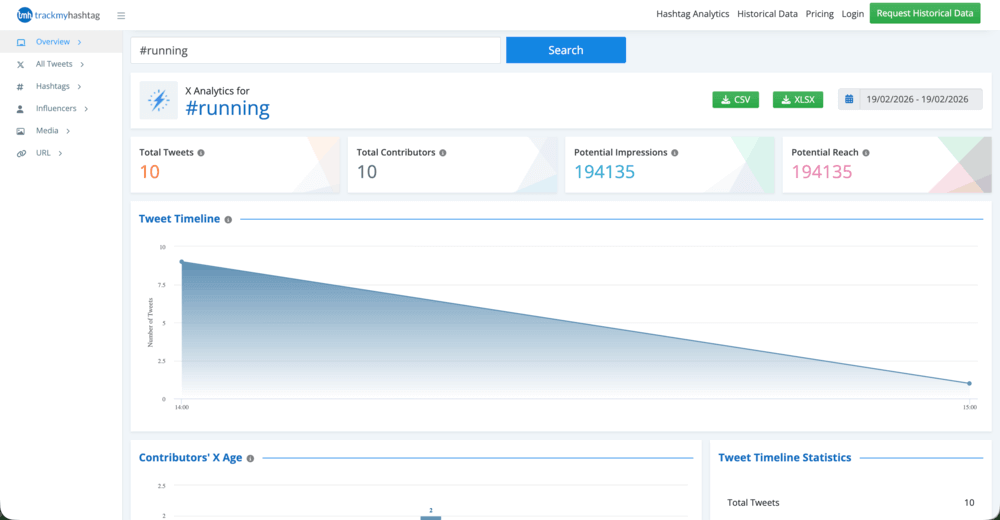
O TrackMyHashtag é uma ferramenta de análise com tecnologia de IA que rastreia e analisa hashtags, palavras-chave e mentions no X (Twitter).
Um de seus excelentes recursos é a acesso a dados X históricos que remonta a 2006, o que o torna útil para analisar campanhas de hashtag em andamento e passadas.
🔑 Principais recursos
- Rastreamento de hashtag em tempo real - monitorar conversas ao vivo sobre hashtags, palavras-chave ou mentions à medida que elas acontecem
- Acesso a dados históricos - obter dados X arquivados desde 2006 para analisar campanhas ou tendências anteriores
- Análise de desempenho - medida métricas de hashtag como alcance potencial, impressões, volume de tweets e atividade do colaborador
- Identificação de influenciadores - identificar e classificar automaticamente as pessoas mais ativas e influentes na conversa em torno de uma hashtag
- Padrões de engajamento e atividade - analisar os horários de pico de postagem e as tendências de conversação
- Informações geográficas e sobre o idioma - ver onde as conversas começam e quais idiomas são usados
Melhor para
- Profissionais de marketing analisando o desempenho da campanha de hashtag
- Pesquisadores estudam conversas e tendências históricas do X
- Marcas que identificam colaboradores influentes em discussões de hashtag
- Equipes que avaliam campanhas de hashtag de concorrentes
Pontos fortes
- Acesso a uma enorme quantidade de dados históricos, desde os primeiros arquivos X
- Análises detalhadas sobre o alcance, o envolvimento e a atividade do colaborador da hashtag
O que poderia ser melhor
- Principalmente focado em análises X, com monitoramento limitado em outras plataformas
- Relatórios de dados históricos ou rastreamento avançado podem exigir planos pagos ou solicitações de dados
05 Fedica (anteriormente Tweepsmap)
3.5/5 - G2 (3 avaliações)
5.0/5 - Capterra (5 avaliações)
Plano gratuito limitado disponível
De $10.00/mês
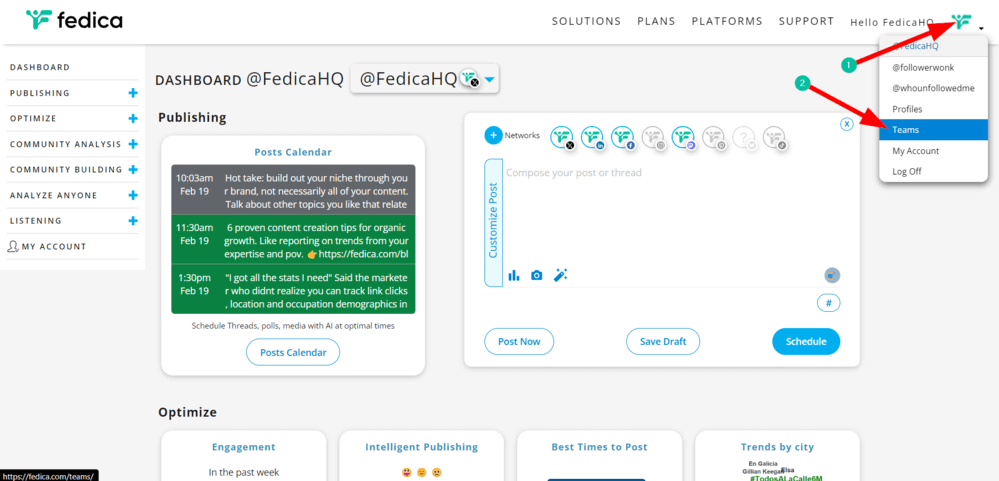
Fedica é analista de mídia social e plataforma de inteligência de público-alvo com hashtag e rastreamento de palavras-chave para X (Twitter).
Em vez de se limitar às estatísticas básicas de engajamento, a Fedica se aprofunda em insights como dados demográficos do público ou onde as conversas estão acontecendo. É uma opção sólida para equipes que desejam entender as pessoas por trás de uma hashtag em vez de apenas o volume de publicações.
🔑 Principais recursos
- Análise de hashtag e palavra-chave - analisar o alcance, as impressões, as contagens de colaboradores e o envolvimento de hashtags específicas
- Mapeamento geográfico - veja onde as conversas estão acontecendo com mapas interativos e insights de localização
- Dados demográficos do público - analisar perfis de pessoas, incluindo gênero, ocupação e interesses
- Insights sobre afinidade com a marca - descobrir outras marcas e tópicos seguidos por usuários que se envolvem com sua hashtag
- Análise de dados históricos - acessar dados de hashtag além dos limites de tempo incorporados do X
- Análise da linha do tempo - detectar picos na atividade de conversação e conectá-los a eventos do mundo real
Melhor para
- Profissionais de marketing analisam o público X por trás das conversas com hashtag
- Marcas que pesquisam os dados demográficos e os interesses dos clientes
- Equipes de mídia social planejando campanhas direcionadas
- Agências que identificam usuários influentes e padrões de engajamento no X
Pontos fortes
- Informações sólidas sobre o público e os dados demográficos dos participantes da hashtag
- Mapeamento geográfico e de conversas que destaca onde as discussões acontecem
- Combinação útil de análise, inteligência de público-alvo e monitoramento
O que poderia ser melhor
- Principalmente focado em análises X e insights sobre o público, com monitoramento limitado entre plataformas
- Relatórios avançados e análises históricas mais profundas geralmente exigem planos pagos
PERGUNTAS FREQUENTES
Quais são as ferramentas de rastreamento de hashtag X (Twitter)?
As ferramentas de rastreamento de hashtag X são plataformas de análise que monitorar como as hashtags são usadas em publicações e conversas. Eles coletam dados como volume de tweets, alcance, envolvimento e principais colaboradores.
Muitos deles também incluem análise de sentimento e dados históricos, para que você possa acompanhar como a conversa em torno de uma hashtag muda ao longo do tempo.
Quais métricas as ferramentas de rastreamento de hashtag X (Twitter) medem?
A maioria das ferramentas de rastreamento de hashtag mede métricas como volume de tuítes, alcance, impressões e engajamento (curtidas, repostagens e respostas), ou sentimento.
Outras percepções podem incluir principais colaboradores, impacto do influenciador e crescimento da hashtag ao longo do tempo. Essas métricas ajudam os profissionais de marketing a avaliar o desempenho da campanha e o envolvimento do público.
Posso rastrear a hashtag X (Twitter) de um concorrente?
Sim. A maioria das ferramentas de rastreamento de hashtag permitem que você monitore qualquer hashtag pública usada no X, inclusive as usadas pelos concorrentes.
Isso o ajuda a analisar o desempenho da campanha, identificar os influenciadores que participam da conversa e entender o envolvimento do público.
O monitoramento das hashtags dos concorrentes também pode revelar tópicos de tendência e estratégias de conteúdo em seu setor.
Por que rastrear hashtags no X (Twitter) em 2026?
O rastreamento de hashtags ajuda as marcas entender como as conversas se espalham pela plataforma. Ele permite que as equipes avaliem o alcance da campanha, identifiquem os influenciadores que impulsionam o envolvimento e detectem picos de discussão.
A análise de hashtag também revela o sentimento do público e as tendências emergentes. Esses insights ajudam os profissionais de marketing a otimizar as campanhas e a responder rapidamente às conversas X.

Artigo revisado por