Table of contents
2M Marketers

According to SocialInsider, Facebook pages in 2026 typically reach only about 2–6% of their followers organically! Did you know that?
That gap is why follower count is a vanity metric and reach is the one worth tracking.
In this guide, I’ll show you what social media reach means, how to measure it on every major platform, and 8 research-backed tactics to grow it in 2026, with real results from major brands.
Key takeaways
-
What is reach in social media?
Social media reach = the number of unique users who potentially saw your content. Don't confuse it with impressions (total views, including repeats) or followers (potential audience).
-
How to measure social media reach?
Three ways to measure it: native platform analytics (most accurate), manual calculation using Impressions ÷ Frequency, or third-party monitoring tools for cross-platform and brand mention reach tracking.
-
Content format determines reach.
For example, Instagram Reels get 36% more reach than carousels — but carousels earn 12% more engagement per impression (Buffer, 2026). Use Reels to reach new people; use carousels to deepen connections.
-
Reach growth is strategic, not accidental.
Uber achieved a 24% increase in online exposure by listening to real-time audience conversations and acting on them fast — not by posting more.
-
The potential audience is enormous.
According to Statista (2026), over 5.4 billion people used social media in 2025 — that's more than 2 in 3 people on Earth active on social platforms every month.
-
Response speed is a hard threshold, not an aspiration.
73% of consumers expect a response within 24 hours or sooner, and 73% say they'll buy from a competitor if they don't get one. (Source: Sprout Social Index 2025)
What is social media reach? Definition
Social media reach is the estimated number of unique users who have potentially seen your content, brand mention, or campaign across social media platforms.
In simple words: It shows how many individual social media accounts were exposed to a post, story, ad, or page, not how many times it was viewed (that would be impressions).
A quick example: If 1,000 different users see your Instagram post, your reach is 1,000, whether each person saw it once or five times.
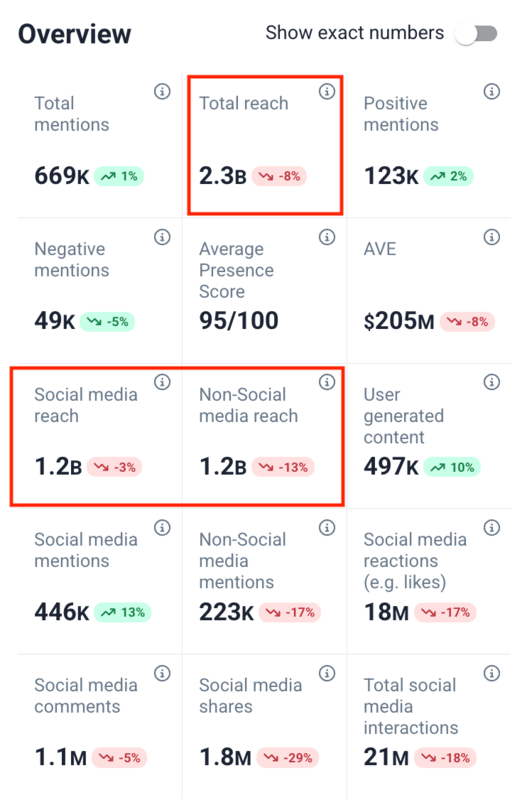
Why is reach important on social media?
- It shows actual brand visibility, instead of showing your potential reach (followers)
- It tells you if your content is spreading outside your current audience
- Reach spikes often signal viral moments, PR opportunities, or reputational crises
- It’s the key metric for calculating CPR (cost per reach) in paid campaigns
- It helps you compare how effectively different content formats and channels work
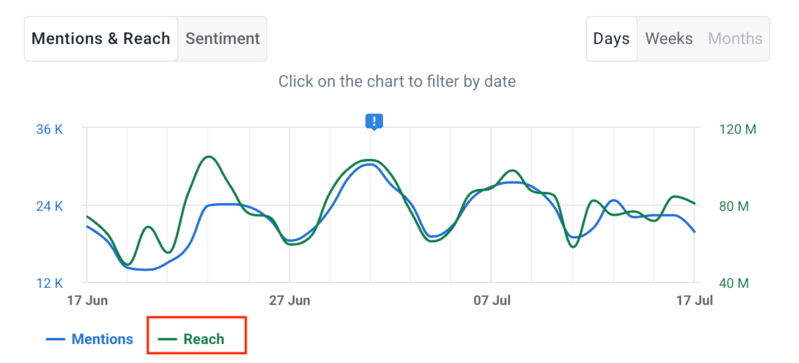
Which metrics are related to social media reach?
| Metric | What it measures |
|---|---|
| 👁️ Impressions | Total views, including repeat views from the same user |
| 💬 Engagement | Likes, shares, comments, saves, clicks |
| 😊 Sentiment | Positive, neutral, or negative tone of social mentions |
| 📢 Share of Voice | Your reach vs. competitors’ reach in the same space |
| 🌱 Organic reach | Unique users who saw your content without paid promotion |
| 💰 Paid reach | Unique users who saw your content through paid advertising |

Social media reach vs impressions
In a nutshell: Reach helps you understand how many individuals your content gets in front of. Impressions show how often people are seeing it.
A quick example:
Think of a billboard on one of a commuter routes in a major city.
- If 1,000 different drivers see it on Monday morning, your reach is 1,000.
- If 500 of those same drivers pass it every day for a week, your impressions climb to 3,500, but your reach hasn’t moved.
Same billboard, very different numbers!
| Aspect | Reach | Impressions |
|---|---|---|
| What it measures | Number of unique people who saw your content | Total number of times your content was displayed |
| Duplicate views | Everyone is only counted once, no matter how many times they saw it | One person can generate multiple impressions |
| Example | 1,000 users see your Instagram post → reach = 1,000 | Everyone of those 1,000 people each see it 3 times → impressions = 3,000 |
In practice:
- ⬆️ High reach + ⬇️ low impressions:
- Lots of people saw it one time and kept scrolling.
- It got in front of a wide audience, but didn’t stay in their memory.
- ⬇️ Low reach + ⬆️ high impressions:
- Fewer people are seeing it, but they’re seeing it repeatedly.
- Great for remarketing, but not ideal for growing your audience.
Social media reach vs engagement
In a nutshell: Reach answers “who saw this?” (how many people viewed your content). Engagement answers “who cared enough to do something about it?” (how many people interacted with it).
A quick example:
A post can reach 100,000 people and get 12 likes.
Another can reach 500 people and generate 200 comments.
Both of these tell you something important — but they’re very different stories.
| Aspect | Reach | Engagement |
|---|---|---|
| What it measures | Unique users who saw your content | Interactions: likes, comments, shares, saves, clicks |
| Primary goal | Brand awareness, audience growth | Community building, content resonance |
| Example | 10,000 users see your post → reach = 10,000 | 800 of those 1,000 like or share it → engagement = 800 |
What the combinations tell you:
- 🟢 High reach + high engagement: The dream combination. Study what worked and repeat it!
- 🔴 High reach + low engagement: People see your brand but aren’t moved to interact. Fix the message before pushing for more reach.
- 🟡 Low reach + high engagement: Your content resonates deeply with a small group. That’s your sign to scale it up.
How to calculate social media reach?
In 2026, we’ve fortunately got plenty of tools that show social media reach inside their built-in analytics.
But if you ever need to estimate it yourself, here’s the social media reach formula:
Reach = Total Impressions ÷ Average Frequency*
*Where frequency = the average number of times each person saw your content.
A quick example:
A LinkedIn post generates 15,000 impressions. On average, one person saw it 2 times. Estimated reach = 7,500 people.
Reach = 15,000 ÷ 2 = 7,500
Frequency appears in ad dashboards (Meta Ads Manager, LinkedIn Campaign Manager). But for organic posts, it’s often not available, so calculating it manually is usually just a rough estimate, not something you should rely on as your main method.
Reach rate is more useful for benchmarking:
Reach Rate = (Reach ÷ Total Followers) × 100
A 5–10% reach rate per post is usually a solid result on most platforms, but it vary a lot depending on the platform and the size of your account. (See the FAQ for platform-specific benchmarks.)
How to measure social media reach?
There are three main approaches. Here’s how they compare before diving in:
| Method | Best for | Accuracy |
|---|---|---|
| 📊 Native analytics (Instagram Insights, Linkedin Analytics, TikTok Business Suite, Meta Business Suite) | Single-platform, highest precision | ⭐⭐⭐ Highest (direct from source) |
| 🧮 Manual calculation (Impressions ÷ Frequency) | Quick estimates and performance checks | ⭐ Lower (depends on frequency data) |
| 🔧 Third-party tools (social media management, monitoring, or influencer platforms) | Cross-platform reach, brand mention reach, competitor benchmarking | ⭐⭐⭐ High (aggregated across sources) |

01 Native analytics tools
Each platform defines social media reach slightly differently and buries it in different menus. Here’s exactly where to find it.
You’ll need a Business or Creator account first.
How to check your reach:
- Go to your profile, then tap Professional Dashboard → Insights
- In the Overview section, tap Views to see unique accounts reached in your selected time range
- For a specific post or Reel: tap the post → View Insights → look for Reach
- For Stories: open the Story before it expires → swipe up to see insights
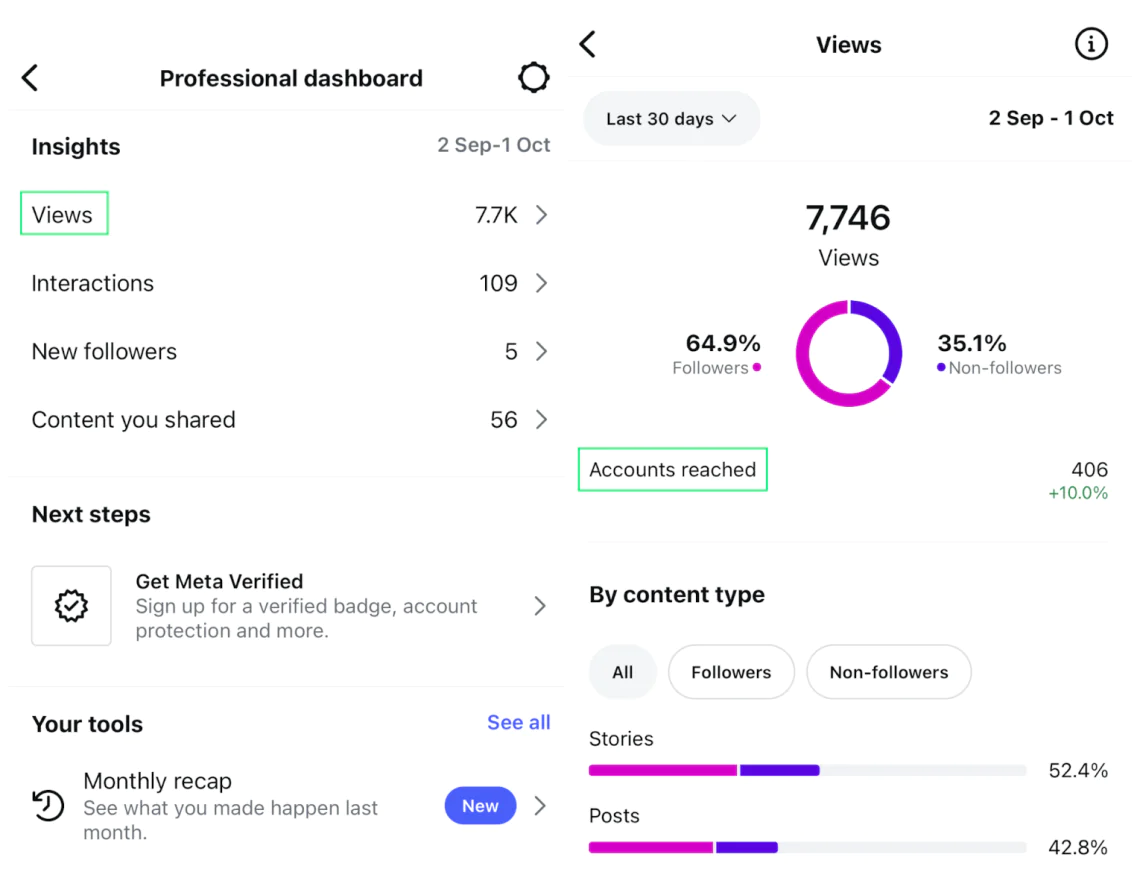
💡 One useful Instagram feature: It breaks reach into followers vs. non-followers, so you can see how much of your content is reaching new people vs. staying within your existing audience.
TikTok
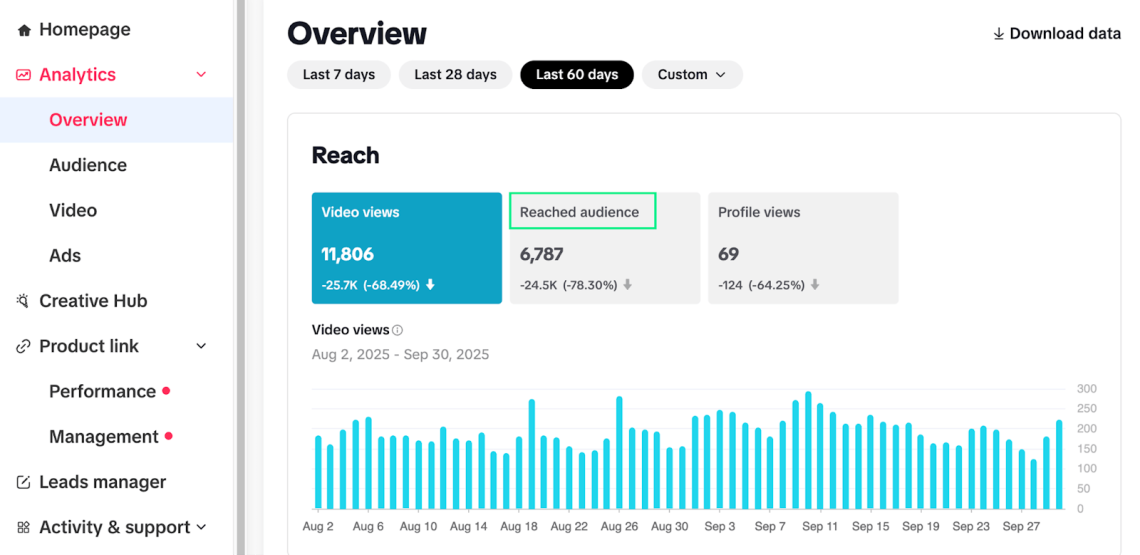
TikTok doesn’t literally label it as “reach,” but you can check “Reached audience” (unique viewers), which is basically the same thing.
How to check reach:
- Switch to a Business or Creator account.
- Go to your Profile → tap the three dots (“more”) → Business Suite → Analytics.
- In the Overview tab, you’ll see key stats including:
- Video Views (total plays)
- Profile Views
- Reached audience (this is your reach)
- Tap individual posts for per-video reach data.
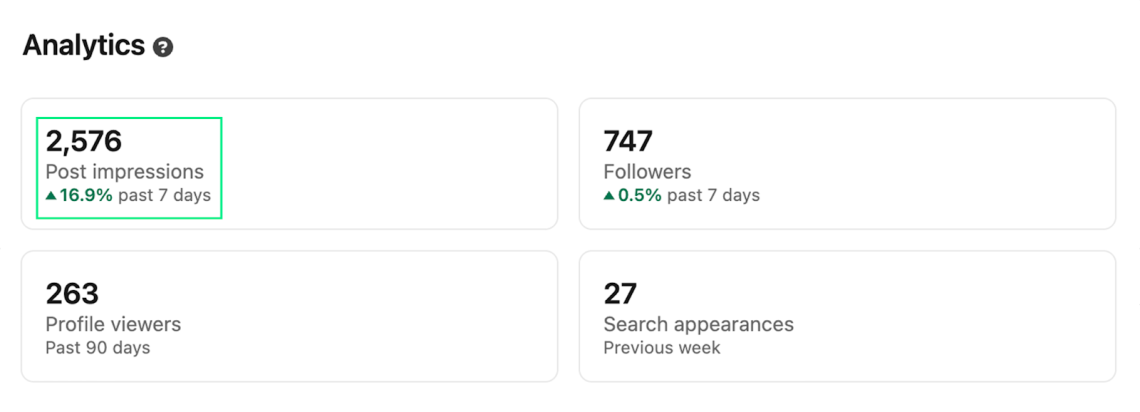
LinkedIn gives you two metrics: Impressions (total views) and Members reached (unique people), which is your reach number.
How to check reach:
For personal posts: profile → Show All Analytics → Post Impressions
For company pages: Company Page → Analytics → look for “Members reached”
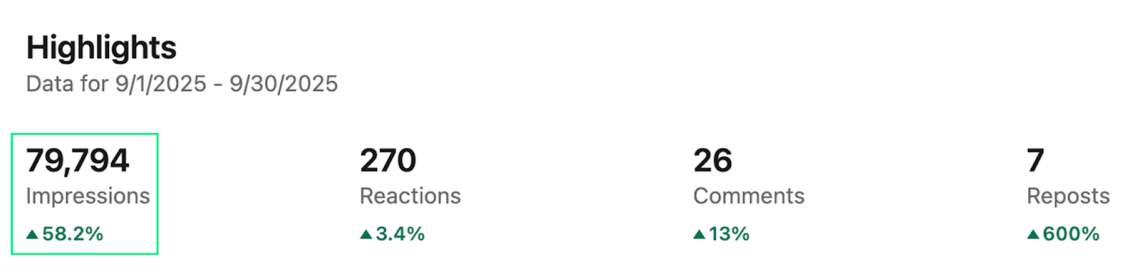
You can also check Impressions for each post. They’re unique and show how far your content is reaching.

You’ll also find the Members reached metric there.
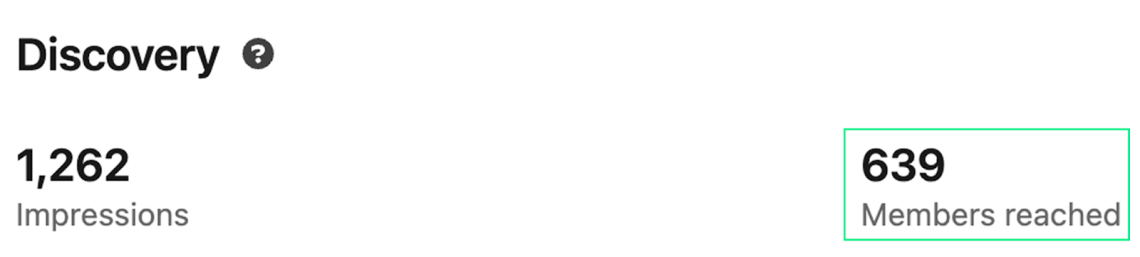
💡 Pro tip: You can track those metrics over time and export reports whenever you need to spot trends.
Facebook gives you detailed insights through the Meta Business Suite or the Professional Dashboard.
How to check reach:
- Go to your Facebook Page.
- Open Professional Dashboard → click Insights.
- Under Overview: Page Reach (unique users from any page content) and Post Reach (per individual post)
💡 According to SocialInsider’s 2026 Facebook benchmarks, average organic reach for business pages now sits between 2–6% of followers, with 2–4% considered strong performance.
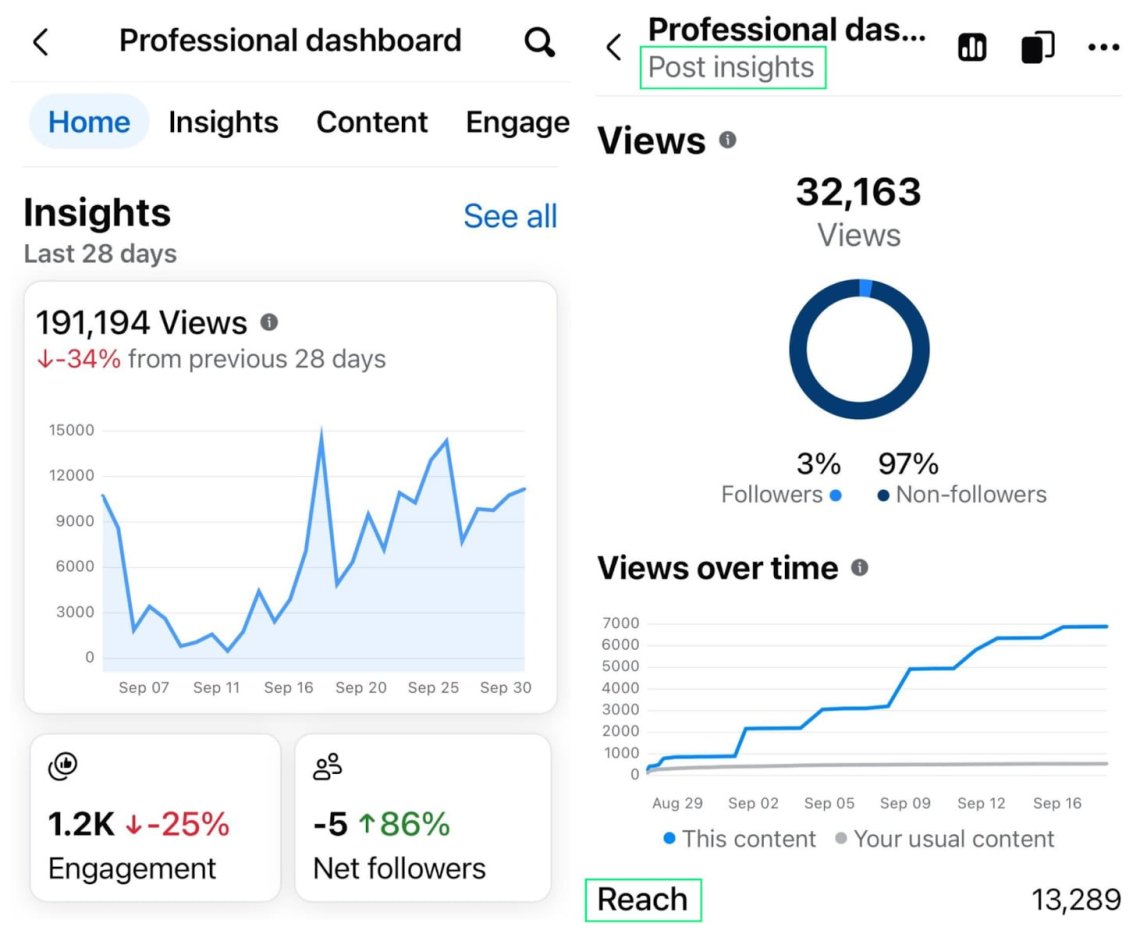
To see reach per post:
- Go to Content → click on a post → check Post Reach.
Pro tip:
💡 Pro tip: Facebook splits reach into organic and paid, which helps you track your ad performance separately.
2. Manual calculation
Use the social media reach calculation formula as a backup when platform analytics don’t show reach directly.
💡 Pro tip: I only use this method when there isn’t a better option. Since the accuracy relies on frequency data that’s often missing for organic posts, think of the result as a rough estimate.
3. Third-party tools
This is where you really gain leverage, especially if you need a cross-platform view or want to understand reach beyond just the content you’ve published.
Why use third-party tools to measure social media reach?
| Aspect | How can reach measurement tools help you? |
|---|---|
| Cross-platform visibility | Instead of checking each native dashboard separately. |
| Competitor benchmarking | See how your reach compares to competitor reach. |
| Custom reporting | Generate branded reports for clients or stakeholders. |
| Trend analysis | Track growth, decline, and campaign impact across different social channels over time. |
| Hashtag tracking | Monitor and measure the reach of popular and relevant hashtags in real time. |
| Influencer discovery | Find influencers that match your business needs and audience expectations. |
What kind of tools can you use to measure reach?
01 Social media management & analytics platforms
These tools track reach across your owned accounts in a single dashboard, along with impressions, and engagement across multiple accounts.
They are good for content scheduling and unified performance reporting.
A quick comparison:
| Tool | What it does |
|---|---|
| Hootsuite | Tracks reach, impressions, engagement, and audience growth |
| Buffer | Provides post reach analytics for Instagram, Facebook, LinkedIn, etc. |
| Zoho Social | Tracks reach along with engagement rates and audience insights. |
📚 Read more about Hootsuite alternatives: 5 key Hootsuite alternatives. A detailed comparison 2026
02 Social media monitoring tools
Social media trackers go a step further by tracking reach generated by all online mentions of your brand, including posts from accounts you don’t control, news articles, blogs, and forums.
This is how you measure campaign reach that travels beyond your own channels.
A quick comparison:
| Tool | What it does |
|---|---|
| Brandwatch | Measures potential reach of mentions, hashtags, and campaigns. |
| Brand24 | Tracks brand mentions and calculates audience reach across online channels. |
| Talkwalker | Estimates reach from social mentions and campaigns. |
📚 Read more about Brandwatch alternatives: Brandwatch Alternatives Compared: What to Use Instead in 2026
03 Influencer marketing platforms
These tools specialize in calculating influencer campaign reach and help you identify creators whose audience profile matches your target.
A quick comparison:
| Tool | What it does |
|---|---|
| Upfluence | Reports reach and impressions of influencer campaigns. |
| Traackr | Tracks influencer content reach and resonance. |
| Aspire | Measures influencer audience reach and campaign results. |
🏆 Real case — Spartan Race
Spartan Race uses social media monitoring to track brand mentions across more than 200 annual race events globally. The metrics their social team cares about most: social media reach, volume of interactions, and hashtag mentions per event.
By comparing reach across hashtags like #SpartanJAX and #SpartanMleiha in real time, they identify which race locations generate the most organic reach, and use that data to inform race programming decisions year-over-year.
💡 Pro tip: Which approach to choose?
1. Use native tools for the most accurate, platform-specific reach.
2. Use third-party tools if you want a consolidated, cross-platform view (great for reporting).
3. Calculate the reach yourself ionly as a last resort, as it’s the most complex and time-consuming option.
How to increase social media reach? [+ Real Cases]
Over 5.4 billion people used social media in 2025. More than 2 in 3 people on Earth are now active on social platforms monthly, so we can clearly see that the potential audience is there. The challenge is earning reach beyond the people who already follow you.
Here are eight tactics that will work in 2026:
- 1 Optimize the timing of your posts
- 2 Choose the most engaging content formats
- 3 Use trending topics before they peak
- 4 Collaborate with micro-influencers who match your audience
- 5 Engage actively in the first 30 minutes after publishing
- 6 Repurpose high-performing content across platforms
- 7 Boost content that already has organic traction
- 8 Monitor competitor reach to find content and timing gaps
These eight tactics come from two places:
- My direct experience as Content Team Lead at Brand24, where I review reach data across dozens of active monitoring projects
- Current (2026) industry research from Buffer, HypeAuditor, HubSpot, and SocialInsider.
Every tactic below includes a source or a clear explanation of where the observation comes from.
1. Optimize the timing of your posts
When your analytics show a clear daily activity peak, try posting just before that window instead of right in the middle of it.
That’s because platforms put a lot of weight on early engagement when deciding what to distribute.
Buffer’s research on social media algorithm signals shows that posts where creators reply to comments within the first hour get 2.1x more total engagement.
Where to check your peak times:
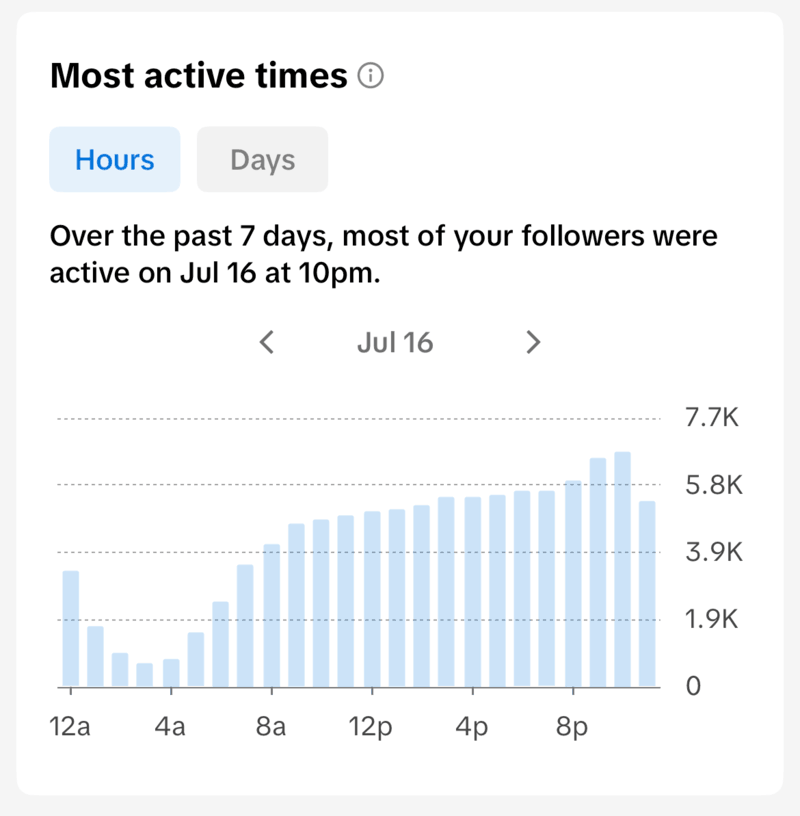
- TikTok Studio → Analytics → Followers → Most active times
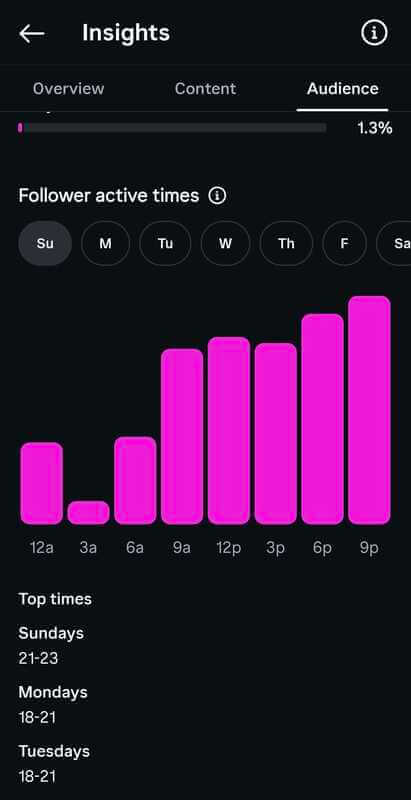
- Instagram Insights → Audience → Follower Active Times and Top Times
- LinkedIn Analytics → According to LinkedIn Help, as of July 2026, you can’t see your audience’s most active times directly in LinkedIn Analytics.
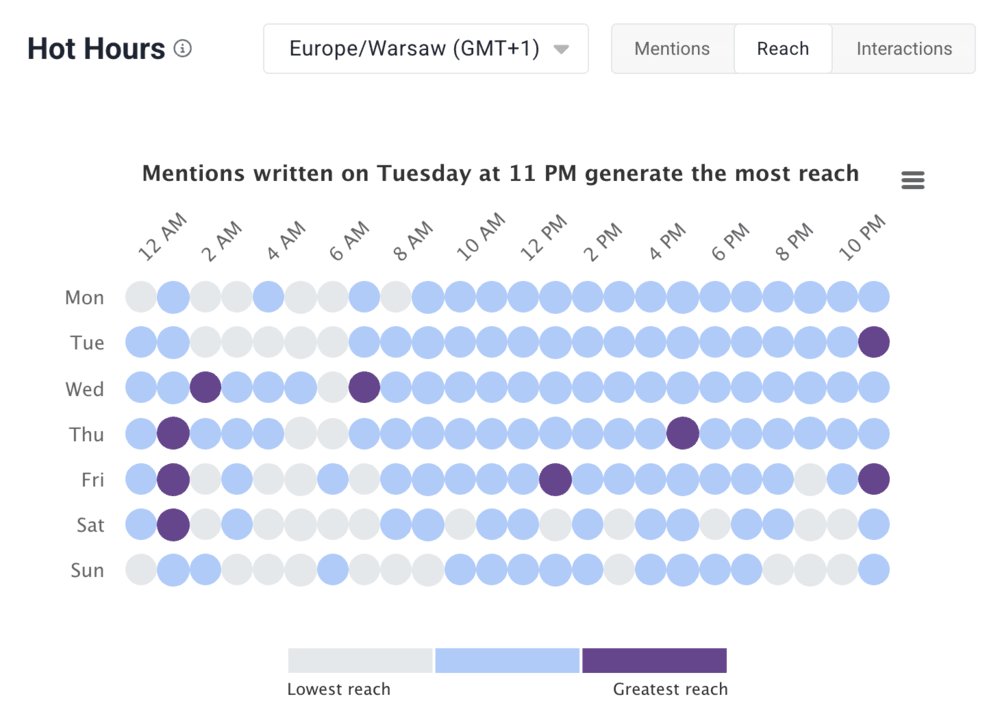
💡 Pro tip: I usually get around this by using an external social listening tool that offers a similar feature, like Hot Hours in Brand24 (see screenshot below).
It shows you the exact times when mentions of a keyword or topic you’re tracking get the most reach, volume, or interactions, filtered by platform (choose Linkedin here!), time range, or language.
2. Choose the most engaging content formats
According to Buffer’s 2026 State of Social Media Engagement report:
- Instgram Carousels earn 12% more engagement per impression because people spend more time swiping through them.
- Instagram Reels get 36% more reach than carousels because the algorithm distributes them to non-followers.
And for other social platforms:
- On LinkedIn, Buffer found that carousel posts drive 278% more engagement than videos and 596% more than text-only posts. When it comes to reach, thought-leadership posts get about 6x more visibility than job-related updates.
- On TikTok, according to the official documentation, the first 3 seconds are what decide whether the algorithm keeps promoting your video, so you’ll want a strong hook that grabs attention fast.
3. Use trending topics before they peak
- When you notice a topic starting to pick up steam, create content within a few hours that ties it back to your brand.
- That way, you can jump on the trend before it goes fully mainstream and the reach gets spread across a lot more creators.
How to find trending and viral topics?
The easiest way is to use a social media monitoring tool, just make sure it includes a feature that highlights trending topics and viral moments that are getting above average reach.
Real-life example – Brand24 Topic Analysis and Event Detection
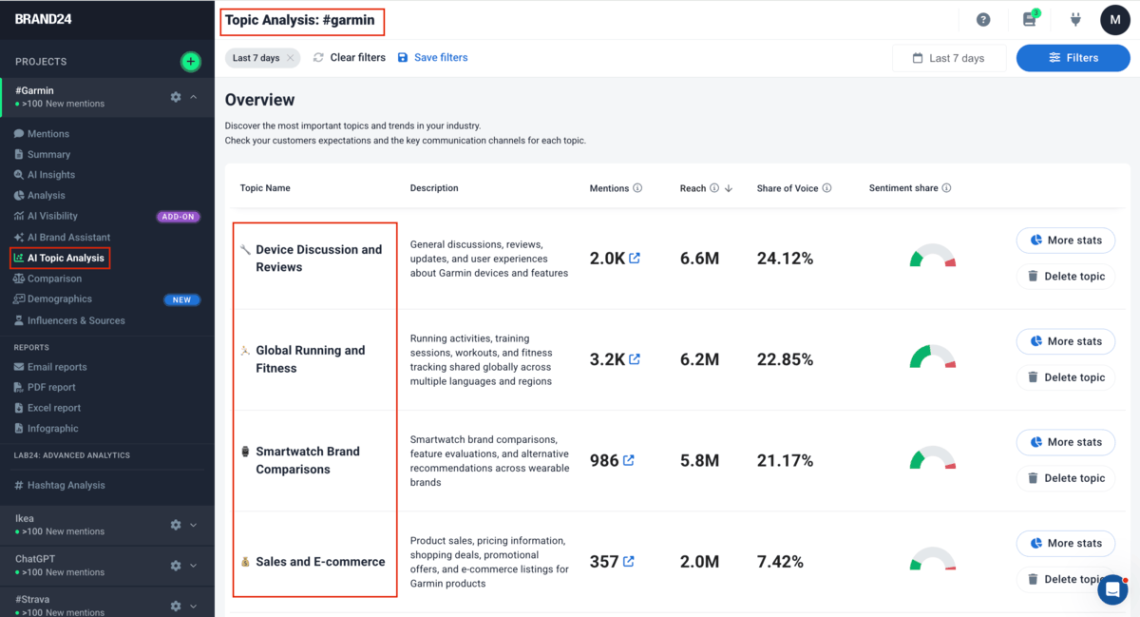
For instance, you can use an AI Topic Analysis feature to spot the most viral topics during a specific time period.
Just click into any topic to see what people are discussing, what’s driving engagement, and which posts and creators are getting the most social media reach.
Another useful feature you’ll find in some AI-powered social listening tools (like Brand24) is Event Detection.
It automatically spots viral moments and spikes in volume or reach, then gives you a heads-up with a quick notification explaining what happened and why.
That way, you can quickly get content ready and jump on a trend while it’s still taking off.
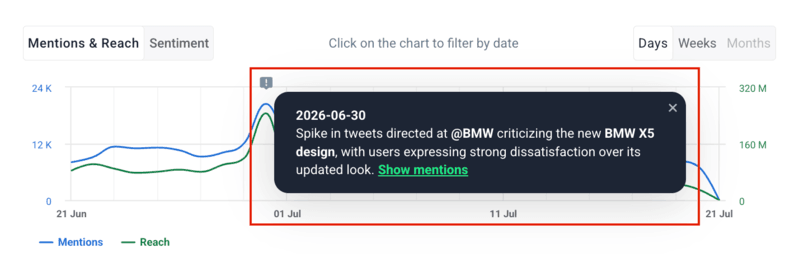
💡 Pro tip: According to Mintel’s US Social Media Trends: 2026 Report, 75% of consumers say influencers shape trends more than celebrities, suggesting that trends often emerge from creator content long time before they reach the mainstream media.
This means that if your brand catches a trend early, you can use the algorithm power to grow your social reach without spending anything on ads!
4. Collaborate with micro-influencers who match your audience
When you want to reach new audience segments without a large paid media budget, partner with micro-influencers (10K–100K followers) whose audience overlaps with your target persona.
HypeAuditor’s 2025 State of Influencer Marketing reports that Instagram micro-influencers generate an average engagement rate of 3.86%, compared to 1.21% for mega-influencers — nearly 3x higher, and 60% of marketers plan to increase influencer investment in 2026.
🚗 Real case — Uber
When Uber launched their new rider app, they tracked the social conversation in real time using social media monitoring.
Within 2 days of launch, online discussion increased 100%, likes grew 90%, and shares increased 250%.
During the uberIceCream campaign, monitoring audience conversations in real time led to a 24% increase in social engagement, an 11% increase in new users, and a 7% increase in average rides per user — from a single 1-day event.

5. Engage actively in the first 30 minutes after publishing
Reply to every comment within the first hour of posting, and spend that same time engaging with other user accounts in your niche.
Why? 🤔
Algorithm research shows that fast, early engagement is one of the biggest signals platforms use to decide how far to push your content.
Brands that consistently respond to early comments tend to see stronger ongoing reach, because they show the algorithm your post is causing real interaction worth sharing more widely.
6. Repurpose high-performing content across platforms
When a post generates above-average reach on one platform, adapt it for 2–3 others within 48 hours.
For example:
- A TikTok becomes an Instagram Reel and a YouTube Short.
- A long LinkedIn post becomes 5 short X posts and a quote card.
- A blog post becomes a Linkedin carousel.
📊 Real case — eRecruiter
eRecruiter increased their reach and brand mentions by 10% year-over-year by sticking with consistent, systematic content visibility instead of chasing only viral topics.
“The data in Brand24 is a counterweight to gut feel. I can see which sources and mentions truly drive reach.”💡 Pro tip: Small improvements will add up over time. And repurposing your best content is free! It keeps delivering value long after the original post disappears from the feed.
7. Boost content that already has organic reach
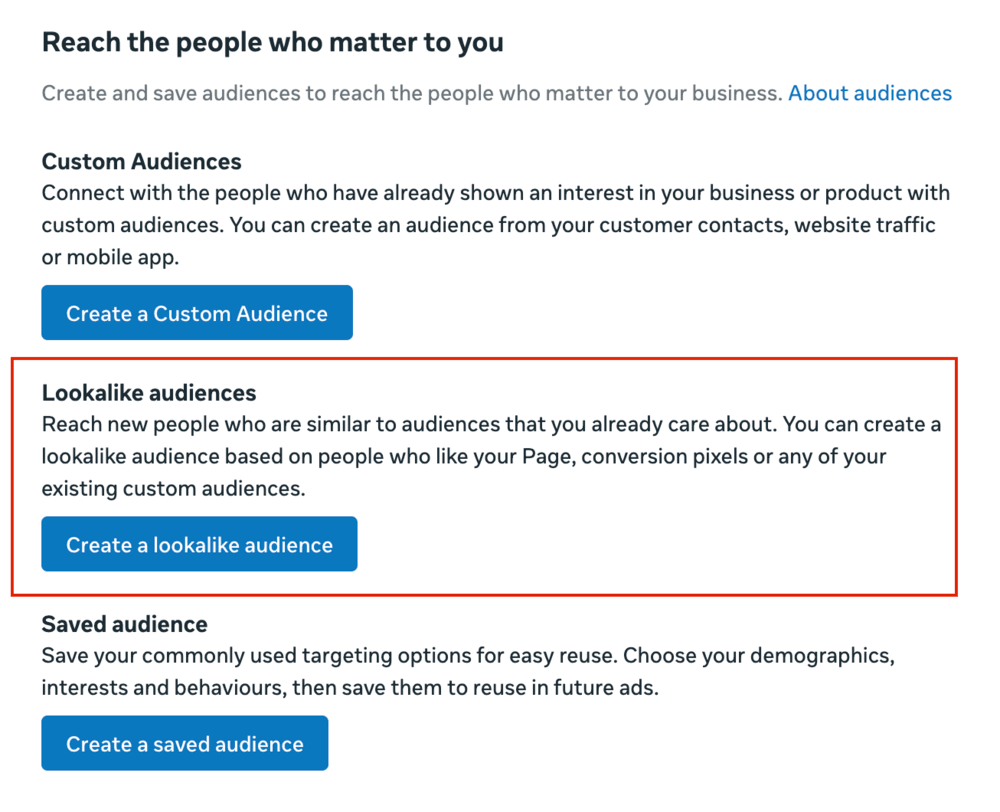
When a post is exceeding your usual organic reach in the first few hours, give it a boost with a paid budget and target a lookalike audience.
That way, you’re putting money into content that’s already clearly resonating. Meta, LinkedIn, and TikTok Ads all let you build lookalike audiences based on your engaged followers.
💡 Pro tip: According to HubSpot’s Social Media Trends Report 2026, 85% of marketers say social media is becoming more important for building brands than for performance marketing. Think of paid reach as the boost that helps your organic content go further!
8. Monitor competitor reach to find content and timing gaps
When you’re planning your content strategy, set up media monitoring for 2–3 key competitors and track their reach against yours over at least 30 days.
Best media monitoring tools let you perform competitor analysis side by side and offer a lot of different metrics to benchmark, like
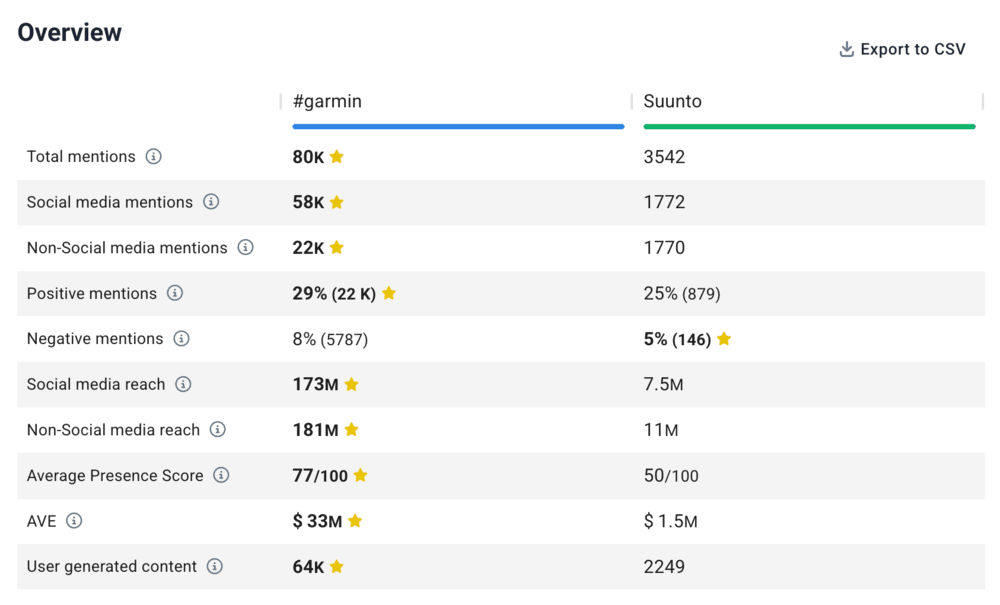
💡 Pro tip: If a competitor’s reach suddenly jumps, there’s usually a clear reason, like a viral post, a press mention, or a trend they joined.
Figuring out what caused the spike shows you what campaign, trend, viral moment, or important event you may have missed and what you can jump on next time.
FAQ
Organic reach comes from your followers, people sharing your content, or others who find it through hashtags, recommendations, or search.
Paid reach lets you reach people based on specific demographics, interests, or behaviors.
It varies a lot by platform and account size:
- Instagram: Accounts under 10K usually get10–20%, and larger accounts 1–3%.
- TikTok: Viral content regularly reaches 10–100x the creator’s follower count.
- LinkedIn: 5–10% per post is average for company pages. Personal posts typically reach 15–30% of connections.
- Facebook: Average organic reach sits between 2–6% of followers, with 2–4% considered strong.
To see why your reach is declining, determine whether reach fell on all platforms (content quality/timing) or just one (platform algorithm shift). Check if engagement dropped first, since weak early engagement limits distribution. Also review broader web brand mentions for wider visibility declines.
Google doesn’t directly use social signals for rankings, but high social reach creates indirect SEO gains through greater brand discovery, site traffic, and backlinks. In 2026, it also boosts AI visibility: real brand mentions across platforms can increase appearances and citations in AI Overviews, ChatGPT, and Perplexity.

