Table of contents
How to See How Many Times a Hashtag Was Used on X (Twitter)
Looking for real X (Twitter) hashtag analytics? Unfortunately, you won’t find any built-in counter on X: it no longer shows a public total of how many times a hashtag has been used.
Native search available on X can give you a quick sense of activity, but if you need accurate volume, reach, or historical data, you’ll need to use external tools.
Let’s break down the options you have in 2026.
Key takeaways:
-
Can you see total hashtag usage inside X?
You can’t see how many times a hashtag was used directly inside X. Native search only shows recent or trending posts, and analytics are limited to performance metrics on your own content.
-
Does X Premium solve the problem?
Not fully. X Premium analytics can show things like hashtag clicks and engagement on your content. What it won’t show: how many times other people used the hashtag, how the hashtag performed platform-wide, or how competitors did.
-
So how do you measure hashtag volume?
You can measure the hashtag volume by using external tools like Brand24, Tweet Binder, or TrackMyHashtag. They collect public posts over time and calculate hashtag count, giving you access to actual usage numbers beyond what X displays natively.
-
Not all hashtag tools work the same way
Tools such as Tweet Binder are ideal for generating one-time reports, while platforms like Brand24 continuously track hashtag volume and activity, detect volume spikes, analyze sentiment, and monitor hashtagged conversations in real time.
-
Hashtag performance is more than just volume
A hashtag can be used a lot and still do nothing. The useful signals are: who amplified it (influencers), how far it spread (reach), how people reacted (engagement + sentiment), and when it spiked or faded, so you can tell whether it’s actually gaining traction.
Use specialized hashtag analytics tools (Best for exact numbers)
If you want to see how many times a hashtag was used on X, you’ll need an external tool.
There’s no public counter inside the platform anymore, so accurate hashtag volume tracking can only happen outside of X.
There are quite a few tools that focus specifically on hashtag analytics. Some are built just for X, while others are broader social listening platforms.
Here’s a quick comparison to help you understand the differences.
| Tool | Pricing | Shows hashtag volume | Real-time monitoring | Best for |
|---|---|---|---|---|
|
From ~$149/month, free 14-day trial available |
✅ Yes |
✅ Yes |
Ongoing hashtag monitoring, alerts, hashtag sentiment & trend analysis |
|
|
From $62.99, free report available |
✅ Yes |
⚠️ Report-based |
One-time hashtag reports and event summaries |
|
|
From $149.99 |
✅ Yes |
✅ Yes |
Campaign tracking and detailed hashtag metrics |



What’s the difference in practice?
Tools like Tweet Binder are usually built around reports. You enter a hashtag, generate a summary, export the data, and that’s it. It’s useful if you need numbers for a specific event or a campaign recap.
TrackMyHashtag gives you more continuous tracking, especially for campaign-style analysis. It’s stronger if you want ongoing metrics rather than a one-off export.
Brand24, on the other hand, takes a broader approach. Instead of just generating a report, the tool keeps tracking the hashtag in real time, allows for the sentiment analysis, detects spikes in hashtag use, and sends alerts when something unusual happens.
📚 Further read: Hashtag monitoring tool guide
If you’re just looking for a one-time hashtag count report, a specialized counter might be enough.
But if you want to monitor a hashtag on X (Twitter) over time and track spikes, measure sentiment, compare periods, or get alerts when activity suddenly increases, you’ll need a tool built for ongoing monitoring.
Here’s how that works in Brand24:
How to track a hashtag on X (Twitter) in Brand24
If you want to monitor a hashtag continuously (not just generate a one-time report), here’s how to set it up in a media monitoring tool like Brand24.
Step 1: Create a project
Start by creating a new project and entering the hashtags you want to track:
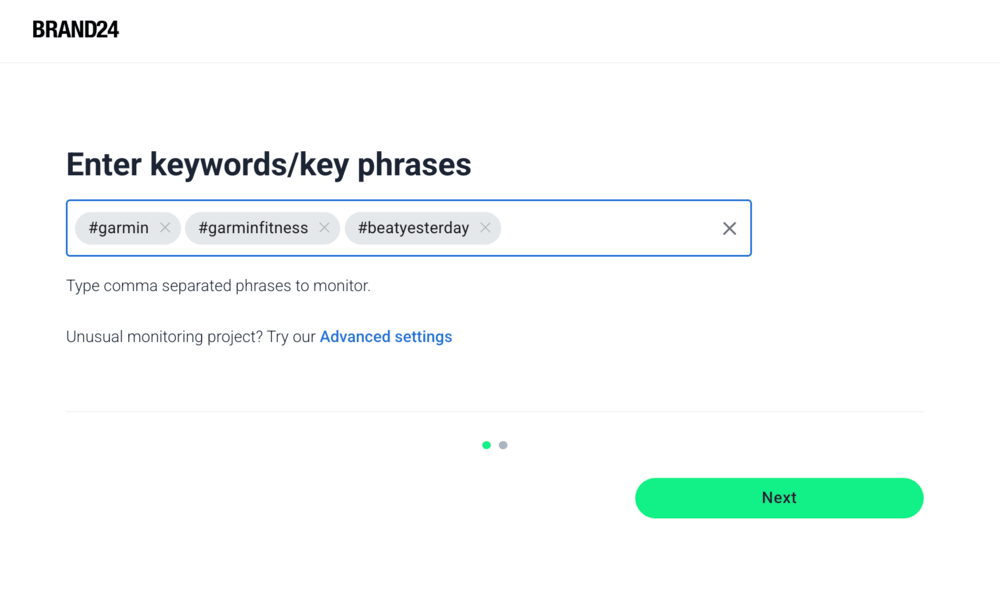
A few quick tips:
1. Always include the # symbol.
2. Choose X (Twitter) as one of your sources in More Settings ➡️ Sources.
3. Monitoring starts from the moment you create the project (Brand24 doesn’t pull full historical X data).
Once the project is live, every mention of your hashtag will appear in the Mentions tab.
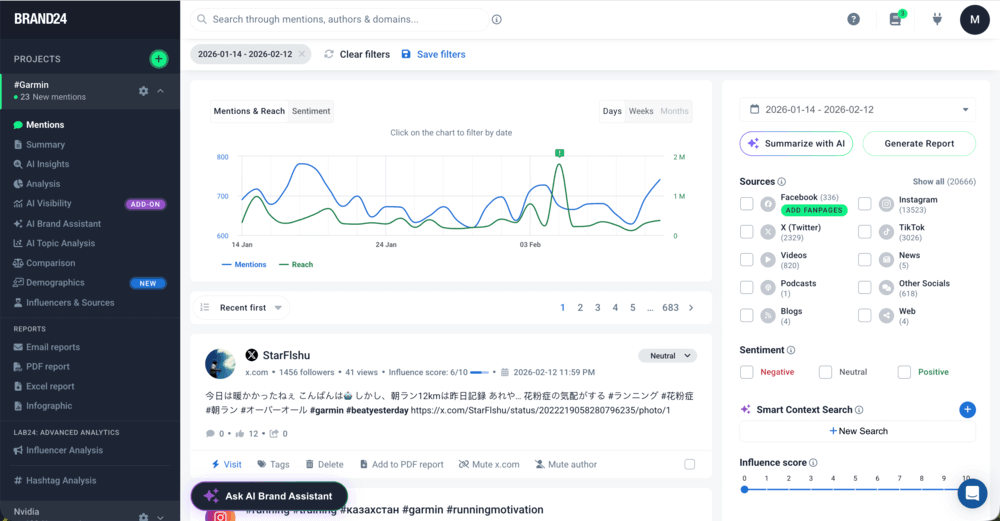
This is where you can:
- Adjust the date range in the top right corner
- See how many times the hashtag was used during your selected timeframe
- Review each individual hashtag mention in detail
Each mention includes:
- Author name
- Number of followers
- Source
- Engagement & sentiment metrics
- Date and content
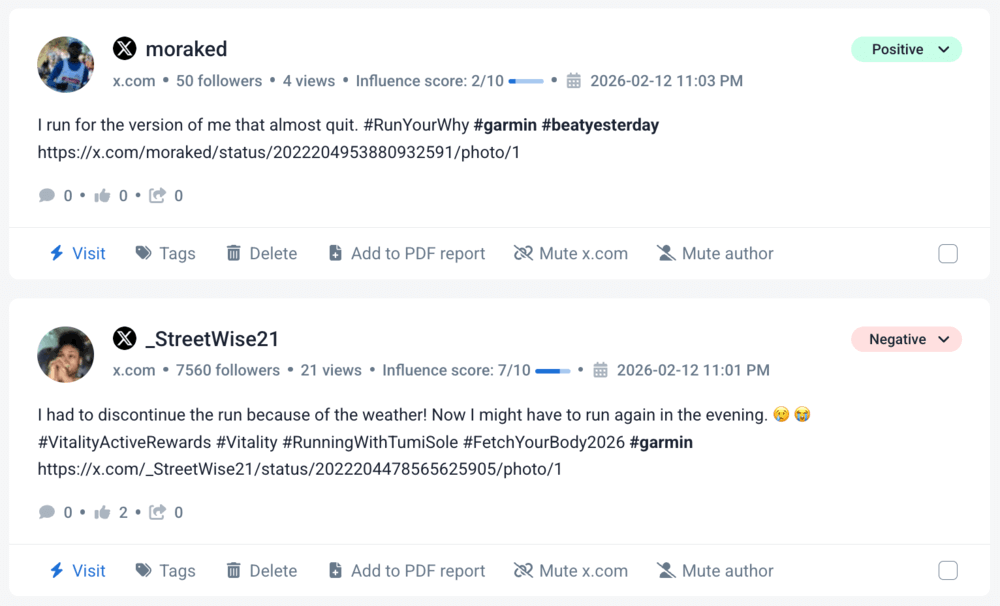
You can take a closer look at this data in the Analysis tab. There, you can check out more results, see voice share, learn about the influence of X posts authors, their reach, the context of discussions, and more.
You can also access these mentions in the mobile app if you want real-time visibility on the go.
Step 2: Analyze hashtag performance
If you’re looking beyond just “how many times was it used,” head to the Analysis and Hashtag Analysis tabs.
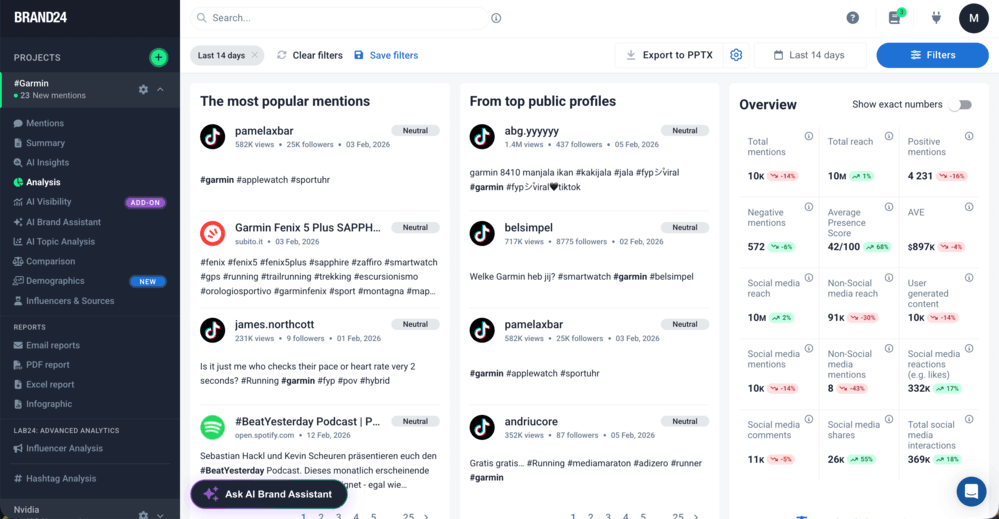
The Analysis tab gives you a deeper hashtag performance breakdown. My favourite top 5 features you’ll find there, are:
| Feature | What it shows |
|---|---|
|
1
Overview metrics |
Total number of mentions containing your tracked hashtag, reach, interactions, and how those numbers changed over time. |
|
2
Sentiment share |
Whether mentions containing your hashtag are mostly positive, neutral, or negative |
|
3
Share of voice |
Understand how your hashtag compares within the broader conversation |
|
4
Top public profiles |
The most influential accounts using your hashtag, based on reach and follower size. |
|
5
Hot Hours |
See when posts containing your hashtag generate the highest reach or engagement. |
Instead of manually counting posts with the hashtag, you can see how the conversation evolves, who amplifies it, and how people react over time.
If you’re tracking more than one hashtag (say your branded tag plus industry or competitor hashtags), the Hashtag Analysis tab shows you exactly how they stack up.
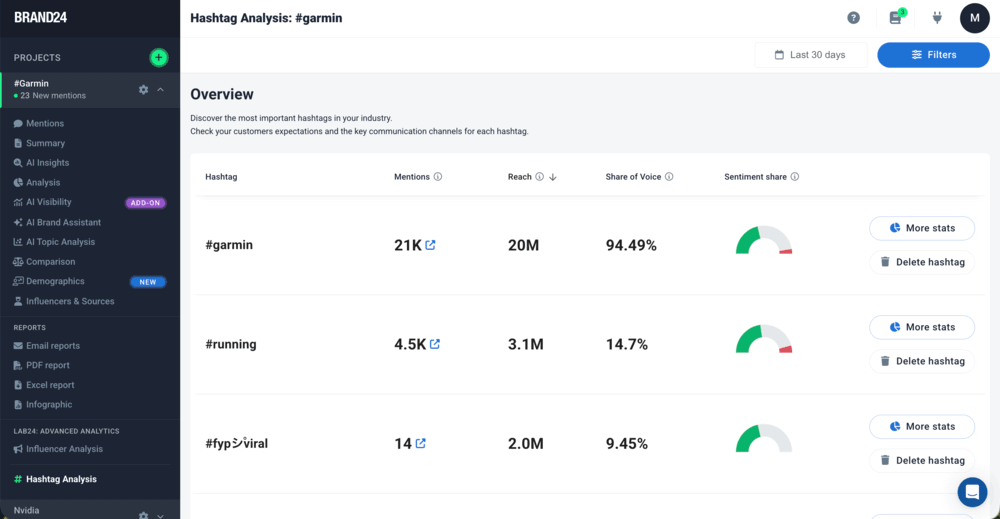
Instead of guessing which hashtag performs better, you can compare, for example:
- 1 Total mentions — which hashtag is used more often
- 2 Estimated reach & sentiment share — which one actually generates more visibility
- 3 Share of voice — how much of the conversation each hashtag owns
- 4 Top mentions — which hashtagged posts drive the biggest impact
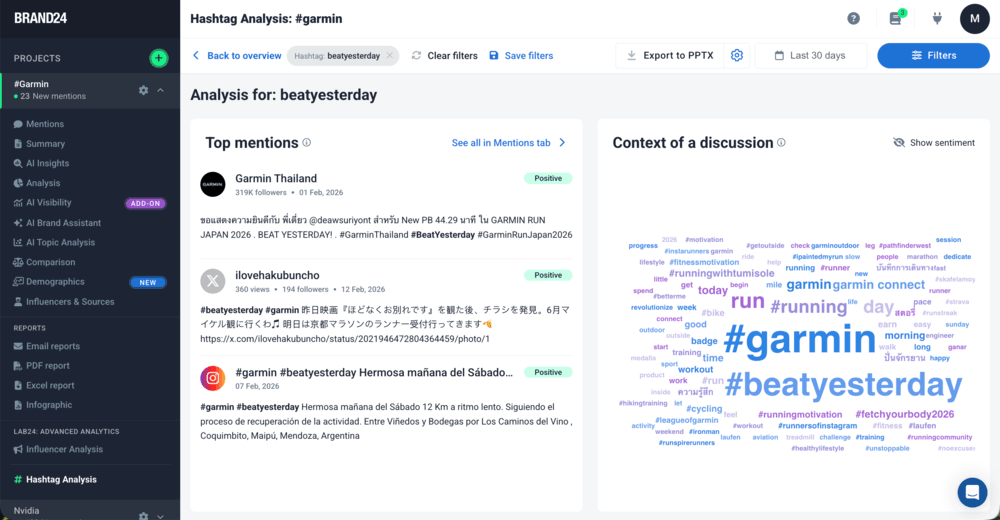
You also get visual breakdowns that make patterns obvious, including how hashtag count changes over time, or what topics (contexts) and emojis people use with each hashtag:
Prefer a quick walkthrough? Here’s a short video showing how hashtag tracking works inside Brand24:
Why does hashtag counting on X (Twitter) actually matter?
Maybe hashtags have lost some of their importance, but they are still not “just labels”. On X (Twitter), they help organize conversations, and conversations are where your brand perception, customer feedback, and trends form.
Tracking X hashtags helps you understand who’s talking, what they’re saying, and how far the discussion spreads.
| Use case | Why track the hashtag? |
|---|---|
|
Product launch |
Measure awareness & early reactions |
|
Marketing campaign |
Evaluate reach and engagement |
|
Industry event |
Monitor live discussion |
|
Influencer collaboration |
Track amplification |
|
Crisis situation |
Detect negative spikes early |
Here’s what that means in practice.
1️⃣ Discover influencers and brand advocates
When you monitor branded or niche X (Twitter) hashtags, you quickly see who’s driving the conversation.
You can identify:
- The most active users
- Influential accounts with large followings
- Natural brand advocates already talking about you
If someone with authority in your niche consistently uses your hashtag, that’s a great sign! You now have access to their audience.
And sometimes, those relationships start with simply noticing who’s already on your side.
2️⃣ Understand your audience better
Hashtags reveal how your customers think and interact on X. By tracking hashtags related to your brand, product, or industry, you can:
- See recurring questions and frustrations
- Spot product feedback in real time
- Understand tone, sentiment, and context
- Notice demographic and lifestyle patterns
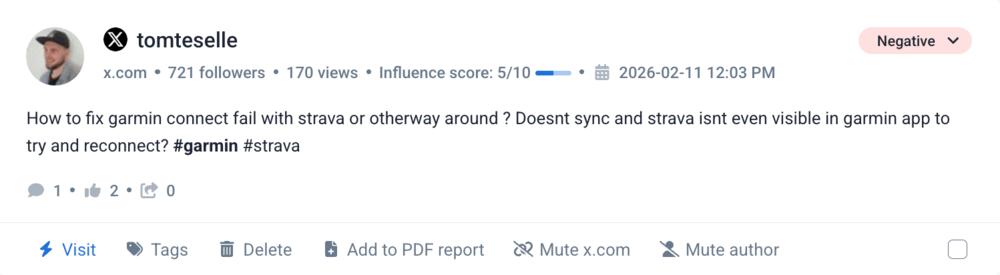
Instead of guessing what your audience wants, you see how they describe their own problems on X (Twitter), and very often it’s more valuable than any customer survey.
3️⃣ Collect customer feedback (without asking for it)
People talk about products openly on X, especially when they’re happy or frustrated.
Hashtag tracking lets you:
- Capture first-hand experiences
- Identify recurring complaints
- Detect praise worth amplifying
- Respond before issues escalate
It’s direct, unfiltered feedback happening publicly, waiting for you to discover it.
4️⃣ Measure branded hashtag performance
A branded hashtag is more than a slogan with a # in front of it. It acts as:
- A campaign anchor
- A discoverability tool
- A way to centralize conversations
- A measurable indicator of brand awareness
The more people use your branded hashtag, the more visibility your campaign gains.
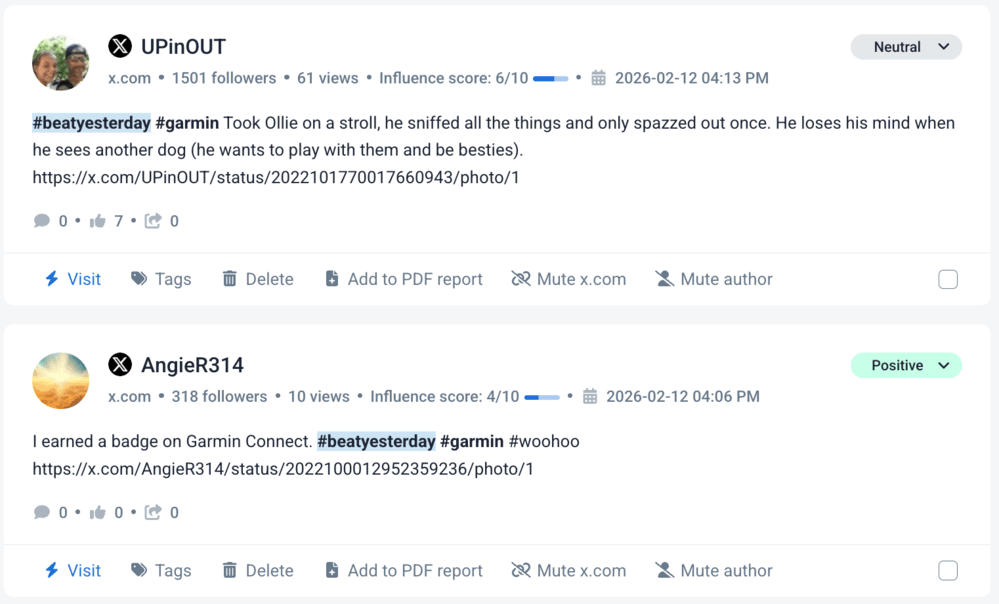
For example, Garmin’s #BeatYesterday hashtag on X (Twitter) is used by people to share personal fitness progress stories. By tracking that hashtag, Garmin can measure its volume, reach, engagement, and community participation in this channel.
5️⃣ Amplify events and campaigns
Event hashtags bring all X (Twitter) conversations into one searchable stream.
Before an event:
- Build visibility and anticipation
- Encourage speakers and sponsors to use the hashtag
During an event:
- Create a live conversation feed
- Engage participants in real time
After an event:
- Collect feedback
- Measure impact
- Keep the discussion going
If an event hashtag starts trending, its reach multiplies, and so does your brand’s exposure.
FAQ
Can you see how many times a hashtag was used on Twitter (X)?
Not directly inside X. The platform does not display a public total count of hashtag usage.
However, you can measure how many times a hashtag was used by using external hashtag analytics or social listening tools like Brand24. These tools collect and analyze public posts over time, allowing you to track hashtag volume, reach, and performance.
| Method | Can you see total hashtag usage? | What you get |
|---|---|---|
|
X native search |
❌ No |
Recent & trending posts |
|
X Premium |
❌ No |
Volume of hashtag clicks on your own posts |
|
Brand24 / Other analytics tools |
✅ Yes |
Hashtag volume, reach, sentiment, trends |
Does X Premium show hashtag count analytics?
X Premium gives you analytics for your own posts, including hashtag clicks and engagement metrics. However, it doesn’t show global hashtag usage or how many times a hashtag was used by other users.
Are Twitter hashtag counters accurate?
Most hashtag analytics tools provide estimates based on collected public data. Dedicated monitoring platforms are more reliable than free search tools because they continuously gather and analyze mentions over time.
How can I track X (Twitter) hashtag popularity in real time?
To track an X (Twitter) hashtag’s popularity in real time, you need a social listening or hashtag analytics tool. These tools monitor new mentions as they appear and can notify you about spikes, engagement changes, or sentiment shifts.

Article Reviewed by