Table of contents
2M Marketers

A social media audit requires time, focus, and, above all… experience. But here’s the truth: conducting a social media audit can completely transform your social media strategy and online performance if you know where to look. Plus, with advanced tools, it’s a pretty easy task.
So, how to do a social media audit? Let’s find out!
Quick summary:
- A social media audit helps to clarify how your content is performing, how your audience is engaging, and whether your strategy aligns with your goals. It is a key step to understanding what is working and what needs to be improved.
- You can spot trends, identify areas of underperformance, and optimize your efforts accordingly. By regularly reviewing key metrics such as reach, engagement, sentiment, and audience growth,
- Using social media audit tools like Brand24 will streamline this process. These tools combine data from different platforms in one place. They simplify reporting and offer intelligent recommendations based on your internal data.
In this article, I’ll break it all down for each question:
- How do you conduct an effective social media audit?
- Which tools should you use?
- How often should you run one?
- And is there a reliable social media audit example or template to follow?
Step by step, so you can run your audit using this social media audit template with confidence and clarity.
What is a social media audit?
A social media audit should include all analyzed information about your account on all social platforms. This can be everything from your publishing performance to your social media strategy and goals.
And even though the word audit might sound a little scary, don’t worry – it’s easier than you think!
Think of it as an integral part of working on social media presence. The goal is to ensure everything is working as it should and delivering the results you’re aiming for.
| Social media audit – definition | A structured review of your presence across all social platforms to understand what is working, what isn’t, and how your strategy aligns with your goals. It includes your performance, audience behavior, and overall social media strategy. |
| Why it matters? | A social media audit helps you stay on track, identify areas for improvement, and confirm that your content and activities are delivering the results you want. |
Why is a social media audit important?
A social media audit is important because it helps you understand what’s working and what isn’t.
It gives you clear insights that guide better decisions and improve your overall social performance.
But it also brings very secific benefits you should take into account:
| Benefit | Description |
|---|---|
| Reveal what content truly works | Understand which posts, formats, and topics drive the best results. |
| Spot new growth & engagement opportunities | Identify untapped audiences, channels, or content ideas. |
| Uncover deep audience insights | Learn more about who engages with your content and why. |
| Align content with business objectives | Ensure social activity supports overall company goals. |
| Optimize low-performing areas | Detect weak spots and adjust strategy for better efficiency. |
| Keep branding clear & consistent | Verify the tone, visuals, and messaging stay coherent across platforms. |
How to perform a social media audit?
When doing a social media audit, I like to follow the rule: from the general to the specific.
- Start with preparation, overall business objectives, and a first glance at the brand across social media platforms.
- Analyze key social media metrics, review the performance of each social media page, and even look at individual posts to understand what content truly resonates with the audience.
- Finally, I move into competitor analysis to see how we compare in the industry and spot new growth opportunities.
And Voila! You’ve got your basics of a social media audit covered.
How to do a social media audit? [Step-by-step]
It’s easy to do such an audit if you’re clear on how to do it… (No way, Sherlock! :P)
That’s why I included a step-by-step tutorial you can follow:
You basically need to systematically review all your social profiles, performance metrics, audience data, and content effectiveness.
Follow these steps:
01 Define the goals of the marketing strategy
Setting clear goals is the first and most crucial step in any successful social media strategy.
I wouldn’t start training in the gym without knowing what I want to improve (whether that’s strength, endurance, or flexibility), and I wouldn’t dive into a social media audit without a clear sense of my goal.
After all, without goals, it’s way too easy to lose motivation, act without purpose, or even sabotage one’s results.
💡The trick is to be both specific and realistic.
Once you have a solid understanding of what you want to achieve. Not just overall, but for each individual platform, you can craft a plan to help you get there.
What are social media goals?
Your social media goals can include:
- Increasing brand awareness
- Discovering audience actionable insights
- Generating sales
- Building audience engagement
- Growing traffic to your site
- Gaining a broad social media reach
Or something else – you tell me!
02 Create a social channels spreadsheet
Writing down all the necessary data is essential for a successful social media audit.
You need to gather relevant data from each of your social media accounts. Even if it feels time-consuming at first. But trust me, having everything in one place makes a huge difference.
When I centralize all my social media audit data in a single file, it becomes much easier to compare results over time: month to month, quarter to quarter, or year to year.
This lets me get a clear, data-driven performance overview across all channels.
How to gather social media data?
Since each platform has different metrics, create a separate row for each channel to track performance more effectively.
I am also adding a special column to note any observations or ideas during the audit process.
03 Create a list of all your social accounts
Once your goals and spreadsheet are set, it’s time to start filling in the data!
I always begin by listing all the brand’s social media accounts.
Should I include the inactive profiles?
Yes, even the ones that are no longer active or only used occasionally.
It’s normal not to be active on every platform, but it’s important to remember these accounts still exist.
Who knows? They might serve as a valuable point of contact with a new target audience or confuse your followers. A social media audit is a perfect time to check it out!
Pro tip: You can simplify it by using tools that gather your social data in one place. This way, you don’t need to do it all manually and can skip directly to the analysis (go to number 5).
04 Make sure your branding is consistent
While creating the list of all your social media platforms, look closely to ensure your branding is consistent.
Branding is essential.
It sets you apart from competitors and communicates who you are to your audience.
Ensure your followers can immediately recognize your company’s profile, no matter where they see it.
How to ensure branding consistency?
- Check profile and cover photos: Ensure they align with your current branding and meet each platform’s image size requirements.
- Use consistent usernames: Use the same username across all social media profiles for easy recognition.
- Update URLs: Double-check the link in your bio. It’s easy to forget links from past campaigns that are no longer relevant.
- Write a clear bio: Craft a user-friendly bio that accurately describes your brand and what you offer.
- Verify your profile: Use platforms that offer verification. A verified profile boosts brand trust and helps your audience know they’re in the right place.
05 Identify key performance indicators
One of the toughest tasks in a social media audit is identifying the right metrics to track.
With so many options available, how do you know which ones matter most for your business?
What to include in a social media audit?
Here’s a list of key metrics for social media audit, which I always check first:
- Social media engagement metrics
- Shares
- Number of mentions
- Impressions
- Referral traffic
- Clicks on links
- Social media reach
How to get social media data?
So, there are two options.
First, you can manually manage each of your social accounts in native apps (but it will take a lot of time, and honestly, it’s hard to get a full picture of your social media performance).
That’s why I preferred the second approach.
Advanced tools like social listening tools gather data across all my social media profiles and collect even those channels where I don’t have accounts but where people are talking about me.
This makes it the best choice for brand awareness, measuring social media presence, and competitor analysis.
Take a look!
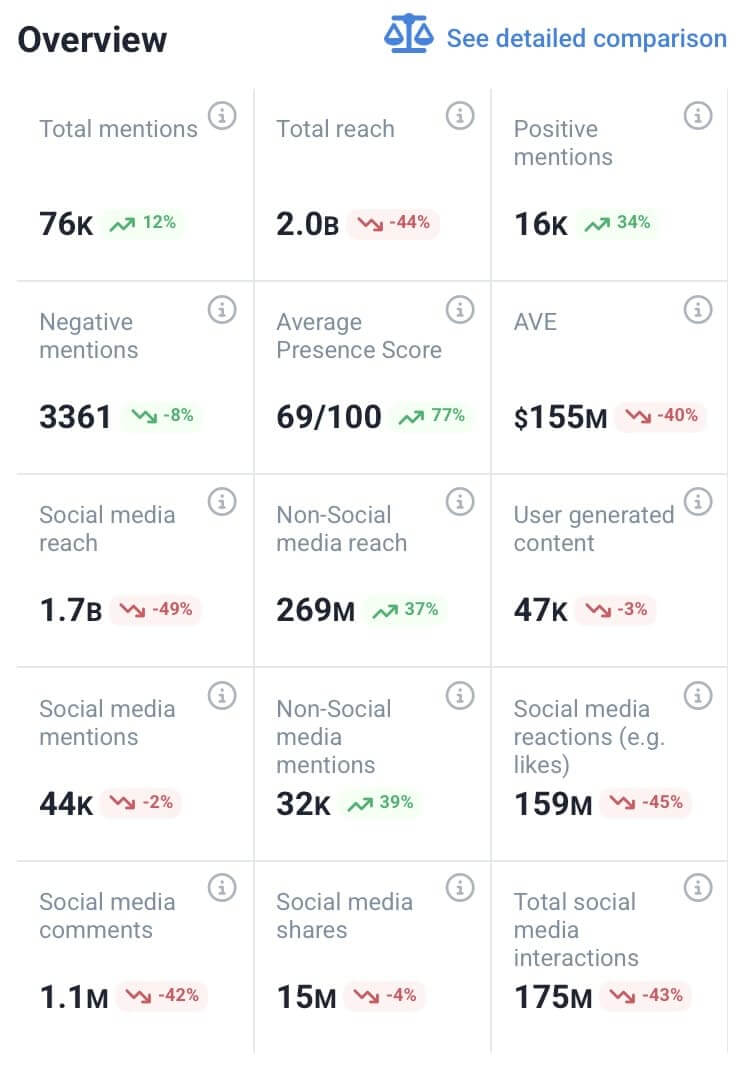
As you can see, the tool provides a comprehensive summary of key performance metrics for your online presence in one dashboard.
You can easily filter by channel to see a specific account’s performance
Here you can read more about social media metrics to check them out while conducting your social media audit.
06 Identify content that matters
Metrics are crucial in a social media audit. But remember that behind every number is a real person.
The real goal? Understanding what your audience cares about, what they’re searching for, and how your brand can meet those needs.
Now, comparing posts across different platforms isn’t always easy. Even with a spreadsheet, drawing meaningful insights can take time and effort.
That’s where I turn to a social media monitoring tool. It helps me uncover key insights like:
- The most popular authors
- The most popular mentions
- Estimated social media reach
- Social media interaction
- Social media likes
- Social media comments
- The volume of mentions
And many more!
How to find data for a social media audit?
I have three favorite ways to monitor my brand’s current social media presence:
- Track mentions
I always keep an eye on the main graph for any sudden spikes in mentions or unusual buzz.
They instantly show what triggered the spike and how people interact with the brand.
Plus, it also includes the mentions in which you’re not tagged.

Use a smart social media tracker to uncover mentions, influencer shoutouts, and audience trends. Without manual searching!
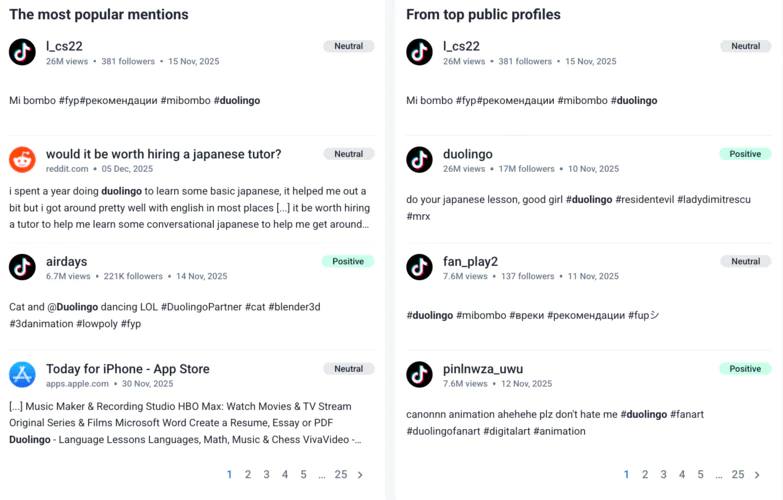
- Find top mentions (in the Summary Tab)
The Summary tab helps me spot the most popular mentions and top public profiles about my brand.
This is where I can quickly catch attention-grabbing shoutouts from influencers, magazines, or key industry players.
- Understand audience trends
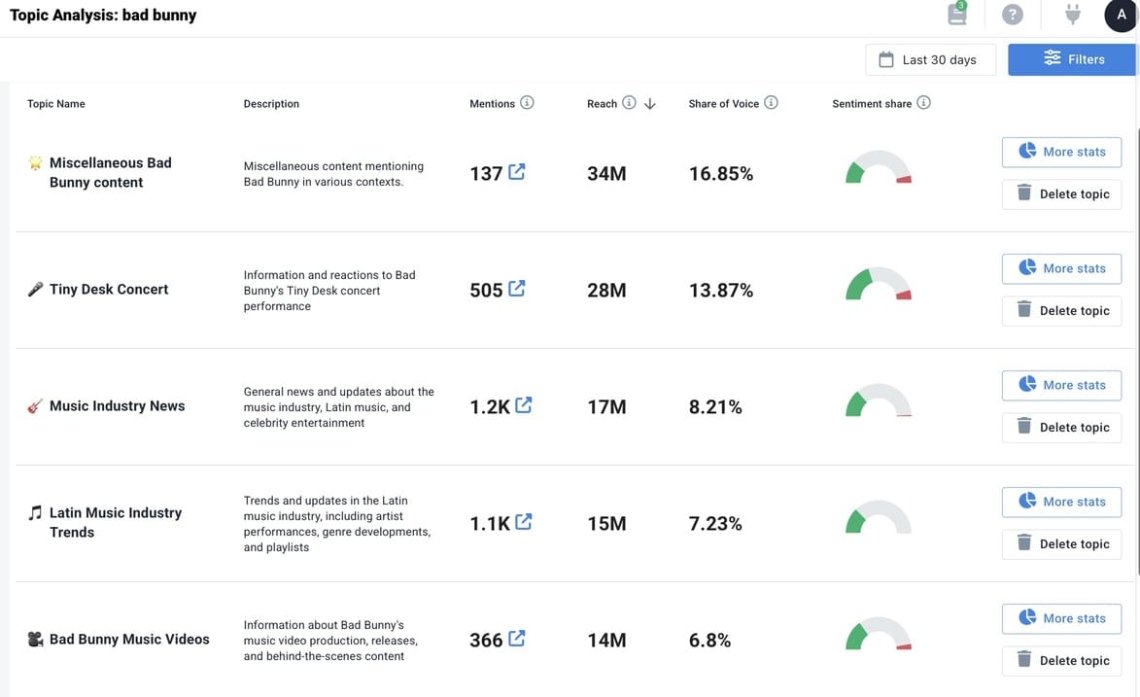
Once I’ve reviewed immediate mentions, I like to head to the Topic Analysis tab. This is by far my favorite feature.
In seconds, I can see what my audience discusses across social platforms, which adds a lot of context to my audits.
Can AI do a social media audit?
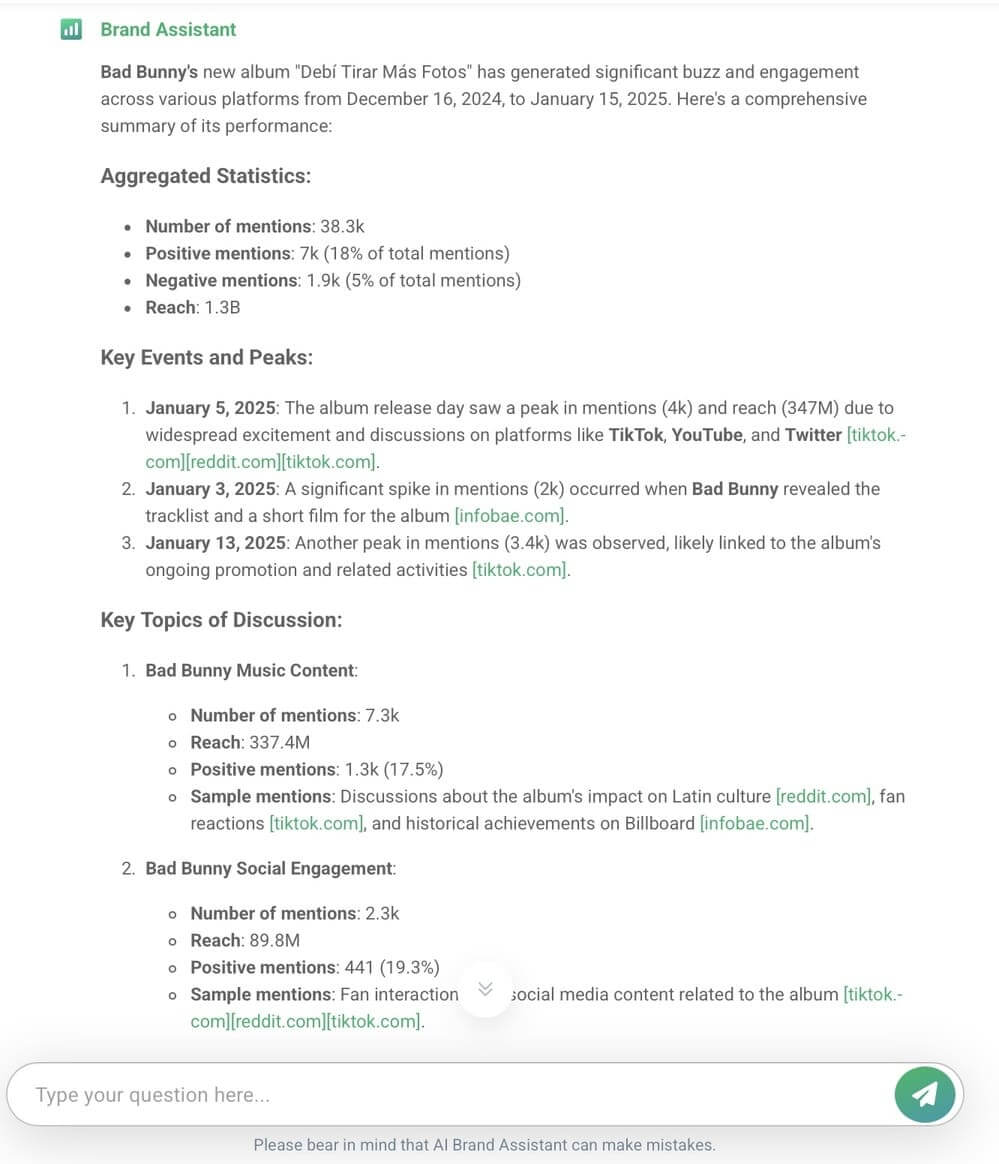
Yes, to some extent. LLMs might not have access to the most current stats, but advanced tools are great for such tasks.
For example, AI Topic Analysis is a goldmine for understanding the audience’s behavior and engagement trends.
It can help you discover new ideas for future social media campaigns, align the content calendar, and base future social media activities.
07 Conduct sentiment analysis
One of the most important, and sometimes most overlooked, parts of a social media audit is understanding how your audience feels about your brand, products, and customer service.
A big goal of any social media effort is to build and maintain genuine relationships.
That’s where sentiment analysis comes in. It helps you determine whether brand mentions are written in a positive, negative, or neutral tone.
What to monitor for social media sentiment analysis?
- Number of mentions by sentiment type through various social media platforms
- Changes in positive/negative tone over time
- Buzz triggers: What caused sentiment spikes?
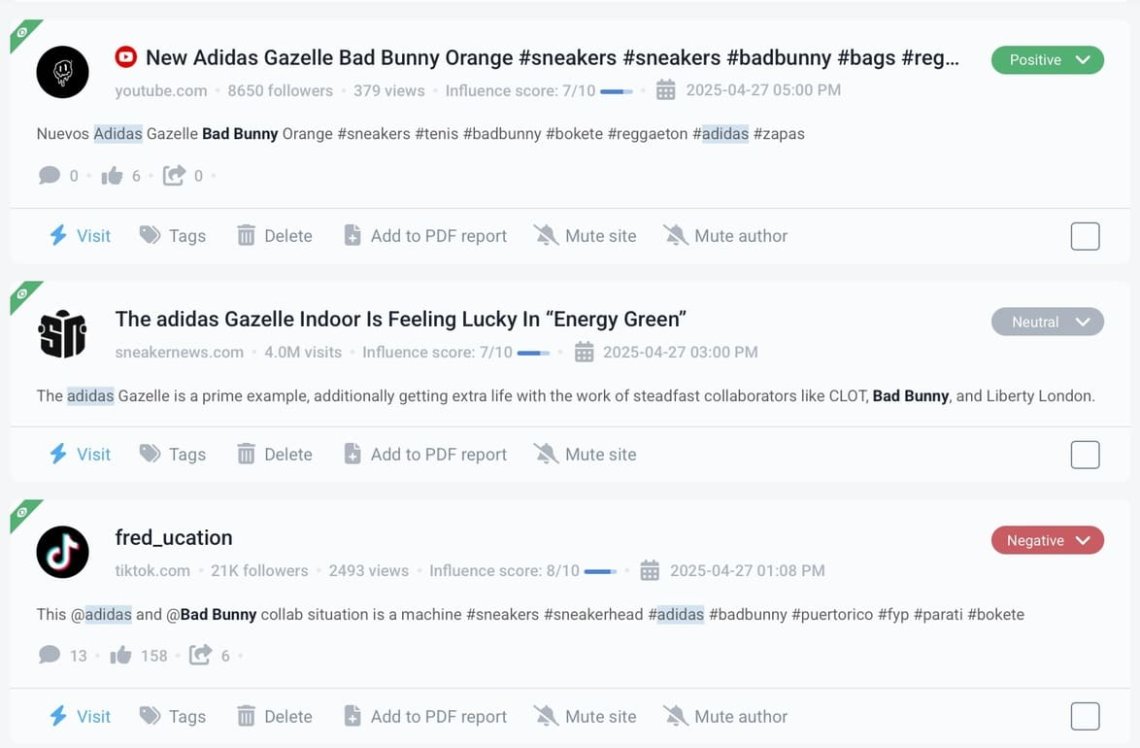
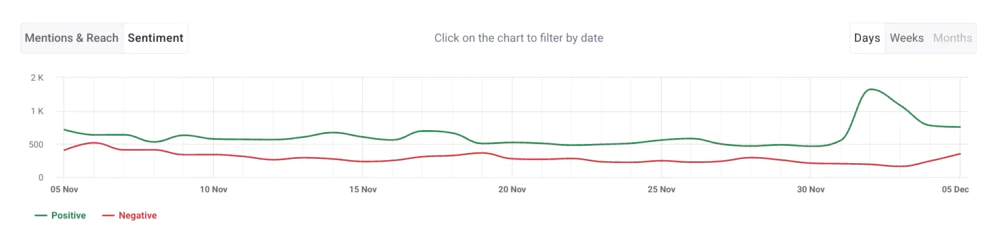
Here you can see mentions detected by Brand24, and categorized by sentiment:
How to conduct social media sentiment analysis?
On the Brand24 dashboard, I switch the graph from Mentions & Reach to Sentiment. This gives me a visual breakdown of how people feel when they talk about my brand.
It’s helpful, especially after launching a new campaign, product, or partnership.
It’s the fastest way to know what’s working and what’s not for the target audience.
I go further and break down the sentiment on each social media platform. To capture the differences in social media presence, some platforms naturally perform better than others.
Knowing this helps me allocate budget and effort wisely in my content strategy and upcoming social media campaigns.
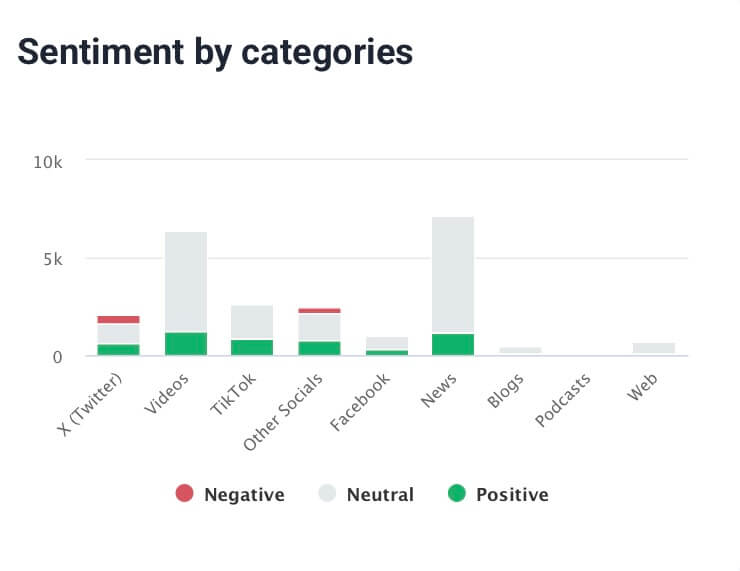
After all, social media sentiment analysis can also help detect early signs of potential problems or opportunities for growth in social engagement.
08 Determine your social media ROI
I know how tricky measuring ROI from your social media activities can be. Especially when conversions aren’t your primary goal.
Yes, you can count direct sales or downloads from multiple channels, but what if your objective is brand awareness or influence on offline sales?
Still, ROI is a vital part of any media audit. It helps ensure you’re not wasting time or budget on social channels that don’t deliver real value to your company.
You can measure impact by:
- Track the number of downloads
- Using Google Analytics to measure organic sessions and traffic sources
- Monitoring hashtag performance for visibility and audience interest
09 Competitive analysis
It’s time to assess how your organization’s social media presence compares to others in your market.
Rising performance is always exciting, but if your competitors are doing even better, it’s a sign that there’s still space to refine your social media content and stay competitive.
How to conduct the competitive analysis?
I typically start by reviewing the Comparison tab. This lets me compare my social platforms directly against key competitors, allowing me to assess our online performance.
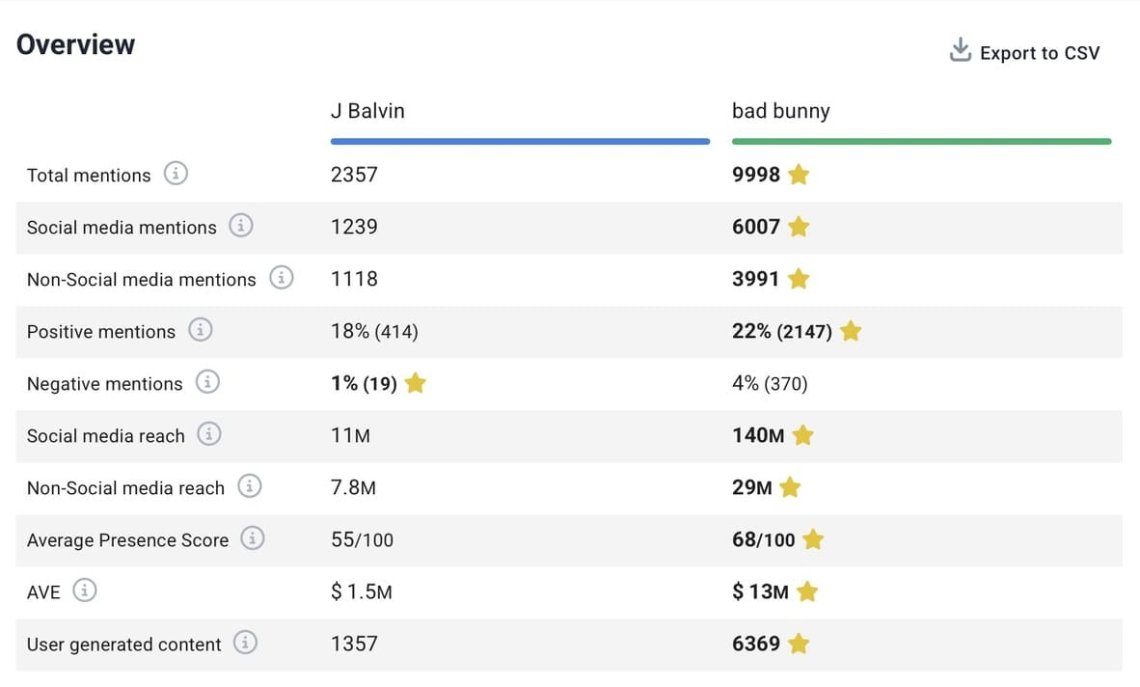
Then, I check my online presence score, which is a reliable snapshot of how strong my digital visibility is.
How to check how strong my online visibility is?
My tip is to look at the Presence Score. It measures how well-known and active your brand is across social and digital channels at any given time. This includes engagement, mentions, reach, and more.
It’s especially useful for benchmarking brand awareness and tracking how your organization’s social media presence is evolving.
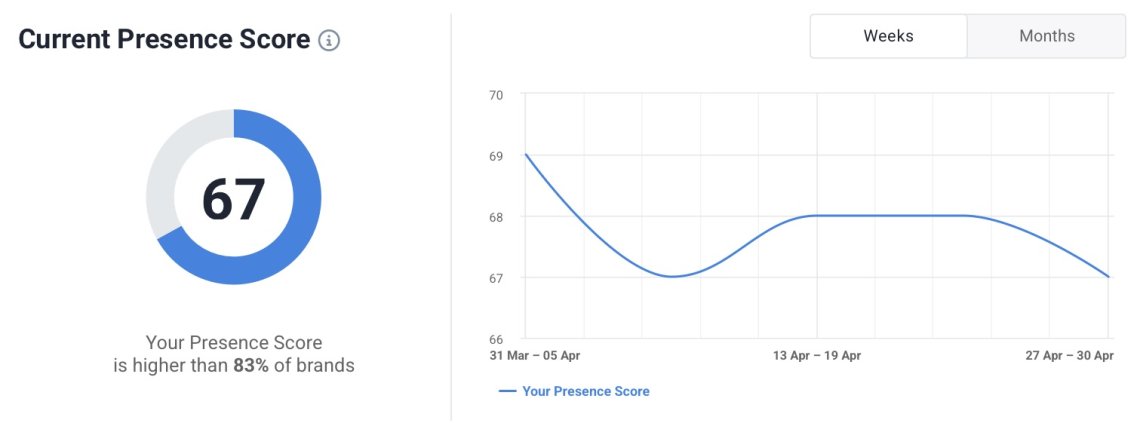
If the score is rising, you’re moving in the right direction. If not, it’s time to dig deeper and adapt your social media strategy.
What are the best social media audit tools?
Having the right social media audit tools is essential to conducting a truly comprehensive social media audit.
But with so many options available, choosing the best fit for your needs and business objectives can feel overwhelming. That’s why I’ve compiled a quick checklist of key features to consider:
What to look for in a social media audit tool?
- Platform coverage
Check, which social platforms the tool supports. Ensure it covers your active social media accounts and all major social networks where people can discuss your brand. - Performance & engagement metrics
The tool should help you gather all the data in one place (from audience demographics to analysis of each social media post, follower growth), speeding up your auditing of social media accounts. - Insights & trends
Choose a tool to help you uncover valuable insights, even those not apparent at first glance. - Reporting & sharing options
Save your time, especially when reporting to clients or teams. Choose a tool with easy-to-read charts, graphs, and other visualizations useful for auditing. - Benchmarking
Many tools don’t have built-in benchmarking features. Without them, you’ll be deprived of insights into deeper audience data in the same niche or be stuck manually comparing accounts or competitors.
Thus, those key features will speed up your auditing process! Are you curious about my 4 top social media audit tools for a comprehensive audit?
Let’s dive into them!
4 Best social media audit tools:
01. Google Analytics
Sure, it’s technically more of a website analytics tool, but it’s indispensable for understanding how social media activity impacts your social media traffic, user behavior, and conversion goals.
Google Analytics is a foundational platform in any social media audit, offering powerful insights that bridge the gap between social engagement and on-site performance.
It reveals how users from various social channels behave once they land on your website, making it a critical tool for optimizing your social media marketing strategy.
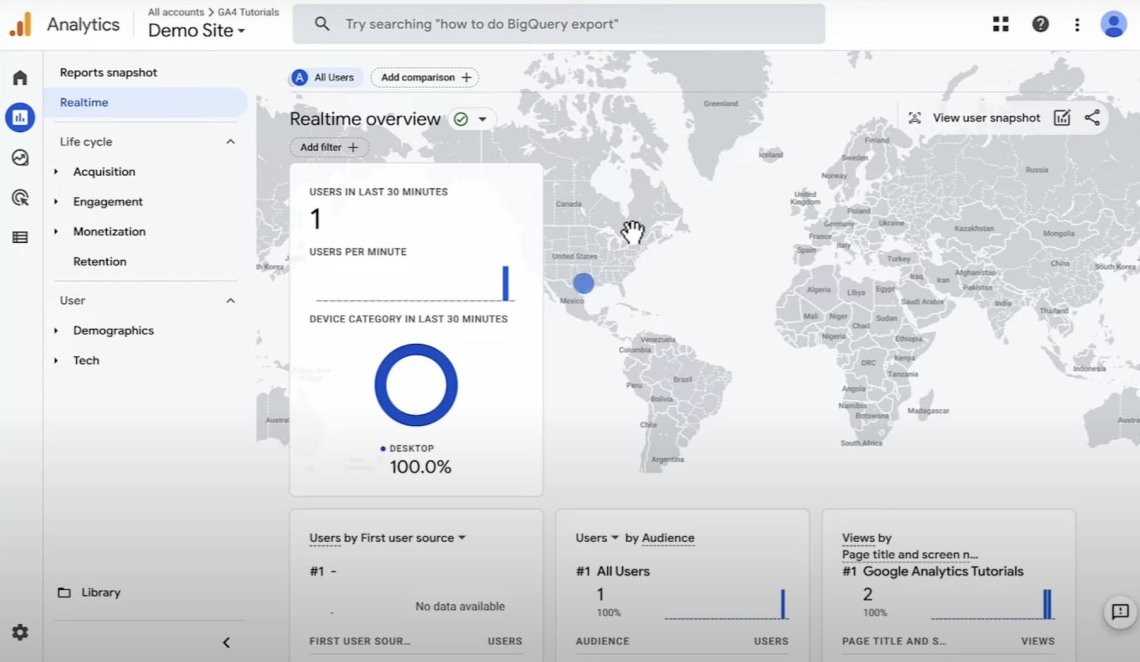
How to use GA for social media audit?
- Traffic source analysis: See which social media accounts drive the most traffic.
- Audience demographics data: Gain detailed demographic data on age, gender, location, and interests.
- Conversion tracking: Understand how social efforts contribute to your goals.
- Custom reports: Create tailored dashboards for tracking specific marketing goals and KPIs.
Pro Tip: Combine Google Analytics with UTM parameters for deeper insight into the performance of specific posts, campaigns, or emerging platforms.
While it doesn’t analyze your social media content, Google Analytics is a must-have tool for website analysis to understand how social media efforts translate into business value.
02. Brand24
These days, tracking content performance alone just isn’t enough. A truly effective social media audit requires a comprehensive view of how your brand is perceived across the web.
What are people saying about you? Are your campaigns generating positive buzz or falling flat?
Brand24 is an AI-powered social listening tool that helps answer those crucial questions.
It monitors conversations across all major social media platforms (including blogs, forums, podcasts, and review sites). So you can stay fully informed about your brand’s online presence and reputation.
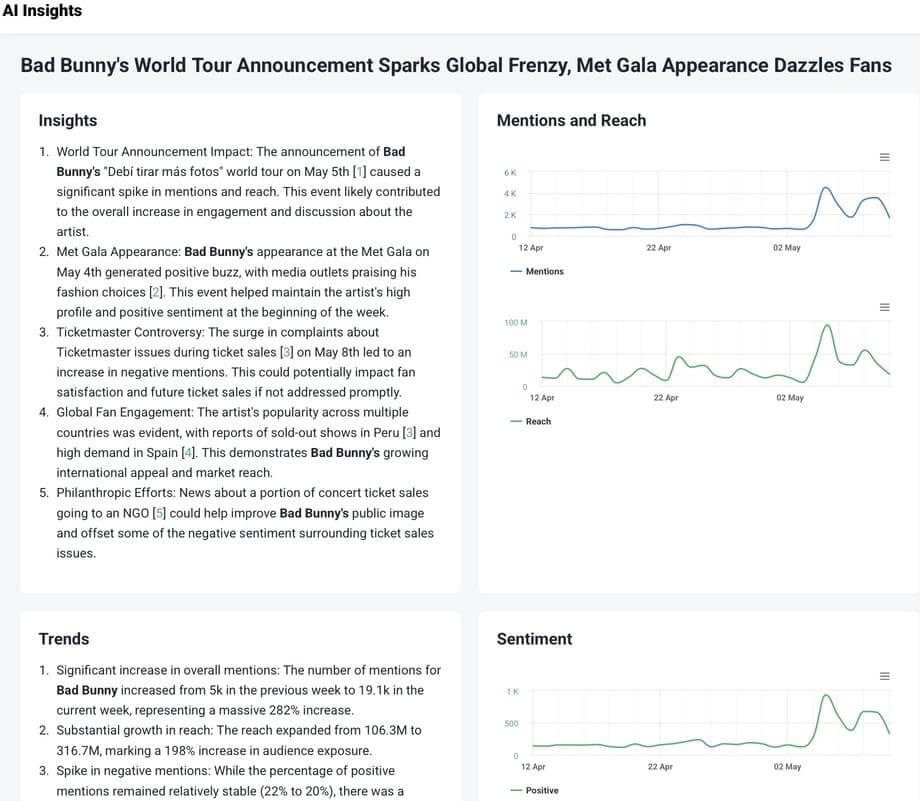
How to use Brand24 for social media audit?
- Use automated reports: Export clean reports in PDF, Excel, infographics, or use Quick Share Reports to send updates to anyone—clients, teammates, or stakeholders. It saves me hours every week.
- AI Features: Get instant sentiment analysis, trending topics, audience reactions, and in-depth recommendations with AI Brand Assistant.
- Content discovery & influencer tracking: Identify high-impact social posts and interactions. Thanks to influencer analysis, you can find creators driving conversations in a niche more naturally.
- Benchmarking: Not limited to brand names, monitor any slogan, hashtag, product name, or campaign to see how competitors are performing, too.
- Demographics: Access information about your audience, such as age, gender, profile.
Explore practical use cases and inspiration in our guide to social listening examples and discover how marketers, agencies, and enterprises use Brand24 to build loyal, data-informed communities.
03. BuzzSumo
BuzzSumo is a tool for social media analytics. Designed to track brand mentions and online trends, rather than tracking brand performance across all your accounts.
It identifies community engagement content, spots emerging topics, and identifies influential voices in the industry. It’s one of the easiest tools to identify what’s working and why.
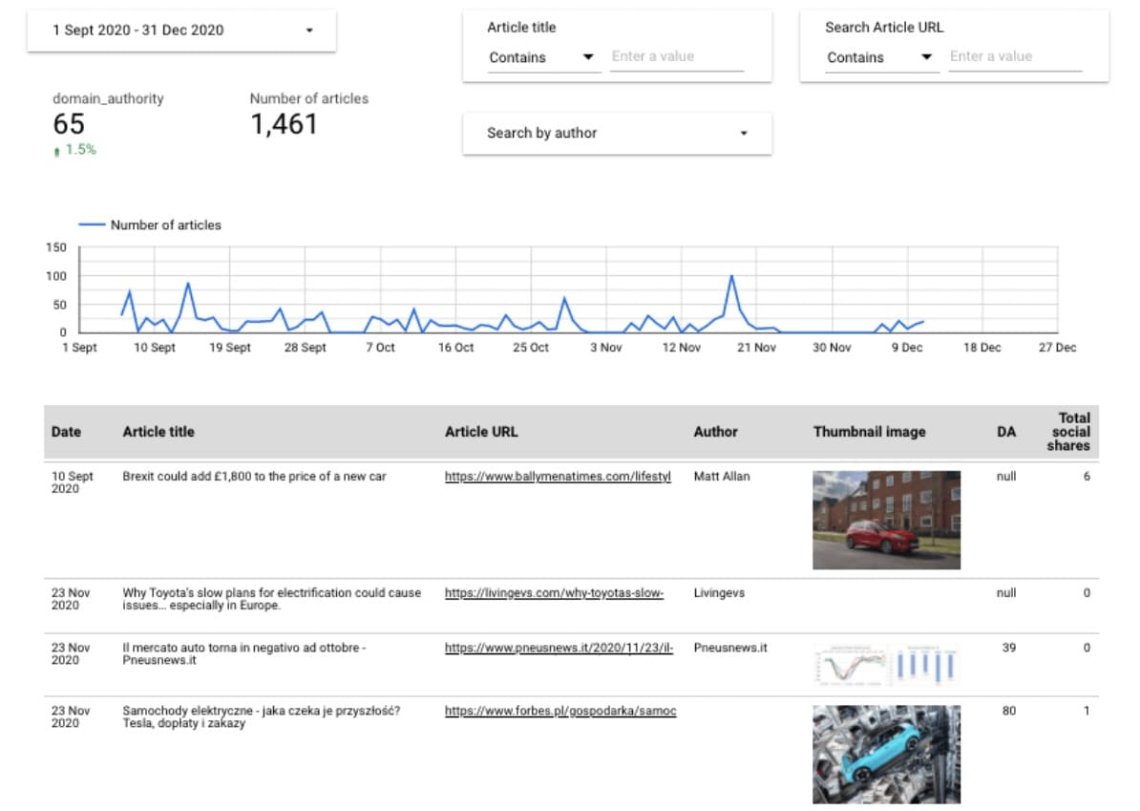
How to use BuzzSumo for social media audit?
- Content auditing: Analyze top-performing content across platforms, competitors, or specific topics.
- Influencer Insights: Identify key people amplifying your content or your competitors’.
- Trend spotting: Set up alerts for emerging keywords and get notified when something goes viral.
- Topic research: Discover content gaps and explore strategic opportunities to guide future content.
04. Buffer
Buffer makes day-to-day social media management easy. Especially for small teams or solo marketers.
While it’s not built for in-depth insights and analytics or trend tracking, its intuitive scheduling and clean interface make it a favorite for staying organized and consistent.
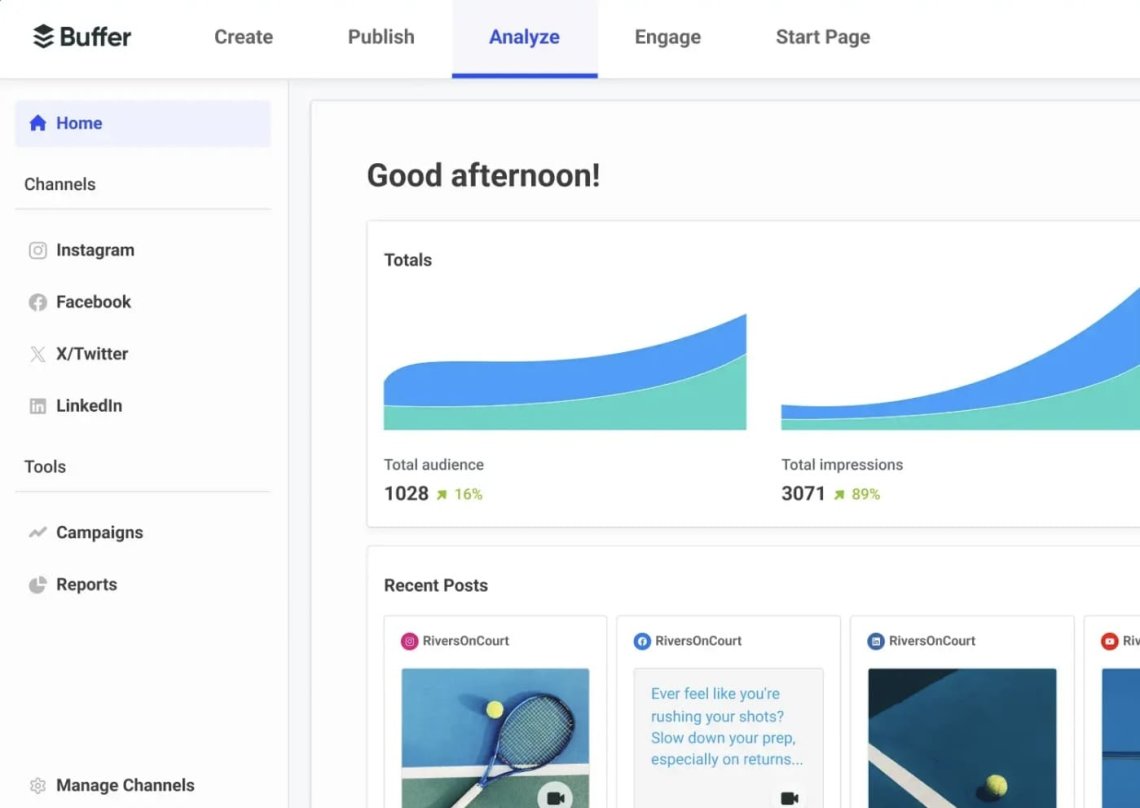
How to use Buffer for social media audit?
- Post & stories analytics: Track followers’ growth, likes, clicks, and engagement on individual social media posts.
- Account performance: Measure metrics across multiple platforms.
- Audience demographics data: Understand who you’re reaching and tailor content accordingly.
Use Buffer to schedule posts consistently, then combine its data with Google Analytics or Brand24 for a broader view of performance and impact.
How to analyze social media audit results?
- Don’t ignore context: Gathered data are essential, but behind them are people. Understanding audience preferences, good timing, and content relevance is your secret weapon.
- Be consistent: Conduct regular social media audits to ensure your strategy is rooted in relevant data.
- It’s about people: At the end of the day, you’re building a social network. Prioritize authentic engagement, keep your social media content fresh, and explore new platforms where your audience might hang out.
- Customize templates: Social media audit templates are great starting points. But don’t be afraid to tweak them.
- Leverage an AI tool: like Brand Assistant, to gain insights faster, spot patterns, and save time across multiple social media channels.
The social media audit template & checklist
A social media audit template helps you review all your profiles, evaluate performance, and spot areas for improvement.
It guides you through analyzing accounts, checking branding consistency, reviewing key metrics, understanding your audience, studying competitors, and creating a clear action plan to strengthen your social media strategy.
Here you can use this ready-to-use social media audit checklist that I have prepared for you:
| Audit’s section | What to check? |
|---|---|
| List of accounts | Gather all active & inactive profiles and confirm they align with your target audience. |
| Branding consistency | Ensure profile photos, cover images, usernames, URLs, bios, and verification are unified and up to date. |
| Key metrics | Track engagement (likes, comments, shares), visibility (reach, impressions, clicks), and top-performing content. |
| Understand your audience | Analyze demographics, behavior, sentiment, and engagement patterns across platforms. |
| Competitor analysis | Review competitors’ content, performance, and engagement to identify opportunities. |
| Create an action plan | Use audit findings to set goals and define steps to improve your social media strategy. |
FAQ
Q1: What is a social media audit?
A social media audit is a structured review of your brand’s entire social media presence. It examines your profiles, content performance, audience behavior, brand mentions, sentiment, and competitor landscape to identify what’s working, what needs improvement, and where opportunities exist.
Q2: Why is a social media audit important?
A social media audit helps you:
- Understand your true social performance
- Discover strengths, weaknesses, and growth opportunities
- Spot outdated branding or inactive channels
- Improve content strategies based on real data
- Align your social activity with business goals
- Monitor brand reputation and sentiment
- Optimize resource allocation and budget decisions
Q3: What is a social media audit template?
A social media audit template is a structured worksheet or spreadsheet designed to guide you step-by-step through evaluating your social media presence. It ensures you gather all necessary information and follow a consistent process each time.
A solid template includes:
- Performance metrics (reach, engagement, clicks, sentiment)
- Content analysis
- Competitor metrics
- Recommendations and next steps
Q4: Why use a social media audit template?
Using a template helps because it:
- Ensures comprehensive coverage of all social channels
- Brings consistency, especially for recurring audits
- Organizes data for easier reporting and comparison
- Saves time by giving you a clear framework
Q5: How often should I run a social media audit?
Most brands perform audits quarterly, while fast-growing companies or those running intensive campaigns may do them monthly. A full audit is also useful:
- After rebranding
- Before planning a new social strategy
- After major platform updates
- When performance suddenly drops or negative sentiment spikes
Q6: Do I need any special tools to perform a social media audit?
You can conduct a basic audit manually, but social media automation tools significantly boost accuracy and reduce time. Tools can also help you create automated reports.

