Table of contents
New in Brand24: Demographics Tab Reveals the “Who” Behind Your Mentions
You know what people are saying. You know how they feel. But do you know who they are? We’re introducing the Demographics Tab – your new dashboard for instant audience insights.
Key takeaways
-
What is the Demographic Panel?
The Demographic Panel is a Brand24 feature that provides detailed insights into the people who encounter mentions of your brand online. It analyzes audience characteristics to help you understand exactly who is paying attention to your brand and your competitors.
-
How can I use the Demographic Panel insights?
You can use this data to: – Optimize marketing spend by focusing on regions with the right audience mix. – Refine your messaging based on your audience’s education, interests, and professional background. – Identify new market opportunities by seeing which demographic segments are underserved by your competition.
-
Where does the demographic data come from?
The data is sourced from web-based mentions (news, blogs, forums) and social media platforms. Specifically, geographic distribution (Top Countries) uses both web and social media data, while other metrics focus on web sources to ensure high data quality and accuracy.
The problem: mentions without a face
Most brands build strategies based on who they think their customers are.
- The risk? You spend your budget on a millennial campaign only to realize your most vocal advocates are actually Gen Z.
- The solution: The Demographics Tab provides real-time data on the Age, Gender, and Country and more insights of the people actually mentioning your keywords.
How it works (real use cases)
Here is how you actually use the data from the new tab:
1. The “Persona Reality Check” (Age Data)
Use the Age Group breakdown to see if your brand’s “voice” matches the audience’s actual age.
- The Insight: A brand assumes their audience is 45+. The Demographics Tab shows a massive spike in the 18-24 range.
- The Action: The brand realizes they’ve become a status symbol for younger investors and pivots their influencer strategy to include younger creators.
2. Geographic Prioritization (Country Data)
Don’t guess where to launch your next campaign. Use the Country list to find where your brand is “hot” right now.
- The Insight: You notice an organic surge of mentions coming from the United Kingdom despite having no active marketing there.
- The Action: You allocate a small test budget for UK-based ads, knowing you already have a “warm” audience waiting.
3. Gender-Specific Sentiment Analysis
Combine the new tab with our Sentiment Filter to see who is unhappy.
- The Insight: Your sentiment drops. You filter by “Negative” and see that 80% of the complaints are coming from a specific gender demographic.
- The Action: You identify a specific product-market fit issue and adjust your messaging (or your product) to address that group’s concerns.
What’s actually inside the demographics tab?
The new tab is clean and data-heavy, moving far beyond basic metrics to give you a 360-degree view of your audience across these core pillars:
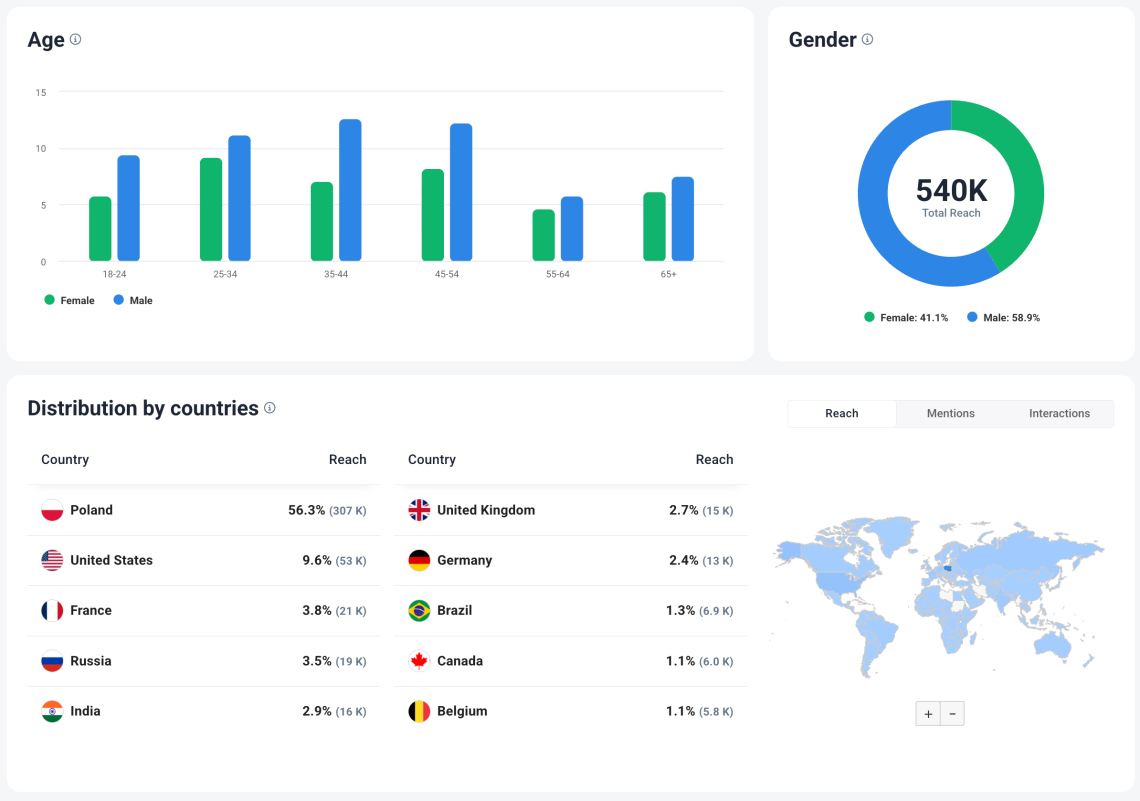
- Age & Gender: Interactive charts showing the male/female split and precise age segments (18-24, 25-34, etc.) so you can find your “sweet spot.”
- Top Countries: A global heatmap and ranked list of where your mentions originate, filterable by Reach, Mentions, or Interactions.
- Occupation & Education: See if you’re reaching CEOs or full-time workers, and tailor your tone based on their education level.
- Income Levels: Understand the purchasing power of your audience with breakdowns of High, Middle, and Low-income segments.
- Interests & Social Presence: Discover what else your fans care about (e.g., Finance, Retail, Technology) and which social platforms (TikTok, LinkedIn, X) they frequent most.
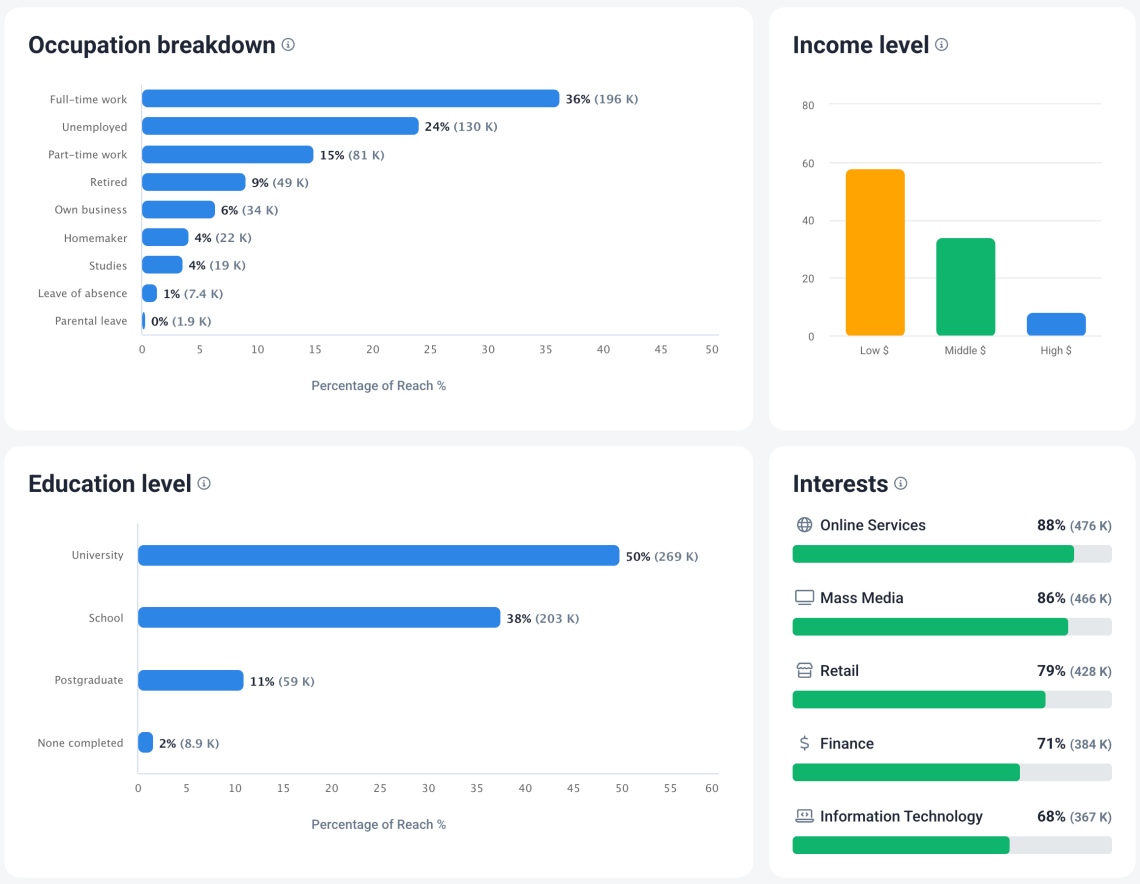
Pro Tip on Data Quality: To ensure the highest accuracy for complex traits like education and income, Brand24 pulls these specific insights primarily from web-based sources (news, blogs, and forums). Geographic data, however, continues to pull from both the web and your favorite social media platforms for a total global view.
“Can I filter this?”
Yes. Just like our Context Search, the Demographics Tab isn’t a static page. It works with your existing filters. Want to see the demographics of people using a specific hashtag? Or the age of people mentioning your competitor?
Just apply your filters in the Mentions tab, and the Demographics tab will update instantly.
Why demographics insights matters in 2026
In an era of “AI-generated everything,” human-centric data is your competitive advantage. The Demographics Tab doesn’t just give you numbers; it gives you the ability to speak to your customers as people, not just data points.
Ready to see who’s behind your mentions?
Availability: The Demographics Tab is now live for all Pro, Business, and Enterprise users.



Top Reads
X (Twitter) Analytics Tools: The 12 Best to Try in 2026
How to See How Many Times a Hashtag Was Used on X (Twitter)
Brand Monitoring: Tools & Guide for 2026
Brand Awareness Strategy [The Ultimate Guide for 2026]
The Best AI Hashtag Tracker and Other Hashtag Tracking Tools [2026]
Social Media Reach: How to Measure & Improve It in 2026?
Sentiment Analysis: What is it & Why do You Need it in 2026?
Share of Voice: Definition, Calculation, Tools [2026 Guide]
Brand Reputation Management: 6 Expert Tips for 2026
Social Media Analysis: Complete Guide for 2026
Start Social Listening!
Get the Brand24 trial and start social listening like a PRO.