Table of contents
Brand24 ChatGPT App: Get Real Brand Data Inside ChatGPT
When you ask ChatGPT about your brand without connecting it to live data, you’re getting a plausible guess – not brand intelligence. Brand24 is now an official app in the OpenAI App Store, making it the first social listening tool to feed real, live monitoring data directly into ChatGPT. This article explains what the integration does, how to set it up, and why it matters for your marketing workflow.
Key takeaways
-
What changed?
Brand24 is now an official app in the OpenAI App Store. You can ask ChatGPT about your brand and get answers based on your actual, live Brand24 data – mentions, sentiment, influencers, competitors.
-
Does this replace Brand24?
No. Brand24 remains your monitoring engine – collecting mentions across 25 million+ sources, analyzing sentiment, tracking influencers, and powering all your projects. The ChatGPT App is a new conversational interface to access those insights. Brand24 is the source of truth. ChatGPT is where you put that truth to work.
-
Why does it matter?
Without connected data, ChatGPT guesses about your brand from stale training data. AI models hallucinate on open-ended brand queries an average of 9.2% of the time (Vectara, 2025). Now it can pull real numbers instead.
-
How is it different from Brand Assistant?
Brandon, Brand24’s built-in AI, has access to richer, deeper data for comprehensive analyses. The ChatGPT App is designed for quick, on-the-go access when you’re already working in ChatGPT.
-
How to start?
Install the Brand24 app from the OpenAI App Store, connect your account, and ask your first question. Setup takes under two minutes.
The Hidden Problem With How Marketers Use ChatGPT Today
Picture this: it’s Monday morning. You open ChatGPT and ask “What’s the sentiment around our brand this week?” ChatGPT answers confidently – sentiment looks stable, no major issues. You share the summary in standup. Everyone nods.
The problem? ChatGPT has no idea what actually happened to your brand last week. It’s reasoning from its training data, which has a cutoff months in the past, has never seen a single mention from your Brand24 dashboard, and has no access to real-time social media, news, or forum conversations about your company.
This isn’t a theoretical risk. Research shows AI reasoning models hallucinate up to 33% of the time on person- and brand-specific questions without source documents (Vectara / OpenAI o3 benchmark, 2025). Meanwhile, 65% of marketers now use ChatGPT as part of their professional workflow (University of Chicago). That’s a lot of confident but sourceless answers shaping real decisions.
The smarter teams have figured out workarounds – exporting CSVs, copy-pasting screenshots, describing dashboard metrics by hand. It works, kind of. But the AI is still reasoning on whatever fragments you managed to paste in, not on the full picture your Brand24 dashboard actually contains.
There’s a better way now.
Brand24 Is Now an Official ChatGPT App
Brand24 is officially available in the OpenAI App Store, making it one of the first social listening tools to reach this status.
This isn’t a workaround – it’s a vetted, maintained connection between your Brand24 account and ChatGPT that lets the AI access your live project data on demand.
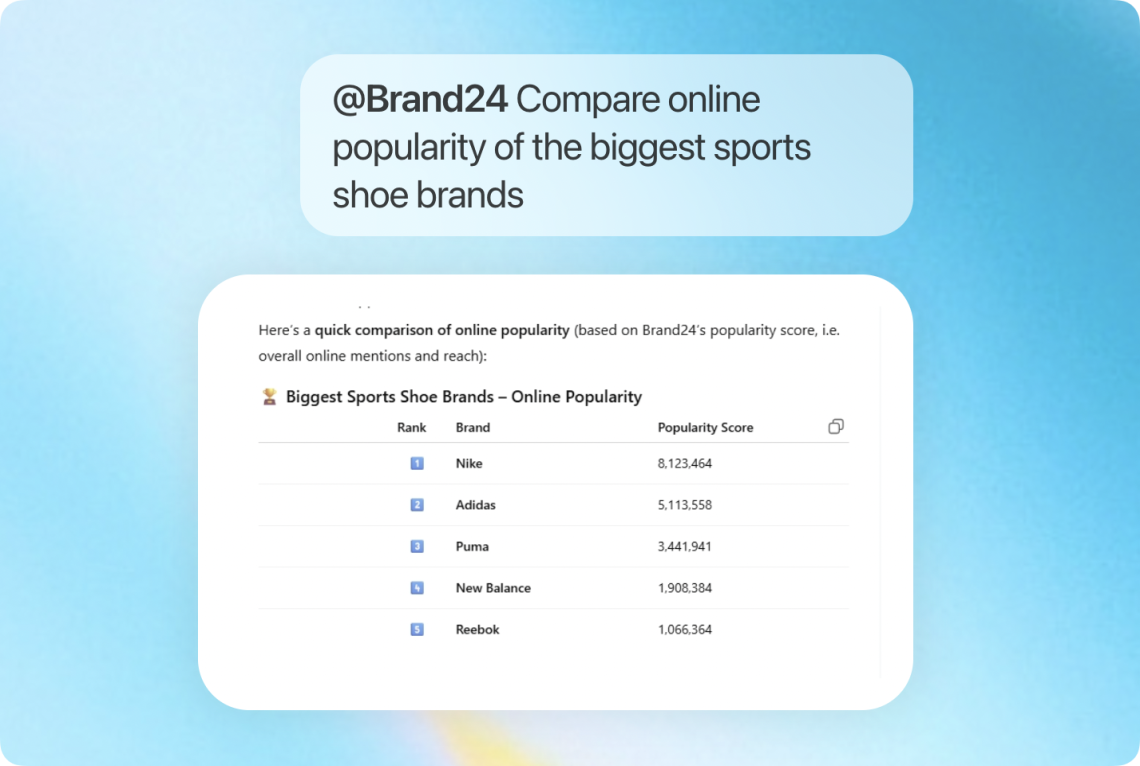
What that means in practice: when you ask ChatGPT about your brand now, it pulls the answer from your actual Brand24 data – live mentions, real sentiment, current influencers. Brand24 does the monitoring across 25 million+ online sources in 108 languages. ChatGPT gives you a conversational way to access it.
Setup takes two minutes:
- Install the app. Open the Brand24 app in the OpenAI App Store and add it to your ChatGPT.
- Connect your Brand24 account. Click “Connect” and authorize access. Your existing projects are instantly available.
- Start asking. Open any ChatGPT conversation and ask questions about your Brand24 projects in natural language. That’s it.
No tab switching and copy-pasting.
What This Actually Looks Like in Practice
Abstract integrations are easy to announce and hard to imagine. Here’s what changes in real daily workflows:
1. The Monday Morning Brief (in 30 seconds)
THE SCENARIO Before you had to open Brand24, scan the mentions feed, check the sentiment graph, export a summary, paste it into a document, share it in Slack before standup.
NOW: Open ChatGPT and type: Summarize what happened with [project name] last week: sentiment, biggest stories, any spikes I should know about. Get a structured briefing while your coffee’s still hot.
ChatGPT reads your live Brand24 data and delivers a narrative summary. What used to take 15 minutes of dashboard browsing now takes 30 seconds. You walk into standup prepared, not reactive.
2. Crisis Early Warning (before it becomes a crisis)
THE SCENARIO Overnight, negative mentions spike. You don’t see it until morning.
Ask ChatGPT: Are there any unusual spikes in negative sentiment for [brand] in the last 24 hours? What’s driving them?
Instead of manually applying filters and reading through individual mentions, ChatGPT reads the data and tells you exactly which story is spreading, what the tone is, and who’s amplifying it. You respond in minutes, not hours.
3. Understanding a Specific Discussion (without reading every mention)
THE SCENARIO A controversy is brewing around a topic related to your brand. Your project has hundreds of mentions about it, but you need the summary, not the firehose.
Ask ChatGPT: What are people saying about [specific topic] in the [project name] project?
ChatGPT filters and summarizes the relevant mentions from your Brand24 data, giving you the key arguments, dominant sentiment, and most active voices – without reading through every single one. You understand the conversation in seconds
4. Competitive Intelligence Before a Pitch
THE SCENARIO You have a client presentation in two hours. You need to know how your client’s brand compares to their main competitor right now.
Ask ChatGPT: Compare the mention volume and sentiment for [brand] vs [competitor] over the last 30 days. What topics are they winning on?
You get a competitive briefing based on live Brand24 data, not on ChatGPT’s training snapshot. Bring it to the room. No report-building required.
5. Content Strategy From Real Audience Signals
THE SCENARIO Your content calendar is due. You want to brief the team on what’s actually resonating with your audience right now, not what resonated last quarter.
Ask ChatGPT: What topics are people discussing most alongside [brand] this month? Which themes have the most engagement?
ChatGPT surfaces the patterns from your Brand24 data. You brief the team on content directions that are already generating interest.
6. Influencer Discovery on Demand
THE SCENARIO You’re launching a campaign and need to identify the right voices — people already talking about your brand with genuine audience reach.
Ask ChatGPT: Who are the influencers with the highest Influencer Score mentioning [project name] this month?
You get a prioritized list with context, without manually building a filter view or exporting the Influencer Tab.
What You Can Ask: A Starting Prompt List
Not sure where to start? These prompts work directly with your Brand24 data once the app is connected:
| What you want to know | Ask ChatGPT |
| Overview of all projects | “Summarize recent events in my Brand24 account” |
| Key moments for a brand | “What happened in the [PROJECT] project this month?” |
| Main discussion topics | “What are the main discussions in the [PROJECT] project?” |
| A specific conversation | “What are people saying about [TOPIC] in the [PROJECT] project?” |
| Top influencers | “Who are the most active influencers writing about [PROJECT]?” |
| Media coverage sources | “List news sites that mentioned [PROJECT] this week” |
| Sentiment check | “Has sentiment for [PROJECT] improved or declined over 30 days?” |
| Competitor comparison | “Compare mentions and sentiment for [brand] vs [competitor]” |
Why “Official App” Status Actually Matters
When we say Brand24 is an official ChatGPT app, it’s not marketing language. It means:
- It’s vetted. OpenAI reviews apps before they appear in the App Store. The integration has been tested for reliability, security, and performance.
- It’s maintained. Unlike community workarounds or unofficial plugins that break with every update, official apps stay current.
- It’s safe. Your Brand24 data is only accessed when you ask a relevant question. It’s retrieved on demand, not stored inside ChatGPT. OAuth authentication means you control access.
- It’s the first of its kind. Brand24 is among the first social listening tools to reach official ChatGPT app status — ahead of larger competitors. If your competition isn’t connected yet, you have a head start.
“We built this integration because we saw our users doing it manually – exporting data, pasting it into ChatGPT, and asking for analysis. The ChatGPT App removes every step between the question and the answer. Brand24 still does all the heavy lifting: collecting mentions, analyzing sentiment, scoring influencers. Now you can access all of that with a single prompt.” – Karol Kłaczyński, Head of Product, Brand24
ChatGPT App vs. Brand Assistant: What’s the Difference?
Brand24’s built-in AI assistant, Brand Assistant, has access to a richer, more complete dataset from your Brand24 account. For deep, comprehensive analyses – the kind you’d run when building a quarterly report or doing a thorough competitive audit – Brand Assistant will give you more detailed results.
The ChatGPT App is designed for a different moment: quick, on-the-go access when you’re already working in ChatGPT. It’s the fastest way to pull a summary, check a trend, or get a helicopter view across your projects without logging into the Brand24 dashboard.
Think of it this way: Brand Assistant is your deep analyst. The ChatGPT App is your fast briefer. Use both, in the right moments.
| Brand24 + Brand Assistant Deep analyses, full dataset, comprehensive reports, quarterly audits | ChatGPT App Quick access, on-the-go summaries, mid-workflow queries, helicopter view |
For Claude and Gemini CLI Users: MCP
The Brand24 ChatGPT app is built on MCP (Model Context Protocol), an open standard that lets AI tools connect to live external data sources securely. Think of it as a universal connector for AI, similar to what USB-C is for hardware.
If you use Claude as your primary AI tool, you can connect Brand24 through Settings > Connectors
If you use Gemini CLI, you can add Brand24 as a remote MCP server using the same endpoint.
For most marketers, the ChatGPT app is the fastest path: two clicks, no configuration, and you’re live. Full MCP setup guide for all AI tools
Why This Matters Right Now (Not Next Quarter)
ChatGPT now has over 800 million weekly active users and processes 2.5 billion prompts daily. Ninety-two percent of Fortune 500 companies use it. In marketing specifically, 65% of professionals use it as a regular work tool. These aren’t early adopters anymore – this is the mainstream.
The teams who connected their AI tools to live data first are already operating differently. They’re not assembling reports on Monday mornings. They’re acting on what the reports already told them.
This gap is going to widen fast. It already has in other areas: social listening vs. no social listening, real-time alerts vs. weekly reports. This is the same shift, one layer deeper.
Connect your monitoring to your AI workflow now, while most of your competitors haven’t.
Get Started in Two Minutes
1. Install the Brand24 app from the OpenAI App Store.
2. Connect your Brand24 account. Ask your first question.
If you want to see Brand24 in action before connecting, start a free trial and explore your first project. Your data will be waiting when you connect to ChatGPT.
Available for:All Brand24 plans. The ChatGPT app reflects the data and projects in your active Brand24 account.
Want to connect Brand24 to Claude, Gemini, or other AI agents instead? See the full MCP setup guide
Frequently Asked Questions
Is the Brand24 ChatGPT App free?
The ChatGPT App itself is free to install. You need an active Brand24 account (any plan) to connect your data. If you don’t have one yet, you can start with a 14-day free trial.
What Brand24 data can ChatGPT access?
The app can access your project data including mentions, sentiment analysis, influencer scores, discussion topics, and source information. The list of available data tools is continuously expanding. For the most current list, you can ask ChatGPT directly after connecting.
Does the ChatGPT App replace the Brand24 dashboard?
No. The dashboard remains the most complete view of your data, with advanced filtering, custom reports, Demographics, AI Visibility, and more. The ChatGPT App is for quick, conversational access when you’re already working in ChatGPT. For deeper analysis, use the full dashboard or Brand24’s built-in AI assistant, Brandon.
Can I use Brand24 with Claude or Gemini instead of ChatGPT?
Yes. The integration is built on MCP (Model Context Protocol), an open standard. You can connect Brand24 to Claude via Settings > Connectors, or to Gemini CLI as a remote MCP server. See the full MCP setup guide for details.
Is my Brand24 data stored inside ChatGPT?
No. Your data is retrieved on demand when you ask a relevant question and is not stored by ChatGPT. The connection uses OAuth authentication, so you control what the app can access and can revoke it at any time.
What ChatGPT plan do I need to use the Brand24 app?
The Brand24 app works with ChatGPT Plus, Team, and Enterprise plans. Check OpenAI’s current documentation for the latest on app availability across plan tiers.


Top Reads
X (Twitter) Analytics Tools: The 12 Best to Try in 2026
How to See How Many Times a Hashtag Was Used on X (Twitter)
Brand Monitoring: Tools & Guide for 2026
Brand Awareness Strategy [The Ultimate Guide for 2026]
The Best AI Hashtag Tracker and Other Hashtag Tracking Tools [2026]
Social Media Reach: How to Measure & Improve It in 2026?
Sentiment Analysis: What is it & Why do You Need it in 2026?
Share of Voice: Definition, Calculation, Tools [2026 Guide]
Brand Reputation Management: 6 Expert Tips for 2026
Social Media Analysis: Complete Guide for 2026
Start Social Listening!
Get the Brand24 trial and start social listening like a PRO.