Best Competitor Analysis Tools in 2026 [Top 12 Compared]
Updated: March 30, 2026
21 min read
Competitor analysis tools help you track what your rivals are doing across SEO, social media, ads, and brand perception.
Instead of guessing or manually checking each channel, you can see which of their campaigns perform, how audiences react to their products, and where competitors are gaining visibility.
In this guide, we compare the best competitor analysis tools for 2026 and explain what each one is best at.
Tool
Best for
Top strengths
What could be better
Brand24
Tracking competitor mentions & brand perception
Real-time mention tracking, sentiment analysis, AI visibility, AI insights
Brand24 is an AI-powered media monitoring and social listening tool that helps you track how your competitors are discussed online, across social media (Facebook, TikTok, Instagram, X, etc.) and non-social media (news, blogs, online communities, and more).
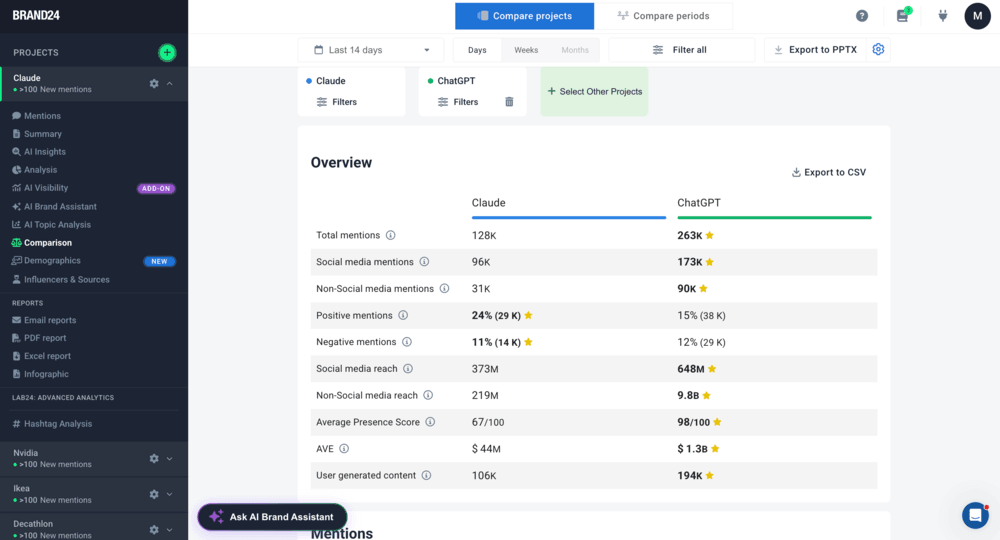
The best feature of Brand24 for competitor research is the Comparison Tab. It allows you to compare multiple competitors to quickly assess your marketing performance in context.
Brand24: Project Comparison Tab for Claude and ChatGPT
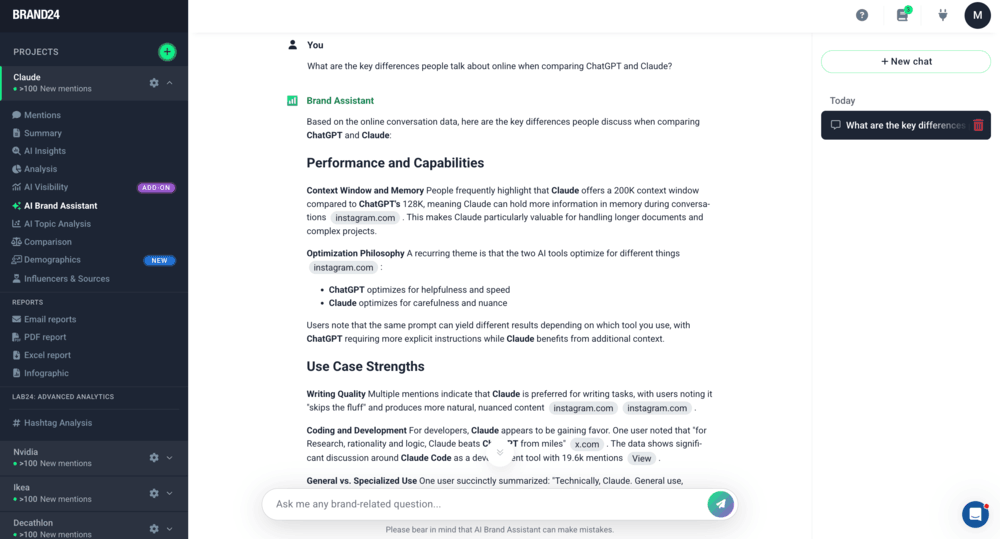
You can also use the AI Brand Assistant to ask questions about your competitors’ online visibility, like which channels generate the most conversation, what topics or keywords people associate with them, and how your brands compare.
Kompyte gives you real-time competitive intelligence at scale.
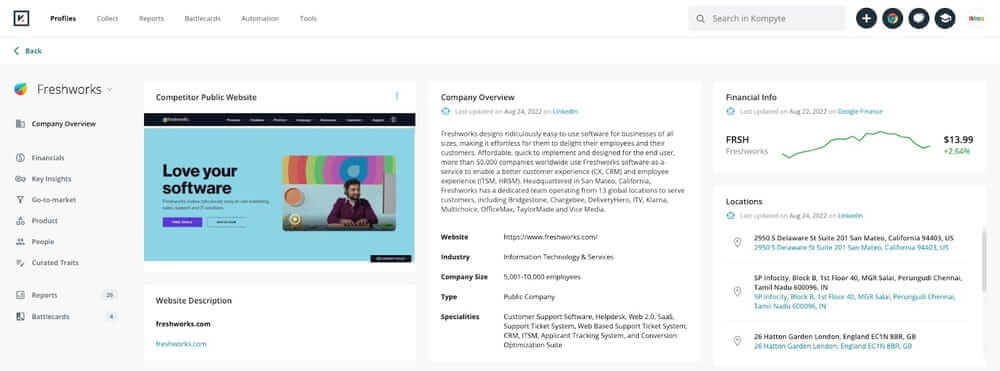
Kompyte is a competitor analysis tool focused on tracking changes in your rivals’ strategy, across their websites, content, campaigns, and positioning.
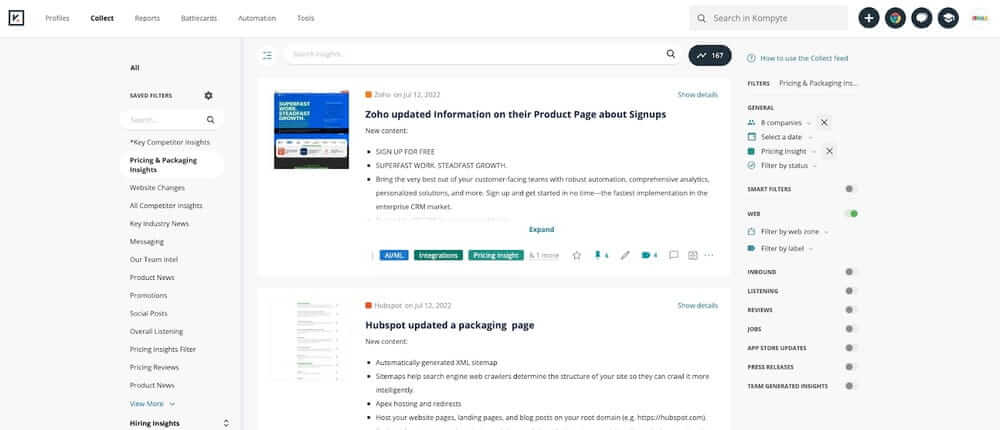
It collects these changes automatically and organizes them into clear comparisons, so you can see what’s shifting and where competitors are focusing their efforts.
Kompyte dashboard
Their standout feature is Battle Cards.
Think of them as competitive analysis dashboards that make it easy to compare rivals side by side: pricing, strengths, weaknesses, key differentiators, and other useful insights into their strategies.
Kompyte insights dashboard
Kompyte gives you a well-rounded view of your analysis. Powered by AI, it filters out the spammy noise and zeroes in on the insights that matter.
🔑 Key features
Real-time website monitoring – tracks changes in competitor pricing, messaging, and product pages
AI auto summaries & GPT Assistant – summarizes competitor updates and lets you query them conversationally
Sales Battlecards – side-by-side comparisons with strengths, weaknesses, and “kill points”
Ad timeline & SEO tracking – monitors competitor ads, keywords, and search visibility
Useful for tracking changes in competitor strategy over time
Built-in comparison formats (battlecards) for quick analysis
Strong fit for sales and product marketing teams
👎 What could be better:
Limited insight into audience reaction (no sentiment or discussion data)
Can feel overwhelming due to the amount of tracked updates
Less useful for real-time PR or brand perception analysis
⭐️ Overall verdict:
Kompyte works best when you want to track changes in your competitors’ messaging, website, and campaigns.
It’s a strong choice for sales and product marketing teams that need structured competitive intelligence, but less suited for analyzing how audiences respond to competitors online.
SEO competitor analysis tools
03 Semrush
4.5/5 – G2 (3,317 reviews)c
4.6/5 – Capterra (2,315 reviews)
7-day free trial available
From $199/month
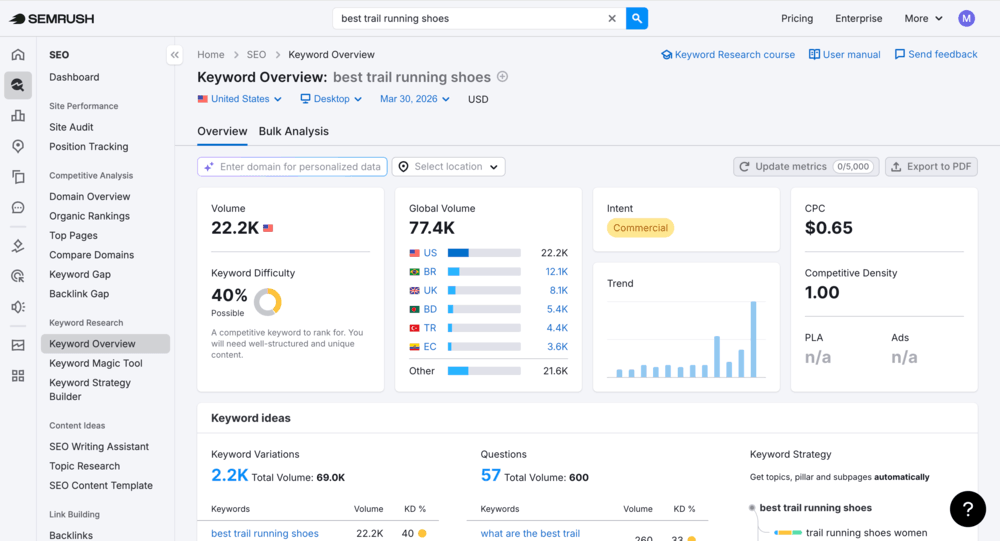
Semrush is a competitor analysis tool focused on SEO, traffic, and search visibility.
It helps you understand how competitors acquire traffic, which keywords they rank for, and how their content and backlink strategies drive results.
Semrush dashboard
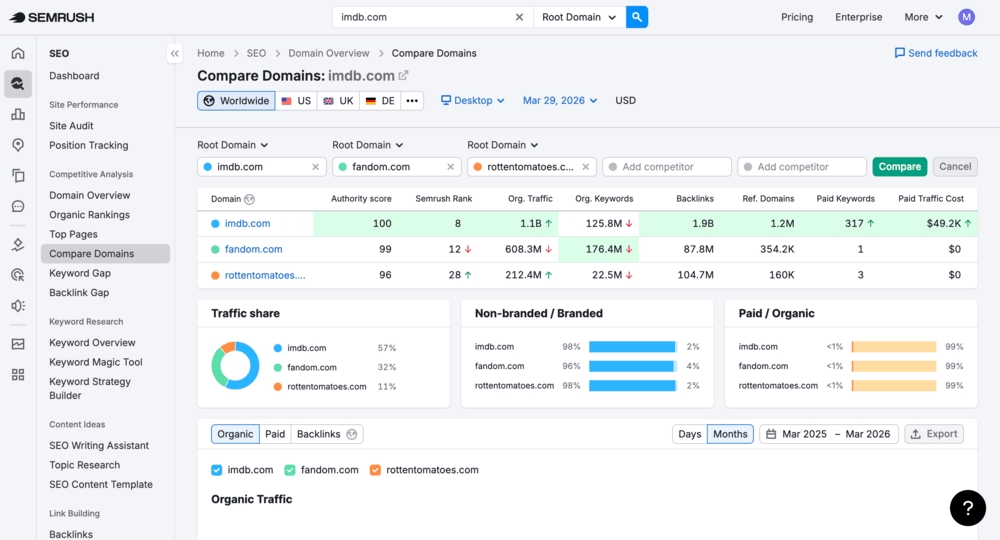
Compare Domains feature lets you benchmark multiple competitors across traffic and keywords in one view.
It’s a quick way to understand where you stand in your market.
Domain Overview – snapshot of competitor traffic, keywords, and authority
Keyword Gap – compares your keywords with competitors to find missing opportunities
Organic Research – shows which keywords drive traffic to competitor websites
Backlink Gap – identifies sites linking to competitors but not to you
💪 Strengths:
Widely used and well-documented tool
Strong SEO and keyword competitor analysis
Detailed insights into traffic sources and acquisition strategies
Reliable data for benchmarking search performance
👎 What could be better:
Limited visibility into audience sentiment or brand perception
No real-time monitoring (data is mostly historical/estimated)
Can be overwhelming for beginners due to feature depth
⭐️ Overall verdict:
Semrush is best when you’re trying to figure out how your competitors are driving traffic and showing up in search results.
It’s a strong choice for SEO and content teams focused on rankings, keywords, and backlinks, but less useful for analyzing real-time conversations or audience reactions.
04 Majestic
4.3/5 – G2 (73 reviews)
4.4/5 – Capterra (30 reviews)
Free preview (demo) available
From $49.99/month
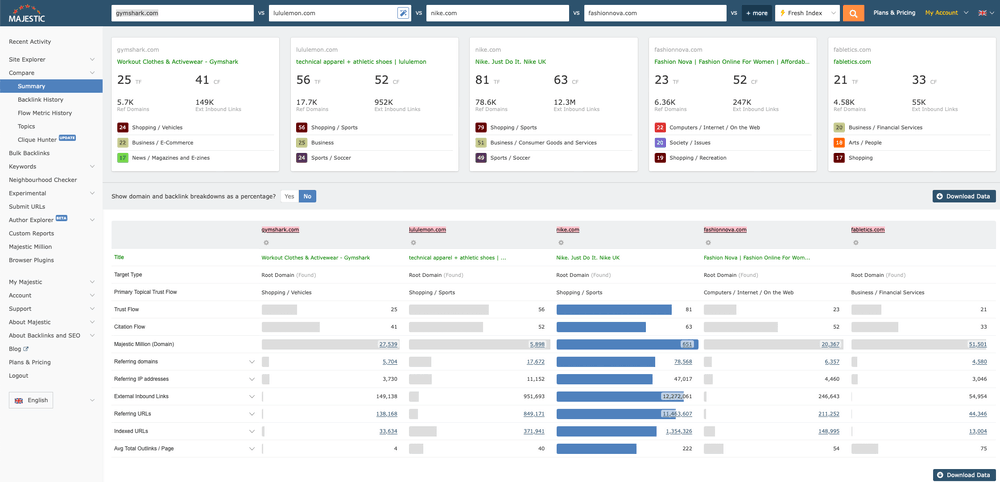
Majestic is a competitor analysis tool focused specifically on backlink intelligence.
It helps you understand where your competitors get their authority from, which sites link to them, and how their link-building strategies impact rankings.
Majestic dashboard
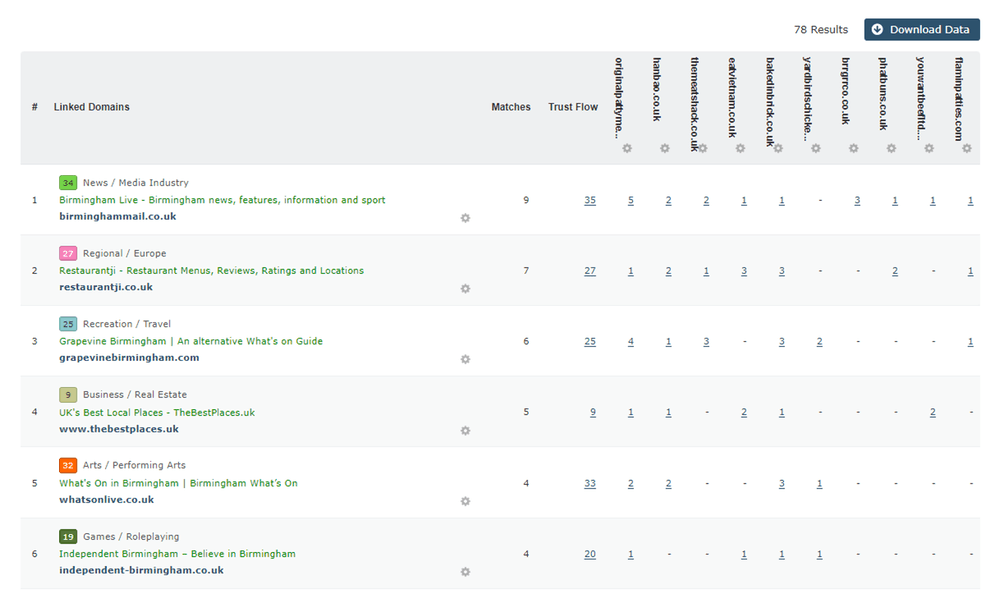
One standout feature is Clique Hunter, which finds websites that link to multiple competitors but not to you.
These are high-probability link opportunities, since those sites already link to brands in your niche.
Majestic Clique Hunter feature dashboard
Additionally, Majestic’s backlink history feature shows how a competitor’s link profile has grown or declined over time.
This insight is valuable for identifying successful link-building competitor strategies or spotting potential weaknesses in a competitor’s approach.
🔑 Key features:
Site Explorer – analyzes competitor backlink profiles, including referring domains and anchor text
Clique Hunter – identifies link gaps between you and multiple competitors
Compare Domains – benchmarks backlink profiles across several competitors
Related Sites – discovers competitors based on similar link profiles
Flow Metrics (Trust Flow & Citation Flow) – evaluates link quality vs quantity
💪 Strengths:
Strong focus on backlink and link-building analysis
Useful for identifying link opportunities from competitor data
Clear metrics for evaluating link quality (Trust Flow, Citation Flow)
Limited beyond backlink analysis (no content, traffic, or social insights)
Interface and data can be harder to interpret for beginners
⭐️ Overall verdict:
Majestic will suit you if you want to understand how competitors build authority through backlinks.
It’s a great choice for SEO specialists focused on link-building, but less useful for broader competitor analysis across content, traffic, or audience perception.
Website competitor analysis tools
05 Google Analytics 4
4.5/5 – G2 (6,708 reviews)
4.7/5 – Capterra (8,089 reviews)
Freemium
Freemium
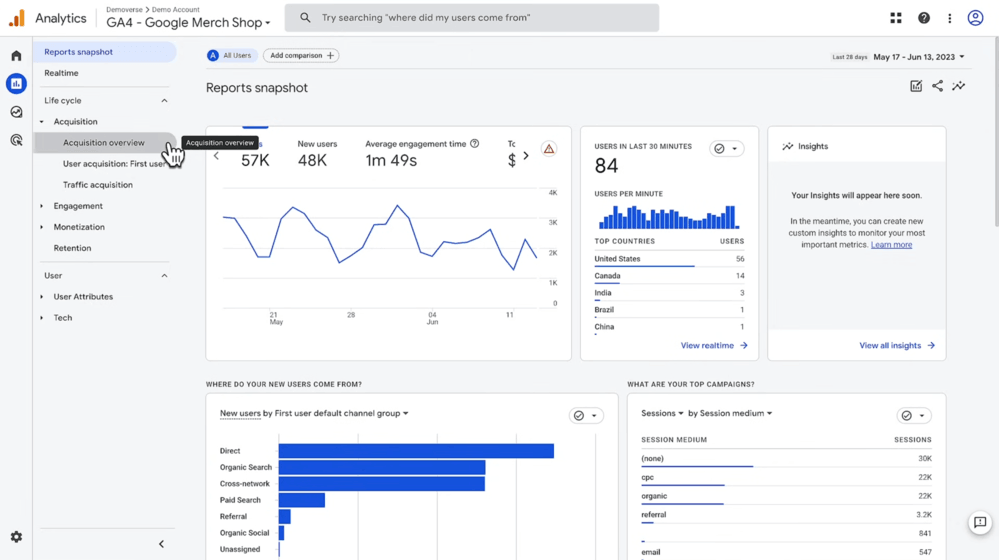
Google Analytics 4 is not a direct competitor analysis tool because it doesn’t show your competitors’ data.
Instead, it helps you see how your website is doing in context, so you can better figure out how competitors are likely performing across channels, audiences, and conversions.
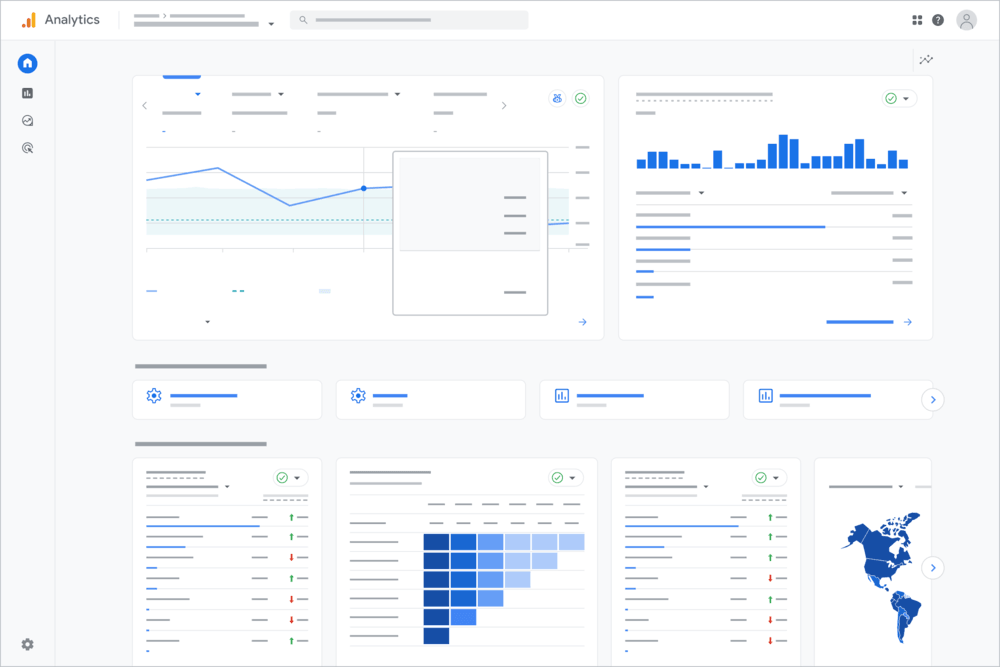
Google Analytics 4 dashboard
One standout feature is Benchmarking Reports, which compare your performance against aggregated industry data.
This helps you see if your metrics (like engagement or conversion rate) are above or below typical results in your niche.
Google Analytics 4 Benchmarking dashboard
🔑 Key features:
Benchmarking Reports – compares your performance to industry averages and percentiles
Acquisition Reports – shows where your traffic comes from (organic, paid, social, referral)
Channel Breakdown – helps identify which channels are likely driving competitor growth
Audience & Demographics – reveals who engages with your site (age, location, device)
Conversion Tracking – measures how effectively your traffic turns into leads or sales
💪 Strengths:
Free and widely available
Strong insights into your own performance and user behavior
Useful for identifying trends and benchmarking against industry data
Integrates well with other Google tools (Ads, Search Console)
👎 What could be better:
No direct access to competitor data
Requires interpretation to extract competitive insights
Limited usefulness without combining with other tools (e.g., SEO or social listening tools)
⭐️ Overall verdict:
Google Analytics 4 works best as a supporting tool for competitor analysis.
It helps you understand only your own performance and spot gaps, so to fully analyze competitors, you’ll need to combine it with tools that provide external data.
Social media competitor analysis tools
06 BuzzSumo
4.5/5 – G2 (106 reviews)
4.5/5 – Capterra (146 reviews)
Free 7-day trial available
From $199/month
BuzzSumo is a social media analytics tool that helps you manage influencer marketing, content marketing, and PR performance. It also provides the analysis of the top competitors’ social posts that are doing best.
With BuzzSumo, you can discover your competitors’ social insights, including:
Networks that share their content
How your content compares
Most effective content types
Engagement metrics
Analytics on their most-shared content
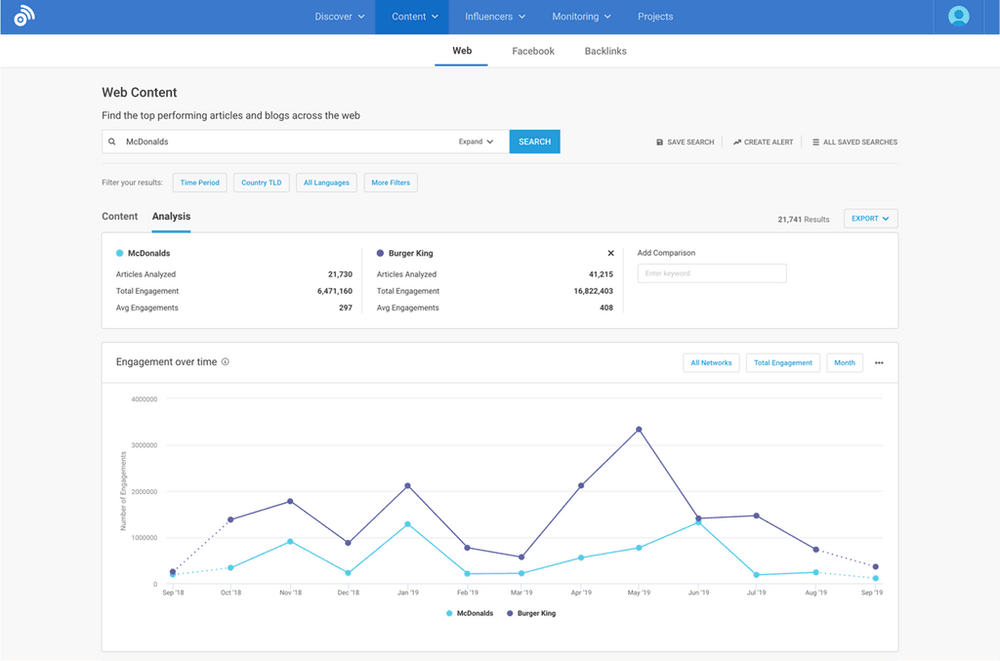
BuzzSumo dashboard
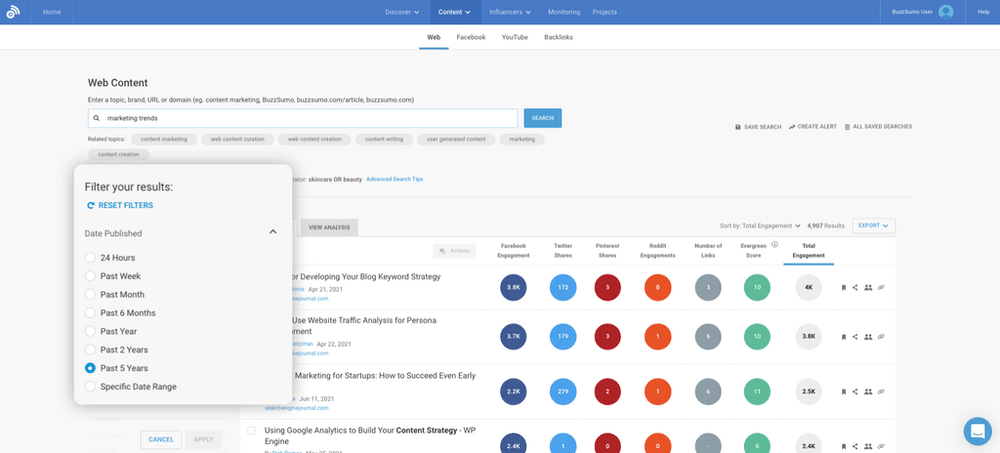
One standout feature is Content Analyzer, which shows the most shared and engaging content for any competitor domain.
This makes it easy to identify which topics, formats, and headlines actually resonate with their audience.
BuzzSumo Content Analyzer dashboard
🔑 Key features:
Content Analyzer – identifies top-performing competitor content across social platforms
Facebook Page Analyzer – compares engagement metrics across competitor pages
Content Alerts – tracks when competitors publish new content or get mentioned
Backlink Analysis – shows which sites link to competitor content
Combines social performance with backlink insights
👎 What could be better:
Limited depth in SEO and keyword analysis
Less focus on traffic and conversion metrics
Data can vary depending on platform coverage
⭐️ Overall verdict:
Buzzsumo is a solid tool for companies creating content on Facebook, X (Twitter), Pinterest, and Reddit.
If you post often, you’ll like having a single dashboard to keep an eye on your competitors and your own performance, compare metrics, and schedule content.
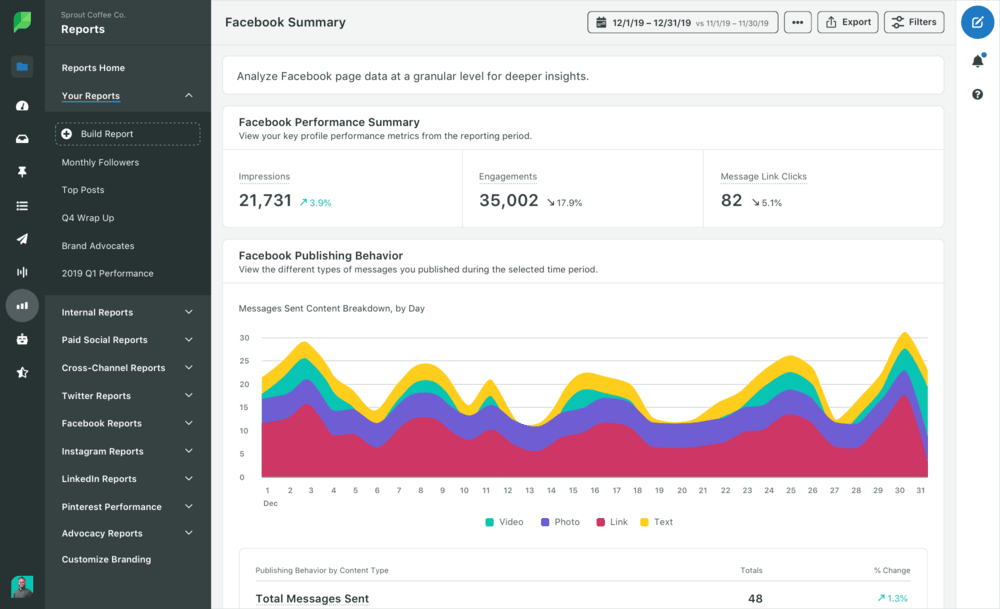
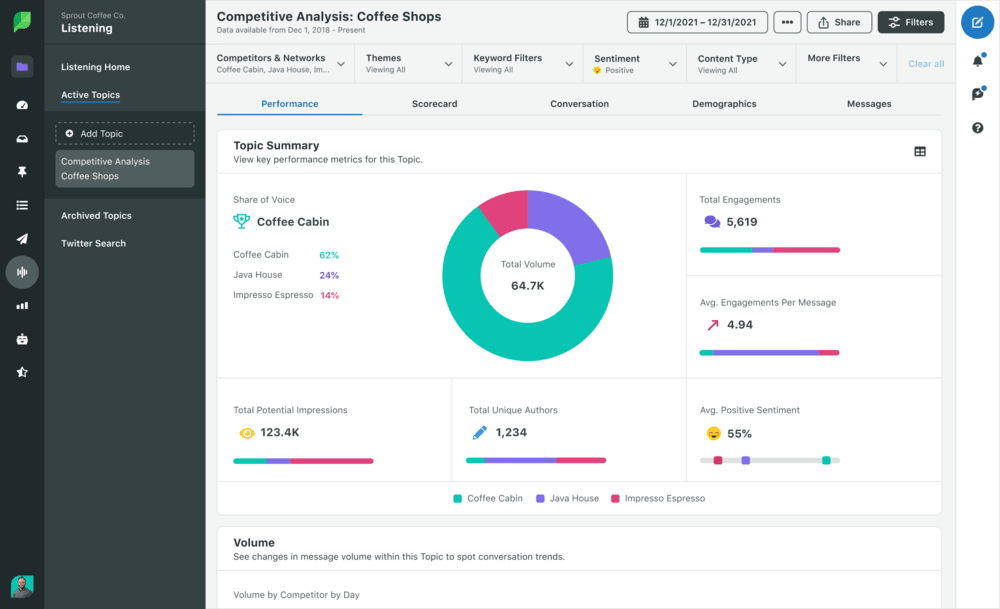
Sprout Social is a competitor analysis tool focused on social media performance and benchmarking.
You can use it to benchmark key business metrics like brand health, social presence, engagement, and impressions against your competitors.
Sprout Social dashboard
One of Sprout’s best features is the Competitor Performance Report, which lets you compare your profiles to competitors using metrics like engagement rate, audience growth, and posting activity.
It gives you an easy, side-by-side look at how your social presence measures up.
Sprout Social metrics
Sprout Social is a bit similar to Brand24 because it also tracks online conversations and sentiment metrics. See how they compare:
Combines performance data with some listening insights
Good reporting and visualization for teams
👎 What could be better:
Social listening is less advanced than dedicated tools
Limited coverage outside social media (no full web monitoring)
Can be expensive for smaller teams
⭐️ Overall verdict:
Sprout Social works best when your competitor analysis is focused on social media performance and benchmarking.
It’s a good choice for tracking how competitors grow and engage audiences on social platforms. However, for deeper insights into brand perception or discussions beyond social, you’ll need a more specialized tool.
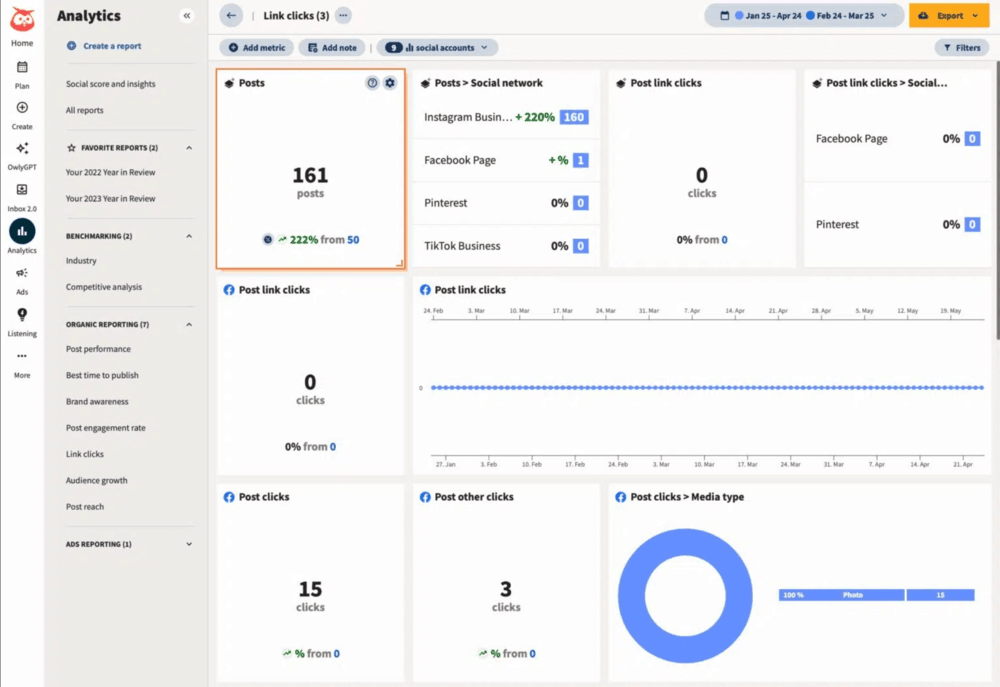
Hootsuite is one of the most recognized competitor analysis tools focused on social media performance, benchmarking, and basic listening.
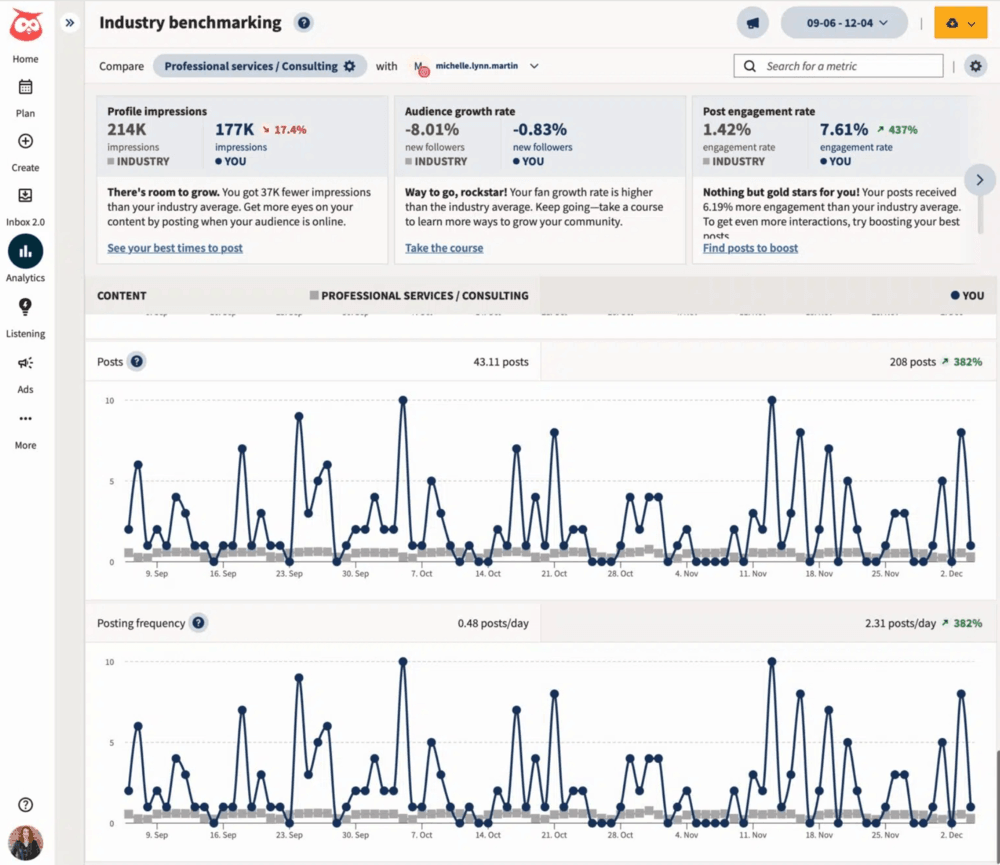
It helps you track how competitors perform on social channels, compare engagement metrics, and monitor brand mentions through its Analytics and Listening features (powered by Talkwalker).
Hootsuite dashboard
Industry Benchmarking in Hootsuite Analytics makes it easy to compare your social performance with multiple competitors across platforms.
You’ll get a quick snapshot of who’s growing faster, posting more often, and driving more engagement.
Hootsuite Industry Benchmarking
🔑 Key features:
Industry Benchmarking (Hootsuite Analytics) – compares engagement, audience growth, and posting frequency
Content Performance Insights – identifies competitors’ top-performing posts and hashtags
Social Listening (Talkwalker integration) – tracks competitor mentions, sentiment, and trends
Real-Time Alerts – notifies you about spikes in mentions or sentiment changes
💪 Strengths:
Social media management and analytics in one tool
Easy competitor benchmarking across platforms
Combines publishing, analytics, and some listening features
Useful for tracking social trends and engagement
👎 What could be better:
Social listening is not as deep as in dedicated tools
Limited coverage beyond social and some of the web sources
Advanced features available only in higher-tier plans
⭐️ Overall verdict:
Hootsuite is an effective platform for managing multiple social platforms from one centralized dashboard.
It’s a solid option for tracking how competitors perform on social channels, but for deeper insights into online discussions or brand perception across the web, a more specialized listening tool will give you better visibility.
PCC competitor analysis tools
PPC campaigns are another great way to get ahead of your competitors.
With the right tools, you can uncover and break down their paid strategies, then create marketing campaigns that perform even better.
09 Spyfu
4.6/5 – G2 (518 reviews)
4.4/5 – Capterra (145 reviews)
Free 7-day trial available
From $199/month
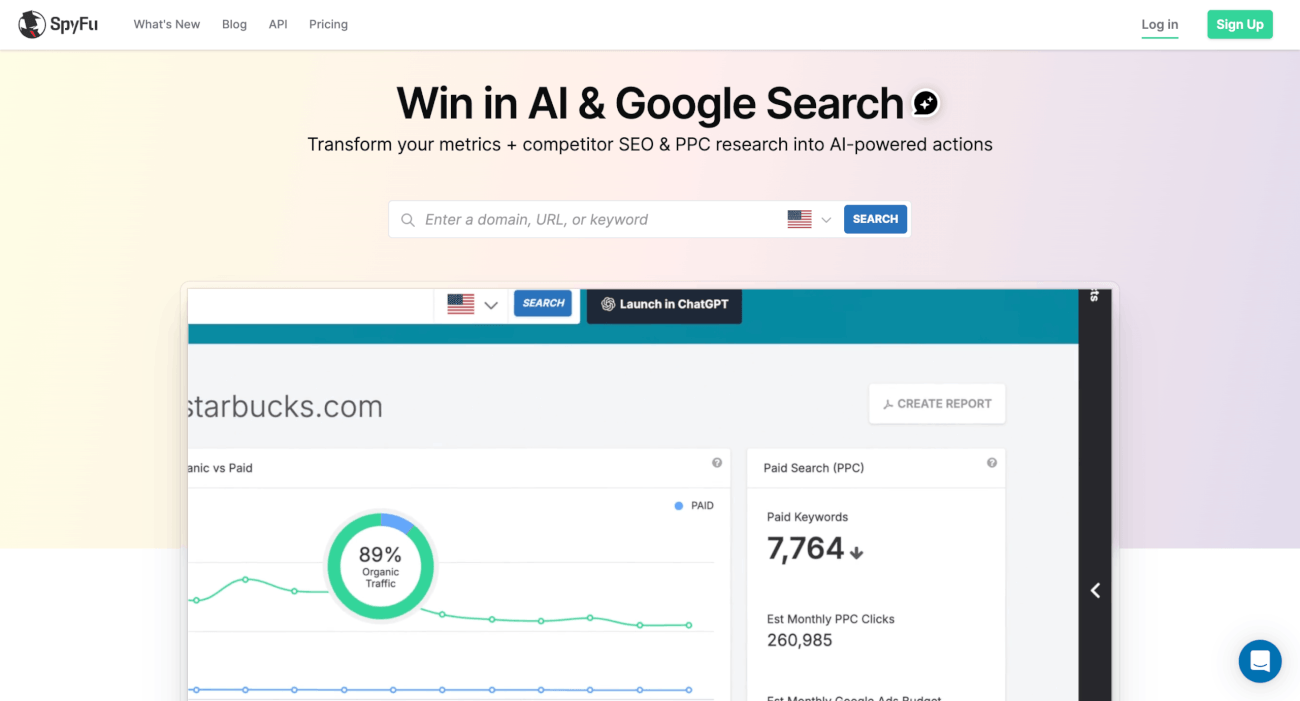
SpyFu is a competitor analysis tool that helps you get a clearer picture of what your competitors are doing with their campaigns.
It shows which paid keywords your competitors are ranking for right now, and which ones they’ve ranked for in the past. SpyFu also includes keyword research features and suggestions based on trends in your target market.
SpyFu homepage
Its biggest advantage is deep PPC data, including years of ad history and spend estimates.
Additionally, SpyFu offers backlink insights and helps you spot new linking opportunities. With this feature, you can build a solid backlink strategy and improve your organic search rankings, too.
🔑 Key features:
Kombat (Keyword Gap Analysis) – compares domains to uncover shared, missing, and unique keywords
PPC Ad History – reveals which ads competitors ran, how long they ran them, and what likely worked
PPC Spend Estimates – shows approximate monthly budgets, keyword bids, and ad positions
Top Pages & SEO Research – identifies which pages drive the most organic traffic
Backlink Kombat – finds link-building opportunities based on competitor overlaps
Google Ads Advisor – suggests profitable keywords based on competitor campaigns
💪 Strengths:
Strong focus on Google Ads and PPC intelligence
Unique access to long-term historical ad data
Clear visibility into competitors’ keyword strategies
Useful for both SEO and paid search planning
👎 What could be better:
Limited to search (no social media or broader web monitoring)
No real-time brand monitoring or mention tracking
Data is estimated, not actual competitor analytics
⭐️ Overall verdict:
SpyFu works best when your goal is to understand how competitors win in search, both paid and organic.
It’s especially valuable for PPC teams and SEO specialists who want to find keyword opportunities, ad strategies, and traffic sources to improve their brand visibility.
10 SE Ranking
4.8/5 – G2 (1,434 reviews)
4.7/5 – Capterra (297 reviews)
Free 14-day trial available
From $109/month
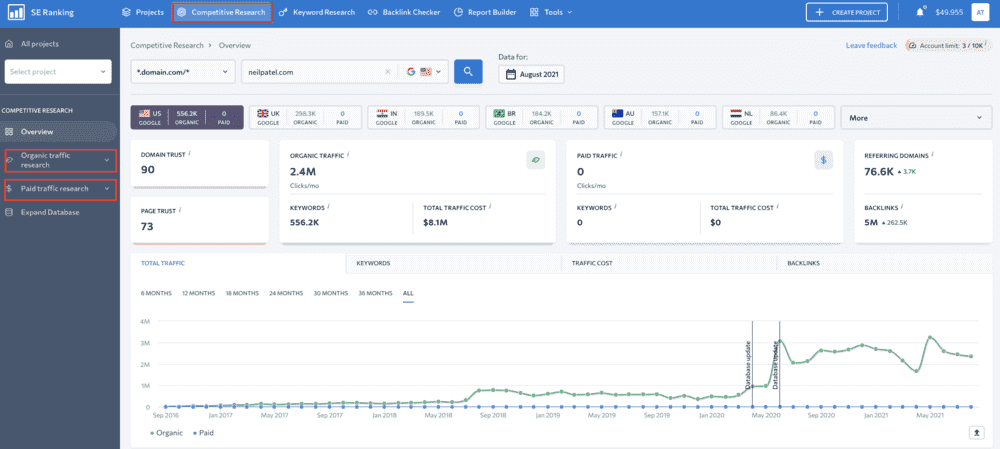
SE Ranking is an all-in-one SEO platform that helps with competitor research, keyword tracking, backlinks monitoring, and search performance analysis across both organic and paid channels.
It gives you a clear, organized look at how competitors rank, which keywords they go after, how they earn backlinks, and how their visibility changes over time.
SE Ranking dashboard
Think of it as a mid-weight alternative to Ahrefs/Semrush, with strong keyword tracking and solid competitor comparison features.
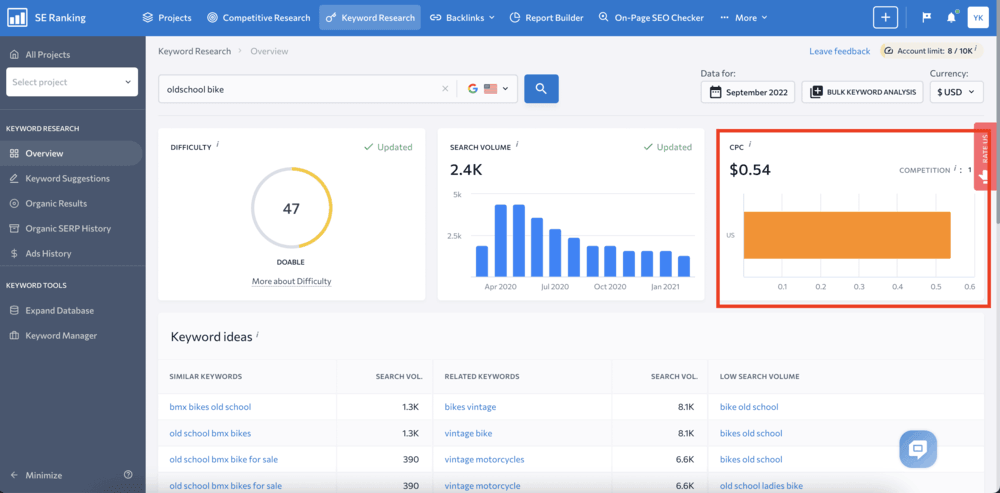
You can check changes in website traffic, keywords, and backlinks by selecting a month and a year.
SE Ranking Keywords Research dashboard
🔑 Key features:
Competitive Research Tool – analyze competitors’ organic & paid traffic, keywords, and traffic cost
Keyword Gap Analysis – compare domains to find missing and shared keyword opportunities
Rank Tracking (with competitors) – monitor daily SERP positions across locations and devices
SERP Analyzer – evaluate top-ranking pages, authority, and ranking difficulty
PPC Research & Ads History – analyze competitor ad strategies and messaging
AI Results Tracker – monitor visibility in AI-generated answers (e.g., Google AI Overviews)
💪 Strengths:
Strong balance between SEO research and rank tracking
Good competitor comparison features (keywords, SERPs, backlinks)
Includes PPC insights, unlike many SEO-first tools
Emerging focus on AI search visibility (Share of Voice)
👎 What could be better:
Less deep data than enterprise tools like Ahrefs or Semrush
No real-time social listening or brand monitoring
Limited insight into conversations, sentiment, or PR activity
Overall verdict:
SE Ranking is a handy tool for tracking SERPs, building links, and keeping an eye on your competitors’ SEO.
One of its biggest perks is the flexible pricing: you can choose a plan that fits your needs and only pay for the data and features you actually use. That makes it a solid option for businesses of any size.
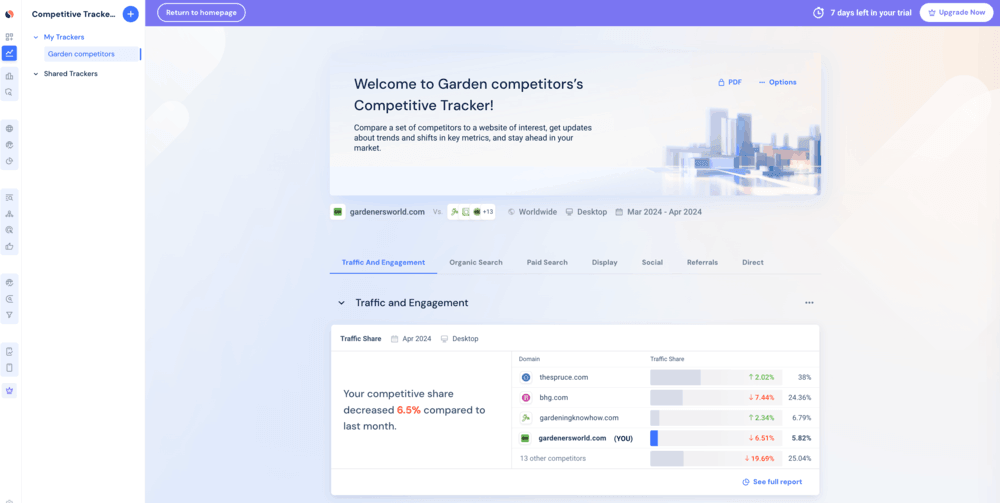
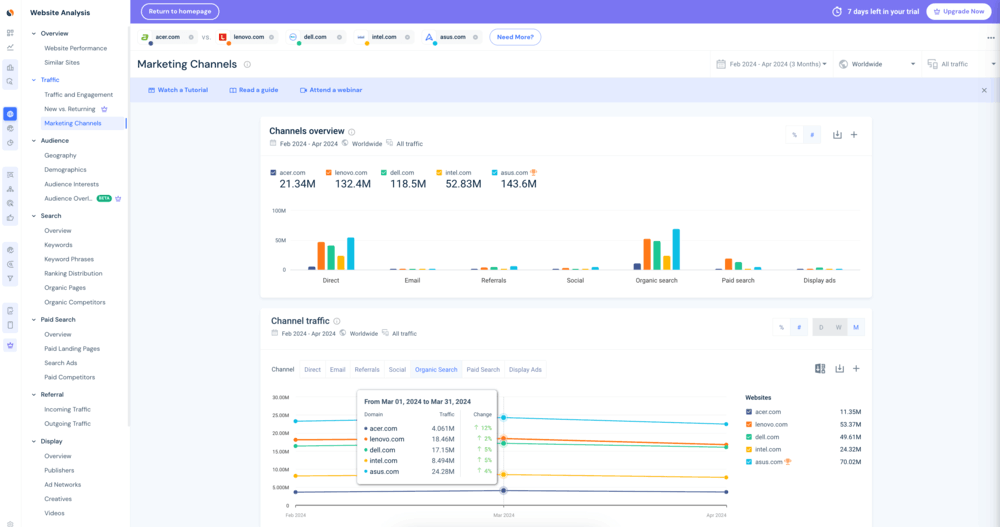
Similarweb is a digital intelligence platform built to analyze website traffic, user behavior, and market positioning across entire industries.
It helps you understand where competitors get their traffic, how users behave on their sites, and how different channels contribute to growth.
Similarweb’s Competitive Tracker
One of Similarweb’s best features is its traffic and channel breakdown. It shows you how much traffic a competitor is getting and where it’s coming from (organic search, paid ads, social, referrals, or direct).
That way, you can quickly spot which channels are fueling their growth and where your strategy might be lagging.
Similarweb traffic dashboard
With this feature, you can see the differences between you and your competitors based on traffic sources.
For example, if a competitor is getting a lot of organic traffic, you can focus your marketing on social traffic instead, or try to compete by publishing a more competitive blog post.
🔑 Key features (free version):
Website Traffic Overview: Check estimated monthly visits, traffic trends, and basic performance metrics for any domain.
Traffic Sources: See how traffic is split across channels like organic search, paid ads, social, and referrals.
Top Keywords (Limited): Get a small sample of keywords driving traffic to competitor websites.
Engagement Metrics: Access high-level data like bounce rate, pages per visit, and average visit duration.
Top Pages: Identify a few of the most visited pages on a competitor’s site.
💪 Strengths:
Strong overview of competitor traffic and channel mix
Easy way to benchmark multiple competitors quickly
Useful for identifying where competitors get visibility (SEO, ads, social)
Free version is enough for quick checks and early research
👎 What could be better (free version):
Limited data depth (only partial keyword and traffic insights)
Restricted historical data
Advanced features locked behind paid plans
Usage limits on daily searches
⭐️ Overall verdict:
The free version of Similarweb works best for quick competitor checks and channel-level insights. It is a great tool for small companies with a tight budget for competitor monitoring tools.
It’s a useful starting point, and if you’d like the basic features, you may eventually go for a paid plan and get complete insights.
12 Ahrefs
4.5/5 – G2 (675 reviews)
4.7/5 – Capterra (581 reviews)
Free version & trial available
From $108/month
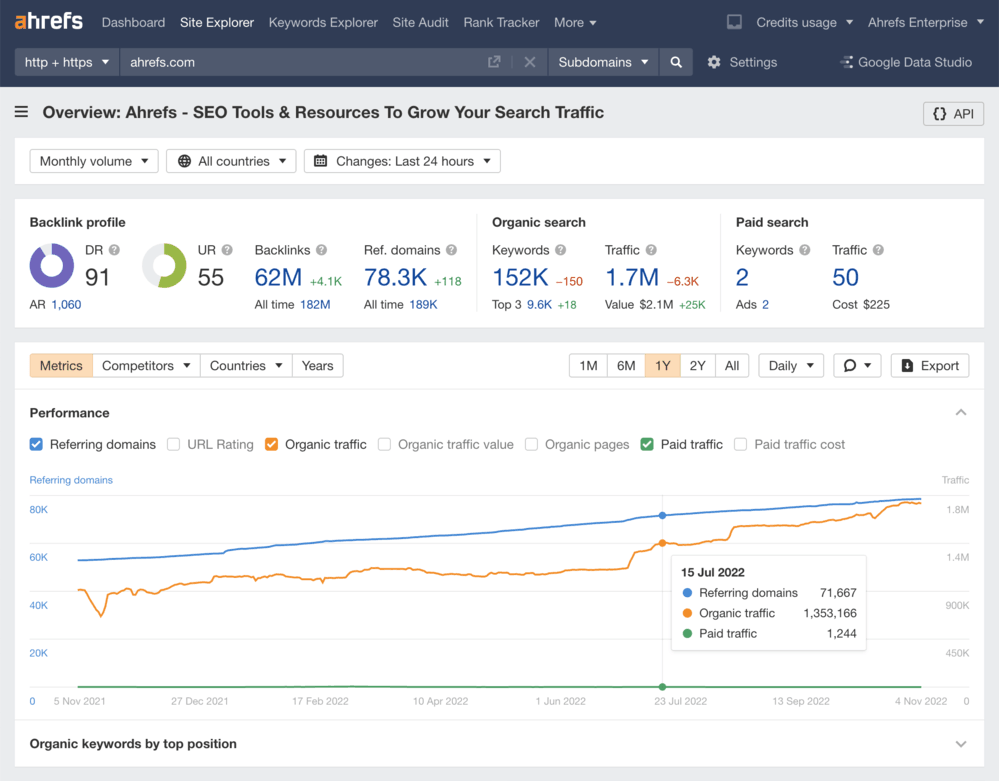
Ahrefs is mainly a paid SEO tool, but it does include a handful of free tools that offer limited competitor insights, mostly focused on backlinks, keywords, and search visibility.
You can use it to compare your positioning with your competitors’ metrics, including:
Search volume
Keyword difficulty
CPC
Position
Traffic volume
Domain Rate
Ahrefs Site Explorer dashboard
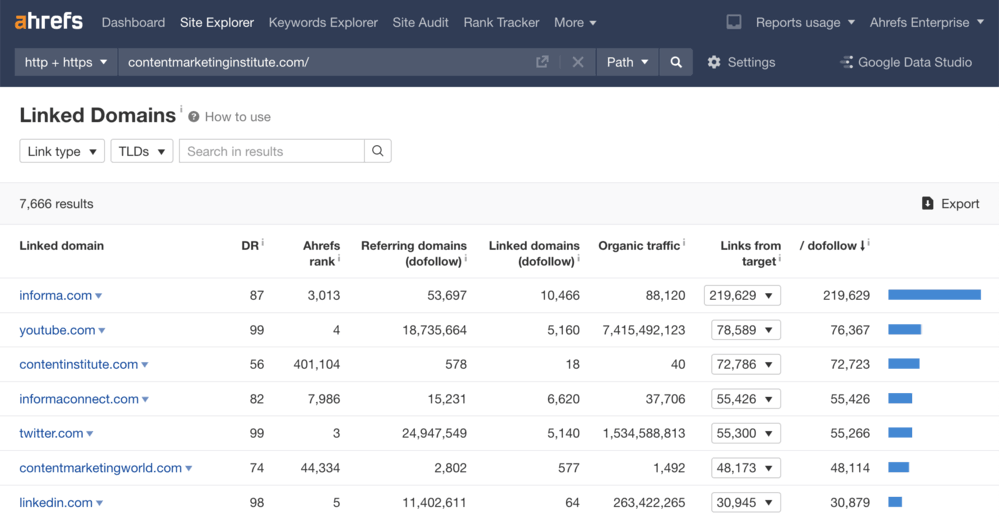
With the free Ahrefs version, you can also check a competitor’s backlink profile and see which websites link to them.
This helps you quickly identify link-building opportunities and understand their authority.
Backlinks Checker in Ahrefs
🔑 Key features (free version):
Website Traffic Checker: Estimate organic traffic, top keywords, and top-performing pages for any domain
Backlink Checker: View the top 100 backlinks and referring domains for a competitor
Keyword Generator: Discover keyword ideas across Google, YouTube, Amazon, and more
Keyword Rank Checker: See where a competitor ranks for a specific keyword
SERP Checker: Analyze top-ranking pages with SEO metrics like Domain Rating and backlinks
Website Authority Checker: Check Domain Rating (DR) for any site
SEO Toolbar: Get on-page SEO data directly in your browser
💪 Strengths:
One of the most reliable sources for backlink data
Free tools are fast, simple, and useful for quick checks
Strong for SEO-focused competitor analysis
No account required for many tools
👎 What could be better (free version):
Very limited data depth compared to paid plans
No full competitor analysis (only snapshots per tool)
Most advanced features (keyword research, full backlink data, tracking) are paid-only
No historical data or large-scale analysis
⭐️ Overall verdict:
Ahrefs’ free version is a great place to start. If you own a website and want to keep an eye on your site’s health, keywords, and backlinks, it’s a solid fit.
FAQ
What are competitor analysis tools?
Competitor analysis tools help you track and analyze what other brands in your market are doing across SEO, ads, social and non-social media, or online visibility.
They collect data like traffic sources, keywords, mentions, backlinks, or audience sentiment so you can understand what’s working for your competitors and where you can outperform them.
What is the best tool for competitor analysis?
There’s no single “best” tool, because it depends on what exactly you want to analyze.
For real-time competitor mentions, sentiment, and AI Visibility: Brand24
For SEO and keywords: Ahrefs, SE Ranking
For traffic and market data: Similarweb
For social media analytics: Sprout Social, Hootsuite
For PPC research: SpyFu
In practice, most teams use a combination of tools to cover different areas.
How do competitor analysis tools help businesses?
They help you make better decisions based on real market data instead of guesswork.
With the right tool, you can:
Spot gaps in your strategy (e.g., missing keywords or channels)
Identify high-performing content and campaigns
Track brand visibility and share of voice
Monitor reputation and customer sentiment
React faster to trends or competitor moves
How to choose the best competitor analysis tool?
Start with your main goal and ask yourself:
Do you want to improve SEO, ads, content, or AI brand visibility?
Do you need real-time data or historical analysis?
Are you looking for quick insights or deep research?
Then match tools to that need.
How to use competitor analysis tools to refine your strategy?
A simple workflow can look like this:
Identify competitors (direct + indirect)
Analyze their strengths (channels, content, keywords)
Find gaps (what they rank for or talk about that you don’t)
Test and adapt your strategy
Monitor continuously to track changes over time
The key here is consistency, as competitor analysis works best when it is an ongoing process.
Why use AI-powered competitor analysis tools?
AI features help you move from raw data to actual insights much faster.
Instead of manually digging through reports, AI tools can:
Tom was the Head of Content at Brand24 for 5 years. During that time, he was actively involved in building an AI-powered social listening tool. He is an experienced digital content creator and marketing strategist working in the SaaS industry.
Best Competitor Analysis Tools in 2026 [Top 12 Compared]
Blog
Competitor Intelligence
Brand24
Insights, analyses & case studies
Tom
Compare the best competitor analysis tools for SEO, PPC, social media, and traffic analysis. See key features, strengths, and what each tool is best used for.