Table of contents
2M Marketers

Competitor monitoring tools will help you track competitors’ online presence, activities, and customer perception across digital channels.
They provide actionable insights, identify market opportunities, and help companies stay ahead of industry trends.
In the past three months, I tried over 20 competitor tracking and monitoring tools to see what each does best and how to choose the right stack for your needs.
Here’s the list:
| Tool | Best for | Trial info | Pricing |
|---|---|---|---|
|
1
|
Competitor mentions & social listening |
14 days free trial |
From $149 monthly |
|
Website traffic analytics |
Free plan available |
From $125 monthly |
|
|
Search trend tracking |
Always free |
Free |
|
|
4
|
SEO & backlink analysis |
No free trial |
From $29 monthly |
|
5
|
Social media benchmarking |
14 days free trial |
From $239 monthly |
|
6
|
YouTube competitor tracking |
Free plan available |
From $10 monthly |
|
7
|
Content performance research |
Free trial available |
From $199 monthly |
|
Website change monitoring |
Free plan available |
From $25 monthly |
|
|
Competitor tech stack detection |
Free plan available |
From $249 monthly |
|
|
10
|
Audience & competitor research |
Free plan available |
From $50 monthly |
|
11
|
eCommerce price monitoring |
Upon request |
Upon request |
|
12
|
Company & competitor intelligence |
Free plan available |
From $39 monthly |
|
13
|
PPC & ad campaign tracking |
Free plan available |
From $59 monthly |
|
14
|
Competitor email monitoring |
No free plan |
From $19 monthly |
Top competitor monitoring tools:
I’ve tested all 16 tools myself, so here’s my honest take on what each one is actually good for.
No fluff, no vendor claims. Just what you need to know before spending your budget.
Let’s get into it.
01 Brand24 for mentions monitoring
Brand24 is a media monitoring tool that helps you monitor your competitors on social media, websites, forums, blogs, podcasts, newsletters, review sites, and other sources.
Why I picked Brand24?
Because it is an advanced brand monitoring tool that allows tracking all mentions of your competitors across the Internet from over 25 million sources.
It provides real-time data on competitor mentions, which helps you stay informed about their campaigns, activities, and customer interactions.
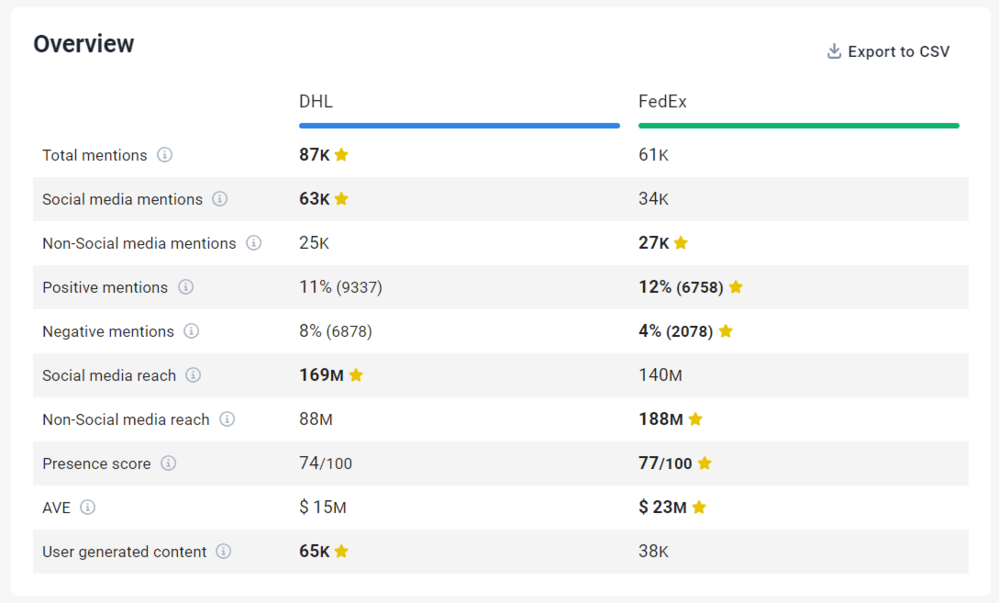
The Comparison feature allows you to benchmark your brand’s online performance against competitors.
Key features:
- Media monitoring – It tracks mentions from many sources in real-time. It lets you analyze metrics such as reach, engagement, Presence Score, Share of Voice, and AVE to evaluate your brand’s position relative to competitors.
- Tracking AI mentions – Keeps track of mentions generated, helping you understand how AI perceives your brand.
- Sentiment analysis – it analyzes the sentiment associated with competitor mentions, determining whether the sentiment is positive, negative, or neutral.
- Influencer identification – you can identify influential individuals engaging with or mentioning your competitors. This allows you to assess the impact of these influencers and potentially collaborate with them to amplify your own brand presence.
- Topic analysis – it identifies and examines topics associated with brands. This helps you keep track of trending topics, who is talking about them online, and where most of the mentions are coming from.
- Detailed Competitive Analysis Report – generate comprehensive insights into competitor activity. Reports are available in multiple formats, including QuickShare links, AI-powered summaries, PDF, Excel, and more.
02 SimilarWeb for website traffic analytics
SimilarWeb is one of the powerful competitor monitoring tools that provides valuable insights.
Why I picked SimilarWeb?
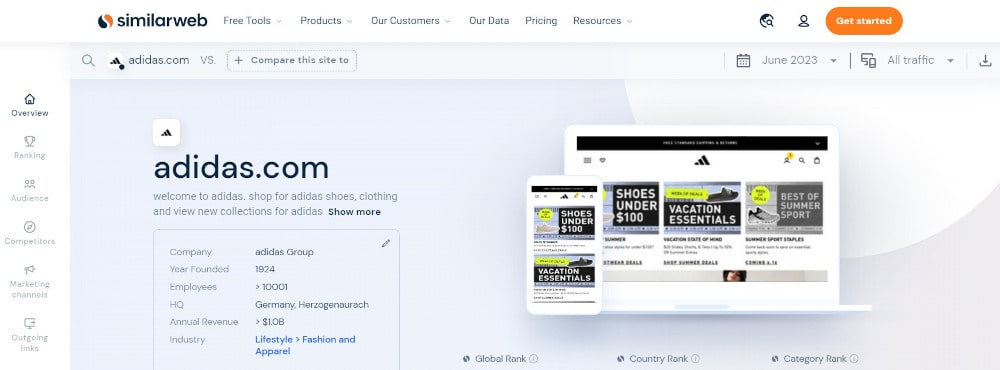
With SimilarWeb, you can evaluate the traffic and engagement metrics of your competitors’ websites. It gives you an idea of their total visits, pageviews, bounce rates, and average visit duration.
By analyzing this data, you can assess the popularity and engagement of your competitors’ websites compared to yours.
The tool provides information about the sources driving traffic to your competitors’ websites. You can identify which channels, such as search engines, social media, referrals, or direct traffic, generate the most visitors.
Key features:
- Website traffic analysis
- Audience demographics
- Competitor benchmarking
- Competitor detecting
- Audience interests
03 Google Trends for trend tracking
Google Trends is a free tool that can provide valuable competitor insights and their online presence.
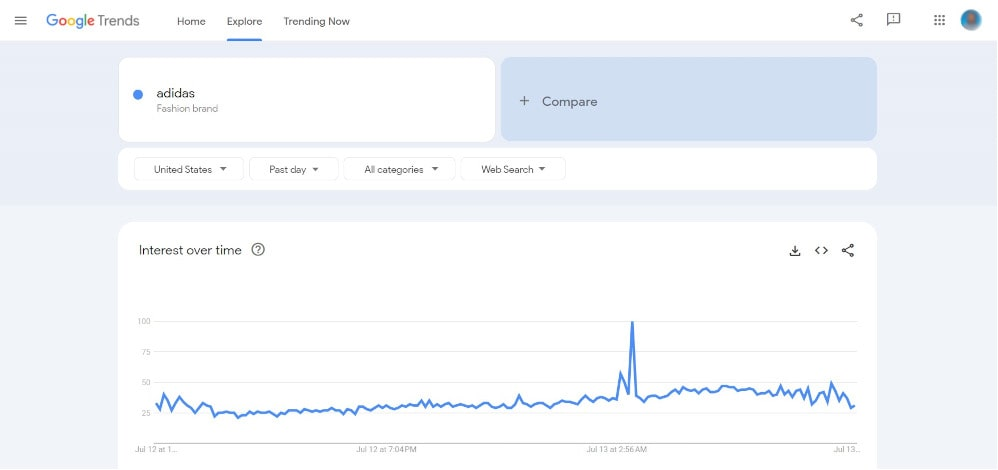
With Google Trends, you can compare the search interest for various keywords or topics, such as your competitors’ brand names.
Why I picked Google Trends?
It’s free and easy to use. By analyzing the search interest over time, you can determine your competitors’ brands’ market trends and popularity.
What’s interesting is that Google Trends provides valuable information about the regions where search interest for specific keywords or brands is highest. This data helps you understand the regional markets where your competitors are gaining traction or facing challenges.
Moreover, Google Trends provides demographic insights into the age and gender distribution of search interest, helping you better understand your competitors’ target audience.
Key features:
- Search interest comparison
- Regional and demographic insights
- Rising queries and topics
- Related topics and queries
04 Ahrefs for SEO analysis
Ahrefs is a well-known SEO analysis tool that also provides competitor analysis features.
Why I picked Ahrefs?
It’s one of the most powerful SEO tools. It also includes an AI-powered visibility tracking tool called Brand Radar (available for an additional fee) that allows tracking of AI Overviews, AI Mode, ChatGPT, and other LLMs.
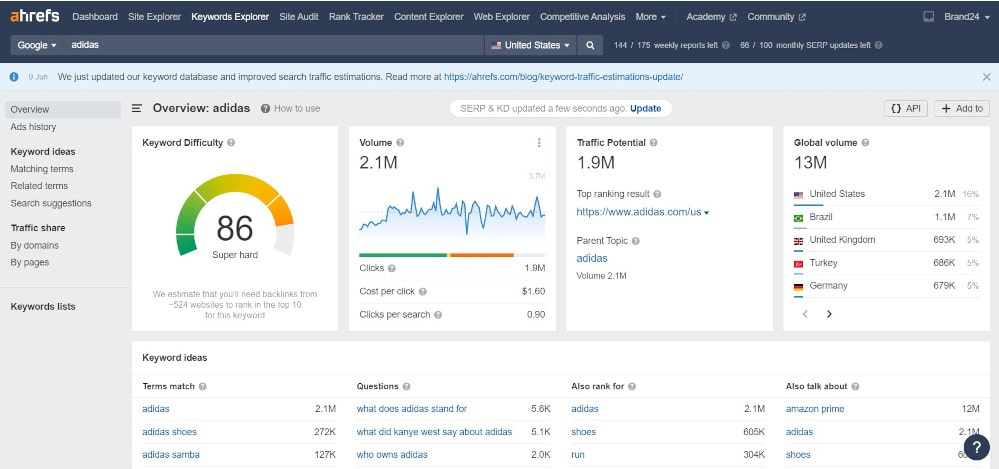
With Ahrefs, you can easily identify your competitors’ best-performing content, keyword research, and organic search strategies. Additionally, this tool provides actionable insights into your competitors’ paid search campaigns.
This information can help you gain valuable insights into their keyword strategies, identify potential growth areas, and optimize your SEO efforts.
Ahrefs offers various competitive analysis features that let you compare your website’s performance. You can analyze their domain authority, backlink profiles, and organic traffic to assess your relative market position and identify areas for improvement.
Key features:
- SEO competitor analysis
- Content gap analysis
- Backlink analysis
- Keyword research
05 Chatbeat for AI visibilty tracking
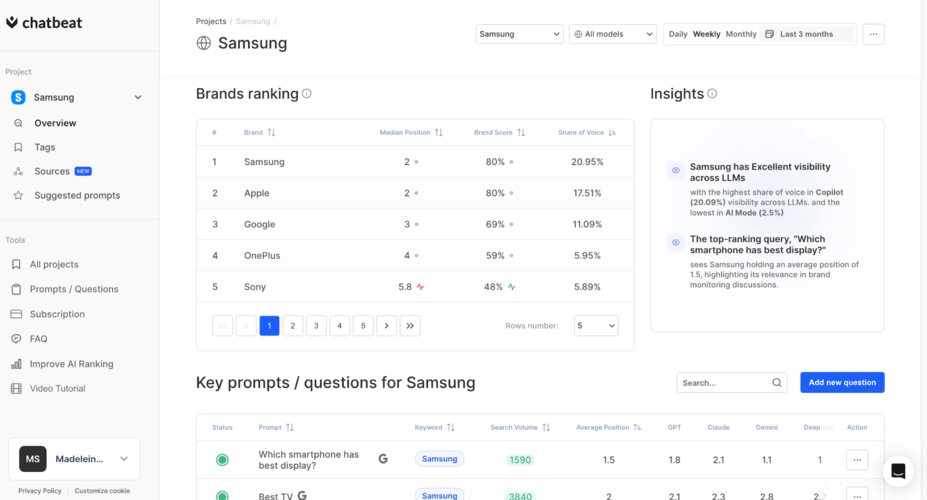
Chatbeat is a tool that tracks how your brand and your competitors appear in AI-generated responses across major AI models, such as ChatGPT, Gemini, and Perplexity.
Why I picked Chatbeat?
What I appreciate about Chatbeat is its precise tracking of prompts. Chatbeat identifies the exact websites and publications that AI models use when generating answers in your category.
With Chatbeat, you can track how often competitors are recommended by AI models, their ranking position, the sentiment of the recommendations, and the sources driving those mentions. That’s intelligence you simply can’t get from Ahrefs or Brand24 alone.
Key features:
- AI visibility tracking
- Competitive AI share of voice
- Key sources analysis
- Suggested prompts
- Context analysis
06 Rival IQ for social media comparison
Rival IQ is a competitive analysis tool specializing in social media marketing.
Why I picked Rival IQ?
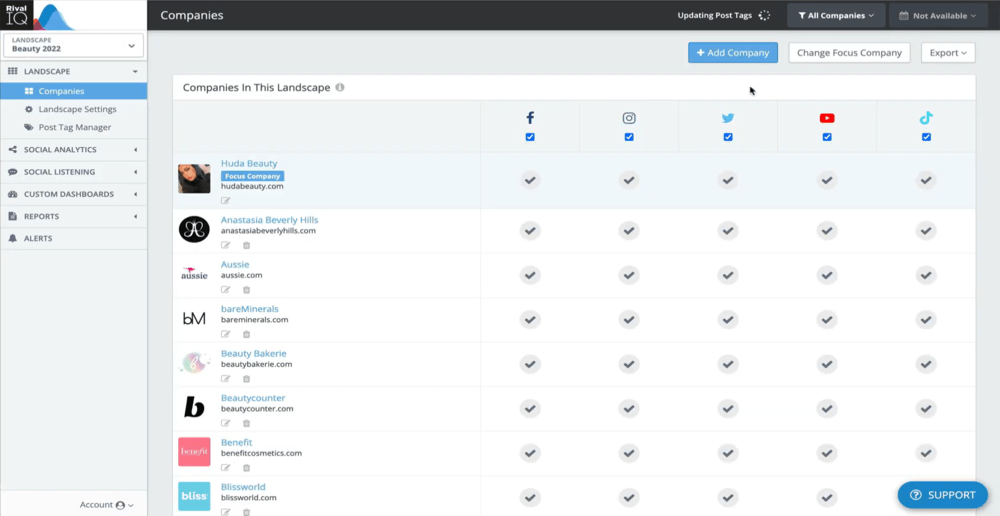
This tool monitors your competitors’ activities across the most important social media platforms. You can track their follower growth, engagement metrics, posting frequency, and content performance.
This enables you to gain insights into their social media marketing strategy, identify which content performs well, and measure your performance against theirs.
Did you know that with Rival IQ, you can make simple social media comparisons without spending any money?
Simply select a competitor and create an email report that will identify their top-performing posts, activity level, engagement, and audience information.
Key features:
- Social media benchmarking
- Social media audit
- Social media posts analysis
07 vidIQ for tracking YouTube competitors
vidIQ is a competitor media monitoring software specifically designed to help monitor and optimize YouTube channels and videos.
Why I picked vidIQ?
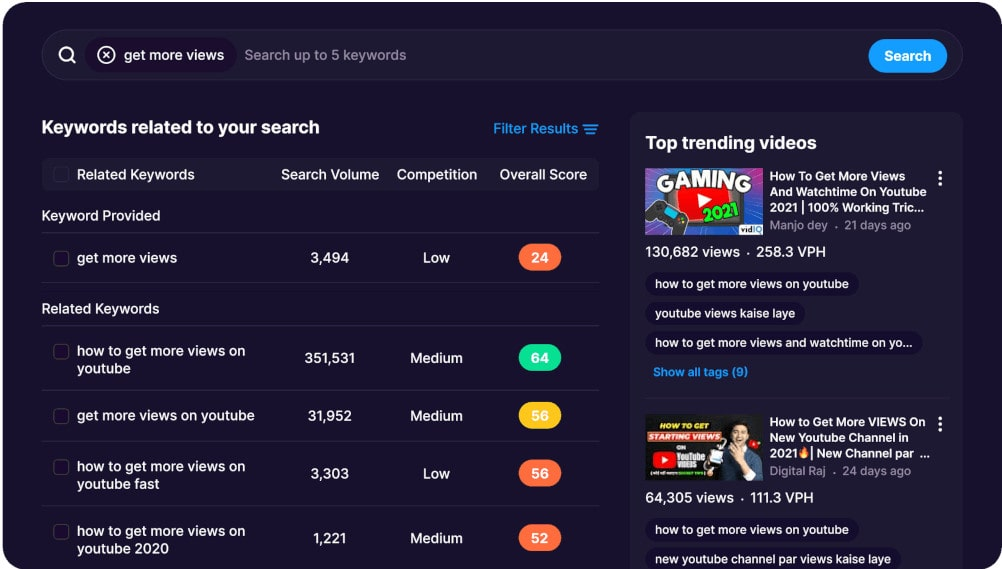
Not many tools offer such a detailed analysis of your competitors’ YouTube channels. You can check out their top-performing and trending videos, view counts, subscriber growth, and channel performance.
This information will help you understand their content strategy, identify popular video topics, and evaluate their audience engagement.
vidIQ provides competitor keyword research tools tailored for YouTube. You can discover trending and relevant keywords and assess their search volume, competition, and ranking difficulty.
Key features:
- Competitor analysis of channels
- Trending video insights
- Subscriber analytics
- Keyword research
08 BuzzSumo for tracking competitors’ content
BuzzSumo is an efficient tool for researching and planning content marketing strategies. It can provide a wealth of insights into what’s working in your industry or niche, including your competitors.
Why I picked BuzzSumo?
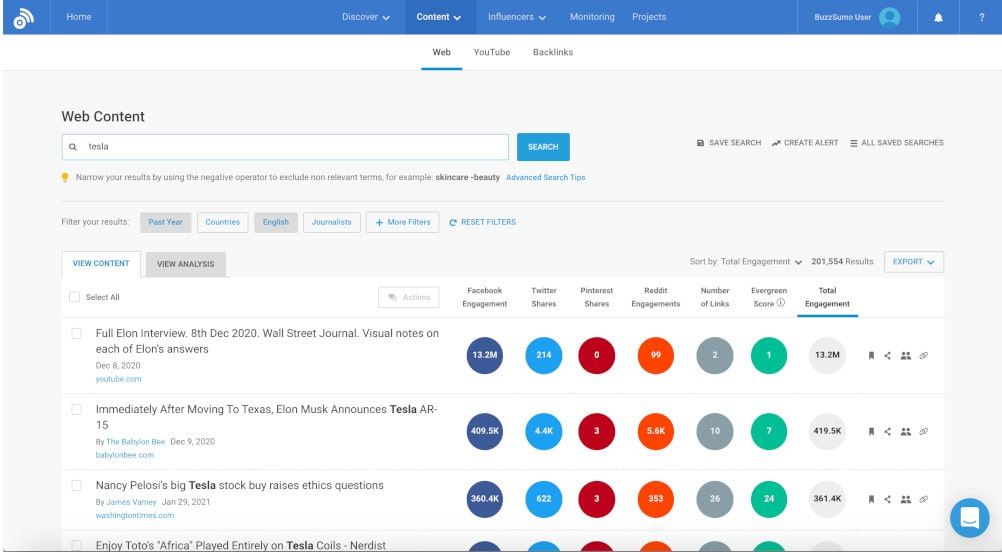
It’s quite a unique tool. You can use it to see which pieces of content from your competitors get the most shares and engagement on social media.
This allows you to understand the types of content that resonate with your target audience, and you can produce similar (but better) content.
BuzzSumo allows you to identify key influencers in your industry who are sharing your competitors’ content. This provides potential targets for influencer marketing and identifies potential partners who can help promote your content and reach new customers.
Key features:
- Content tracking
- Competitive analysis of content
- Key influencers identification
- Competitors’ content performance
09 Visualping for website monitoring
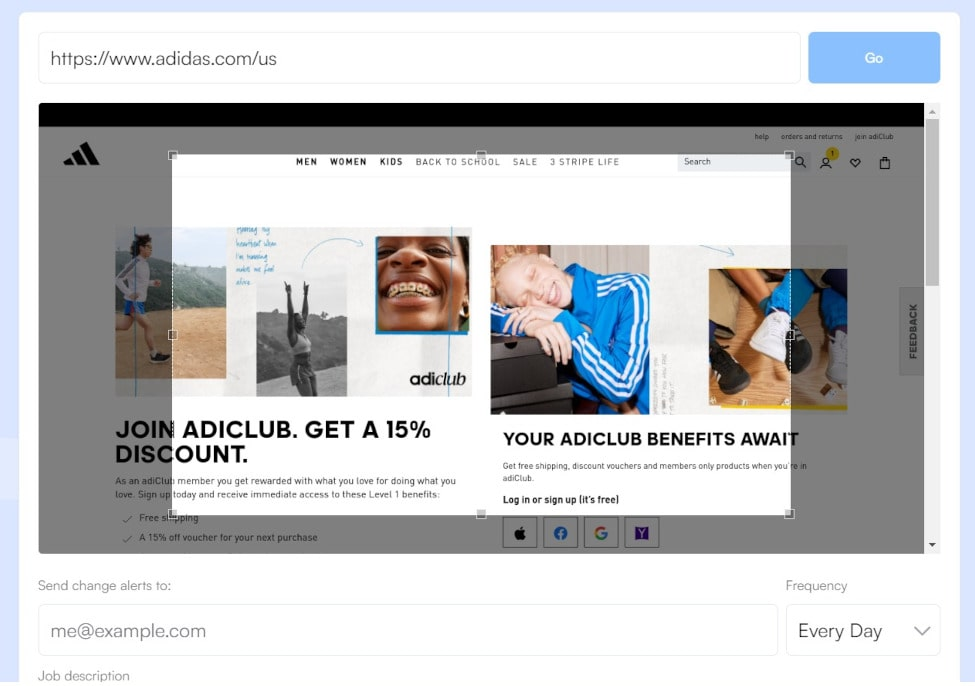
Visualping is primarily used to monitor changes on your competitors’ websites. It can automatically track modifications to their web pages and notify you when changes are detected.
Why I picked Visualping?
It’s extremely helpful for pricing monitoring. With Visualping, you can monitor and track changes to your competitors’ websites. This could include updates to product offerings, pricing changes, promotional offers, updates to their “About Us” or “Team” pages, and more.
You will be notified if they make any changes to their pricing or any other important changes.
Key features:
- Website changes monitoring
- Product pricing tracking
- Search Engine Optimization changes
- Content updates
10 Infodesk for competitive advantage
Infodesk is a competitive intelligence tool that helps businesses monitor and analyze their competitors’ activities. It offers various features that can make online monitoring more effective and efficient.
Why I picked Infodesk?
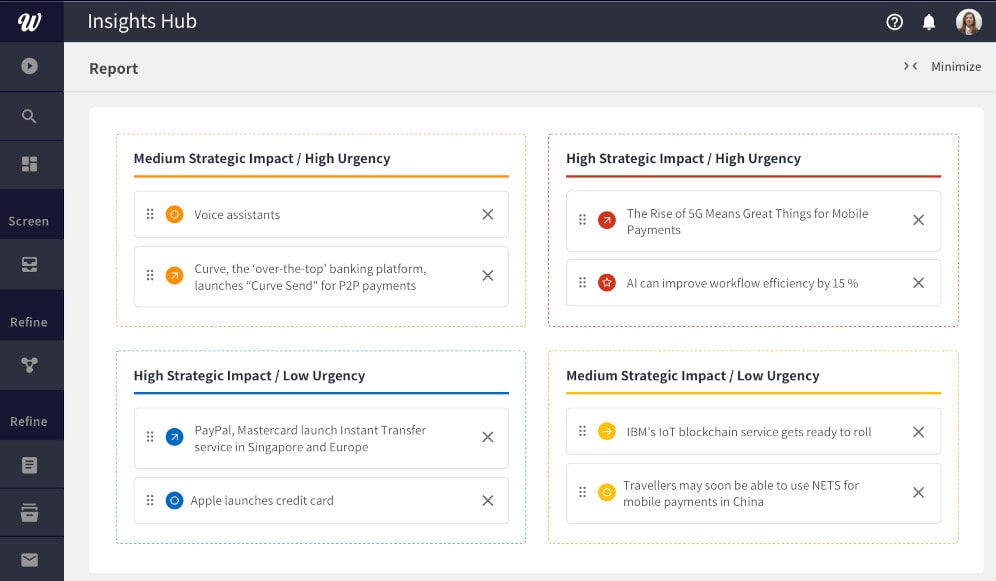
The tool can pull data from various sources. This means you can track your competitors, industries, regulations, and market developments across multiple platforms in one place.
The tool helps sift through large amounts of data to find the most relevant and valuable information. It uses a combination of AI and machine learning to reduce noise and ensure you get only the insights you need.
Key features:
- Aggregating information from premium databases
- Intelligent filtering
- Custom dashboards, alerts, and reports
- Integrations
11 Wappalyzer for technology detecting
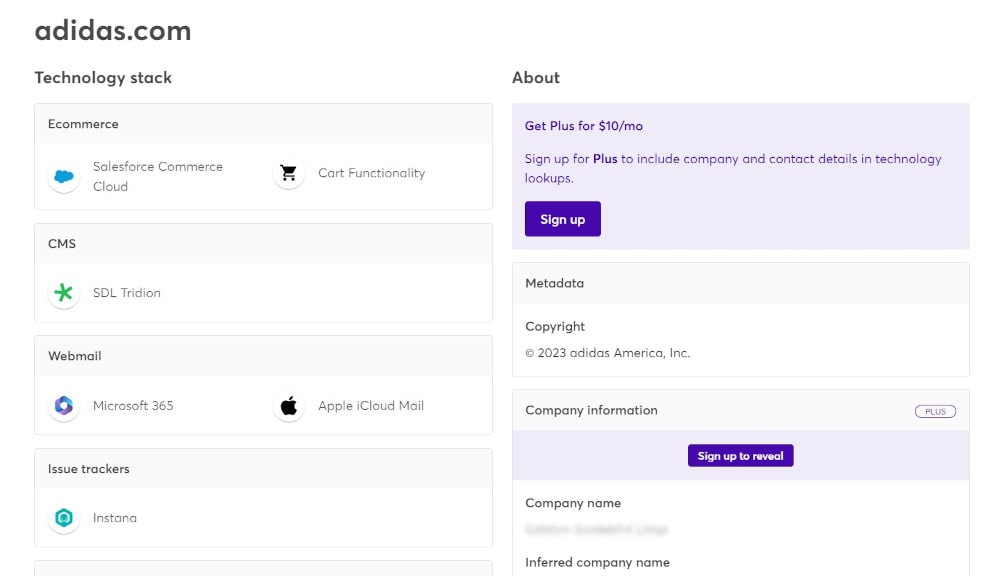
Wappalyzer is a tool for uncovering the technologies used on websites. It detects content management systems, e-commerce platforms, web servers, JavaScript frameworks, analytics tools, and more.
Why I picked Wappalyzer?
It’s always a great idea to closely examine what your competitors are up to. By checking out the technologies, platforms, and tools they are using, you might find some really helpful insights into their strategies.
Keep an eye on their technology stack. Try to understand why they’ve chosen them. You might even discover a new tool or platform to supercharge your business.
What’s interesting is that Wappalyzer can identify third-party tools like customer support chat systems, appointment scheduling widgets, and more. This can give you insights into your competitors’ user experiences.
Key features:
- Technology stack analysis
- Security analysis
- Budget & resources estimation
12 SparkToro for audience insights
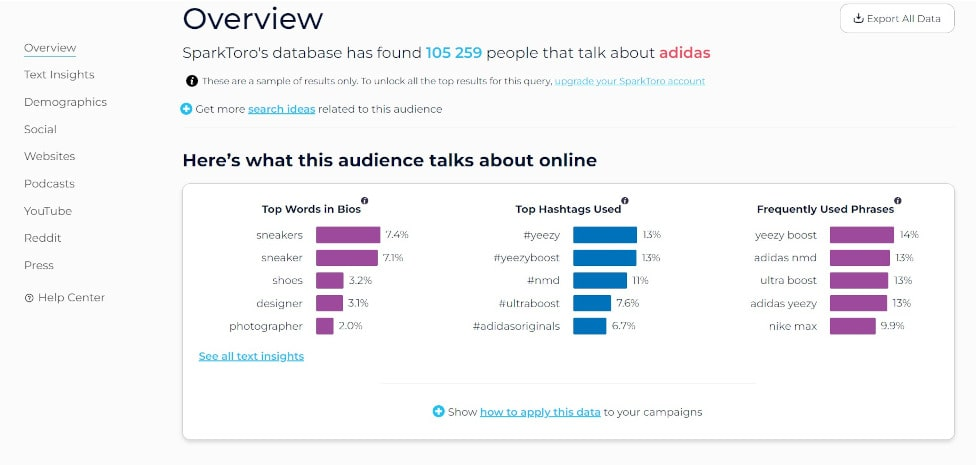
SparkToro is a competitor research and audience intelligence tool. It will help you understand your competitor’s audience and how to reach them online.
Why I picked SparkToro?
SparkToro can help you understand where your competitors’ audiences are engaging online. This includes which websites they visit, the social media accounts they follow, the podcasts they listen to, the videos they watch, and more.
SparkToro identifies the keywords and phrases used by your competitors’ audience in their content. This can help you understand their messaging and positioning.
Key features:
- Audience research
- Keywords discovery
- Influencer identification
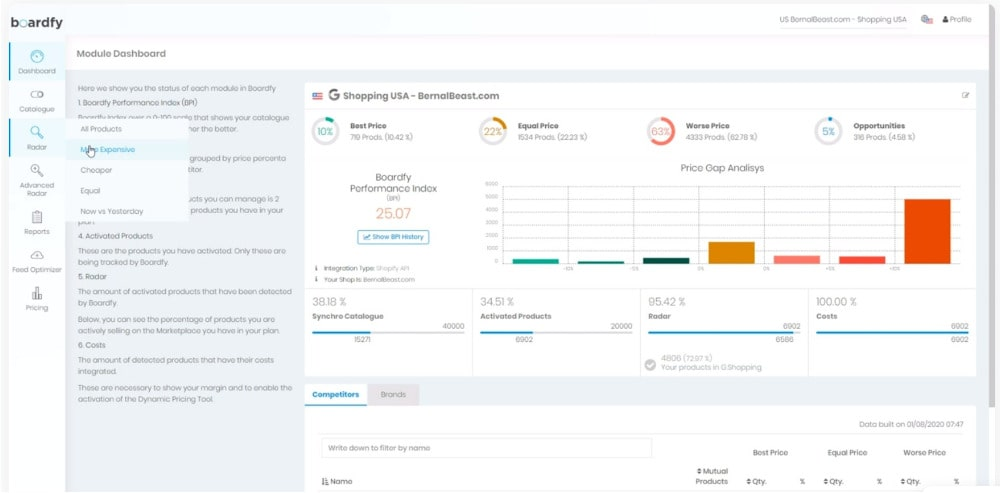
13 Boardfy for price monitoring
Boardfy is a pricing intelligence tool primarily used by e-commerce businesses to monitor competitor pricing. It automatically tracks price changes and promotions on your competitor’s websites and various marketplaces.
Why I picked Boardfy?
Boardfy tracks the prices of your competitors’ products across platforms such as Amazon, Google Shopping, and eBay.
The tool can automatically adjust your prices based on your pricing strategy and competitors’ charges. It allows you to set up pricing rules and apply them in real time.
Also, Boardfy can send you alerts whenever a competitor puts a product on sale or runs a promotional offer.
Key features:
- Price tracking
- Promotion alerts
- Dynamic pricing
- Marketplace monitoring
14 Owler for financial analysis
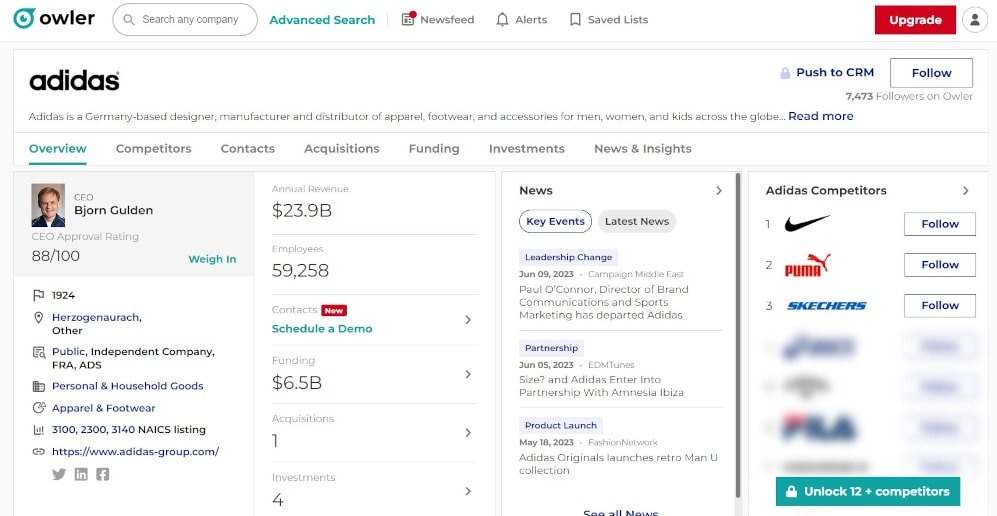
Owler is one of the competitor analysis tools that provides detailed insights about millions of companies, including information about their:
- Revenue
- Employees
- Funding
- Acquisitions
- Competitors
- Leadership
Why I picked Owler?
The tool detects similar companies that might be your potential rivals based on competitor data. Furthermore, Owler detects recent news that can provide insights into your competitors’ strategies and growth.
Also, Owler offers a “Competitive Graph” that visualizes your competitive landscape, helping you understand who your competitors are and how they relate to each other.
Key features:
- Company profiles analysis
- Competitive analysis
- Competitive Graph
- Company rankings
15 iSpionage for tracking ad campaigns
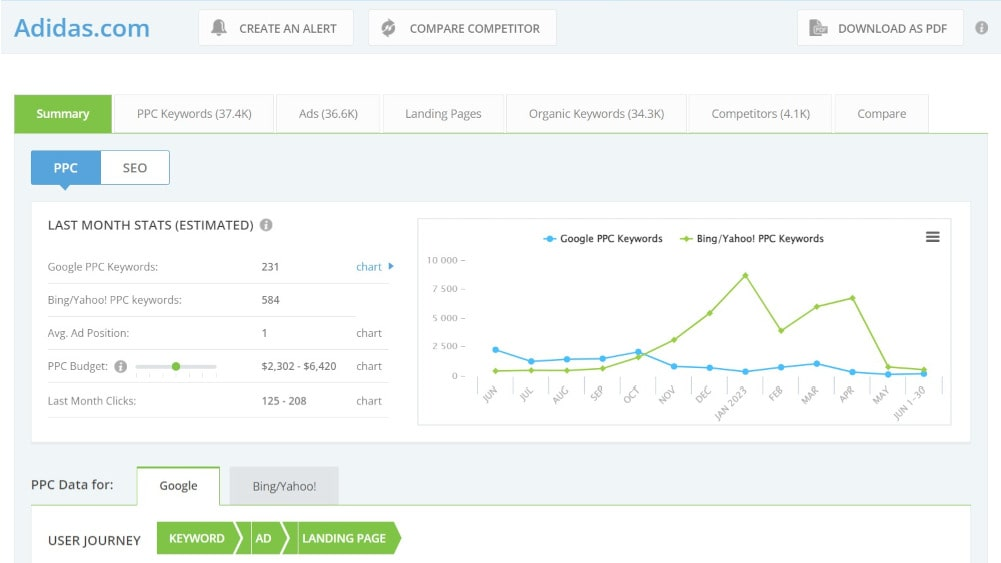
iSpionage (now part of the TapClicks family) monitors your competitors’ PPC and SEO strategies. The tool lets you see which keywords your competitors target in their PPC and SEO campaigns.
Why I picked iSpionage?
Thanks to iSpionage, you can see the exact ad copy your competitors use in their PPC campaigns. The tool estimates how well your competitors’ PPC campaigns are performing.
In addition to PPC, iSpionage provides information on your competitors’ organic search performance, helping you understand their SEO strategy.
Key features:
- PPC and SEO keyword research
- Ad copy analysis
- Campaigns performance
16 Owletter for email monitoring
Owletter is an email monitoring tool that can help you track your competitors’ email and newsletter strategies.
Why I picked Owletter?
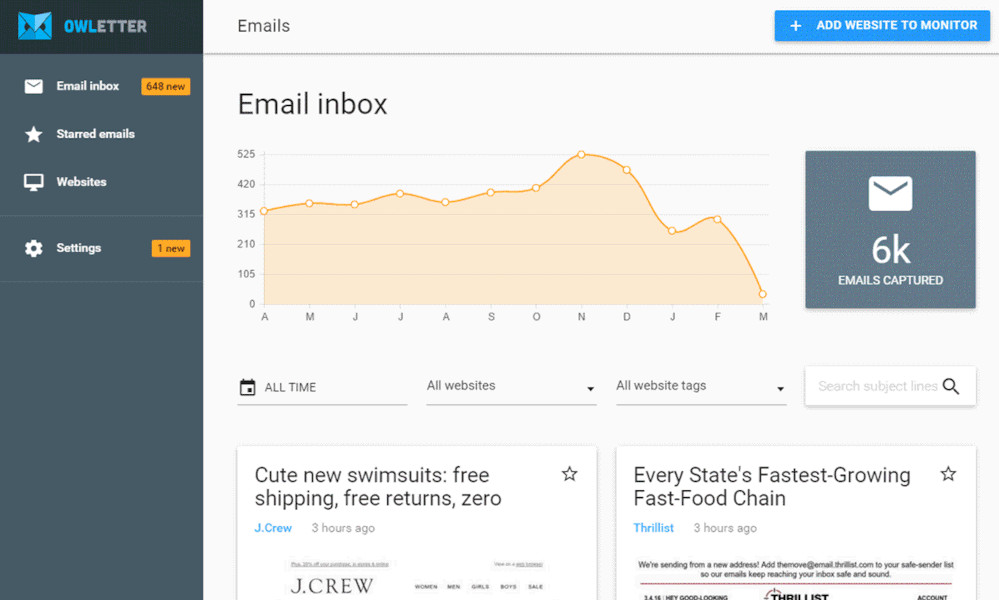
It’s extremely useful for email campaigns. Owletter automatically captures and stores every email sent from the websites you want to monitor.
This tool analyzes how many emails your competitors have sent this year, the specific days they send the emails, and the hours of the day when they send them.
It’s a perfect solution for those looking to get inspired to write better emails.
Key features:
- Email storage
- Email analysis
- Competitors spam reputation
- Trending topics in emails
Tools rating comparison
⚠️ Important note: Those ratings are sourced from G2 and Capterra, verified in Q2 2026. Some tools have low review counts. Remember to treat those scores with caution.
| Tool | Best for | G2 Rating | Capterra Rating |
|---|---|---|---|
|
Competitor mentions & social listening
|
⭐ 4.6/5
|
⭐ 4.6/5
|
|
|
Website traffic analytics
|
⭐ 4.5/5
|
⭐ 4.6/5
|
|
|
Search trend tracking
|
–
|
–
|
|
|
SEO & backlink analysis
|
⭐ 4.6/5
|
⭐ 4.5/5
|
|
|
Social media benchmarking
|
⭐ 4.5/5
|
⭐ 4.5/5
|
|
|
YouTube competitor tracking
|
⭐ 4.5/5
|
⭐ 4.4/5
|
|
|
Content performance research
|
⭐ 4.5/5
|
⭐ 4.5/5
|
|
|
Website change monitoring
|
⭐ 4.8/5
|
⭐ 4.8/5
|
|
|
Competitor tech stack detection
|
⭐ 4.5/5
|
⭐ 4.9/5
|
|
|
Audience & competitor research
|
⭐ 4.4/5
|
⭐ 4.3/5
|
|
|
eCommerce price monitoring
|
–
|
⭐ 4.1/5
|
|
|
Company & competitor intelligence
|
⭐ 4.3/5
|
⭐ 4.0/5
|
|
|
PPC & ad campaign tracking
|
⭐ 4.3/5
|
⭐ 4.2/5
|
|
|
Competitor email monitoring
|
⭐ 4.2/5
|
–
|
Recommended competitor monitoring stacks by use case
No single tool covers everything. The best setups combine 3–5 tools, each handling a different layer: brand perception, SEO, traffic, ads, or pricing.
Stack 1: Solo Marketer ~$180/mo
- Brand24 – Mentions, sentiment, share of voice
- Chatbeat – AI visibility tracking
- Ahrefs Starter – Keyword gaps, backlinks
- Google Trends (free) – Search demand, seasonal trends
- SimilarWeb (free) – Traffic channel overview
Why I picked those tools?
Brand24 + Chatbeat + Ahrefs cover the three highest-signal channels (brand visibility, AI visibility + SEO). Google Trends and SimilarWeb add a free traffic layer on top.
Stack 2: SaaS / B2B marketing team ~$470/mo
- Brand24 – Mentions, sentiment, AI insights
- Chatbeat – AI visibility tracking
- Ahrefs – Organic traffic, content gaps
- Visualping – Pricing and homepage change alerts
- Owletter – Competitor email monitoring
- SparkToro – Audience intelligence
Why I picked those tools?
Covers the full GTM picture: what people say, how competitors rank in AI and search, when messaging shifts, and where their buyers spend time.
Stack 3: eCommerce ~$480–530/mo
- Brand24 – Product mentions, review sentiment
- Chatbeat – AI visibility tracking
- SimilarWeb – Traffic sources, channel breakdown
- Boardfy – Real-time price tracking (~$99–150, custom)
- iSpionage – PPC keywords and ad copy
- Google Trends (free) – Seasonal demand
Why I picked those tools?
Each tool is an early-warning signal for a different competitive move: price drop, traffic surge, new ad push, or a competitor gaining ground in AI search results.
Stack 4: Enterprise Competitive Intelligence $1,800+/mo
- Brand24 – Brand perception, crisis alerts
- Chatbeat – AI visibility tracking at scale
- SimilarWeb – Market share, traffic benchmarks
- Ahrefs – Full SEO intelligence
- BuzzSumo – Content performance, PR mentions
- Wappalyzer – Competitor tech stack changes
- Infodesl – CI aggregation, analyst briefings (custom)
Why I picked those tools?
Each tool feeds a different team. Chatbeat adds the AI search layer that traditional CI stacks miss entirely. The goal isn’t one dashboard, it’s the right data in the right hands.
Competitor monitoring tools: Evaluation criteria
To make my recommendations as structured and trustworthy as possible, I evaluated each tool using the following framework.
Breadth of competitor data (25%)
What kind of competitor intelligence does the tool actually deliver?
I looked at mentions and social media conversations, website traffic, SEO rankings, paid ad campaigns, pricing changes, email activity, technology stack detection, and company financials.
The score reflects how well each tool delivers on its core data promise.
Data accuracy & freshness (20%)
Raw data is only valuable if it’s reliable.
I assessed real-time vs. delayed delivery, geographic and language coverage, source breadth, historical data availability, and update frequency. Tools that often miss mentions or present outdated data received lower scores.
Insights & analytics quality (20%)
I evaluated depth of analysis beyond raw numbers: sentiment analysis, AI-powered summaries, competitor benchmarking views, trend detection, and alert relevance.
Reporting & workflow integration (15%)
I considered dashboard customizability, export options (PDF, Excel, shareable links), alert configurability, team collaboration features, and integrations with CRMs and Slack.
Daily usability (10%)
Clarity of the user interface, onboarding experience, help documentation, and responsiveness of customer support assessed from a non-technical user’s perspective.
Value for money (10%)
Pricing transparency, free trial availability, feature limits per tier, and scalability for growing teams.
Competitor monitoring: iPhone vs Samsung case study
Now, using iPhone and Samsung, let’s see how you should monitor your competitors… with the help of the right tool, of course.
01 Mentions and reach
iPhone and Samsung’s volume of mentions and reach across multiple platforms over time are following:
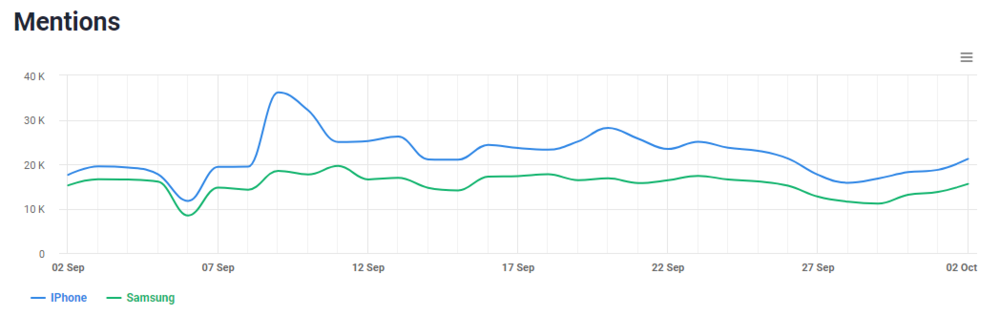
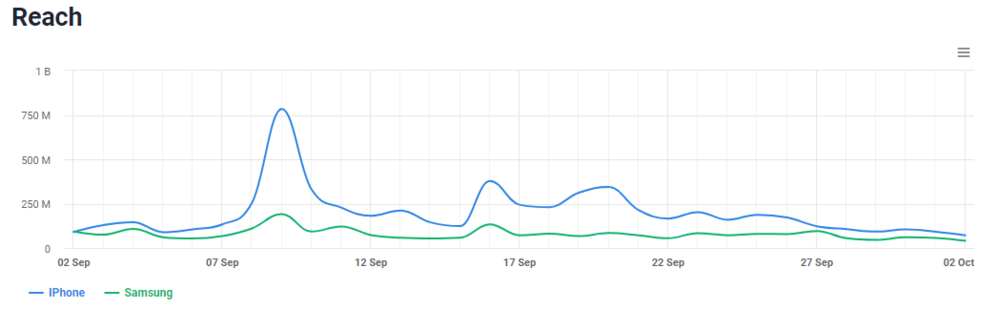
As you can see, the iPhone is mentioned more often than Samsung in online conversations, and it has a significantly greater impact.
What can it be caused by?
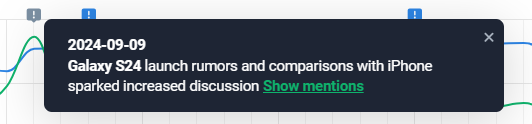
The Anomaly Detector says that the spike (later sustained at a higher level than Samsung mentions and reach) was due to the release of the new iPhone 16.
However, due to the iPhone release and rumors about launching the Samsung Galaxy S24, there was also more talk about Samsung as people began to compare the iPhone 16 to the Galaxy S24.
02 Sentiment analysis
Now, let’s compare how people feel about the iPhone and Samsung:
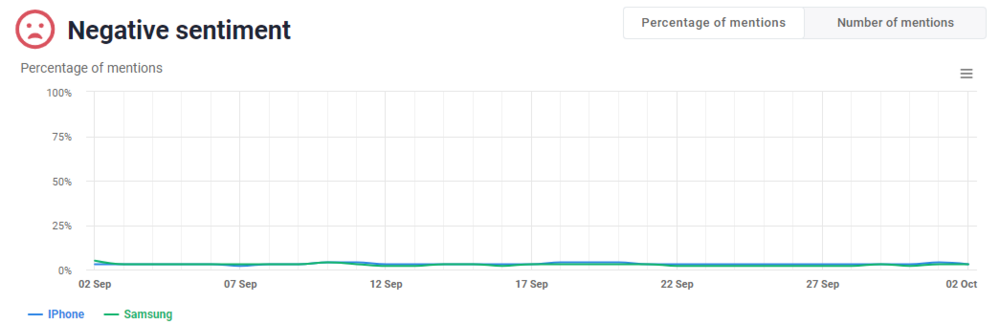
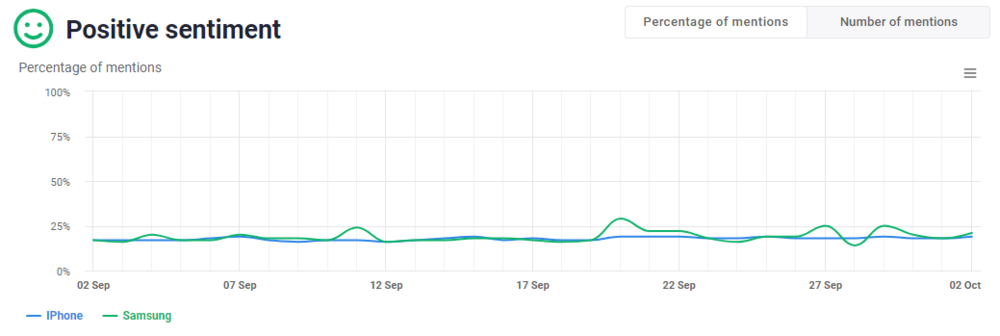
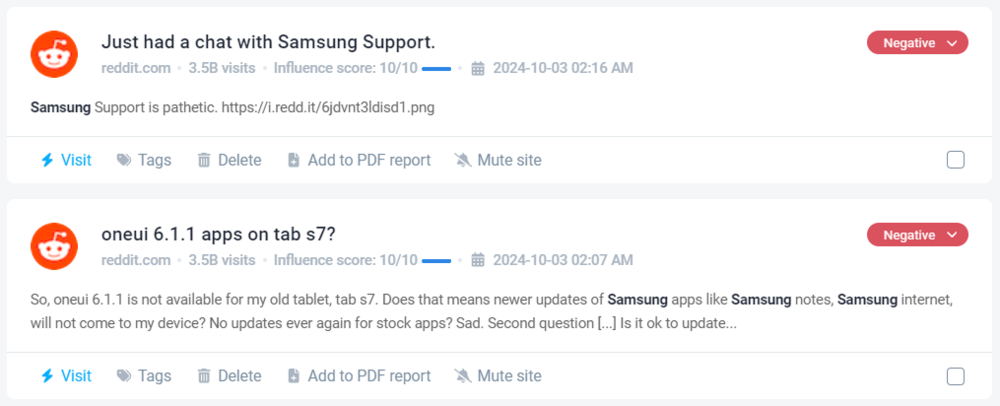
The metrics look similar for both brands, so let’s take a look at the important negative mentions of Samsung:
03 Share of Voice
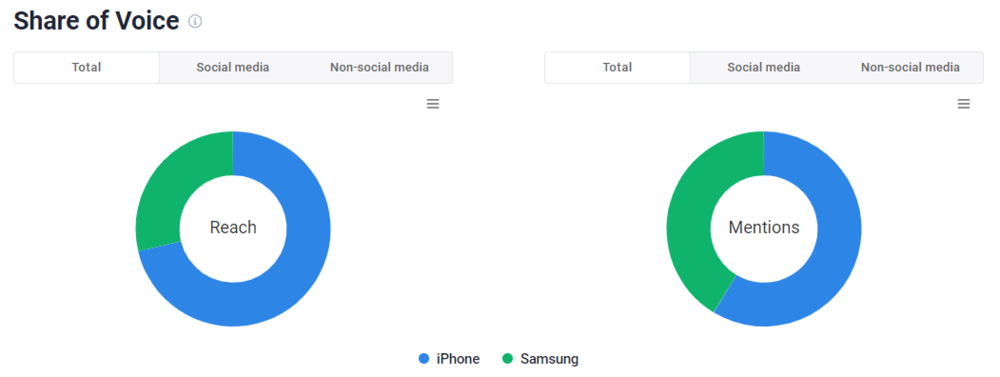
Share of Voice measures how much of the Internet is dominated by either you or your competitors.
As you might guess, it is dominated by the iPhone. Also, if we consider only social media platforms:
04 Presence Score
Looking at your competitor’s Presence Score, you can see how popular it is and, most importantly, whether it is more popular than you.
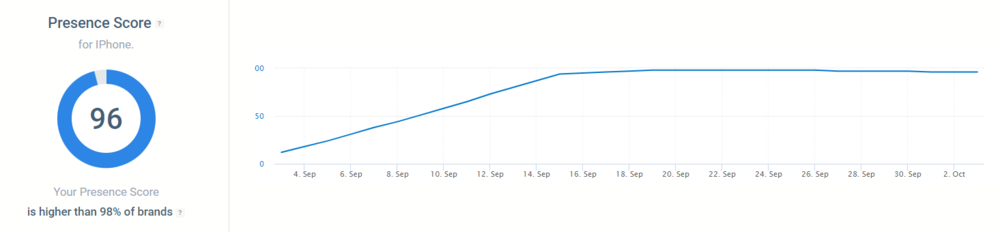
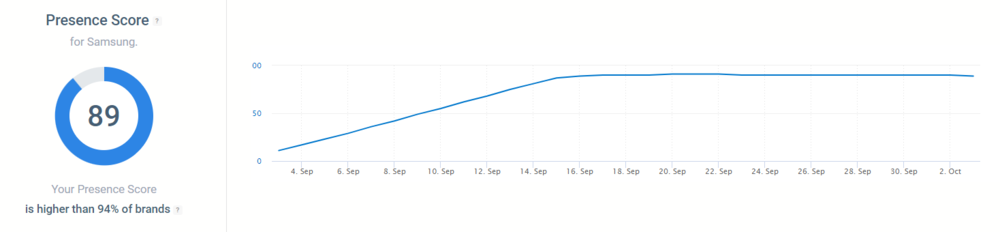
The iPhone’s Presence Score is 96, and Samsung’s is 89 – not that far apart, but at this point, the iPhone is a more recognizable brand.
05 Insights
By monitoring your competitors’ consumer reviews, you can gain insight into what to include in your products to turn their customers into yours.

Discover our client’s success story — read the case study.
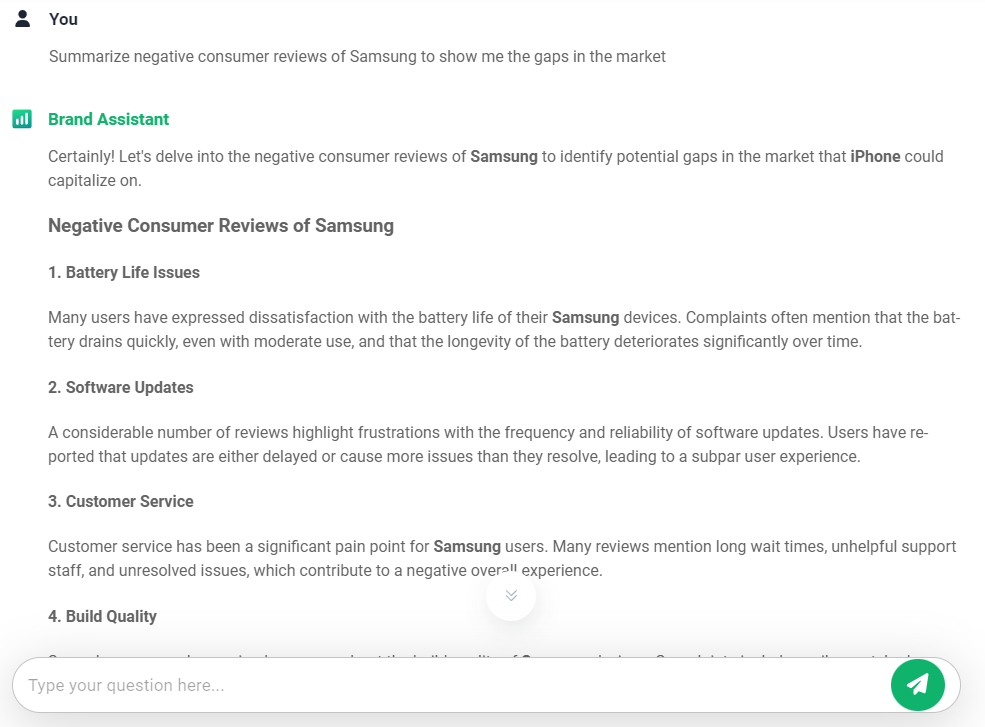
Tip: You can do the analysis using AI
I used this prompt in the AI Brand Assistant (can also be good for Claude or other AI tools you integrated):
Summarize negative consumer reviews of [competitor’s name] to show me the gaps in the market
Let’s see what Samsung users are complaining about and how the iPhone can make use of it:
06 Comparison overview
A comparison overview shows how iPhone and Samsung perform in relation to each other in terms of different metrics:
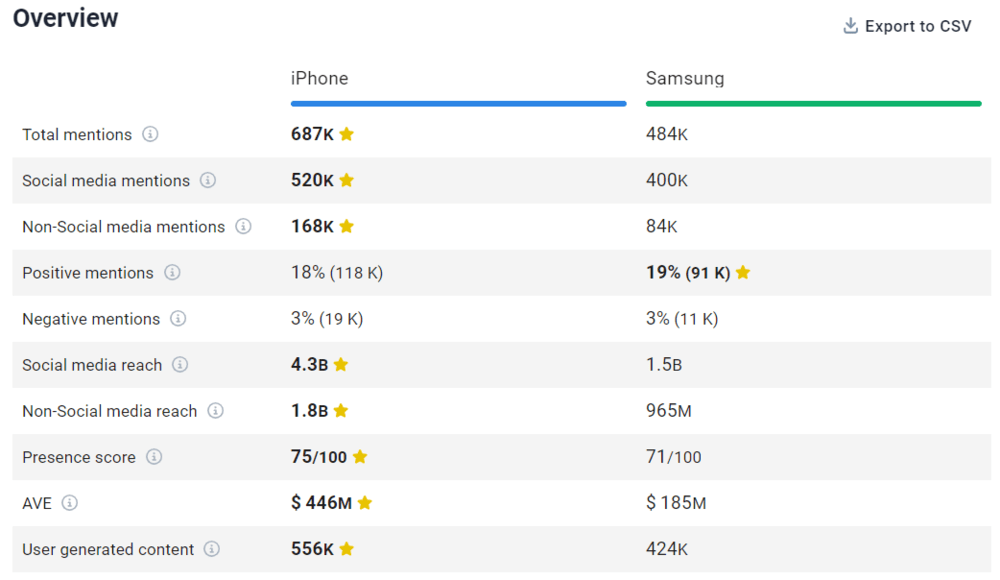
Based on this, the iPhone is clearly a cut above Samsung.
I’ve shown you how to monitor two brands – iPhone and its competitor, Samsung – but you can monitor and compare even more brands.


