Table of contents
2M Marketers

How to start checking if your social media strategy truly works? This comprehensive guide explains what social media analysis is, its importance, and how to conduct it effectively.
I’ll cover different types of social media analytics and show how to measure and report your social media performance.
Key takeaways
- Social media analytics reveals what truly works
It helps you understand whether your marketing efforts deliver real results. - Tracking the right metrics drives brand success
Key indicators allow you to measure campaign performance and brand growth accurately. - The best insights come from multiple data perspectives
Combining performance, audience data, sentiment, competitors, influencers, and paid ads creates a complete picture. - Advanced analytics tools provide full context
A dedicated platform connects data across channels and turns it into actionable insights.
Let’s dive deeper!
What is social media data analysis?
Social media data analysis is the process of collecting and analyzing data from social media platforms to understand performance, audience behavior, and brand perception.
The goal is to identify meaningful patterns and insights that inform business decisions and inform your marketing strategy. It includes all the metrics that show how your brand performs online.
More broadly, social media analytics covers tracking content reach and engagement, monitoring what people say about your brand, benchmarking against competitors, and measuring the ROI of your social media efforts.
But about it, later! 😉
Types of social media analytics
Social media analysis can feel overwhelming because it covers many different angles.
That’s why it’s important to understand which areas of analysis exist and what each one is responsible for:
Types of social media analytics:
| Type of analysis | What it measures |
| Performance analytics | Post and profile performance: impressions, reach, likes, shares, clicks, views, conversions |
| Audience analytics | Follower demographics and behavior: age, gender, location, interests, devices |
| Competitor analytics | Competitor follower counts, engagement rates, top content, share of voice |
| Paid social analytics | Ad performance: clicks, CTR, CPC, conversions, spend, ROI |
| Influencer & campaign analytics | Campaign results: posts, interactions, hashtag usage, referral traffic or sales |
| Sentiment & brand health analytics | Brand perception: positive, neutral, and negative mentions, sentiment trends |
You don’t need all of these types every time. The key is knowing which ones matter for your goal.
For example:
- If you didn’t run paid campaigns, you can skip paid social analytics.
- If brand reputation is your priority, sentiment and brand health analytics matter most.
- If you’re launching a campaign, influencer and campaign analytics should be your focus.
Why is social media analytics important?
Social media analytics might sound like just tons of numbers, collecting data, and building overwhelming Excel sheets. But that’s not the point of it.
The real value of social media analytics lies in the insights it provides. They play an important role in strategic decision-making.
It helps teams justify budget requests, set hiring priorities, and allocate time and spending more effectively.
By linking key KPI’s to business objectives (such as lead quality, customer retention, or customer satisfaction), brands can demonstrate the real value of their social media efforts.
Managing and analyzing multiple channels using only native analytics tools is a long and demanding task. That’s why many teams opt to use social media monitoring tools, which consolidate data from all platforms in a single, clear dashboard.
Thanks to that, social media analytics becomes smoother, and it’s much easier to gather, compare, and interpret insights.
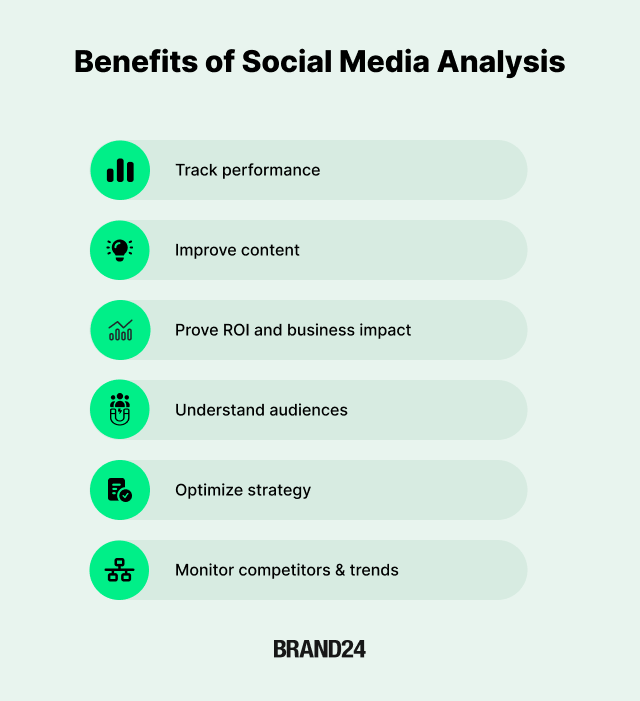
Let’s explore this deeper:
Spot trends early
Social media moves fast. Trending topics, emerging platforms, or viral content formats can suddenly gain popularity overnight.
Engagement metrics, such as shares and saves, indicate high-quality, valuable content that audiences want to revisit.
By closely monitoring analytics, you can identify which platforms are gaining traction and which content resonates most with your audience.
Understand audience sentiment
Sentiment analysis helps determine whether conversations around your brand are positive, negative, or neutral.
Tracking sentiment over time shows whether customers are satisfied or if issues are starting to appear.
Measure what works
Without analytics, you’re essentially flying blind.
Performance metrics show which posts, campaigns, and strategies deliver results, and which ones don’t.
Prove ROI and business impact
Social media analytics helps you demonstrate the real business value of your work by connecting social metrics with website traffic, leads, conversions, and sales.
Inform strategy and product decisions
Social data reveals customer pain points, unmet needs, and opportunities that help shape marketing, product, and customer experience strategies.
Gain competitive intelligence
Analytics lets you benchmark your performance against competitors and identify gaps, strengths, and positioning opportunities.
Manage crises in real time
Monitoring mentions and sentiment enables you to detect potential crises early and respond effectively before they escalate.
Create ready-to-use reports
Analytics tools simplify reporting by turning complex data into clear, shareable insights for stakeholders.
How to Do Social Media Analytics: Step-by-Step with Brand24
This step-by-step framework shows how social media analytics works in real life using Brand24’s capabilities.
Brand24 is designed for social media marketers, marketing teams, and enterprise brands that need actionable insights.
The goal of this tool is simple:
Help you analyze social media data across multiple social media channels, understand what actually impacts performance, and turn insights into better business decisions.
Here’s the workflow I recommend if you want analytics to stay practical:
- Collect social media data (owned + earned)
- Filter it to the audience, market, and timeframe you care about
- Analyze patterns, benchmarks, and anomalies
- Decide what actions to take (content, messaging, budget, CX, PR)
- Report results in a format that stakeholders actually use
- Apply changes based on data
A good example is Uber, which used social listening insights to improve its offerings and achieved a 24% increase in online exposure.

Now let’s apply it in real life.
01. Create a Project
Start with a clearly defined project, which means choosing the right „keyword” you want to monitor.
What to include in your Brand24 project:
- Brand name and product or service names
- Branded hashtags and social media campaign hashtags
- Key spokespersons, founders, or executives
- Competitor names or industry keywords
- Common misspellings and brand variations
This setup allows Brand24 to track brand mentions across social media networks and other digital sources. Including both tagged mentions (for example, @brand on X/Twitter) and untagged conversations.
02. Choose filtering option
Brand24 aggregates data from multiple platforms into a single dashboard, making in-depth analysis and enterprise-level reporting possible.
Social media platforms and data sources monitored include:
- Social platforms such as Facebook, Instagram, X (Twitter), LinkedIn, TikTok, YouTube, and Reddit
- Blogs and online media
- News outlets
- Forums, reviews, and discussion platforms
Once data collection is active, the next step is to filter the data.
Common filtering options you’ll use:
- Platform (for example, only Instagram Insights–related mentions or Twitter Analytics–driven conversations)
- Language
- Demographic (countries or regions)
- Sentiment (positive, neutral, negative)
- Influence and reach thresholds
- Time range
Filtering helps you focus on the target audience, specific social channels, or emerging trends that matter most to your business objectives.
For example, you can isolate English-language conversations in Europe about pricing or customer experience to support regional strategy decisions.
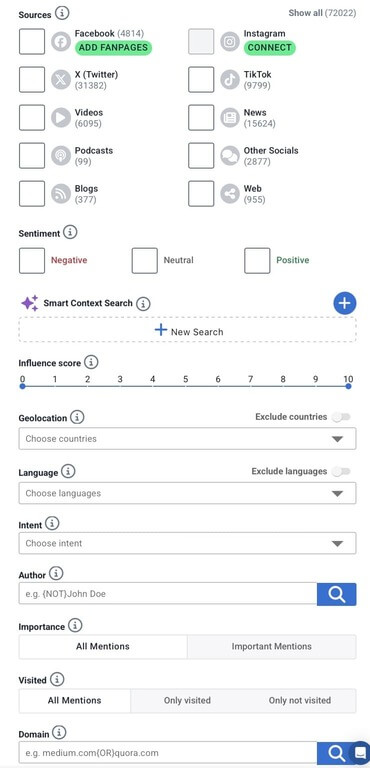
I also really like that you can save filters, so you can reuse them in another project and avoid wasting time applying the same filters.
03. Analyze data
Collecting data is only the starting point. Social media analytics begins when you start analyzing data at scale.
Brand24 supports this stage with AI-driven insights that help move beyond surface-level metrics.
Audience demographics
Mentions gathered across social media provide valuable insights into your audience demographics. This information allows you to better understand who is talking about your brand and how to tailor your communication accordingly.
Brand24’s Demographics Panel (available for Pro users) reveals deeper audience insights, including age, income level, education, employment status, interests, and geography.
Key demographic insights available:
- Age, gender & location – understand the age range and purchasing power of your audience
- Income level – see what percentage of your reach comes from each income group
- Education & occupation breakdown – see professional background and job status
- Interests – identify shared interests and topics connected to your brand
- Geographic reach – discover which countries and regions drive visibility
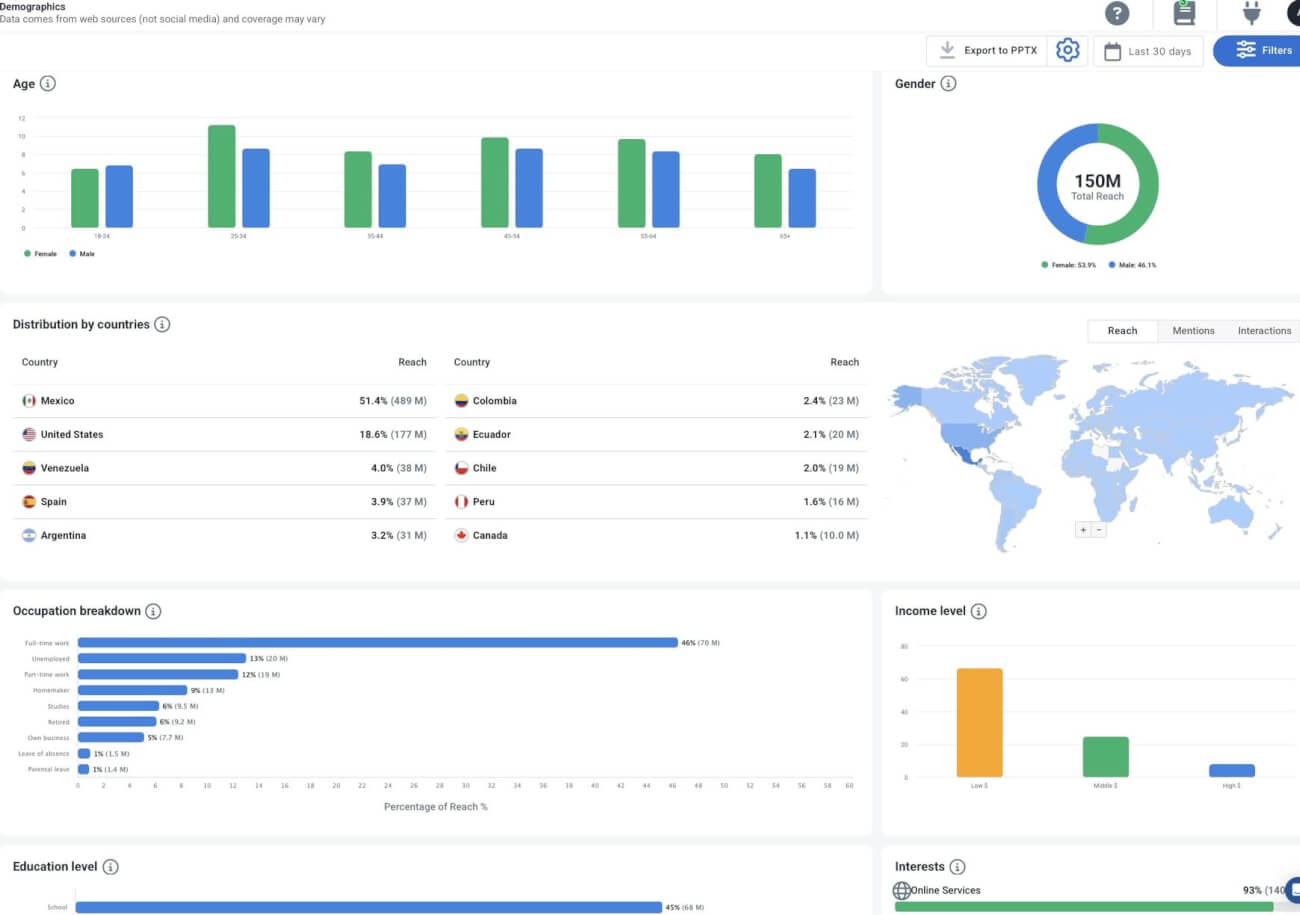
With the demographic panel, you can:
- Stop wasting budget by targeting audiences that don’t engage
- Improve ROI by aligning messaging with real audience profiles
- Support global and local strategies across multiple markets
Identify patterns
Look for recurring themes across social interactions:
- Topics mentioned most often
- Repeated customer questions or objections
- content themes that drive engagement metrics
With AI Topic Analysis, you’ll see all the main topics people are talking about in one Dashboard, categorized and analysed (number of mentions, reach, share of voice, and sentiment).
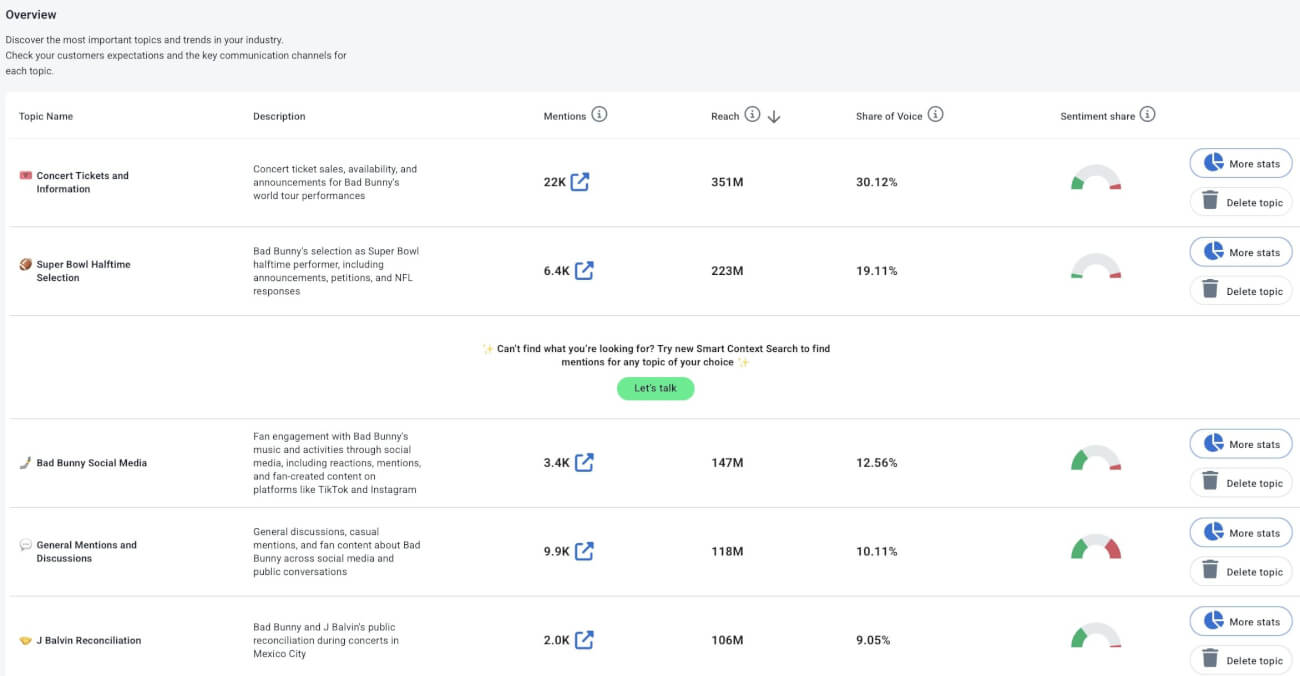
These patterns help refine your content strategy and social media efforts.
Benchmark performance
Compare performance across time and competitors:
- Mention the volume this month vs last month
- sentiment trends over time
- share of voice compared to competitors
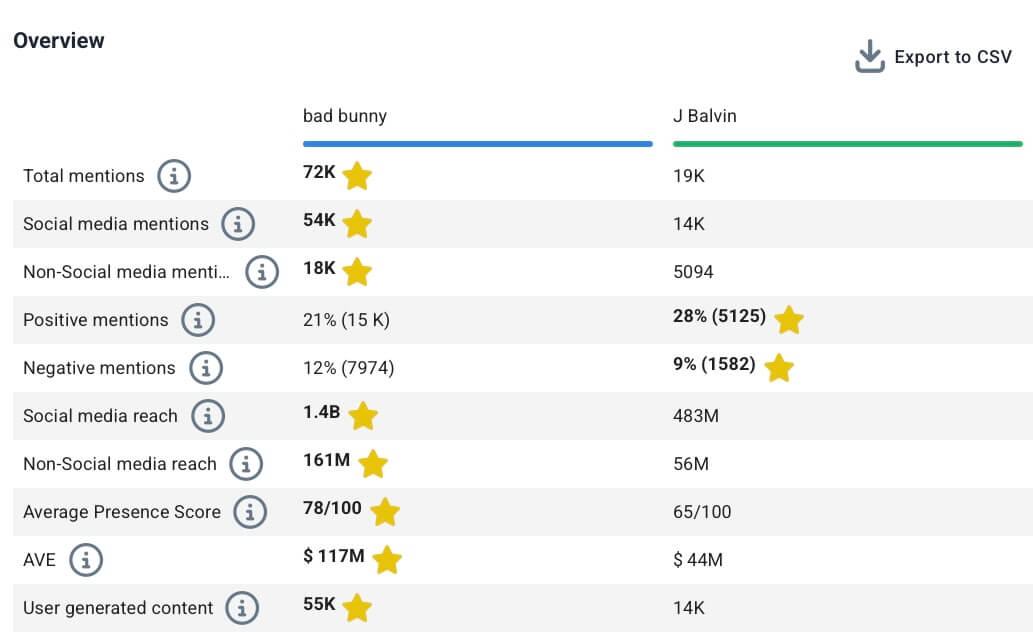
With the Comparison tab, you can benchmark multiple projects, helping you explore high-level performance trends or drill down into specific metrics for deeper insights.
Detect unusual events
Monitor sudden increases in mentions and identify buzz around your brand as it happens. Brand24’s event detection helps you spot unusual activity immediately.
This is especially useful when an influencer mentions your brand, a piece of content goes viral, or an unexpected conversation starts gaining traction.
Brand24 helps surface anomalies such as:
- Sudden spikes in brand mentions
- Unexpected drops in sentiment
- Unusual conversations that may signal potential risks or new opportunities
With Storm Alert, you can receive real-time notifications via email or Slack about sudden fluctuations in mentions or sentiment so that you can respond instantly.
04. Turn insights into actions
Insights from social conversations often highlight unmet needs, product friction, or messaging gaps, making social media analytics a valuable input for customer experience and product decisions.
Brand24’s AI Brand Assistant helps translate social media analytics into practical recommendations that support marketing strategy, reputation management, and performance tracking.
Common actions based on AI insights include:
- Adjusting content strategy by prioritizing formats and topics that drive engagement metrics and positive brand sentiment
- Improving messaging when sentiment analysis reveals confusion or dissatisfaction around a feature or campaign
- Optimizing budgets and channels by shifting focus toward platforms that deliver more substantial reach and interaction
- Monitoring brand sentiment proactively with alerts for sudden negative changes
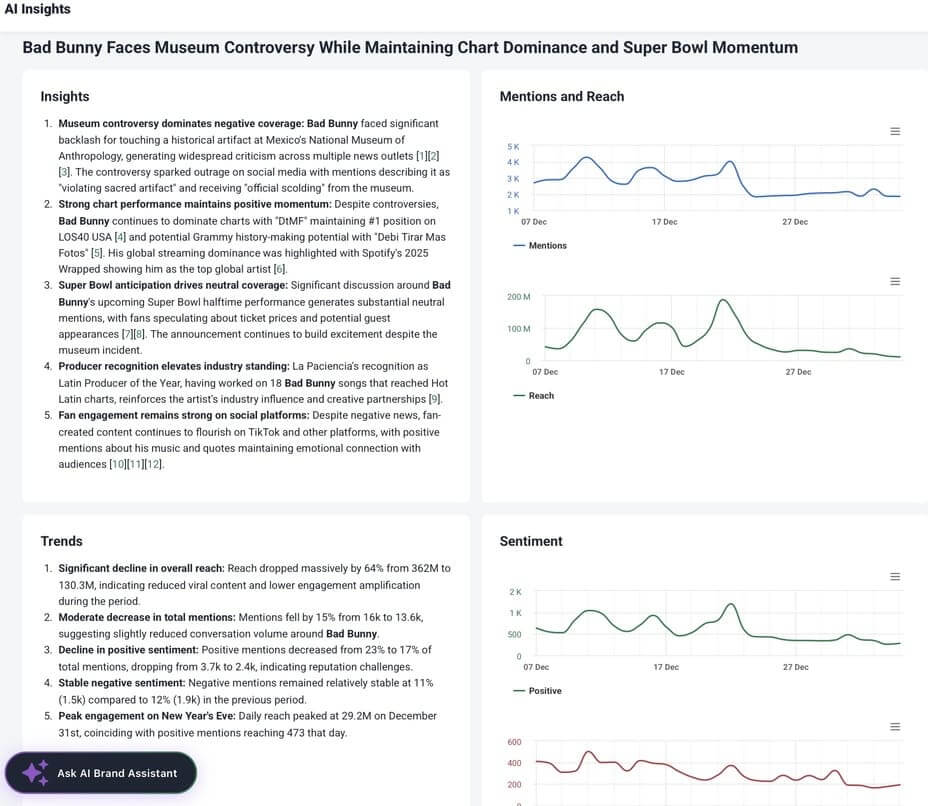
Using this insight, the team adjusted its content mix:
- fewer sales-driven posts,
- more educational and problem-solving content,
- clearer CTAs aligned with audience intent.
What’s best is that they are valued not only by the marketing team.
By combining social sentiment with first-hand customer feedback, brands can identify common pain points, evaluate product changes, and improve overall customer service.
Teams that use social sentiment to drive product updates often see higher customer retention and long-term loyalty because decisions are based on actual conversations and user needs, rather than guesswork.
05. Choose your reporting format
Reporting is a crucial part of social media analytics. Especially when you need to share insights with stakeholders, leadership, or other teams, because different objectives require different perspectives, your social media analytics reports should be tailored to your specific goals.
Common reporting formats include:
- Executive summary – a high-level overview of performance, key metrics, and overall business impact
- Monthly performance report – trends over time, follower growth, sentiment changes, and platform comparisons
- Campaign performance report – hashtag reach, earned engagement, sentiment results, and campaign effectiveness
- Reputation or crisis report – timelines, sentiment shifts, root causes, and response actions
Using automated reporting tools can save time by collecting social media analytics data from multiple platforms in one place. Brand24 allows you to export reports in formats such as PDF, PPTX, and Excel, making it easy to share insights with marketing teams, leadership, and external partners.
Reports can also be fully customized to match your goals, audience, and brand identity (by adding your logo, colors, and preferred layout).
What to look for in social media analytics tools?
In 2026, social media analysis integrates artificial intelligence (AI), social listening, and competitive intelligence to enhance insights.
But when marketers choose the right one, I recommend checking three areas that make analysis faster and more professional.
Many teams complement listening tools with scheduling or BI platforms, depending on their workflow.
1) One dashboard for multiple platforms
Switching dashboards and relying only on native analytics tools is time-consuming, and it makes it harder to compare performance across social channels.
A good tool should help you:
- Connect multiple social media platforms
- Compare overall social media performance across channels
- See differences in performance metrics by platform or campaign
- Keep your relevant data in one place
This is especially important when running marketing campaigns across multiple social media channels and needing a single view for reporting.
2) Automation that saves time
Don’t waste your time on manual work, which can be automated.
Look for automation across:
- data collection
- alerts for spikes in brand mentions or sentiment drops (useful for emerging trends and crisis prevention)
- AI summaries that speed up analyzing data
- reporting workflows (scheduled exports, recurring updates)
3) Reporting options that people actually use
Many marketers spend too much time creating social media analytics reports. A solid reporting option should help you export insights in formats that are easy to share.
Regularly generating social media analytics reports can help track performance and inform future strategies. With Brand24, you can generate ready-to-share reports (for example, PDF and Excel exports) without rebuilding the same report every month.
This makes it easier to communicate results with marketing teams, leadership, or clients ;).
Best social media analytics software:
I’m focusing on tools that support analysis and insights, not on scheduling or publishing.
Here you can find an audio comparison of my best social media analysis software:
| Tool | Best for | Key strengths | Type of analysis |
| Brand24 | Social listening & sentiment analysis | Real-time monitoring, sentiment score, topic analysis, alerts | Earned media, brand health, competitor analysis |
| Google Analytics | ROI & website impact | Traffic, conversions, attribution | Conversion & performance analysis |
| HubSpot | Lead-driven reporting | CRM + social data, funnel tracking | Business & revenue-focused analysis |
1) Brand24
Brand24 is a social media monitoring tool built for social listening and advanced analytics.
It helps brands understand what people say online, how they feel about it, and how those conversations impact brand perception.
Instead of scheduling or publishing content, Brand24 focuses on analyzing earned conversations across 30+ digital channels, including social media platforms, blogs, news sites, forums, reviews, and podcasts.
Key capabilities include:
- real-time social listening for tagged and untagged brand mentions
- sentiment analysis to track brand health and perception changes
- topic analysis to identify trends and conversation drivers
- share of voice and competitor visibility
- real-time alerts for sudden spikes in mentions or negative sentiment
Brand24 is best suited for teams that need actionable insights, reputation monitoring, and in-depth audience analysis.
2) Google Analytics
Google Analytics is a free and essential tool.
It won’t show you likes or comments, but it will show you:
- Web traffic from social media platforms
- What social users do on your site
- Which campaigns drive conversions
- How social contributes to business outcomes
For me, the best option is to combine GA with social listening tools to have a broader view.
3) HubSpot
HubSpot is valuable when your social media efforts are closely connected to lead generation and CRM workflows.
It focused on:
- Lead generation and attribution from social media campaigns
- Integration with CRM data to track contacts, deals, and customer interactions
- Performance tracking across the sales funnel, from engagement to conversion
- Marketing automation and email campaign integration
Personally, I prefer social listening and sentiment analysis tools over traditional social media management tools for social media analysis.
FAQ
1. What is the difference between social media analytics and social listening?
The main difference is what each approach focuses on.
Social media analytics answers one question: how is your content performing? It examines metrics such as reach, engagement, clicks, and follower growth to assess the effectiveness of your social media efforts.
Social listening, on the other hand, focuses on what people are saying and how they feel about it. It tracks brand mentions, conversations, and sentiment across social media and the wider web.
Social listening is a valuable part of social media analytics. Performance metrics reveal what is working, while social listening explains why—providing marketers with a clearer picture of audience behavior and brand perception.
2. How often should you analyze social media data?
At a minimum, social media analytics should be reviewed monthly to track trends and performance changes.
For active brands and marketing teams, ongoing social media monitoring is key, with weekly check-ins for engagement and sentiment and real-time alerts for sudden spikes or risks. Campaigns and product launches often require daily analysis.
3. Can social media analytics really prove ROI?
Yes, when combined with tools like Google Analytics or CRM systems, social media analytics can connect campaigns to website traffic, leads, and conversions.
Tracking clicks, conversion rates, and assisted conversions helps show how social media efforts contribute to business outcomes, not just visibility.
4. How do you do a competitive analysis on social media?
To do a competitive analysis on social media, start by identifying your main competitors and the platforms where they are most active. Track key metrics such as mentions, reach, engagement, sentiment, and share of voice. Analyze competitors’ content strategies, audience reactions, and influencer mentions. Comparing performance over time helps you spot trends, gaps, and opportunities to improve your own social media strategy.
To learn more, read our complete guide on creating a competitive analysis report.
5. Do you need paid tools to do social media analytics?
You can start with native analytics tools such as Facebook Insights or Instagram Insights, but they offer limited visibility and require manual comparison across platforms.
Paid social media analytics tools make analysis more scalable by consolidating data, automating reporting, and providing insights like sentiment analysis and share of voice.
6. How does AI improve social media analytics?
AI helps analyze large volumes of social media data more efficiently by detecting patterns, changes in sentiment, anomalies, and emerging trends.
Instead of manually scanning dashboards, AI surfaces key data, helping teams move from data to action more quickly.