Table of contents
2M Marketers

There are now 5.79 billion social media users worldwide. With social ad spend reaching $276 billion, understanding exactly where and how your content spreads is the difference between campaigns that scale and budgets that disappear.
Key takeaways
-
Social shares actively spread your content.
Unlike likes or comments, shares put your blog posts, videos, or product pages in front of new audiences.
-
Tracking shares shows what content actually travels.
It helps you see which topics, formats, and campaigns people want to pass on.
-
Hashtags and UTMs make tracking easier.
Use a unique campaign hashtag for public mentions and UTM links to measure social traffic in GA4.
-
Social share data should lead to action.
React to mentions, amplify viral content, respond to negative conversations, and use insights to improve future campaigns.
What are social shares?
A social share happens when someone shares your content — a blog post, product page, video, or article — from your website to their own social media profile.
Every share extends the organic reach of your content to an entirely new audience without any paid promotion.
Social shares are different from likes or comments: they actively distribute your content, creating a multiplier effect on your brand’s visibility.
Why track social shares?
Social media moves fast. Social media crises spread 1,200% faster than traditional news, and 79% of customers expect a brand response within 24 hours. Without tracking, you’re flying blind.
Here’s what tracking social shares gives you:
| Action | Benefit |
|---|---|
|
1
Real-time visibility into content performance
|
You’ll see which posts generate the most shares, on which platforms, and by which audience segments. This helps you double down on formats that work. |
|
2
Audience and sentiment insights |
Engagement metrics — likes, comments, shares, and engagement rates — help gauge audience interaction and content resonance. Shares in particular signal strong enough interest to actively recommend your content to others. |
|
3
Campaign ROI measurement |
Linking social media activities to website traffic, leads, sales, and overall return on investment using metrics like click-through rates and conversion rates is far easier when shares are tied to UTM parameters. |
|
4
Crisis detection |
A sudden spike in negative shares or mentions can signal a PR crisis in the making — tracking allows you to react before damage spreads. |
|
5
Competitive benchmarking |
Monitoring and benchmarking features allow brands to understand their share of voice and how they’re growing versus their competitors. |
How to track social shares?
Step 1: Choose a dedicated campaign hashtag
Before launching any campaign, create a unique, memorable hashtag. This makes tracking significantly easier across platforms.
- For brand awareness campaigns: Use your company name or product name (e.g., #YourBrandPL)
- For specific campaigns: Create a campaign-specific hashtag (e.g., #BrandSummerSale2026)
A campaign hashtag centralizes all public mentions of your content, making it easy to track shares, reach, and sentiment in one dashboard.
Tip: If you’re running a larger campaign, track each campaign hashtag separately. This makes it easier to compare performance, spot the strongest content, and report results clearly after the campaign ends.
Step 2: Add UTM parameters to every link you share
UTM tracking is one of the most reliable methods for measuring the impact of social shares on your website. Add UTM codes to all URLs shared on social media, then monitor them in GA4.
Example UTM structure: https://yoursite.pl/blog/post?utm_source=instagram&utm_medium=social&utm_campaign=spring2026
UTM tracking adds a short code to any URLs you share on social — think blog posts or product links — so you can see in Google Analytics exactly how much traffic each channel, post, or ad sends to your site.
Use Google’s free Campaign URL Builder to generate links without typos. The five parameters that matter most for social are:
| Parameter | What it captures | Example value |
|---|---|---|
|
1
utm_source |
Which platform sent the traffic |
|
|
2
utm_medium |
The channel type |
social |
|
3
utm_campaign |
The campaign name |
spring2026 |
|
4
utm_content |
Which specific post or creative |
carousel_day3 |
|
5
utm_term |
Optional — useful for paid social to tag the ad set |
retargeting |
Finding the data in GA4
Go to Reports → Acquisition → Traffic acquisition. Change the primary dimension from Session default channel group to Session campaign to see your exact UTM values. Click any campaign name to filter the full report to that campaign and see sessions, engagement rate, and conversions side by side.
When one campaign outperforms another
Tip: Don’t wait until it’s over. Check the utm_content values within the winning campaign to identify whether format, copy, or posting time is driving the difference — then shift your remaining posts or paid budget toward whatever’s working.
Once the campaign ends, note the winning engagement rate and conversion rate as the baseline your next campaign needs to beat.
One thing to watch: high session counts mean little if engagement rate is low. A campaign driving 500 sessions at 70% engagement beats 2,000 sessions at 15% every time.
Step 3: Set up a social media monitoring project
Every media monitoring plan starts with project creation.
In Brand24, enter the hashtags and keywords you want to track in the project setup.
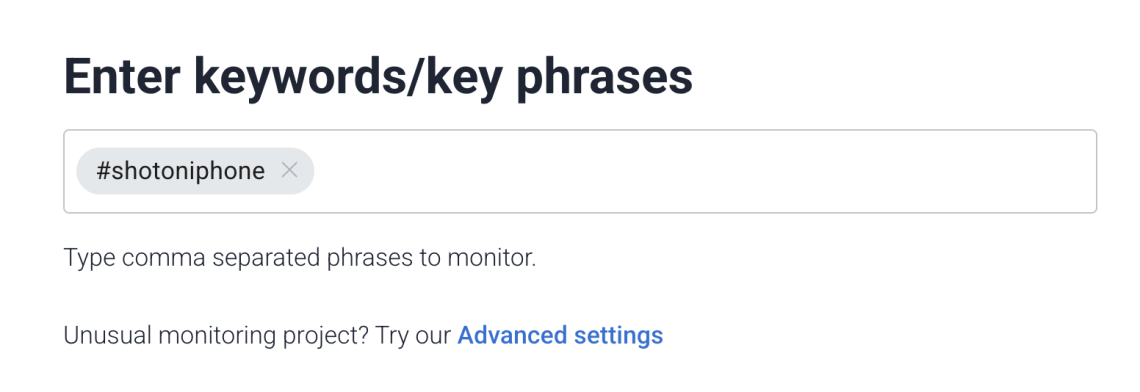
A few tips here:
- Set up separate projects: one for your general brand hashtag and one for campaign-specific hashtags. This keeps your data clean and makes reporting much easier.
- Select the language you’d like to monitor. This helps minimize spam results in your dashboard, so it’s worth configuring properly.
From that moment, Brand24 will start collecting all publicly available mentions containing your keyword across 25 million+ sources in real time.
Step 4: Analyze your dashboard
Brand24 collects all mentions and displays them in a clean, filterable dashboard. You can filter results by author, domain, date, or source, and save those filters for future use.
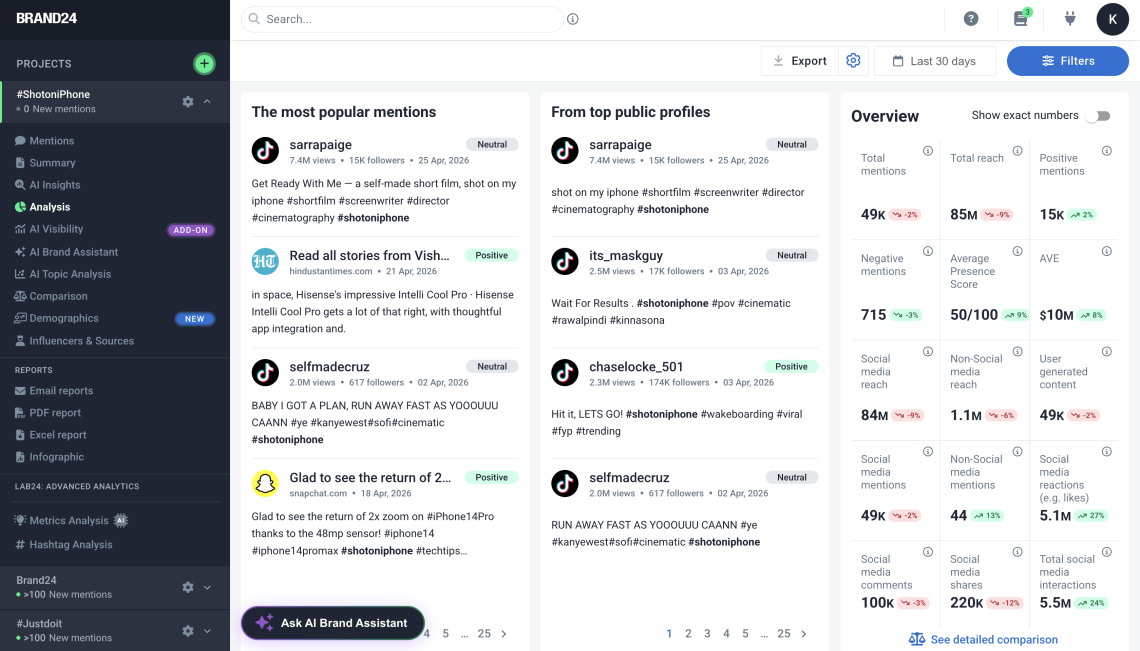
In the Analysis tab, you’ll find the metrics that actually matter for your campaigns:
- Estimated Social Media Reach (ESMR) tells you how many people could have seen your hashtagged content. The more people see your posts, the bigger your brand awareness — this is the top-line number to watch.
- Interactions (shares, likes, comments) measure how engaged your audience actually is. The more engagement your content generates, the more people will see it — that’s how social network algorithms work.
- Sentiment analysis shows whether the conversation around your brand is positive, negative, or neutral. A high estimated reach paired with prevailing negative sentiment is a warning sign of a social media crisis — not a success metric. That’s why you should always track shares and sentiment together.
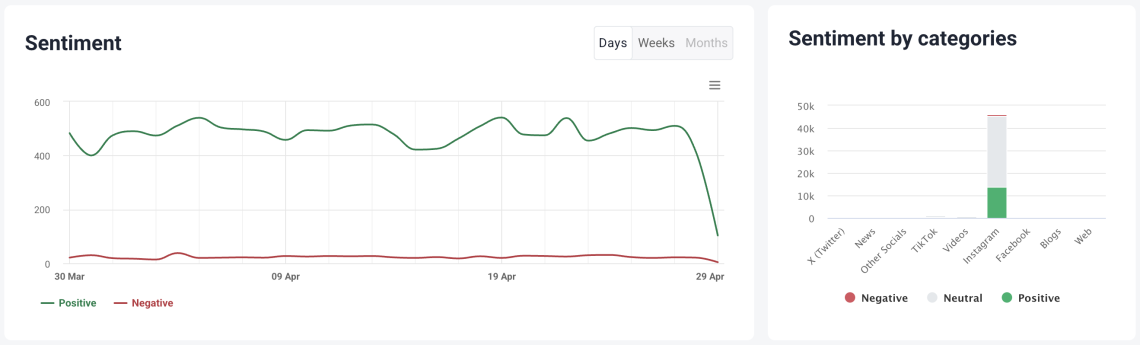
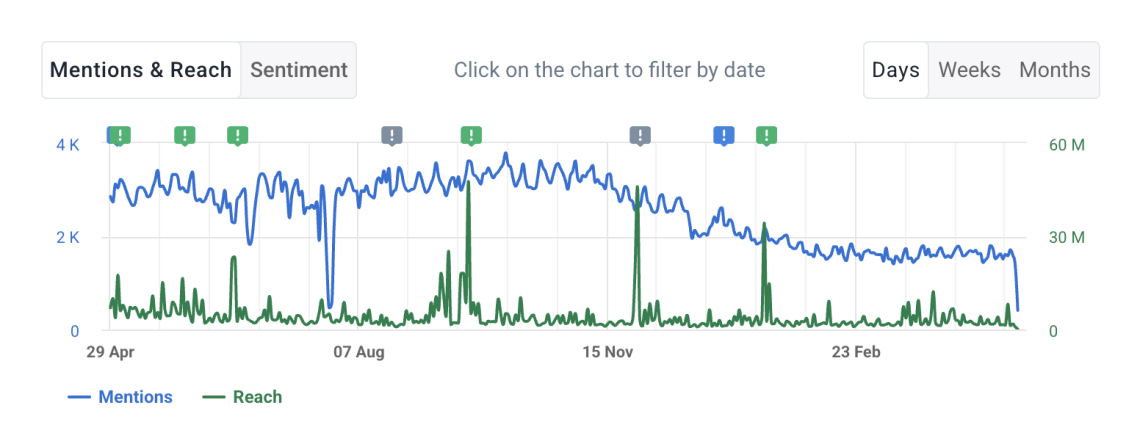
Tip: You can also monitor spikes in mention volume. A sudden jump usually signals either a viral moment worth amplifying or an emerging issue worth addressing quickly.
Step 5: React to social shares
Tracking social shares isn’t just about collecting data — it’s about acting on it. Brand24 lets you react swiftly to all mentions about your brand, even those that appear outside your earned media channels.
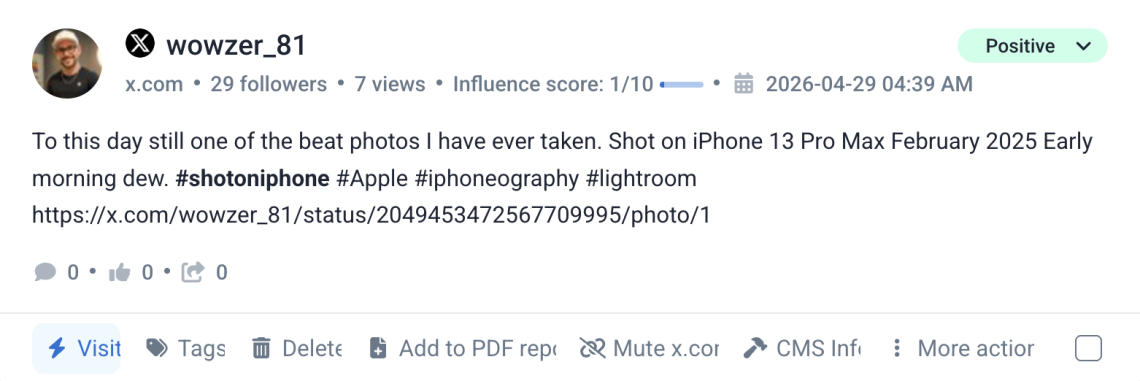
Thanking users for positive mentions and acknowledging negative ones publicly builds your online presence and positions your brand as responsive and trustworthy.
Real results: How Mercedes-Benz tracked social shares with Brand24
A good example of social share tracking in action is the Mercedes-Benz T-Class campaign run with BBDO WWA.
The campaign encouraged people to share emotional, everyday family moments online using dedicated hashtags. Mercedes-Benz used Brand24 to monitor those campaign hashtags in real time, track how the conversation spread, and understand the sentiment behind the mentions.
In just two weeks, the campaign generated:
| Metric | Result |
|---|---|
|
Social mentions tracked
|
Nearly 200,000
|
|
YouTube views
|
600,000
|
|
Landing page engagement
|
4x longer time spent on page |
The key takeaway?
Tracking social shares helped the team see not only how much the campaign was spreading, but also what emotions people connected with it. That gave Mercedes-Benz and BBDO WWA a clearer view of campaign performance beyond basic likes or clicks.
Instead of guessing whether the content resonated, they could track:
- how many people joined the conversation,
- which hashtags and posts gained traction,
- how the audience reacted emotionally,
- whether social buzz translated into deeper landing page engagement.
How to track social shares in Google Analytics?
Use GA4 events: Google recommends the share event for cases where a user shares content from your website or app.
- 1 Set it up with Google Tag Manager so the event fires when someone clicks your social share buttons, and add parameters like method — Facebook, LinkedIn, X — and content_type or item_id.
- 2 Then check the data in GA4 → Reports → Engagement → Events, or build an Explore report filtered by the share event.
- 3 For tracking traffic from social posts to your site, use UTM-tagged links because GA4’s automatic social source detection is useful but not always perfect.
Summary
Social shares happen when people share your content on their own social media profiles. They help spread your content organically, increase reach, and show what resonates with your audience.
Tracking social shares helps you measure campaign performance, spot viral moments or crises, understand sentiment, and react quickly to brand mentions.
- 1 Create a unique campaign hashtag.
- 2 Add UTM parameters to all social links.
- 3 Set up separate Brand24 projects for brand and campaign tracking.
- 4 Monitor reach, interactions, sentiment, and mention spikes.
- 5 Check sentiment together with reach, not separately.
- 6 React quickly to positive and negative mentions.
- 7 Use insights to improve future content and campaigns.
