X (Twitter) Sentiment Analysis: 6 Simple Steps [2026]
Updated: April 2, 2026
13 min read
Are you wondering how people really feel about your brand on X (Twitter)? Without sentiment analysis, it’s hard to quickly understand whether the conversation is positive, negative, or shifting.
In this guide, you’ll learn how to run X (Twitter) sentiment analysis in 6 simple steps and understand what X users think about your brand, and how it changes over time.
Key takeaways:
What is X (Twitter) sentiment analysis?
Twitter sentiment analysis is the process of classifying tweets as positive, negative, or neutral
It helps you understand how people feel about a brand, product, or topic based on large volumes of Twitter data.
There are two ways to do it: manually or with a media monitoring tool
Manual analysis works only for small datasets. Tools automate data collection, sentiment classification, and trend tracking at scale.
The process follows a clear step-by-step workflow
Define your goal → choose keywords → collect X (Twitter) data → filter results → analyze sentiment → compare results.
X (Twitter) sentiment analysis is used across multiple domains
Common use cases include brand monitoring, campaign evaluation, customer feedback analysis, public opinion tracking, and financial signals (e.g. stock market or crypto sentiment).
Keywords and filters directly impact X (Twitter) data quality
Broad queries generate noise, while precise keywords and filters (like Twitter/X source or language) ensure relevant and accurate sentiment analysis.
How to do X (Twitter) sentiment analysis?
There are two ways to do X (Twitter) sentiment analysis: manually or with a socialmedia monitoring tool.
Manual analysis
It means reading tweets and assigning sentiment yourself (positive, negative, neutral). It works for small datasets or quick checks, but becomes slow and inconsistent as volume grows.
They collect tweets/X posts automatically and classify their sentiment using AI. This lets you track large volumes of mentions and spot changes or trends in sentiment.
In addition to X, many social media monitoring tools analyze sentiment analysis for Facebook, Instagram, and other social media platforms.
Method
How it works
Best for
Limitation
Manual analysis
You read and label tweets yourself
Small datasets, quick checks
Time-consuming, not scalable
Social media monitoring tools
Tool collects mentions and detects sentiment automatically
Step 2: Create a project for the keyword(s) you want to analyze
Start with the topic you want to track. This can be your brand name, product name, campaign hashtag, competitor, or any keyword people use when talking about you.
This step matters because sentiment analysis is only as good as the query behind it:
If your keyword setup is too broad, you’ll collect a lot of irrelevant mentions out of the topic. On the other hand, if it’s too narrow, you’ll miss important ones.
👉 If you use Brand24:
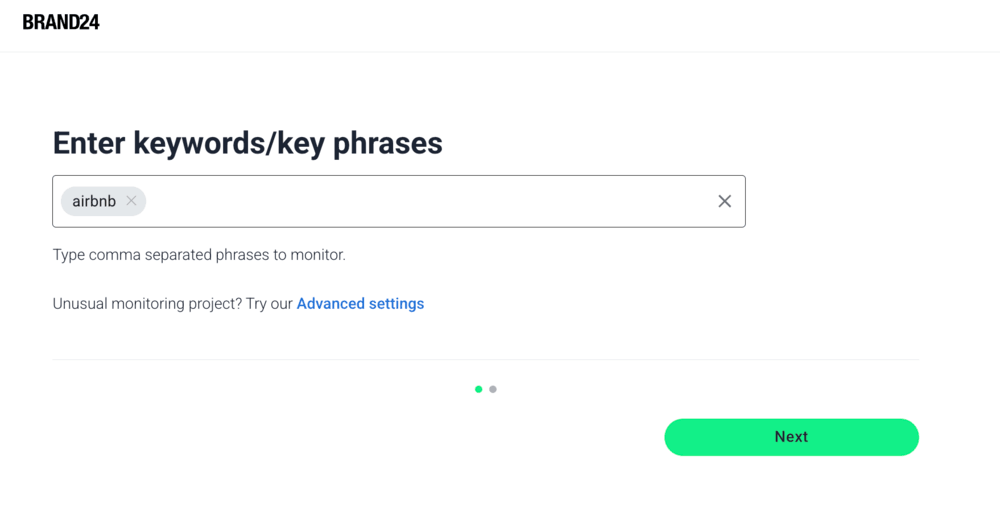
Create a project for your chosen keyword/keywords or hashtags.
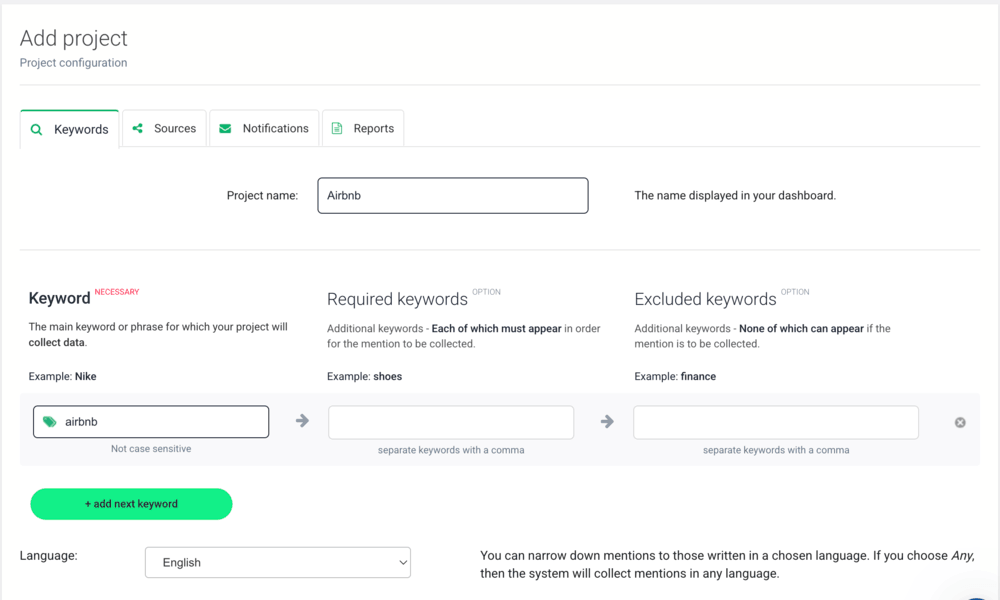
You can also use Advanced settings and choose the language of mentions or type in required/excluded keywords if you want to narrow the results from the start.
Setting up a monitoring project for Airbnb in Brand24 using the quick setupAdvanced Settings give you a few more options when you’re setting up a project in Brand24
Step 3: Narrow the mentions dataset to X (Twitter)
X sometimes works differently from other socials, news sites, forums, or review platforms, so if you want to understand sentiment there, you need to look at X mentions only.
This step ensures you’re analyzing only X (Twitter), not general online sentiment.
👉 If you use Brand24:
1. Open your project
2. Go to Mentions tab
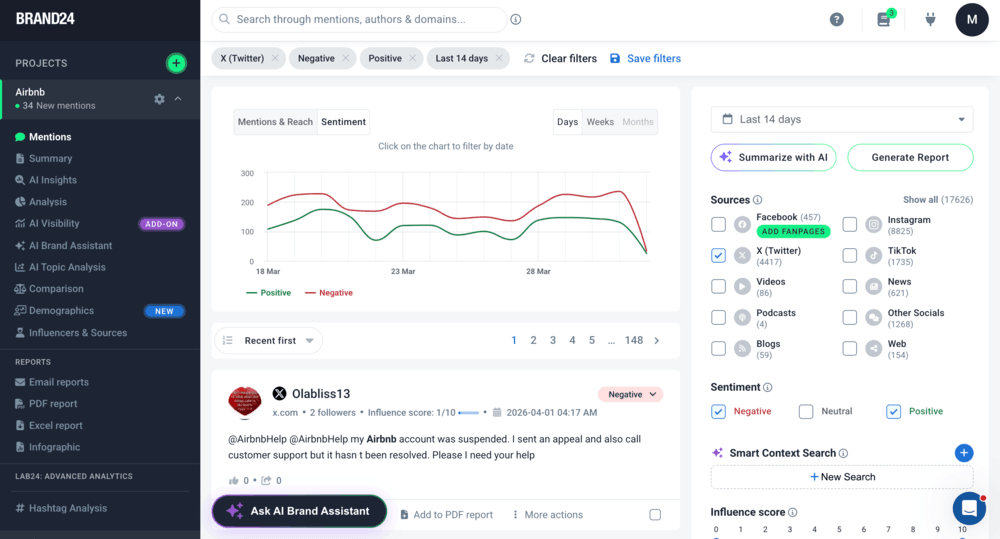
3. Use the panel on the right: Filters → Source → X (Twitter)
4. Save this filter if you’ll use it often
To see X (Twitter) mentions only, tick the X option in the right-hand panel in Brand24
Step 4: Check the volume and sentiment split
Before you dive into sentiment more granularly, it’s good to look at the overall, bigger picture:
1How many X (Twitter) mentions are there?
2How many of them are positive, negative, and neutral?
3Are you looking at a steady discussion sentiment or any sudden spikes?
This step helps you understand the scale and direction of the X conversations.
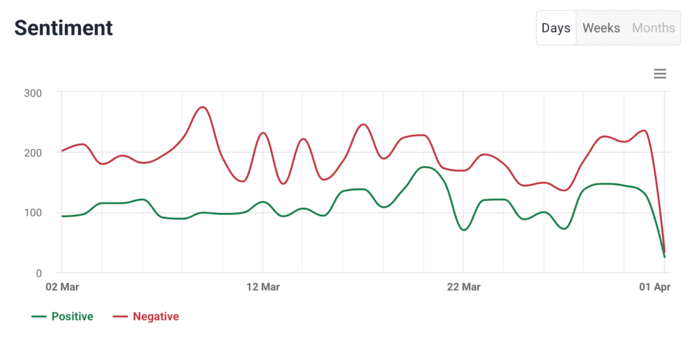
Visible spikes in negative sentiment mentions on X in the Airbnb project
For example, a sudden increase in negative mentions may signal that something specific happened (like a viral negative post or a controversial event) and needs your attention.
👉 If you use Brand24:
Go to the Mentions tab and look at the chart at the top. Focus on:
1. The number of mentions over time
2. The proportion of positive vs negative mentions
3. Any visible spikes or drops
If something looks unusual, you can narrow the date range to zoom in and browse through the mentions to get a clearer picture of what’s going on.
Step 5: Analyze what caused the sentiment shift
After identifying a spike, the key question becomes: what caused it?
Numbers alone won’t give you that answer. You need to look at the actual tweets behind the change and understand the context.
This is where sentiment analysis becomes useful: when you move from “what happened” to “why it happened.”
You can start by reviewing the most influential tweets in that time period:
1Are people complaining about the same issue?
2Are they reacting to a specific event or announcement?
3 Is there a recurring hashtag or keyword in negative mentions?
4Do people use similar wording to describe the topic?
5Are there consistent topics linked to positive or negative sentiment?
Compare what shows up in positive vs negative mentions. This helps you understand the sentiment breakdown and the context behind it.
👉 If you use Brand24:
Go to the Analysis tab, set the time range to the spike, and filter by:
1. Source: X (Twitter)
2. Sentiment → Negative (or Positive)
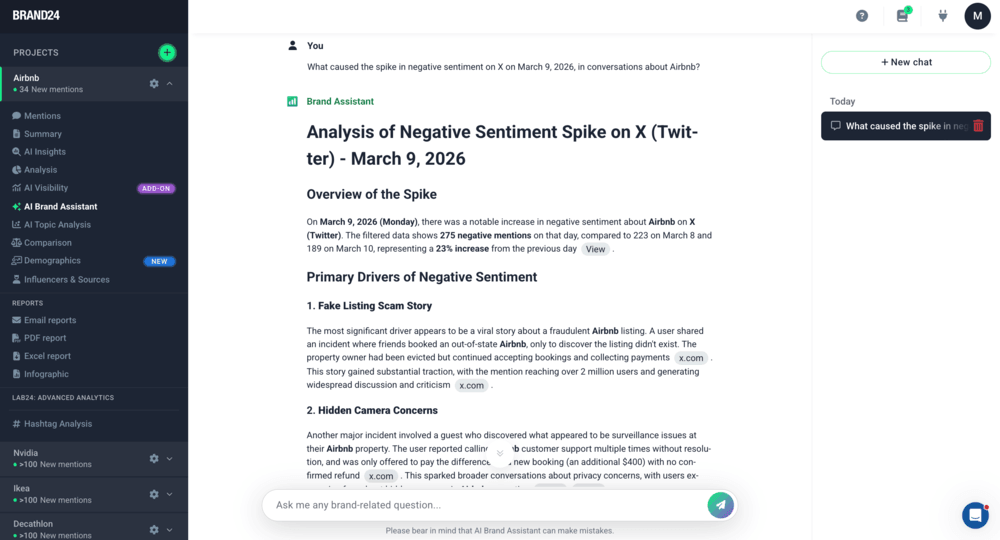
You can also ask the AI Brand Assistant to explain which exact event, trend, or issue caused the spike.
Brand Assistant’s answer to a question about a one-day spike in negative Airbnb mentions on X
Step 6: Compare sentiment in context
At this point, you know what the sentiment breakdown is. However, you still need context to interpret it correctly.
A single number (for example, 20% negative sentiment in the last 30 days) doesn’t tell you much on its own. You need a point of reference to decide whether it’s good, bad, or normal.
You can compare:
current results vs previous period
before vs after a campaign or event
your brand vs competitors
This step helps you answer more meaningful questions, such as:
Is sentiment improving or getting worse?
Did the campaign change how people react?
Was the spike temporary or part of a larger trend?
Are we perceived better or worse than competitors?
👉 If you use Brand24:
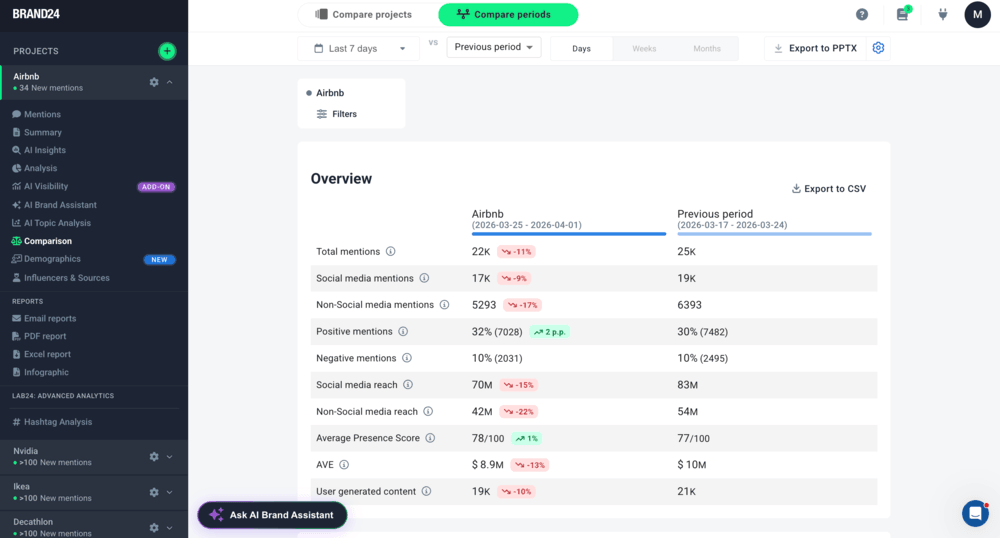
Go to the Comparison tab, where you can:
1. Compare your brand’s sentiment with a competitor
or
2. Compare your brand’s sentiment across different time periods
Then analyze differences in:
– positive vs negative sentiment,
– number of mentions,
– reach.
Overview of two periods of Airbnb mentions in Brand24
Start X (Twitter) sentiment analysis with Brand24!
What to do with X (Twitter) sentiment analysis results
Once you’ve analyzed sentiment on X (Twitter), the next step is simple: use it to make decisions.
Sentiment data becomes valuable only when it changes how you respond, what you improve, or how you communicate.
Here’s how to put it into practice:
01 Address negative feedback
A flood of negative tweets can damage your reputation and hurt your business. If there is a lot of negative feedback about a product or service, it’s essential that you address those issues quickly.
Sometimes it is good to react to individual mentions, but you can also look for patterns:
Are people complaining about the same feature?
Is one issue being repeated by different users?
Did negative sentiment increase suddenly?
Some social media monitoring tools (e.g., Brand24) have Storm Alert features. So you will be notified whenever there is a rapid change in the mentioned volume.
👉 If you use Brand24:
Set up Storm Alerts to get notified when mention volume spikes. This helps you catch potential issues before they grow.
You can get Storm Alerts straight to your inbox!
02 Observe what brings positive tweets
By keeping an eye on X activity around your brand, you can get a clear sense of what people actually like about it.
Using social media monitoring is a solid way to spot what types of content spark positive tweets and which topics get people engaged.
Look beyond “people liked it” and ask:
Are the same themes repeated?
What exactly are they reacting to (A whole post? One comment? Viral video? A fresh POV on some issue?)
Which campaign, message, or feature triggered it?
For businesses, those insights can help shape smarter marketing and customer service strategies.
03 Prioritize product changes
Use social media sentiment analysis data to figure out which areas need attention first, so you can prioritize your updates.
For example, if customers are frustrated about slow shipping, it makes sense to fix that before tackling anything else.
04 Monitor trends
Use X (Twitter) sentiment analysis over time to monitor rising trends on X and hashtags in customer feedback and respond quickly if needed.
Tracking it over time helps you:
detect emerging issues
measure the impact of campaigns
see whether improvements are working
This will help ensure that customer satisfaction remains high over the long term.
Twitter sentiment analysis is used to support business decisions across different areas. It’s often combined with opinion mining, which goes one step further.
While sentiment analysis tells you whether an X (Twitter) mention is positive, negative, or neutral, opinion mining focuses on what exactly people are reacting to: for example, price, quality, delivery, or specific product features.
Here’s a short video that sums up how to use sentiment analysis to find out what your customers like (or dislike) about your company or product:
Because Twitter provides large volumes of fast, unfiltered reactions, both approaches are widely used in practice:
01 Business
In business, companies use opinion mining tools and X (Twitter) sentiment analysis tools to understand what customers think about their product, service, brand, or campaigns.
negative sentiment may increase or decrease over time or spike at a single point of time
opinion mining reveals that most complaints mention delivery delays and pricing
This allows teams to move from “people on X are unhappy with our product” to “people on X are unhappy with our product because of A, B, and C”, and fix the right problem first.
02 Finance and market analysis
In finance, Twitter sentiment analysis is used to track how people react to companies, industries, and news using X data and other social media sources.
One common application is stock market prediction using Twitter sentiment analysis. Analysts look at huge volumes of tweets to detect changes in public opinion.
For example, increasing negative sentiment around a company can reflect declining confidence before it even shows up in traditional metrics.
Another finance-related use case is Twitter crypto sentiment analysis, which uses X sentiment to track reactions to cryptocurrencies like Bitcoin and Ethereum.
03 Politics
In politics, sentiment analysis and opinion mining are used to track public opinion at scale.
Instead of surveys, analysts use Twitter data to monitor reactions to:
policy changes
political statements
public figures
Opinion mining is especially useful here because it helps identify:
which topics people react to most strongly
what specific issues drive positive or negative sentiment
You can quickly analyze posts on X with a Twitter monitoring tool. It can automatically spot positive and negative posts and display the sentiment results in a clear, easy-to-read format.
Thanks to sentiment analysis on X (Twitter), you can:
See what people are saying about your brand or product,
Keep an eye on your brand reputation and prevent PR crises.
FAQ
What is X (Twitter) sentiment analysis?
X (Twitter) sentiment analysis is the process of identifying whether tweets express positive, negative, or neutral opinions about a brand, topic, or event.
It helps you understand how people feel by analyzing large volumes of X (Twitter) data in real time.
Why is X (Twitter) sentiment analysis important?
X (Twitter) sentiment analysis is important because it helps you understand how people react in real time to your brand, product, or campaign. It can help you to:
Every tool uses its own sentiment analysis algorithm. Here’s how Brand24’s works, explained from a technical perspective:
After you create a project, the system starts collecting mentions that include your keyword. Each mention is then processed by our sentiment analysis model and classified as positive, negative, or neutral in real time.
Our model is based on machine learning, including deep learning and pretrained language models (PLMs), similar to those used by companies like Google or Microsoft. It’s trained on thousands of annotated examples, with dedicated data annotation and AI teams continuously improving its accuracy.
As a result, the system can detect sentiment across multiple languages and handle large volumes of data with high reliability.
Krzysztof Rajda
Head of IT in Brand24
How to get X (Twitter) data for sentiment analysis?
You can get X (Twitter) data for sentiment analysis in two ways:
manually, by collecting tweets yourself
automatically, using a social media monitoring tool or API
In practice, most teams use tools that collect tweets in real time based on selected keywords and prepare them for analysis.
What is the scope of X (Twitter) sentiment analysis?
The scope of Twitter sentiment analysis includes:
brand monitoring
customer feedback analysis
campaign evaluation
competitor analysis
trend and topic tracking
Because X provides fast, public data, it’s often used to analyze real-time public opinion across different industries.
Why use X (Twitter) for sentiment analysis?
X (Twitter) is widely used for sentiment analysis because:
users share opinions quickly and publicly
discussions happen in real time
reactions to events, brands, products, globan and local news appear almost instantly
This makes X (Twitter) one of the best sources for tracking live sentiment and opinion shifts.
What sentiment analysis can you do on X (Twitter)?
On X (Twitter), you can perform several types of sentiment analysis, including:
classifying tweets as positive, negative, or neutral
tracking sentiment trends over time
detecting spikes in negative or positive sentiment
comparing sentiment between brands or time periods
How accurate is X (Twitter) sentiment analysis?
The accuracy of X (Twitter) sentiment analysis depends on the method and tool used.
Modern AI models based on Machine Learning, Deep Learning, and Pretrained Language Models can achieve high accuracy, especially at scale. That said, they can still struggle with context-heavy tweets, sarcasm, or slang.
Content Team Leader and Social Listening Expert at Brand24
56 published articles
For over 4 years, she's been taking part in developing an AI media monitoring tool. Katarzyna wrote content about mentions monitoring, sentiment analysis, and brand strategies. Currently managing a team of talented writers.
X (Twitter) Sentiment Analysis: 6 Simple Steps [2026] | Brand24
Blog
Sentiment Analysis
Brand24
Insights, analyses & case studies
Katarzyna Dereń
What is X (Twitter) sentiment analysis? Learn how to collect X data, classify sentiment, track sentiment trends, and analyze what X users think of your brand.