Table of contents
2M Marketers

Is 30 AI mentions a lot? Well… compared with what? That’s the question AI share of voice helps answer. By tracking AI SOV, you get a clearer picture of your brand’s visibility and how it compares with competitors.
Here’s how to measure AI share of voice, which tools I find most useful, and what I’d focus on to improve your score.
Key takeaways
-
AI share of voice measures your visibility against competitors
It shows how much of the visibility around your tracked prompts belongs to your brand versus your competitors'. A common calculation is: your brand mentions ÷ total category mentions × 100.
-
Your AI share of voice is different on every platform
Strong visibility in ChatGPT doesn’t guarantee the same result in other chatbots. A 2026 study of over 161,000 prompts found that ChatGPT, Gemini, Perplexity, and Google AI Overviews cited the same domains for just 3.8% of prompts. That’s why you should track your AI SOV across multiple platforms.
-
Manual tracking only works at a small scale
Running a fixed set of prompts yourself works for a small test. Once you’re tracking 10+ of prompts, competitors, and AI platforms, dedicated AI visibility tools become a necessity, especially if you work in SEO, marketing, or PR.
-
The best AI share of voice tools give you much more than the % score
My top picks are Chatbeat, Profound, AthenaHQ, Semrush AI Visibility Toolkit, Otterly.AI, Similarweb, and Amplitude. They all track AI SOV, but differ in how deeply they cover prompts, competitors, citations, sentiment, and content opportunities.
What is AI share of voice?
AI share of voice (AI SOV) measures how much visibility your brand has in AI-generated answers compared to your competitors.
In simple terms, it tells you who gets mentioned most when people ask AI models questions related to your category.
The most common calculation looks like this:
AI Share of Voice = (Your brand mentions ÷ Total category mentions) × 100
Let’s say you check AI answers to a set of questions your customers might ask about your niche. Across those answers, your brand is mentioned 30 times, while all brands in your category are mentioned 120 times in total.
30 ÷ 120 × 100 = 25% AI share of voice.
That means your brand owns 25% of visibility for that particular set of prompts and AI responses.
That percentage will vary from chatbot to chatbot, sometimes quite a lot.
A 2026 Writesonic study of 161,286 prompts found that ChatGPT, Gemini, Perplexity, and Google AI Overviews all cited the same domains in just 3.8% of cases.
So, one platform giving you strong visibility doesn’t mean the others got the memo. That’s why it’s worth tracking the same prompts across several AI engines and monitoring how your SOV changes over time.
Let’s look at how to set that up.
How to measure share of voice in AI search?
First up, define your tracking setup. Choose the prompts, competitors, and AI platforms that you’ll track regularly.
If you want to measure your AI SOV manually, start by putting yourself in your ideal customer’s shoes.
Think about the questions they would ask an AI search tool when researching your category, comparing options, or looking for a recommendation.
For example, if you sell project management software, you might track questions like “What are the best project management tools for small marketing teams?” or “Which project management software is best for agencies?”
Then build a fixed set of these questions and use the same setup every time you measure your results.
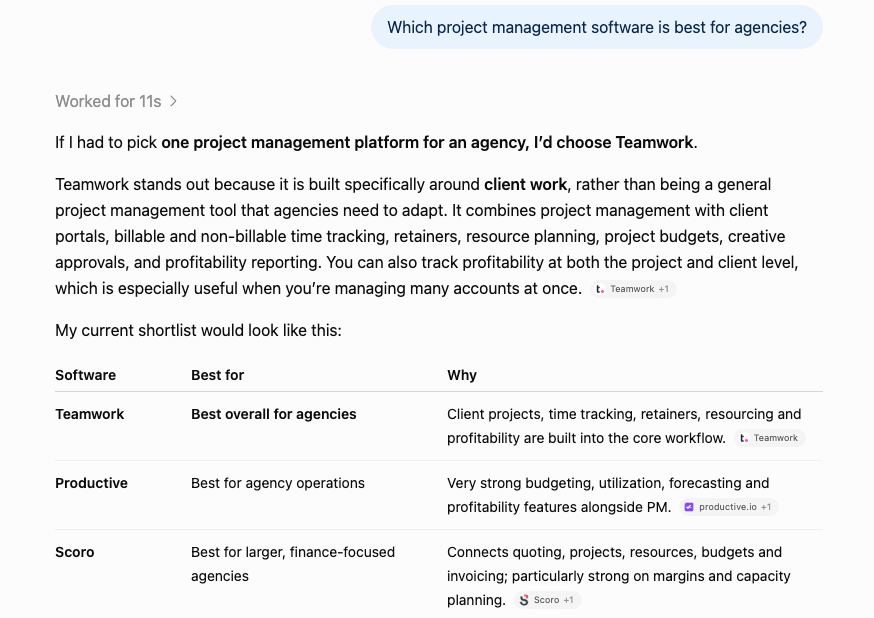
The whole process looks roughly like this:
- 1 Define the topics you want to track
- 2 Build a list of customer prompts
- 3 Choose the AI platforms you want to monitor
- 4 Run the same prompts across each platform
- 5 Record which brands appear in the AI-generated responses
- 6 Calculate your AI share of voice
- 7 Repeat the process regularly using the same setup
Once you have a baseline, you can benchmark against competitors, spot the prompts they’re winning, and see what may be driving their visibility.
Now, while I wouldn’t dismiss the manual approach entirely, I’ve found there are much more efficient ways to do this.
Manual tracking works well for a small group of high-priority prompts or for understanding what drives the percentage before you start relying on a dashboard.
It also lets you look closely at the actual answers instead of immediately reducing everything to a score.
The problem is scale.
Once you’re tracking 20+ of prompts, 10+ competitors, and multiple AI platforms, doing it manually becomes difficult to manage consistently.
And that’s where dedicated AI visibility tools come in handy.
They automate much of the tracking, keep your measurement setup consistent, and make it easier to compare and contrast over time.
Best tools to measure share of voice in AI search in 2026
| Tool | Key features | Best for | Starting price |
|---|---|---|---|
|
1
|
SOV tracking, sentiment tracking, citation analysis, AI-powered strategic recommendations
|
Small businesses, mid-market teams, and agencies
|
$99/month
|
|
2
|
SOV tracking, prompt tracking, content optimization, FactCheck
|
Mid-market and enterprise SEO & content teams
|
$99/month
|
|
3
|
SOV tracking, citation analysis, configurable views, Competitor Heatmap
|
Small businesses, mid-market teams, and cross-functional teams
|
Free plan available
|
|
SOV tracking, 1:1 competitor analysis, sentiment tracking, AI-powered strategic recommendations
|
Mid-market and enterprise teams
|
$99/month
|
|
|
SOV tracking, sentiment tracking, citation analysis, AI prompt research
|
Agencies, small businesses, and marketing teams
|
€29/month
|
|
|
SOV tracking, sentiment tracking, automatic competitor discovery
|
Mid-market and enterprise teams
|
$99/month
|
|
|
SOV tracking, AI-referred traffic analysis, revenue attribution
|
Mid-market and enterprise product and growth teams
|
Custom
|


I reviewed 15 of the most popular AI SOV tools on the market before narrowing this list to the lucky 7.
The 8 that didn’t make the final cut (Peec AI, Ahrefs Brand Radar, HubSpot AEO, Rankability, Goodie, Scrunch AI, Slate, and Klue) were either too similar to stronger picks, less focused on AI SOV, or didn’t add enough to justify another spot on the list.
I wanted the shortlist to be varied enough that you can find a good fit regardless of your budget, team size, or how deep you want to go with AI visibility data.
Share of voice tracking was a must, but I also highlighted features that complement it well, such as source analysis and sentiment.
Let’s dive in.
01 Chatbeat
N/A
14-day free trial
From $199/month
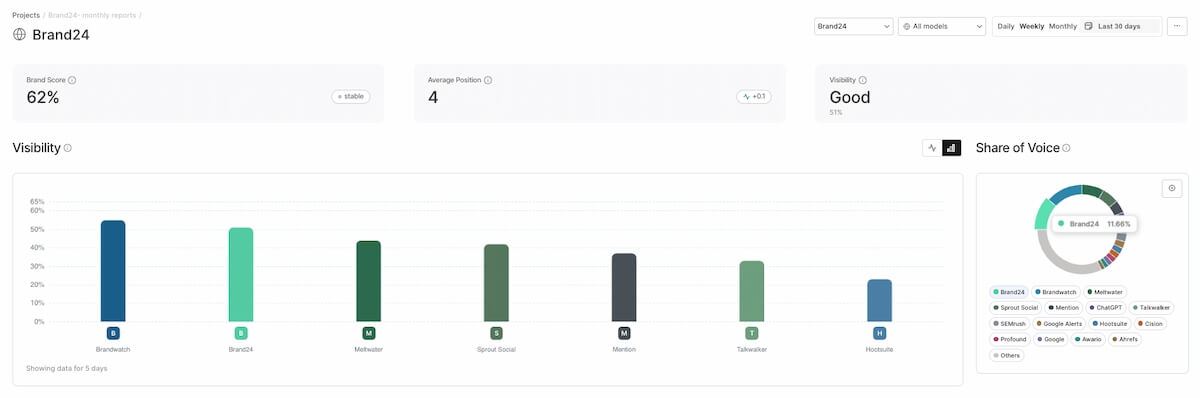
Chatbeat covers the full AI SOV workflow: prompts, rankings, sources, sentiment, context, and recommendations for improving your brand’s visibility.
It’s actually Brand24’s own AI visibility tool. We first built it to support our internal workflow, then realized it was useful enough to turn it into a product other teams could use, too.
So yes, this recommendation comes with a little bias. But I wouldn’t put it first if I didn’t think it genuinely earned the spot.
I like that Chatbeat doesn’t reduce SOV to one chart. The Overview tab gives you four main angles at a glance: your overall share of voice, how it changes over time, how it differs by chatbot, and where each brand ranks.
It’s a great starting point. From there, you can dig into competitors, sources, sentiment analysis, and platform-level gaps to see what’s really going on behind the % score.
Key features:
- Share of Voice breakdowns – you can compare your SOV against competitors, track how it changes over time, and break it down by individual AI platform.
- Key Sources – Chatbeat shows which domains and sources AI tools rely on when answering prompts in your niche. For me, this is one of the most actionable views because it shows where competitors are earning authority, and where you may want to be mentioned too.
- Context and sentiment – visibility means very little if AI keeps misrepresenting your brand. The Context section shows sentiment trends and the topics AI associates with your brand, so you can see how you’re being positioned, not just how often you appear.
AI platforms covered: ChatGPT, Gemini, Claude, DeepSeek, Perplexity, Grok, Copilot, Google AI Mode, Google AI Overviews.
✅ Pros:
- The main SOV views are grouped neatly in the Overview
- Covers the whole workflow, with clear paths from tracking to deeper analysis
- GEO Recommendations give you something concrete to work on after the analysis
- Suggested Prompts make it easier to expand your tracking beyond the obvious queries
❌ Cons:
- No historical data
- The Essential plan is limited to 30 prompts and one project
For me, Chatbeat works best as an ongoing pulse check. You check your stats, take the useful insights, act on them, and then come back later to see whether those changes made any difference.
That’s why I’d most recommend it to SEO, content, PR, and brand teams that monitor AI visibility as part of their day-to-day work.
And if you already use Brand24, you don’t necessarily need to add Chatbeat to your toolkit. AI Visibility is available as an add-on to your existing subscription, so you can track SOV, prompts, competitors, and citations right inside Brand24.
02 Profound
4.5/5 – G2 (1,129 reviews)
7-day free trial
From $99/month
Profound is one of the more comprehensive AI visibility platforms I tested.
There’s a lot packed into it: share of voice, citations, sentiment, opportunities, prompt research, and content workflows.
But what stood out to me most is how closely the tracking and content work are connected. Once you spot a visibility gap, Profound gives you a clear path into the content side of fixing it.
Key features:
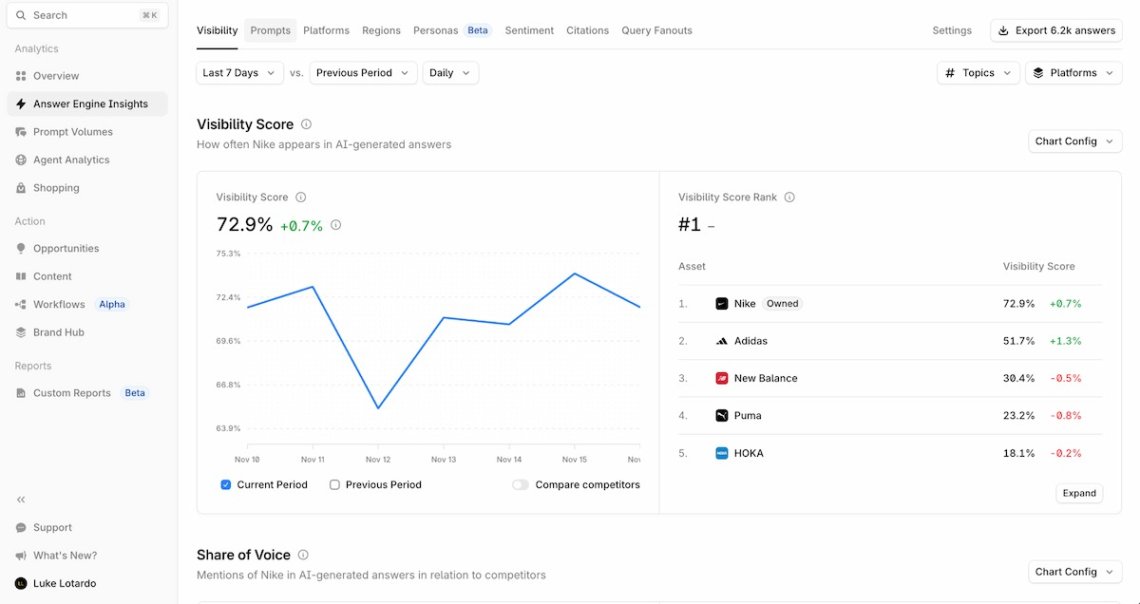
- Daily prompt tracking – Profound reruns your tracked prompts every day and records SOV, rankings, citations, and sentiment.
- Content optimization – this is a big one for content teams. You can create new content or optimize existing pages using citation data and top-performing competitor content as context.
- FactCheck – Profound checks factual claims AI makes about your brand against your own source material and shows which citations may be feeding incorrect information. I haven’t seen this handled quite as directly in any other tool.
AI platforms covered: ChatGPT, Gemini, Claude, DeepSeek, Perplexity, Grok, Copilot, Google AI Mode, Google AI Overviews.
✅ Pros:
- Clean dashboard that’s easy to navigate
- Daily prompt tracking for visibility changes
- Prompt Volumes help prioritize what to track
- Content Tab to help you get cited by AI answer engines
- FactCheck flags incorrect or outdated brand information
❌ Cons:
- The Starter plan only covers one AI model, and the price climbs up quickly once you need to track more platforms
- Quite a learning curve once you get into the deeper reports
I’d recommend Profound especially to SEO and content teams that want to track AI visibility closely. You can follow SOV, citations, sentiment, and prompt performance in enough detail to see where competitors are pulling ahead.
I also like that FactCheck sits alongside that visibility data because negative or inaccurate AI sentiment can start to affect trust and the sales pipeline if it goes unchecked.
Once you spot a gap, you can move straight to improving an existing page or creating something new based on the data.
03 AthenaHQ
4.9/5 – G2 (44 reviews)
Free Plan available
From $295/month
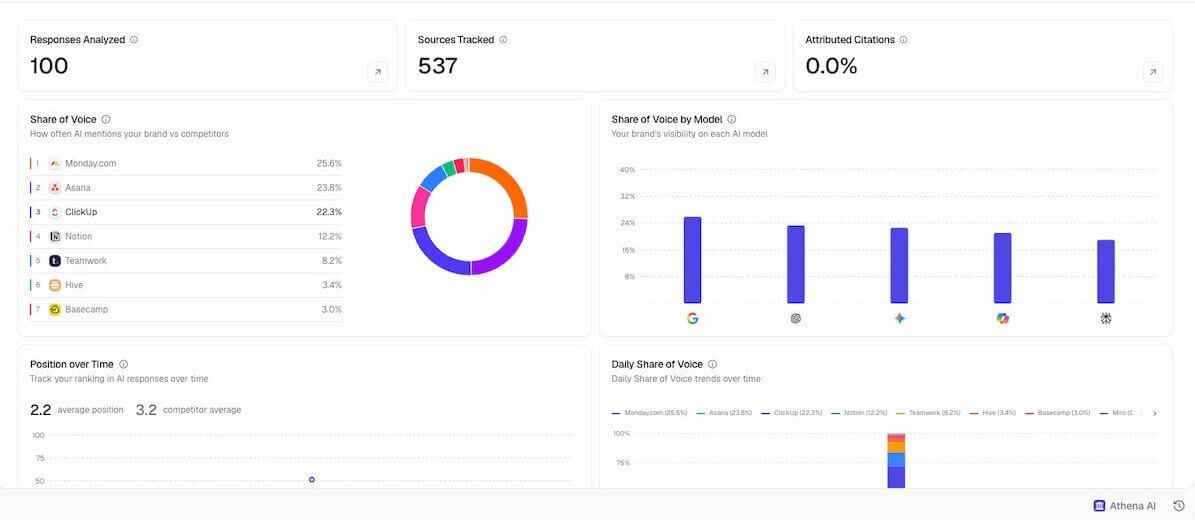
AthenaHQ covers your AI SOV basics, including competitor performance, citations, and content analysis.
But it really won me over with its flexibility.
You can create different views around personas, teams, regions, or goals. That makes it easy to tailor the same data for different team members, who view AI visibility from slightly different angles.
Key features:
- Configurable views – you can tailor dashboards around different personas, teams, regions, or goals.
- Competitor Heatmap – one of my favorite views in AthenaHQ. It shows AI brand visibility by topic, so you can quickly see where you’re ahead and where competitors are showing up more often in AI search results.
- Source URLs and attributed content – you can trace AI visibility back to specific pages, both your own and competitors’, and see which sources are feeding into an AI-generated response.
AI platforms covered: ChatGPT, Gemini, Claude, DeepSeek, Perplexity, Grok, Copilot, Google AI Mode, Google AI Overviews, Meta AI.
✅ Pros:
- Very strong source tracking down to individual URLs
- Configurable views for different personas, teams, regions, and goals
- Brand voice and guideline controls help keep your AI-generated content on-brand
❌ Cons:
- The prompt library is thin on industry-specific starting points
- The Free plan relies on credits, and tracking lots of prompts and AI models can burn through them quickly
AthenaHQ is a perfect starting point if you want to test AI visibility tracking without paying upfront.
The free plan gives you enough room to explore the basics, build a tracking setup, and see whether the platform fits your workflow.
04 Semrush AI Visibility Toolkit
N/A
No free trial
$99/month
Semrush is one of the biggest SEO platforms out there, with tools for keyword research, competitor analysis, site audits, content, and more. Its AI Visibility Toolkit adds AI search tracking to that existing ecosystem.
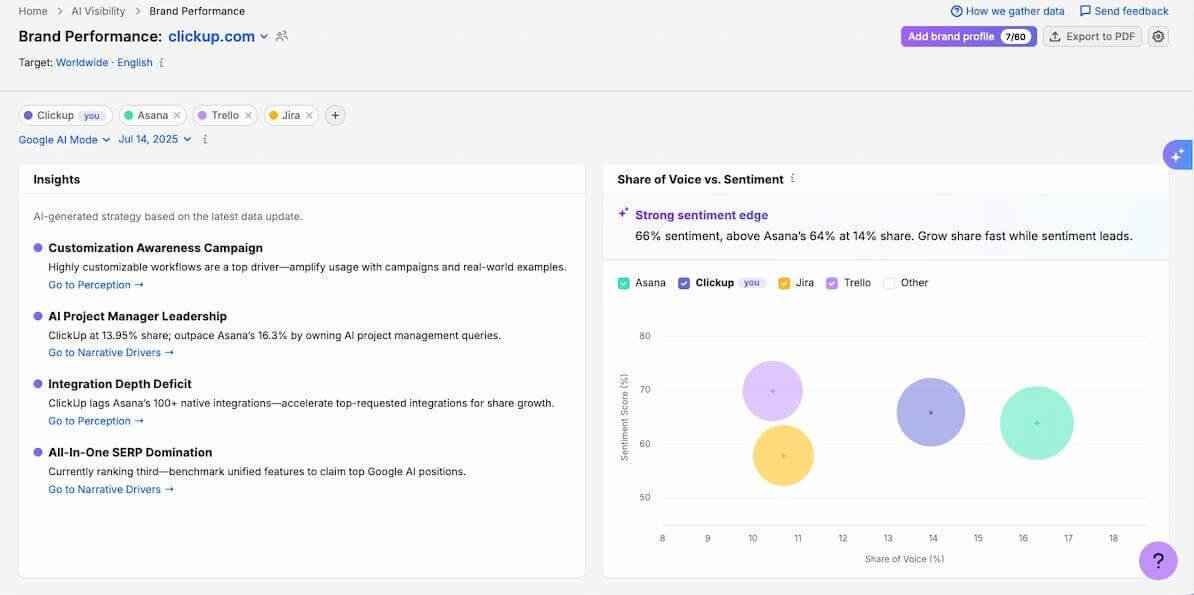
And a full toolkit it is. There are separate reports for SOV, competitors, prompts, sentiment, business drivers, and opportunities, with plenty of room to keep digging.
I had a lot of fun digging through it because so much of the analysis is already organized for you: key gaps, competitor advantages, sentiment drivers, and suggested next steps are grouped into small, easy-to-scan sections.
It’s also heavily AI-powered, so you keep getting little summaries and recommendations as you move through the reports. That makes it much easier to spot where you’re losing ground, understand why, and figure out what to work on next.
Key features:
- Key Business Drivers – this was one of my favorite reports. Semrush groups mentions by topic related to your niche and shows how your share of voice changes for each one.
- 1:1 competitor analysis – besides the overall comparison, you can open dedicated reports for individual competitors and compare share of voice and sentiment for the same prompts.
- AI Strategic Opportunities – Semrush turns visibility gaps into concrete recommendations and groups them into short-, medium-, and long-term opportunities, so you can see where improving your SOV is most realistic.
AI platforms covered: ChatGPT, Gemini, Claude, DeepSeek, Perplexity, Grok, Copilot, Google AI Mode, Google AI Overviews.
✅ Pros:
- A natural extension for teams already using Semrush for SEO
- Plenty of AI-powered recommendations
- Daily Prompt Tracking to see whether your optimizations are moving the needle
- AI Search Site Audit flags crawlability issues
❌ Cons:
- There’s no free trial, so you need a paid subscription to test the toolkit
- Per-user pricing can get expensive for larger teams
- If you’re not already using Semrush, there are more affordable standalone tools on this list
Semrush is the easiest recommendation here for teams that already rely on it for SEO.
You can keep your regular search work and AI visibility analysis closer together, rather than moving between separate platforms every time you want to check SOV.
05 Otterly.AI
4.7/5 – G2 (54 reviews)
7-day Free Trial
From €29/month
Otterly.AI is a tool agencies are going to love. It works perfectly well for individual marketers and in-house teams too, but the dedicated agency setup comes with a few extras that can make client work much easier.
As an agency, you get separate workspaces for each client, Pitch Workspaces for running audits before a prospect signs, and custom Looker Studio reports with your own branding.
But there’s something for everyone: daily SOV updates, prompt-level sentiment, citation trends, prompt research, and ChatGPT Ads Tracking on every plan.
Key features:
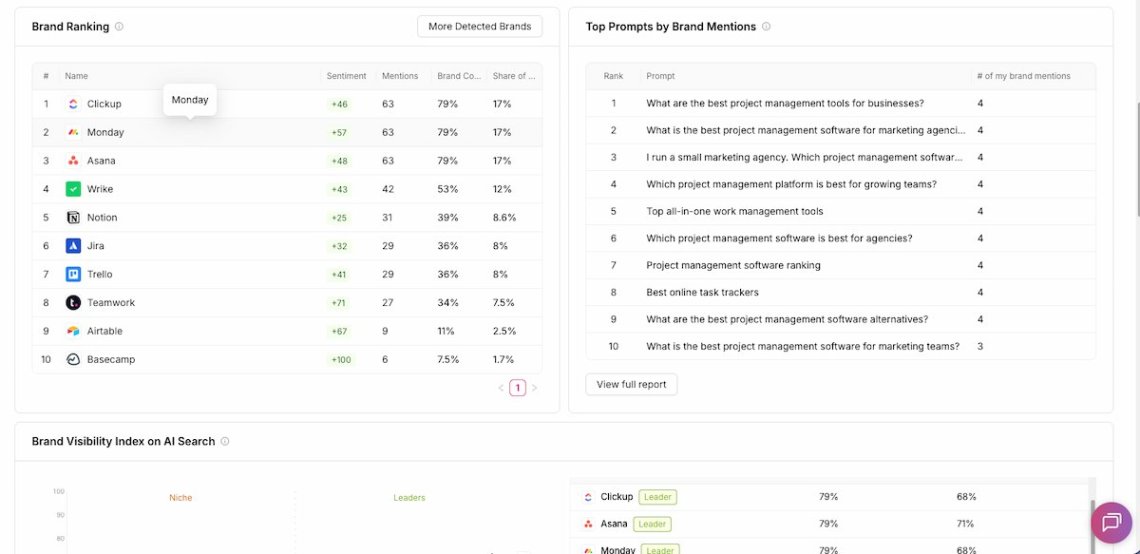
- Sentiment at a glance – each prompt has a sentiment indicator next to it, so you can scan your AI mentions and immediately see the context around them. Most of the tools I tested make you open a separate sentiment report for that.
- Domain Coverage Over Time – track how often your website and competitor domains are cited across AI responses and see whether that coverage is growing or dropping.
- AI prompt research – Otterly helps turn SEO keywords into prompts worth tracking, and Query Fan-Out shows the related searches an AI engine may generate behind a single prompt.
AI platforms covered: ChatGPT, Gemini, Claude, Perplexity, Copilot, Google AI Mode, Google AI Overviews.
✅ Pros:
- Strong prompt research for expanding your tracking set
- Content Checker flags content and technical issues that may hurt visibility
- API, MCP, and Looker Studio access on higher plans
- Localized tracking across 65+ countries
❌ Cons:
- The cheapest Lite plan includes only 15 prompts, and you can’t buy the +100 prompt add-on unless you move to Standard or Premium
- Gemini, Claude, and Google AI Mode cost extra on every self-serve plan
As I mentioned, Otterly.AI is probably the best fit for agencies thanks to its client workspaces, pitch audits, and branded reporting.
But there’s plenty here for in-house teams and individual marketers too. I liked using it, and I’m definitely not an agency.
The SOV tracking is solid, but the workspaces, daily updates, prompt-level sentiment, and citation views are what make it truly useful once AI search monitoring becomes a regular part of your workflow.
06 Similarweb
4.5/5 – G2 (1,187 reviews)
7-day Free Trial
From $99/month
Similarweb takes a slightly different approach to AI share of voice.
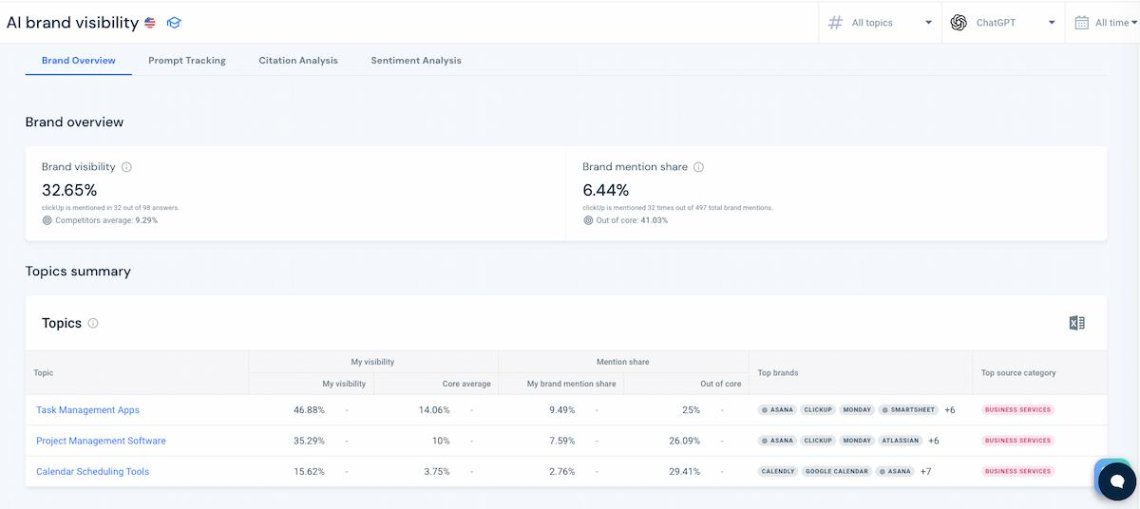
Instead of calculating your score only against a competitor set you choose yourself, Brand Mention Share looks at all brands appearing across the AI responses in your tracked topics.
That gives you a broader view of the competitive landscape and can surface brands you didn’t think to add as competitors in the first place.
Key features:
- Brand Mention Share – your score is calculated against all brands mentioned across the AI answers in your tracked topics, rather than only the competitors you manually selected.
- Automatic competitor discovery – because the denominator isn’t limited to a fixed competitor list, you can spot new brands gaining visibility before they become obvious competitors.
- Sentiment comparison – you can compare sentiment scores between brands in a similar way to Share of Voice, which adds useful context when two brands are mentioned at similar rates.
AI platforms covered: ChatGPT, Gemini, Perplexity, Google AI Mode.
✅ Pros:
- Broader SOV methodology with the full picture of the competitive landscape
- Can reveal emerging competitors you might otherwise leave out of your tracking
- Sentiment can be compared across brands alongside visibility
❌ Cons:
- AI platform availability varies by region, and coverage is especially limited in the US
- Setup takes longer than with some of the more lightweight tools on this list
- Historical data is limited on lower plans
Similarweb is one I’d pick if you care a lot about how the SOV number is calculated. Its broader denominator makes the score harder to inflate by choosing a too-narrow set of competitors.
That also makes it useful for competitive research.
You’re not just checking whether you beat the brands you already know about. You can see who is getting mentioned across the category and catch new competitors as they start gaining ground.
07 Amplitude
4.5/5 – G2 (3,865reviews)
Free plan available
Custom pricing
Amplitude is best known as a product and digital analytics platform, with tools for funnels, journeys, cohorts, and session replay. Its AI Visibility features bring AI search data into that same environment.
That makes it quite different from the other tools here.
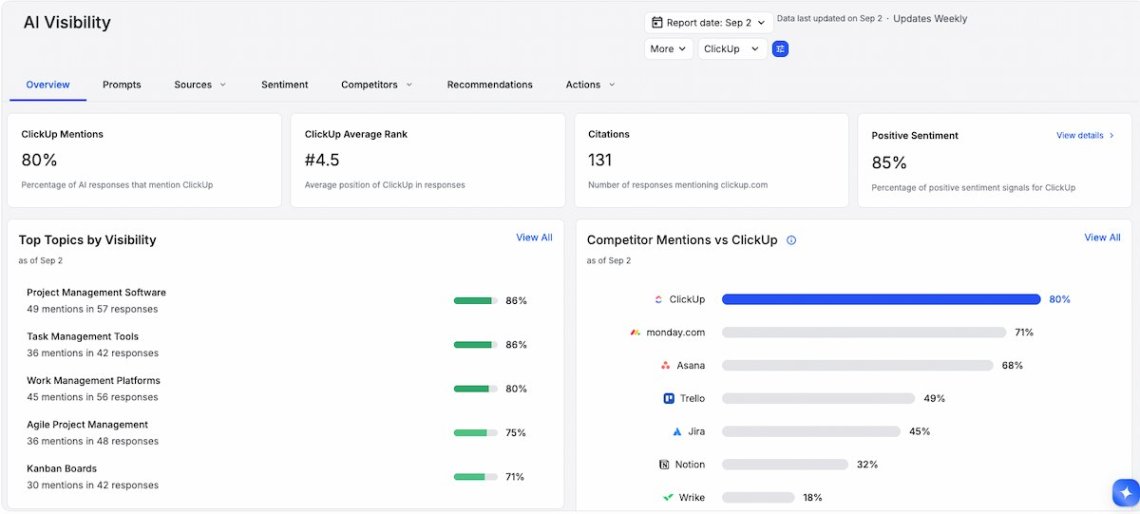
Instead of treating SOV as the end metric, Amplitude lets you see whether stronger AI visibility is followed by more AI-referred traffic, better conversion rates, or higher revenue.
Key features:
- Connect SOV to business results – build a funnel that starts with AI-referred sessions from ChatGPT, follows users through your signup or demo request flow, and attributes revenue to the prompts where your brand appeared.
- Track AI-referred visitors – see how people coming from AI search behave once they land on your site, including the paths they take and where they drop off.
- Session Replay for AI traffic – watch real sessions from AI-referred visitors to understand how they interact with your website or app.
AI platforms covered: ChatGPT, Google AI Overviews.
✅ Pros:
- Connects AI SOV directly with AI-referred traffic, conversions, and revenue
- Experimentation tools let you test how content changes affect visibility and performance
- Combines AI visibility with product and behavioral analytics
❌ Cons:
- Only covers ChatGPT and Google AI Overviews
- More complex setup than dedicated SOV tools
- It can be overkill if you don’t already need Amplitude’s broader analytics features
Amplitude wouldn’t be my first choice if your main goal is simply to compare SOV across many AI platforms. With only two chatbots covered, you miss a big part of the picture.
But if you already use Amplitude, or you care about proving what AI visibility is worth beyond the score itself, it becomes much more interesting.
Being able to connect a change in SOV with traffic, conversions, and revenue gives you something most of the dedicated trackers on this list can’t.
How to improve your AI SOV?
So, how do you put all that data to work?
Your tracked prompts, competitor positions, citations, and sources can all point you to the areas where you have the best chance of gaining visibility.
We’ve seen this work in practice, too. In our Viessmann case study, the team used Chatbeat data to guide its SEO, content, and publisher strategy.
Within four months, their share of voice for relevant topics grew from roughly 18-19% to 29%, while median position moved from #2 to #1, and Brand Score increased by 6 percentage points.
To put that into perspective, AthenaHQ’s State of AI Search 2026 report found that leading brands average around 33.6% AI share of voice, while brands in second and third place average 19.5% and 13.3%, respectively.
While the benchmarks aren’t directly comparable across datasets, Viessmann’s 29% result is impressively close to the 33.6% average for category leaders.
So, what did they change, and what can you take from it to improve your own AI SOV?
Let’s break it down.
01 Start with the prompts where you’re losing
Start where the gap is obvious.
Review your tracked prompts and compare your positions, SOV, and competitors’ performance. High-intent questions where competitors consistently appear ahead of you should move pretty quickly to the top of the list.
For example, prioritize prompts where:
- Your competitors are regularly recommended, and you aren’t
- Your position is noticeably lower than theirs
- The topic is closely connected to a buying decision
- Your visibility has been dropping over time
02 Inspect the prompt and figure out the “why”
Once you find a weak prompt, dig into it.
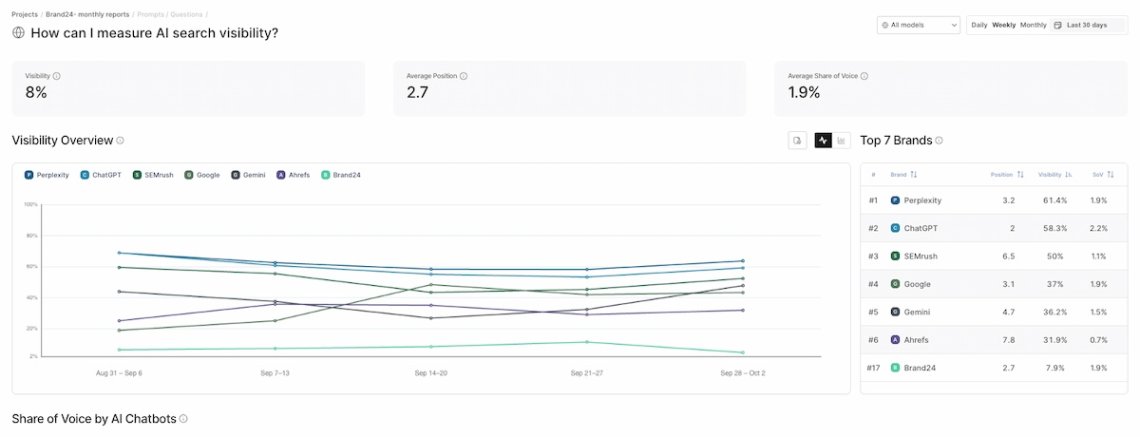
Tools like Chatbeat let you move beyond the overall SOV score and inspect the data behind individual prompts, including the sources AI uses to form its answers.
This is where things get interesting.
Maybe AI keeps recommending a competitor because the sources it trusts rank them higher. Maybe it’s pulling directly from your competitor’s website. Or maybe there’s a whole cluster of related questions your content doesn’t cover yet.
03 Go after the sources AI models keep citing
Pay close attention to the sources behind those weak prompts.
If AI platforms repeatedly use a third-party site that talks extensively about your competitors but barely mentions you, getting onto that site can be a very direct way to change the information available to them.
Depending on the source, that might mean:
- Getting included in an existing comparison or ranking: reach out to the editor with a short pitch explaining what’s changed about your product since the article was published.
- Pitching expert commentary: find articles where the author quotes industry voices and offer a specific, data-backed insight they can add.
- Contributing an article: look for sites with a “write for us” page or contributor guidelines.
- Earning a review or product mention: send the product to the publication’s review team with a clear use case they can test.
Viessmann found exactly this kind of opportunity. Its citation analysis uncovered websites that AI models cited frequently but weren’t previously on the team’s industry radar. Those sources then became targets for its publisher and PR work.
And if the source happens to be your competitor’s own domain? Well, asking nicely probably won’t do much.
That’s your cue to build a stronger source of your own.
04 Give AI a better page to cite
Sometimes improving AI SOV looks suspiciously like good old SEO. Funny how that keeps happening.
If competitors’ own pages are winning the citations, audit the page on your site that should be competing with them. Compare the two side by side and look for specific gaps:
- Check whether your page answers the exact prompt, not just the broader topic
- Compare the depth and structure of both pages
- Add clear headings and concise answers AI can easily pick up
- Look for missing evidence, such as benchmarks, comparisons, expert input, or original research
- Check whether the competitor uses useful formats you don’t, such as pricing or feature comparison tables
- Strengthen internal linking, backlinks, and topical authority around the page
- Track the prompt again after making changes to see whether the citation shifts
Viessmann followed a similar SEO + AI approach: traditional search data showed where demand existed, while AI visibility data showed what models were answering, recommending, and citing. Topics that looked promising on both sides got priority.
05 Use fan-out queries to find your next content opportunities
The prompt you’re tracking is rarely the whole story.
AI search systems can expand one question into related queries to gather enough information to answer it.
If your tracking tool shows those queries, use them as another layer of content research.
Say your main tracked prompt maps nicely to a homepage or pillar page. Its fan-out queries might reveal more specific questions about pricing, alternatives, features, comparisons, use cases, or reviews.
So if your main tracked prompt is “best project management tools for agencies”, fan-out queries might include “project management pricing for small agencies,” ‘or “project management tools with client portal features.”
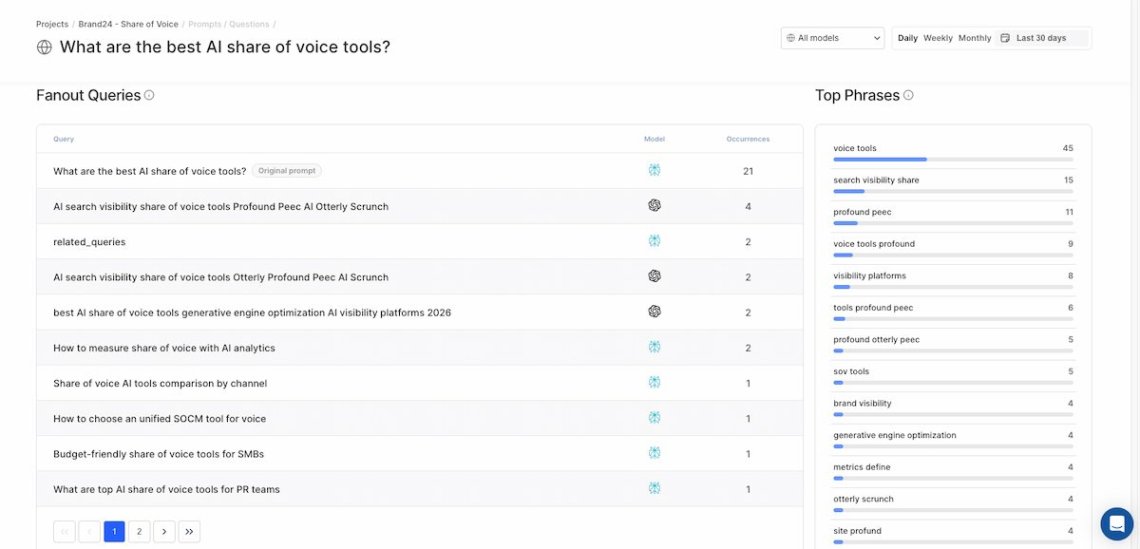
Some may deserve a new blog post. Others might fit as a section on an existing page.
And don’t forget about older content. Keeping relevant pages fresh can help prevent citation loss as they age.
The point isn’t to publish a page for every query you find. It’s to spot useful supporting topics that can strengthen your authority around the main prompt and give AI systems more relevant content to cite.
06 Keep tracking the same prompts and see what moves
Then comes the glamorous part: doing it again.
Keep a stable core set of important prompts and watch what happens after your SEO, content, and PR changes.
If a prompt improves, see what changed and build on it. If nothing moves, try something else.
That’s the real value of tracking AI share of voice.
The score tells you where you stand. The prompts, competitors, sources, and rankings behind it tell you where to go next.
And once you start using it that way, AI SOV becomes much less of a metric and much more of an ongoing SEO, content, and PR feedback loop.

Conclusion
AI share of voice is a great metric because it gives you something plain AI visibility doesn’t: context.
You can see whether your brand is keeping up with competitors, which prompts are dragging down your score, and where the biggest gaps are.
The important part is not to get too attached to the percentage itself. Break it down by prompt, platform, competitor, position, and source. Look at other AI metrics, especially sentiment and citations. That’s where the useful stuff usually is.
If your SOV is low, use those signals to decide what to do next:
- improve the pages that should be winning,
- cover the related questions the AI response is pulling in,
- strengthen your authority around the topic,
- and look at the third-party sources AI already trusts.
So yes, track the number. But don’t stop there.
FAQ
Start with a set of prompts your audience is likely to ask AI tools, such as product comparisons, recommendations, and category-related questions. Then track how often your brand appears compared with competitors across platforms such as ChatGPT, Gemini, and Claude.
You can do this manually, but an AI monitoring tool makes it much easier to rerun the same prompts and compare results over time. Keep your core prompts and competitor set consistent so changes in your AI SOV are easier to track.
AI SOV can shift significantly within days due to content changes, so it’s worth keeping a fairly close eye on it.
A monthly in-depth check is a good baseline, especially after making changes to your content or AI visibility strategy, as it gives you time to see whether they’re working. In between, run weekly or biweekly check-ins to keep an eye on sudden spikes, drops, or emerging trends.
AI share of voice is the main benchmark, but it works best alongside other metrics. Look at your average position, prompt-level visibility, sentiment, citations, source quality, competitor performance, and AI-referred traffic where available.
Compare them based on the things that will shape your day-to-day tracking: which AI platforms they cover, how many prompts you can monitor, what competitor and citation data they show, whether they track sentiment, and how flexible the reporting is.
It’s also worth checking pricing and integrations, especially if you want to connect AI visibility data with the rest of your marketing stack.
Some of the best tools to measure share of voice in AI search in 2026 include Chatbeat, Profound, AthenaHQ, Semrush AI Visibility Toolkit, Otterly.AI, Similarweb, and Amplitude.
They all measure AI visibility slightly differently, so the right choice depends on how many prompts and platforms you want to track, your budget, and whether you also need features such as citation analysis, sentiment tracking, or AI-referred traffic analysis.
Related articles




Top Reads
X (Twitter) Analytics Tools: The 15 Best for 2026
Brand Awareness Strategy [Ultimate Guide for 2026]
Sentiment Analysis in 2026: Definition, AI Methods & Original Research
Brand Monitoring: Tools & Guide for 2026
Brand Reputation Management: Expert Guide + Original Research [2026]
How to See How Many Times a Hashtag Was Used on X (Twitter)
9 Hashtag Tracking Tools Tested in 2026
Social Media Reach: How to Measure & Improve It in 2026?
Share of Voice: Definition, Formula, Tools [2026 Guide]
Social Media Analysis: Complete Guide for 2026
Start Social Listening!
Get the Brand24 trial and start social listening like a PRO.