Table of contents
2M Marketers

With 3 billion+ monthly active users and 63% checking the app daily, Instagram is where brand reputation is built (or broken) in real time. Manual tracking won’t cut it.
In this guide, I gathered tested strategies and best tips to help you learn how to capture and analyze untagged Instagram mentions, surface sentiment trends, and turn raw data into actionable insights.
Key takeaways
-
Instagram is too big to ignore.
With 2 billion+ monthly active users and 63% opening the app daily, it's one of the world's most engaged platforms — and most brand conversations there go unmonitored.
-
Most mentions happen without a tag — and without monitoring, you'll never see them.
People post about brands in captions, Stories, and comment threads without using @. That's where the most candid — and valuable — conversations happen.
-
Instagram moves fast — early detection beats damage control.
A critical comment thread can go viral before your team's morning standup. Monitoring acts as a PR early warning system, catching negative sentiment before it spreads.
-
Influencer marketing without monitoring is guesswork.
Monitoring shows how an influencer's audience actually responded — not just the numbers the influencer reports. Sentiment and downstream brand lift tell the real story.
-
Your competitors' comment sections are market research.
Tracking what people say about rivals on Instagram reveals where they're falling short — and where you can step in with a better offer.
What is Instagram monitoring?
Short Answer: Instagram monitoring is the process of scanning Instagram for conversations, content, and signals relevant to your business — including mentions of your brand name, competitor activity, trending hashtags, influencer performance, and audience sentiment.
It goes beyond checking notifications. A single post about your product in someone’s Story — no tag, no hashtag — vanishes from your radar unless you have a system in place.
What you can monitor:
- 1 Direct brand mentions (tagged with @)
- 2 Untagged brand mentions in captions and comments
- 3 Hashtag conversations
- 4 Competitor account activity and mentions
- 5 Influencer content and its real reach
- 6 Sentiment around campaigns and product launches
What you can’t monitor (and shouldn’t try to): private accounts and DMs.
Those are off-limits to any legitimate tool. If an app promises otherwise, it’s a scam.
Why Instagram monitoring matters?
Here are the numbers that make the case:
| Metric | Value |
|---|---|
|
1
Monthly active users |
3 billion+ |
|
2
Daily active users |
500 million |
|
3
Users who open the app daily |
62% |
|
4
Avg. daily app opens per user |
7.8 times/day |
|
5
Average time spent per day |
33.9 minutes |
Instagram moves fast. A critical comment thread, a viral Reel reaction, a micro-influencer’s negative review — these can generate hundreds of responses in the time between your morning coffee and your first meeting. Monitoring is what closes that gap.
Instagram monitoring tips
| Tip | Why? |
|---|---|
|
Define what you’re listening for before you start. |
Brand reputation? Campaign performance? Competitive gaps? Influencer ROI? The answer shapes which keywords you track and which metrics you prioritize. |
|
Monitor more than your brand name. |
Product names, campaign slogans, key people at your company, industry-level terms (“best [category] in [city]”) — all of these catch conversations your brand name alone would miss. |
|
Instagram has a unique content rhythm — account for it. |
Stories disappear after 24 hours. Reels have a longer lifespan but frontloaded engagement. Monitoring tools that don’t account for format-specific behavior can undercount Story mentions significantly. |
|
Don’t monitor and do nothing. |
A customer sharing genuine praise deserves a response. An unanswered criticism in a comment thread compounds over time. Monitoring without engagement is half a strategy. |
|
Review DMs manually — tools can’t reach them. |
Private messages aren’t accessible to any monitoring tool. Build a regular DM review into your workflow; it’s often where unresolved issues surface first. |
|
Use sentiment filtering to triage, not just track. |
When mention volume is high, sentiment filtering tells you what actually needs attention — so your team isn’t reading through hundreds of positive comments to find the three that require action. |
What to look for in a monitoring tool?
Instagram-specific features matter, but the best tools go wider:
| Feature | Why it matters |
|---|---|
|
Untagged mention tracking |
Most Instagram mentions don’t include a direct @ |
|
Hashtag monitoring |
Brand and industry hashtags carry significant conversation |
|
Sentiment analysis |
Volume tells you what happened; sentiment tells you whether to act |
|
Influencer reach metrics |
Distinguish between accounts with real vs. inflated engagement |
|
Real-time alerts |
Crises don’t wait for your weekly report |
|
Cross-platform coverage |
Instagram conversations often echo on TikTok, Reddit, and review sites |
|
Competitor tracking |
Your own data is only half the picture |
Brand24 covers all of the above and pulls data from Instagram, TikTok, YouTube, Reddit, LinkedIn, Telegram, review platforms, podcasts, and news — so Instagram mentions land in context, not isolation.
In addition to the features listed above, Brand24 offers some additional benefits.
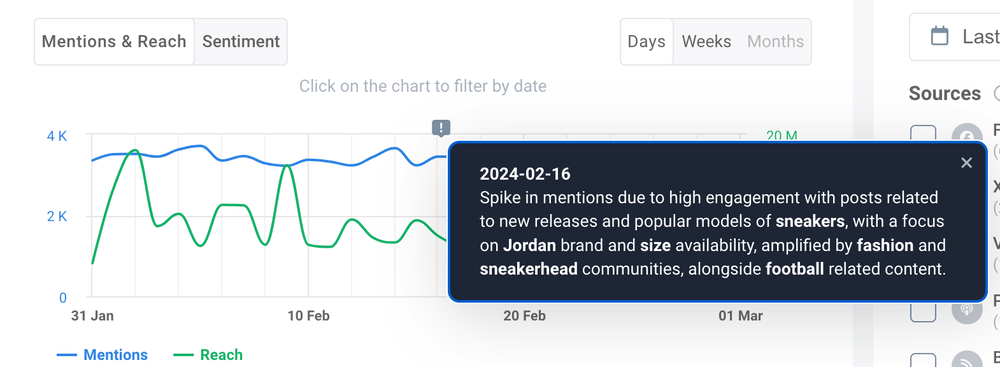
Thanks to advanced AI technology, Anomaly Detector by Brand24 can identify the causes of potential spikes in mentions. It’s a game-changer for all social media managers.
You don’t need to go through each comment and manually draw conclusions – the tool does it for you automatically.
Real-world examples
Pasibus — knowing which influencers actually move the needle
Pasibus is a Polish fast-casual burger brand that’s built a loyal, vocal fanbase on Instagram. Their Marketing Director, Maciej Moc, uses Brand24 to connect influencer activity with real business outcomes — correlating mention spikes with sales and reservations data to see which partnerships are worth repeating.
The result: smarter budget allocation, less guesswork, and a monitoring habit embedded in daily operations.

📚 Read Pasibus’s success story: How Pasibus Uses Brand24 to Understand Its Customers’ Needs
Uber — reading the room after a major launch
When Uber rolled out its redesigned rider app, the social response was immediate. Online discussion doubled within two days (from ~8–9K to 16–22K daily mentions), likes jumped 90%, shares 250%.
But beyond the positive buzz, Brand24 helped Uber identify which specific features were generating friction — feeding that feedback directly into the product roadmap.
Monitoring didn’t just measure success. It made the next version better.
📚 Read Uber’s success story: How Uber Increased Online Exposure by 24% with Social Listening
How to monitor Instagram: step by step
01 Start with Instagram Insights
Every business and creator account has access to Instagram Insights — the platform’s native analytics. It’s free, built in, and a decent starting point.
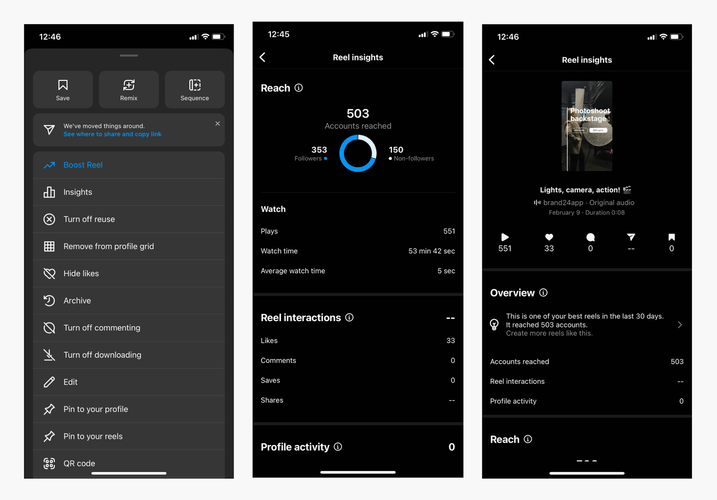
Instagram metrics you get:
- Follower growth and demographics
- Post, Reel, and Story performance
- Reach and impressions per content type
- Engagement rate trends
- Best-performing content
To access: profile → three lines (top right) → Insights. For individual posts, tap the three dots → View Insights.
The honest limitation: Insights only show what’s happening on your own account. No competitor data, no untagged mentions, no sentiment, no export.
It tells you your story — not the story others are telling about you.
02 Add a social listening layer
First things first, diving into such vast data can be time-consuming. And why bother if many advanced Instagram analytics tools can do this heavy lifting for you?
For the full picture, you need a tool that goes beyond your own account. Instagram monitoring tools scan public Instagram content for your keywords and surface relevant social mentions automatically — including the ones you’d never find manually.
The basic workflow I recommend:
- 1 Choose your keywords — brand name, product names, campaign hashtags, competitor names
- 2 The tool monitors public Instagram posts, Reels, and comments for those keywords
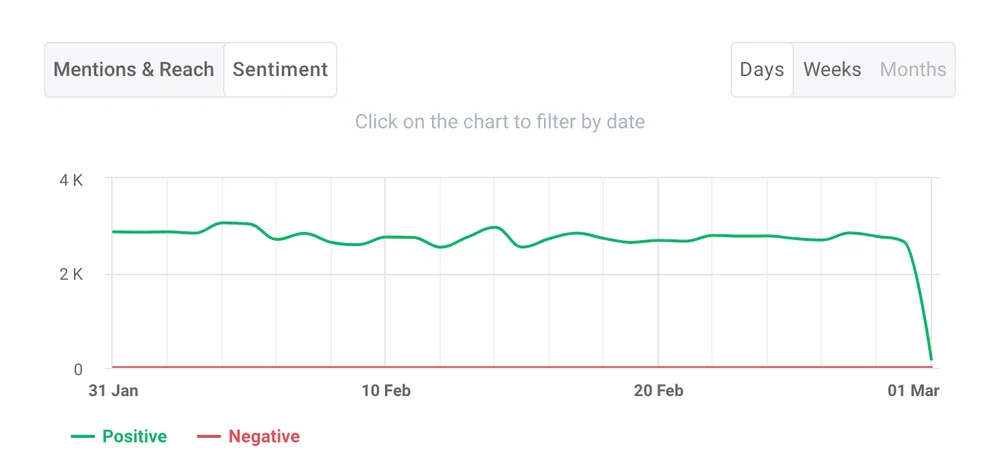
- 3 Mentions appear in a dashboard, filtered by date, sentiment, or reach
- 4 Set up alerts for spikes or high-priority keywords
- 5 Act on what surfaces — respond, collect, or escalate
Worth knowing: Untagged mentions are often the most candid. Someone writing “tried [brand] last week and honestly loved it” in a caption isn’t performing for the brand — they’re just talking. That’s the most useful signal you can get.
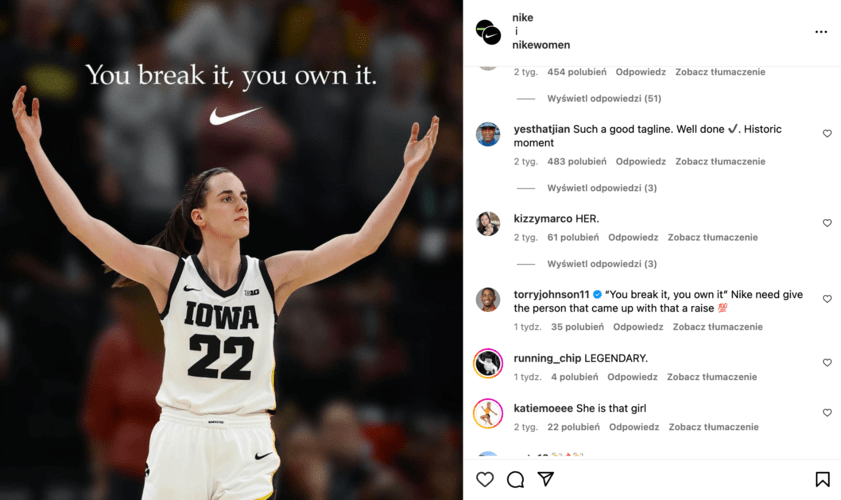
After looking at a comment like the one below, Nike can be sure they did a great job.

03 Track progress, not just snapshots
One-off checks tell you what happened. Regular monitoring tells you why, and what to do next.
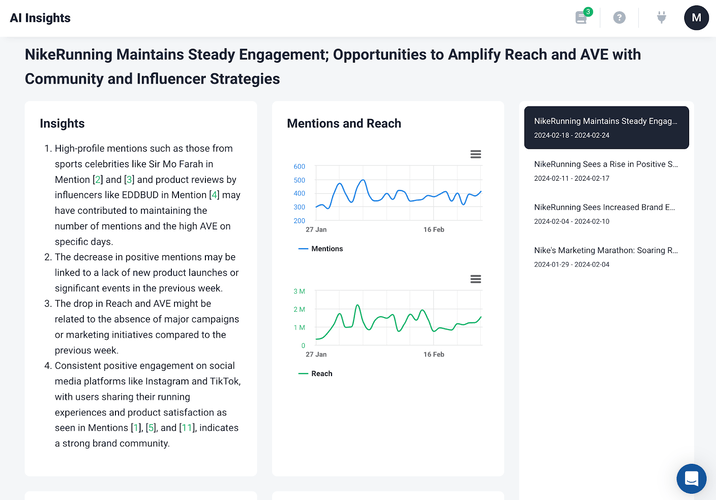
By monitoring Instagram performance, you can identify which types of posts get the most engagement – should you focus on reels or stories? You’ll know exactly what your audience prefers.
Moreover, regular monitoring helps you spot trends, find popular hashtags, and adapt quickly. Social media is always evolving, and what worked last month might not work today.
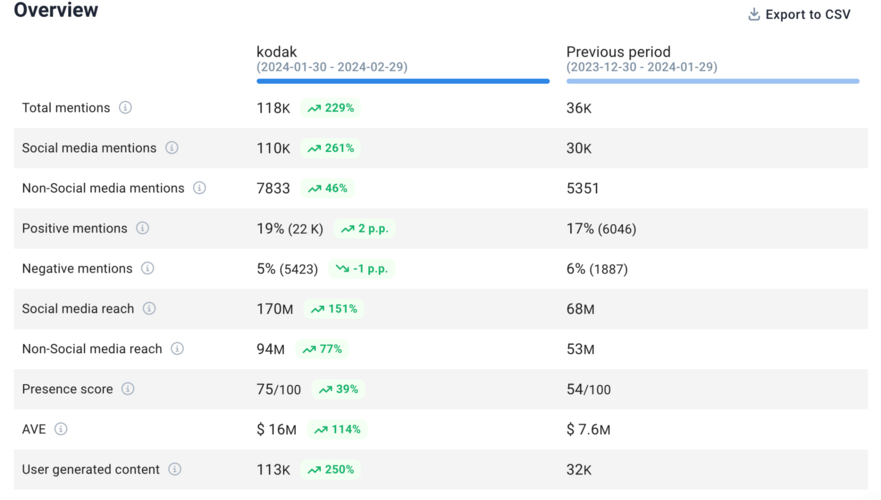
Brand24 also offers comparison features. By monitoring your progress, you can stay ahead of the curve and consistently deliver content that resonates with your audience. It’s super important.
(Take a look below. This is what a Brand24 period comparison looks like.)
Instagram Insights vs. social listening tools
Both are worth using. Instagram Insights is your account’s heartbeat. Social listening is the broader conversation your brand is living inside, whether you’re aware of it or not.
| Capability | Instagram Insights | Social listening tool |
|---|---|---|
|
Your own post performance |
✅ |
✅ |
|
Tagged brand mentions |
✅ (via notifications) |
✅ |
|
Untagged brand mentions |
❌ |
✅ |
|
Hashtag monitoring |
Limited |
✅ |
|
Competitor monitoring |
❌ |
✅ |
|
Sentiment analysis |
❌ |
✅ |
|
Influencer performance tracking |
❌ |
✅ |
|
Cross-platform data |
❌ |
✅ |
|
Data export |
❌ |
✅ |
|
Real-time alerts |
❌ |
✅ |
Conclusion: “Getting started” checklist
Instagram monitoring is not a one-time setup. It’s an ongoing feedback loop between what you put out and how it lands — and the brands that stay close to that loop consistently outperform the ones making decisions based on vibes.
Based on my media monitoring experience, I shortlisted 8 core steps you need to cover before you start:
- 1 Define 3–5 core keywords (brand name, product names, key hashtags)
- 2 List 2–3 competitor accounts you want to track
- 3 Set up or review Instagram Insights on your business account
- 4 Choose a social listening tool with native Instagram support and sentiment analysis
- 5 Configure real-time alerts for brand name and high-priority keywords
- 6 Establish a weekly rhythm: review mentions, DMs, and competitor activity
- 7 Assign ownership — someone specific who acts on flagged mentions within 24 hours
- 8 Run a period comparison every month to spot what's shifting
FAQ
Why monitor an Instagram profile?
It’s also how you find potential influencer partners, catch negative comments before they escalate, and spot user-generated content worth resharing.
Check out Brand24’s Instagram Competitor Analysis for more insights.
Is Instagram monitoring legal?
Private accounts and DMs cannot be monitored by any legitimate tool.
Can I track mentions when someone doesn’t tag me?
Instagram’s own notifications only surface direct @-tags. Everything else is invisible to native tools.
How is Instagram monitoring different from just checking Instagram Insights?
Instagram monitoring covers what others are saying about you, including on accounts and in comment threads you’d never think to check.
How often should I review Instagram monitoring data?
Real-time alerts handle anything urgent in between.
What keywords should I start with?
Does Instagram monitoring help with influencer marketing?
Beyond what an influencer reports in their own metrics, monitoring shows you how their audience actually responded — sentiment, conversation quality, and whether the brand lift lasted beyond the post itself.
Can Instagram Stories be monitored?
This is one reason real-time monitoring matters more on Instagram than on slower-moving platforms.