Table of contents
2M Marketers

Following hashtags on TikTok takes two taps, but understanding how they actually work takes a bit more.
Let’s walk through how following TikTok hashtags actually works, and how to keep track of them properly if you’re using them for marketing.
Key takeaways:
-
There are two ways to follow hashtags on TikTok
You can follow a hashtag natively inside the TikTok app by adding it to your Favorites, or you can track it with a social media monitoring tool like Brand24. The first option helps you browse content. The second allows you to measure performance and analyze results.
-
Following a hashtag in TikTok app ≠ seeing every post
Adding a hashtag to Favorites does not mean you’ll see every post that uses it. TikTok still ranks and filters content using its algorithm, which prioritizes engagement, watch time, and user behavior over simple hashtag usage.
-
Hashtags in 2026 are categorization tools
Hashtags no longer function as growth hacks. Instead, they help TikTok understand what your video is about and which niche it belongs to. They support content indexing and search visibility rather than directly driving reach.
-
Hashtags support TikTok search visibility
TikTok increasingly functions as a search engine, especially for Gen Z. Well-chosen hashtags help your video appear in search results, but only when they match your spoken words, captions, and on-screen text.
-
When do you need a hashtag tracking tool?
If you want to measure hashtag performance, TikTok alone isn’t enough. Inside the app, you can only see the number of posts using a hashtag. You won’t get reach data, sentiment analysis, trend detection, or cross-platform insights. To properly track hashtag performance, you need an external monitoring tool like Brand24.
How to follow a hashtag on TikTok?
There are 2 main ways you can follow hashtags on TikTok: inside the TikTok app and through hashtag tracking tools.
Without further ado, let’s check how to monitor hashtags across social media!
Method 1: Using TikTok search
Like Instagram, TikTok lets us follow hashtags. How to do it? It’s pretty simple.
Let’s imagine you want to follow content on Strava, a fitness tracking app used mostly by runners and cyclists.
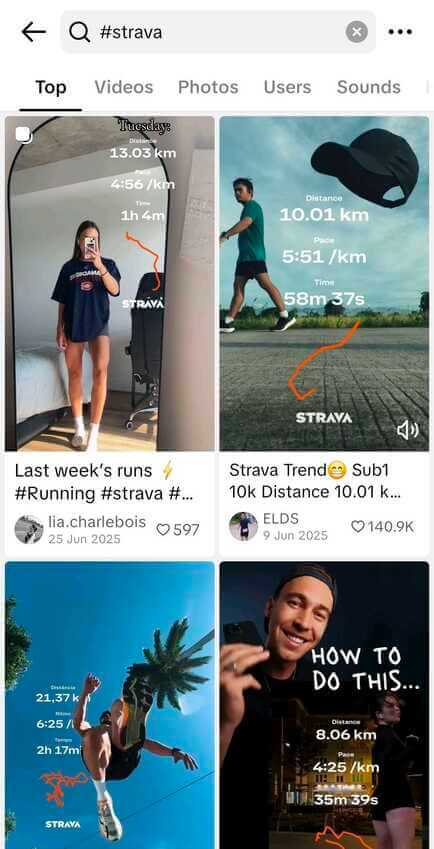
- Find the hashtag you want to follow by typing # plus a keyword related to the content you’re looking for. For example, to follow branded content for a fitness app, use #strava.
- Now you can browse the Top content for the hashtag.
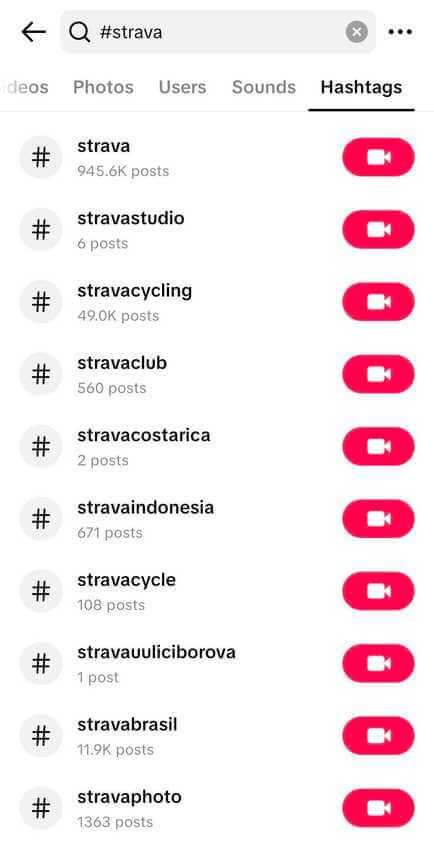
3. Click the “Hashtag” tab, and you’ll discover other similar TikTok hashtags and their volume. It’s an easy way to discover trending, semantically connected tags.
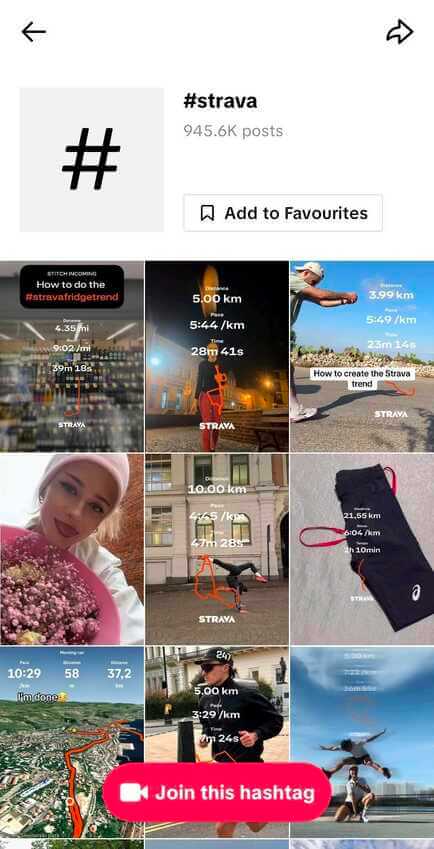
4. The next step is adding a hashtag to your Favorites.
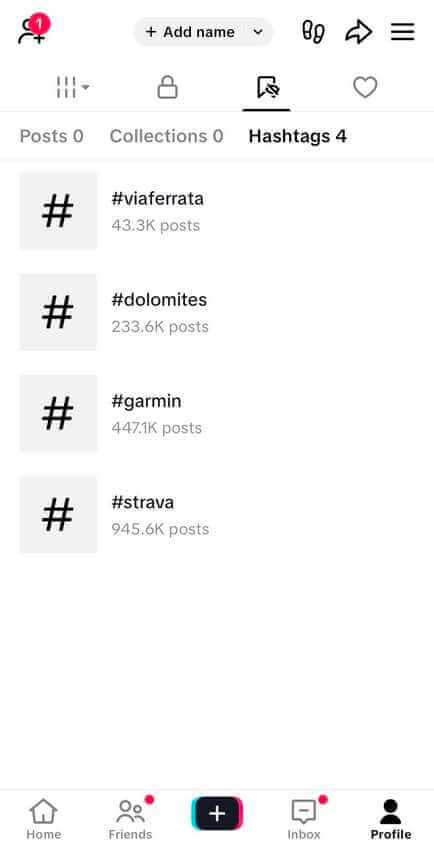
5. After that, go to your profile and click the bookmark icon to see the list of hashtags you follow.
ℹ️ Good to know
Adding a hashtag to Favorites doesn’t create a feed of every post using it. TikTok’s algorithm still decides what you see based on your engagement and behavior.
Also, TikTok doesn’t provide detailed hashtag analytics inside the app. You’ll only see the number of posts using the hashtag, without reach, growth, or sentiment metrics.
Adding a hashtag to Favorites on TikTok works more like bookmarking than subscribing. Here’s what happens:
| What you get | What you don't get |
|---|---|
|
Quick access through your Favorites ➡️ Hashtags tab |
A chronological feed of every post |
|
A stronger interest signal for your For You Page algorithm |
Guaranteed visibility of all # posts
|
|
A ranked Hashtag page (Top/Trending posts first)
|
Real-time updates |
|
Total number of posts using the hashtag |
Reach, growth trends, engagement data, sentiment |
For casual browsing, that’s usually enough: TikTok helps you discover content, but it doesn’t help you measure it.
If you need more intricate features like hashtag monitoring, sentiment analysis, or trends tracking, though, you’ll need something more advanced than the native app.
That’s where hashtag tracking tools come in!
Method 2: Track hashtags with a monitoring tool
You can use the power of a hashtag tracker to monitor hashtags on TikTok and other social media networks.
Here’s how it works in Brand24:
- Create a new project in Brand24 and enter the hashtag you want to track (for example, #strava or #stravacycling).
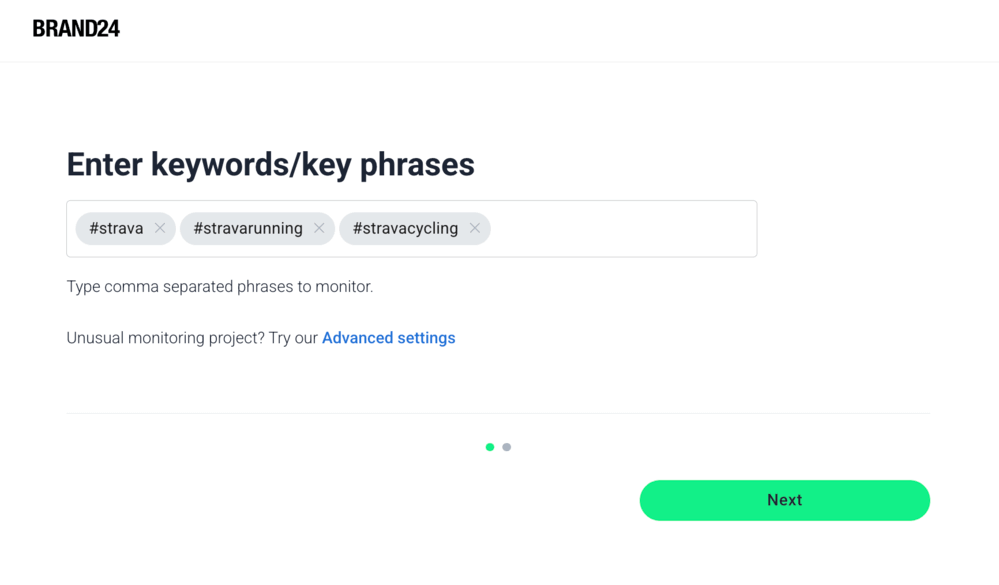
2. Then, choose the platforms you want to monitor, including TikTok, and start the project.
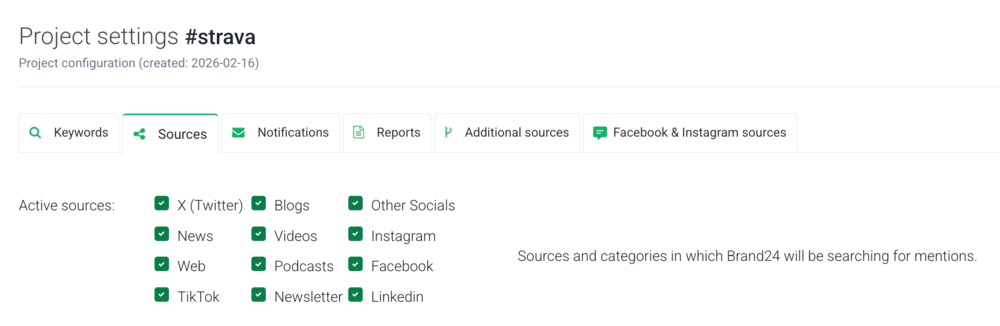
3. That’s it! From now on, Brand24 collects TikTok mentions containing your chosen hashtag in real time.
What you can see after setup
Once your project is running, you can:
- Measure overall Presence Score
- Track the number of hashtag mentions
- Measure the reach of posts using that hashtag
- Identify the most popular TikTok videos
- Analyze hashtag sentiment (positive, neutral, negative)
- Detect sudden spikes with real-time alerts
- Discover related and trending hashtags
- Catch relevant spoken mentions through TikTok video transcriptions
In general, you’ll be able to analyze hashtags on social media platforms in detail. With such a tool, you can easily track branded and niche hashtags.
Here you can see the Mentions tab of #stravarunning hashtag campaign:
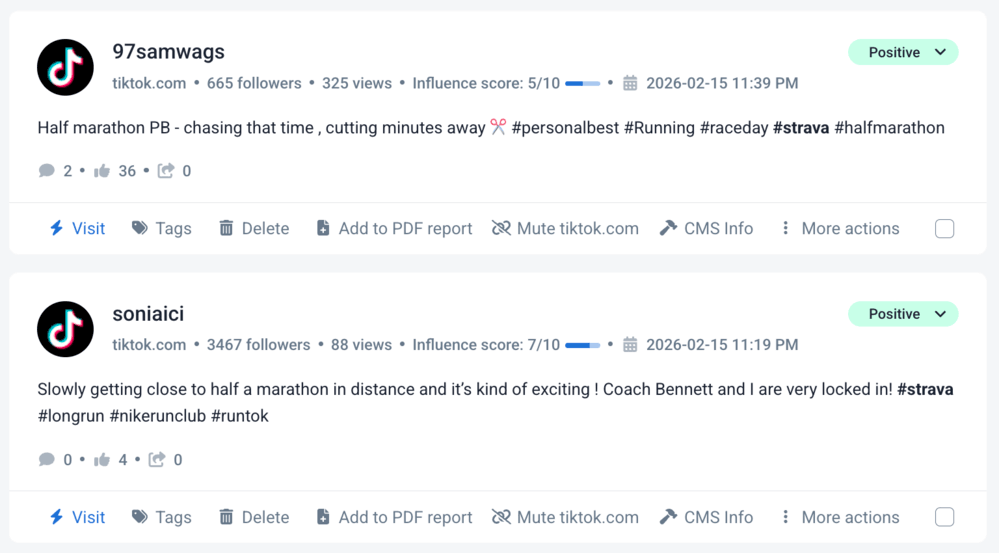
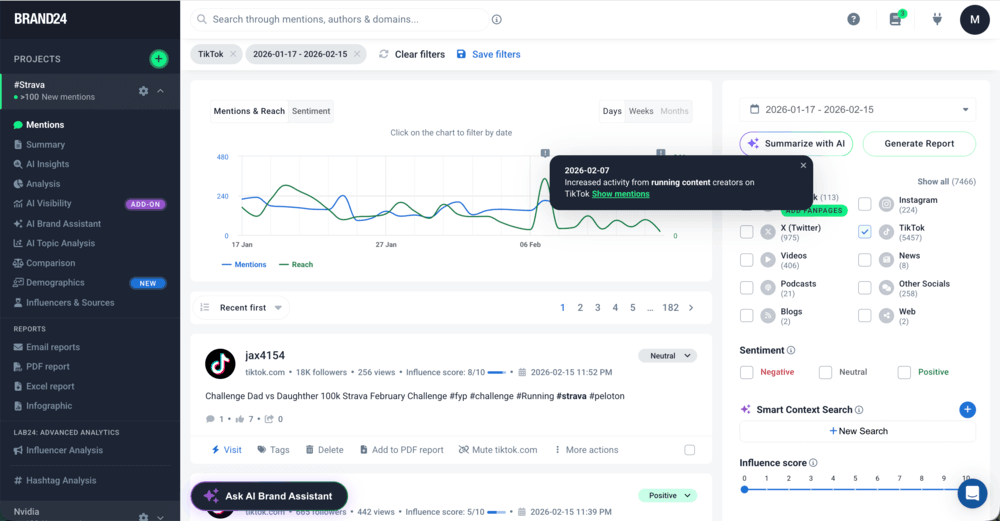
In the screenshot below, you can see that in the last 30 days, there were 5457 TikTok mentions in the Strava project. You can browse through them in the Mentions tab, using various filters:
📚 Further read: TikTok monitoring guide
Which method is better?
Tracking hashtags in the TikTok app does not provide any meaningful statistics beyond the number of views. That means you’ll be able to define the popularity of hashtags and… that’s it.
Using a hashtag tracker is a great idea when you need more in-depth statistics, such as:
- social media reach,
- sentiment analysis,
- exact number of posts that include a hashtag,
- analysis of the contexts in which your hashtag appears,
- or top public profiles using it.
It is a perfect solution for creating detailed performance reports on hashtag campaigns.
Why follow TikTok hashtags in 2026?
TikTok no longer relies on hashtags to understand content. The algorithm reads your captions, analyzes visuals, processes spoken words, and heavily prioritizes watch time, saves, shares, and search behavior.
But…does that mean hashtags are completely useless?
No!
In 2026, hashtags are no longer growth hacks, but more of categorization and search signals. They help the algorithm “file” content into the right niche and help users intentionally explore specific topics.
I gathered a few tips on how it plays out in practice:
01 For consumer insights
When you follow or track a hashtag, besides just browsing posts, you’re also observing:
- what questions people ask
- what language they use
- what problems keep repeating
- what formats get strong watch time and engagement
Because TikTok increasingly functions as a search engine (especially for Gen Z), niche hashtags often represent high-intent conversations.
02 For influencer discovery (within specific niches)
Big creators don’t rely on #fyp anymore. They build around niche hashtag categories like #BookTok, #TechTips, #StravaRunners, etc.
Following relevant hashtags helps you:
- spot creators consistently appearing in a category
- see which voices dominate a niche
- identify emerging micro-creators early
In 2026, influence is community-driven, and hashtags help map those communities.
03 For competitor analysis (context > vanity metrics)
Tracking hashtags connected to your industry shows you:
- what competitors are publishing
- how audiences respond (comments, saves, shares)
- which content angles are gaining traction
And because discovery is algorithm-driven, watching what survives in a hashtag feed tells you what TikTok actually wants to push.
What TikTok hashtags should you use?
In 2026, the best TikTok hashtag strategy is more about clarity than volume.
Instead of adding everything remotely related to your topic, stick to 3–5 highly relevant hashtags that clearly describe what your video is about. TikTok algorithm already analyzes your audio, captions, and visuals. Hashtags now work more like supporting signals: they confirm the topic, not define it.
So what should you actually use? It really helps to think in categories.
01 Niche hashtags (your foundation)
These are the most important ones.
Niche hashtags tell TikTok exactly which “side” of the platform your content belongs to: #BookTok, #FitTok, #StravaRunners, #MarketingTips, etc.
They:
- help your video appear in topic-specific search results
- connect you with highly engaged communities
- give the algorithm a stronger context
If you’re choosing only a few tags, these should make the cut.
02 Search-aligned hashtags
TikTok increasingly behaves like a search engine. People type full phrases into the search bar:
- “how to edit reels,”
- “best budget laptop,”
- “morning routine for acne.”
Using hashtags that mirror how people search increases your chances of appearing in those results.
Instead of:
- #viral #fyp
Try:
- #MorningRoutineForAcne
- #BeginnerGymWorkout
- #EmailMarketingTips
03 Branded hashtags (for tracking & UGC)
If you’re building brand awareness, a branded hashtag still makes a lot of sense, especially for:
- collecting user-generated content
- organizing and monitoring campaigns
- monitoring brand or product mentions
If you want to actually measure how your branded hashtag performs (volume, sentiment, reach), that’s where external tools become necessary, as TikTok itself won’t show you much beyond total post count.
04 Broad hashtags (use carefully)
Tags like:
- #fyp
- #foryou
- #viral
- #tiktok
still exist. But they’re extremely competitive and don’t guarantee visibility. In most cases, they add noise rather than clarity.
If you use them at all, pair them with strong niche and search-specific tags.
🧠 A quick reality check
TikTok hashtags no longer “push” content to the For You Page.
Watch time, engagement, and search behavior dominate distribution.
Your hashtags should:
- match what you say in the video
- match what’s written in your caption
- clearly define your niche
If they don’t align with your content, they won’t help and may even confuse the algorithm.
FAQ
Can you follow hashtags on TikTok?
Yes, you can add a hashtag to your Favorites inside the TikTok app.
However, in 2026, this works more like a bookmark and interest signal than a real feed subscription. You won’t see every post using that hashtag. TikTok still ranks and filters content based on engagement, watch time, and relevance.
If you need full visibility (including metrics like reach, sentiment, or trends), you’ll need a hashtag tracking tool such as Brand24.
How do you follow a hashtag on TikTok?
To follow a hashtag natively:
- Open TikTok and go to the search bar.
- Type the hashtag (e.g., #BookTok).
- Open the hashtag page.
- Tap Add to Favorites.
- Access it later via your profile ➡️ bookmark icon ➡️ Hashtags.
Keep in mind: this does not create a chronological feed. TikTok algorithm still decides what you see.
How can you track a TikTok hashtag’s performance?
To properly track a TikTok hashtag:
- Use Brand24, a social media monitoring tool
- Create a project with the hashtag as your keyword (e.g., #YourBrandName).
- Filter results by TikTok source.
- Analyze hashtag mentions, reach, sentiment, trends, influencers, and top-performing content!
This allows you to:
- Measure campaign performance
- Detect sentiment spikes and trends
- Monitor user-generated content
- Compare branded vs. competitor hashtags
It’s especially useful for brands running hashtag campaigns or influencer collaborations.
What’s the difference between following a hashtag and tracking its performance?
Following a hashtag inside TikTok is useful but very limited. If you’re a brand, creator, or marketer, you’ll quickly hit those limits.
Here are the top 5 differences:
| Feature | Following a hashtag in TikTok | Tracking a hashtag with Brand24 |
|---|---|---|
|
See all posts |
❌ No, algorithm filters content |
✅ Yes, all detected mentions |
|
Chronological feed |
❌ No |
✅ Yes (with filters)
|
|
Sentiment analysis |
❌ Not available |
✅ Positive / negative / neutral |
|
Trend detection |
⚠️ Manual only |
✅ AI-powered trend & anomaly detection |
Do hashtags still matter on TikTok in 2026?
Yes, but not the way they used to.
Hashtags no longer “push” content to the For You Page. Instead, they help the TikTok algorithm categorize your video and understand its topic. Distribution is driven mostly by:
- watch time
- engagement (shares, saves, comments)
- search behavior
- on-screen and spoken keywords
Hashtags now act as a supporting signal, not a growth hack.