Table of contents
2M Marketers

TikTok Mentions help you instantly see who’s talking about your brand, products, or campaigns, and why. Tune into them to track conversations in real time, spot trends early, and turn attention into action.
Key takeaways
-
What are TikTok mentions?
TikTok mentions are posts, comments, or videos where people talk about your brand. They can be direct @mentions or untagged references to your brand, products, or hashtags.
-
How can I track TikTok mentions?
You can track TikTok mentions manually through notifications and search (limited, time-consuming), or use a social listening tool for broader coverage. The latter can capture tagged and untagged, as well as spoken mentions, and analyze reach, sentiment, and conversation spikes (fast, detailed).
-
Why should I track TikTok mentions?
TikTok is a major discovery channel: 61% of users discover new brands and products on the platform, and 1 in 2 use it to research them. Tracking mentions shows you what people are saying along the way, so you can respond to feedback, spot trends, and understand how your brand is perceived. TikTok mentions also contribute to your wider online footprint, which can influence how LLMs understand and surface your brand in AI search.
What are TikTok Mentions?
On TikTok, a mention occurs when a user tags another user’s username in their video caption or comment using the “@” symbol.
Mentions can also appear on TikTok Stories, although they’re less common. These are also added by the “@username”.
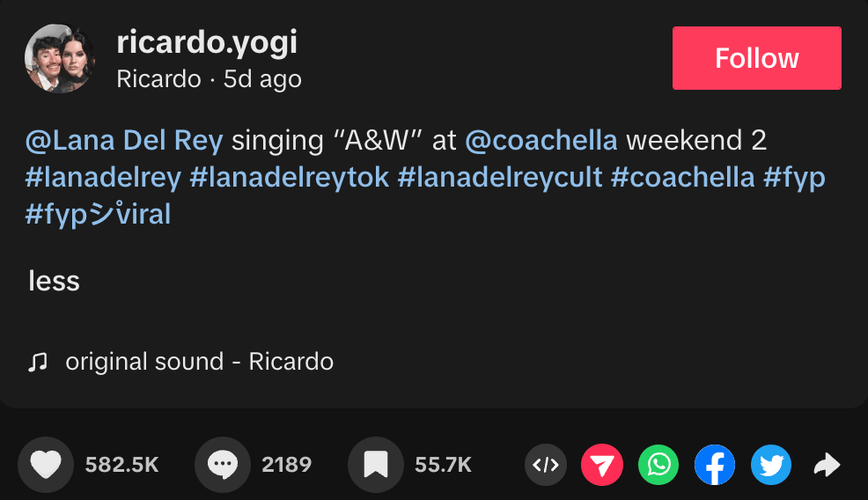
A direct mention can boost your brand’s visibility and point you straight to useful user-generated content you may want to reshare on your own channels.
Benefits of tracking mentions on TikTok:
- Higher engagement: Tracking mentions helps you find people already talking about your brand, so you can join the conversation with a reply, comment, or reshare.
- Greater brand awareness: You can spot organic posts and user-generated content worth amplifying, especially when a mention starts gaining traction.
- Faster response to feedback: Mentions help surface complaints, questions, and product feedback early, so your team can respond quickly and protect your brand’s e-reputation before the conversation moves on.
- Better audience insights: You can see what people associate with your brand, what they like or dislike, and what new audience groups are joining the conversation.
- Earlier trend detection: Mention spikes can reveal rising sounds, topics, or content formats you can use to shape your own TikTok strategy while they’re still relevant.
💡 Why TikTok mentions matter in 2026?
TikTok mentions can put your brand in front of people who haven’t discovered it yet. According to TikTok Marketing Science studies conducted by Material, 61% of TikTok users discover new brands and products on the platform, and 1 in 2 use TikTok to research or learn more about them.
But that visibility doesn’t stop at TikTok itself.
Mentions boost your visibility. In 2026, TikTok mentions influence how your brand is understood and surfaced by Large Language Models (LLMs) like ChatGPT.
LLMs analyze online conversations, articles, and social media mentions to build context around brands. Even if your brand name isn’t linked, every mention strengthens your digital footprint.
The stronger your online presence, the more likely AI tools are to reference your brand in their responses.
But not every mention will be tagged. Some won’t even be written down.
People can mention your brand in a caption or comment without using @, or simply talk about it in the video itself. So, how do you ensure you get relevant data and also monitor those untagged mentions?
This is where advanced social media monitoring tools step in.
They can easily capture those untagged yet valuable mentions and help you analyze them for reach, sentiment, topics, and so much more!
This is what an untagged mention detected by Brand24 looks like:
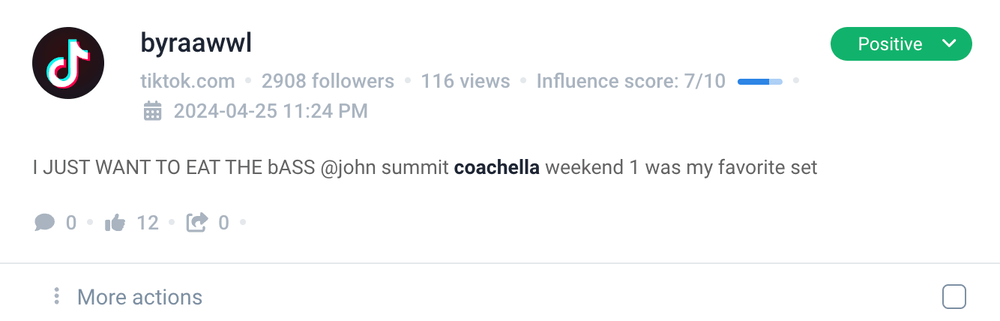
But tracking mentions isn’t just about finding them. It’s about digging into their stories. What do they tell us?
For me, every mention is a piece of a puzzle that helps us sharpen our TikTok marketing strategy.
How to track TikTok mentions?
There are two main ways to track TikTok mentions, and from my experience, one is definitely more efficient than the other. That said, both have their strengths, so let’s look at them side by side.
01 Manual tracking
You can start using the TikTok app itself.
To see your TikTok mentions, go to Inbox → Activities → All activity and select Mentions and tags. This filters your notifications so you can quickly find posts and comments where someone tagged your account.
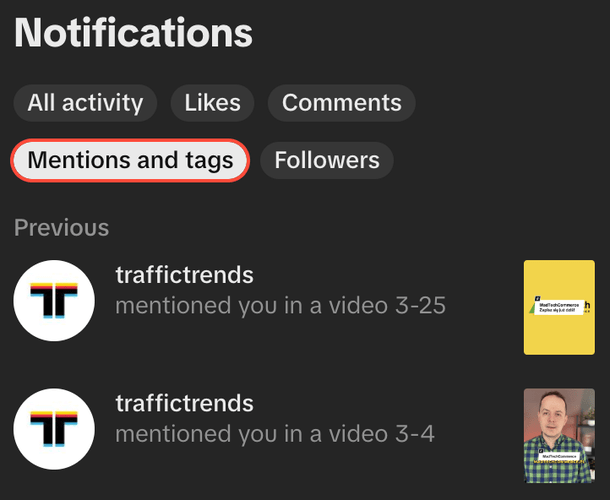
Pretty handy, right?
The tougher part is looking for untagged mentions.
You can try to find them manually by simply typing in your brand’s name or associated hashtags in the TikTok’s search bar.
This way, you’ll probably be able to find a few places where you’re mentioned.
I tried it and typed “Coachella” to see if I could find any relevant mentions.
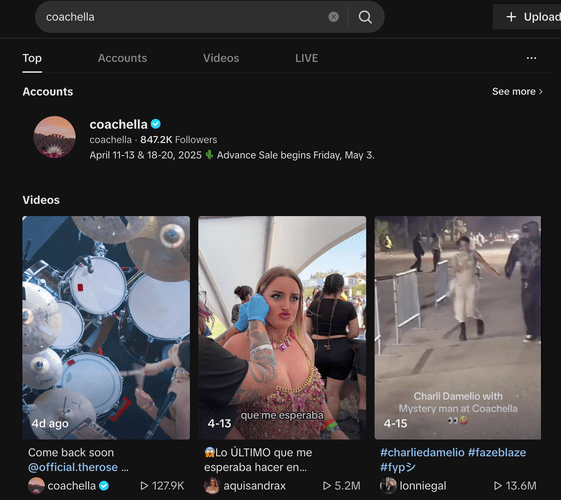
Sadly, the results were just the most popular videos and the official account. Making this method effective would be super time-consuming (especially with a high volume of mentions)
Plus, it misses some mentions and lacks in-depth analytics, such as social media reach and sentiment.
That’s why a much more efficient way to monitor your TikTok mentions is using advanced social listening tools.
02 Using a social media monitoring tool
These tools offer a comprehensive way to monitor mentions across various platforms, including TikTok.
They are designed to track public mentions, hashtags, and virtually any keyword associated with your brand.
The advantage? They don’t just collect data; they analyze it, providing insights from many new sources.
Brand24, for instance, helps you discover discussions (also those not tagged directly) across:
- Social media platforms
- Review sites
- Podcasts
- Forums
- Other publicly available sources
Brand24 can also give you access to video transcriptions from monitored TikTok profiles, helping you catch spoken mentions that match your project keywords.
It makes it a robust tool for comprehensive social listening.
Tip: Use Events Detector feature
Check this one out: Events feature that identifies any spikes in your brand mentions and instantly explains what happened that caused the spike:
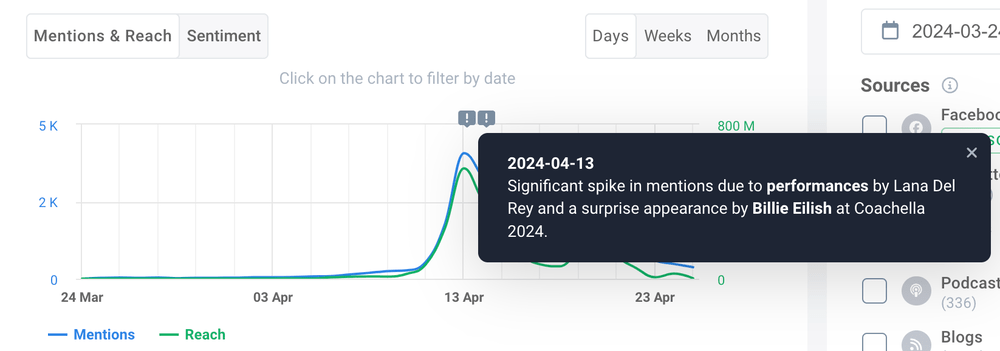
I honestly don’t know if I could find out that Billie Eilish’s appearance created so much buzz on TikTok myself.
How to analyze TikTok mentions to gain insights?
Advanced tools like Brand24 make the analysis much easier with features built specifically for digging into your mentions and providing automated social media insights. Let me show you the ones I use most and the steps I usually follow.
01 Set a baseline
Start by comparing your current results with a typical period, so you know what “normal” looks like.
I did this for Coachella using the Compare periods view. It offers a comprehensive view of project stats and enables data comparison within a specific timeframe.
Here’s how Coachella performed on TikTok between March 27 and April 26 compared with the previous 30-day period:
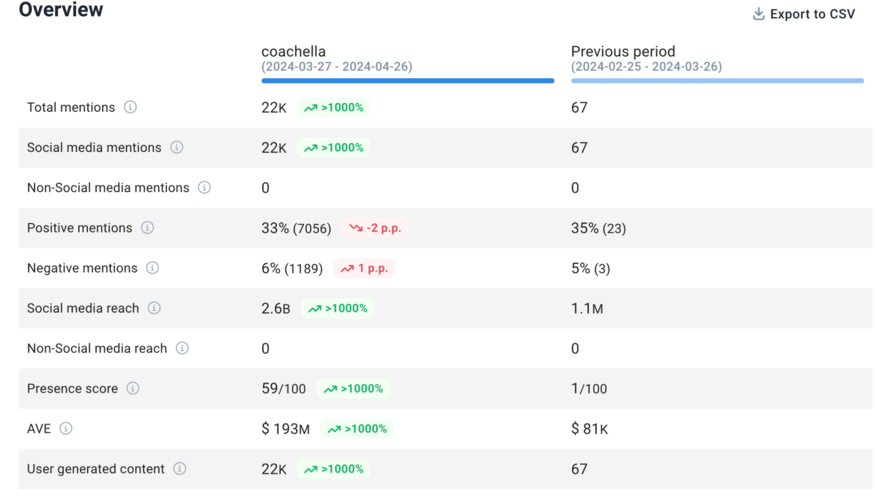
As you can see, Coachella generated 22K mentions and 2.6B in social media reach on TikTok alone, compared with just 67 mentions and 1.1M reach in the previous period.
That huge gap is a good reminder to read the numbers in context. For an event like Coachella, the festival itself is naturally the peak conversation period, so a quieter previous month is exactly what you’d expect.
As a general rule, I’d take a closer look whenever daily mentions reach around 2–3x your 30-day average. That usually signals that something worth investigating is happening.
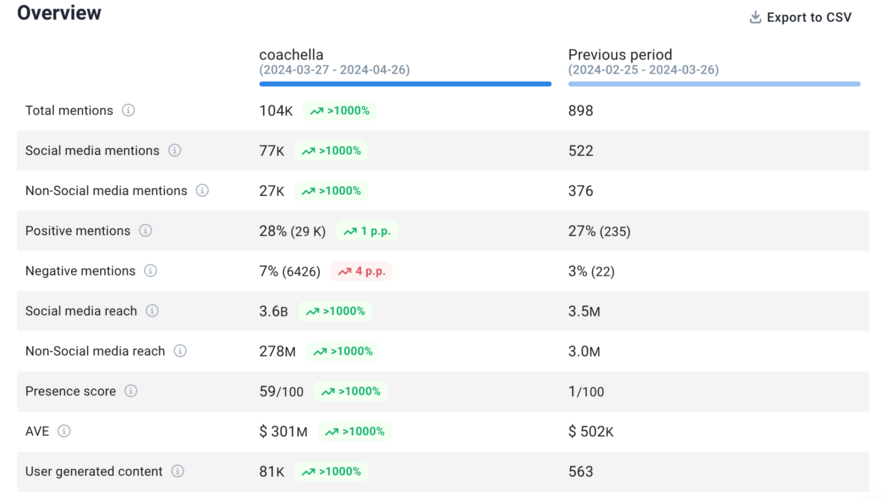
Across all sources monitored by Brand24, the conversation around Coachella was even bigger, with 104K total mentions, including 77K social media mentions and 27K non-social mentions:
02 Investigate the spikes
Once mentions move well above your usual level, look at when the spike happened and which posts or events drove it.
This is where AI Insights can save a lot of digging. In the Coachella project, it linked the biggest activity peaks to live events and performances, so I didn’t have to work backward through thousands of mentions myself.
From there, check the mentions with the highest reach or engagement to see which posts had the biggest impact on the conversation.
03 Look at sentiment and recurring themes
Once you know what caused the spike, look at how people reacted and what they were actually talking about.
That means putting the numbers in context. A surge in Coachella mentions during the festival or right after the lineup drops is expected; the same surge in an otherwise quiet month would be much more interesting.
And volume alone still won’t tell you whether people loved what happened or hated it. For this, you need to look at sentiment.
At this point in the analysis, I usually turn to AI Insights. With this feature, instead of checking each metric separately, I can pull together the context behind the numbers: sentiment shifts, recurring topics, and the events that may have caused them.
This is what an AI-based Summary looks like:
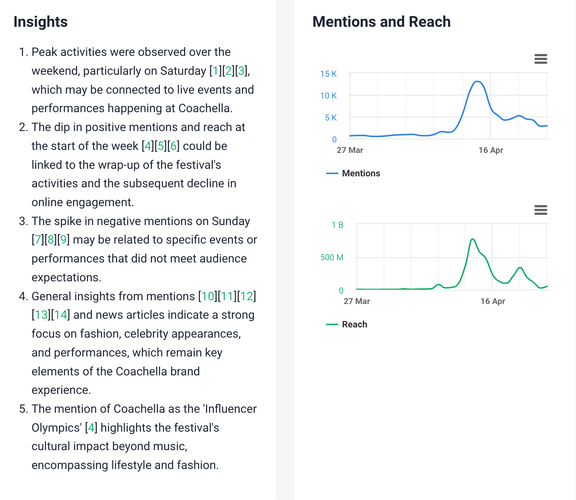
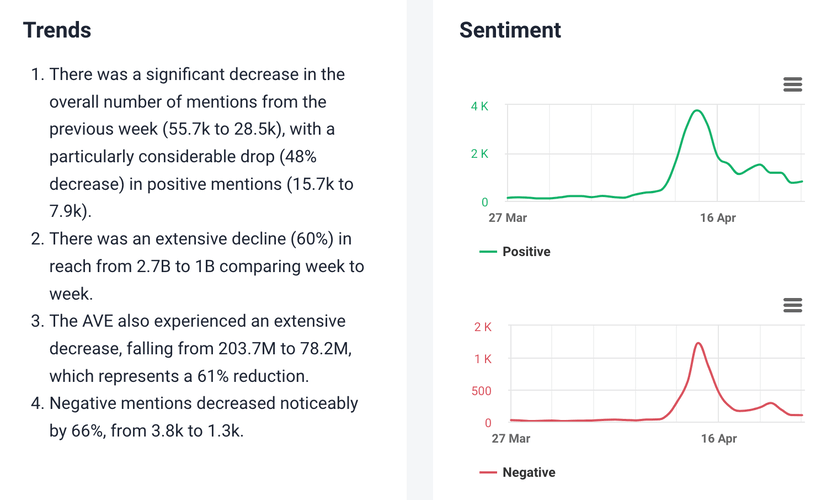
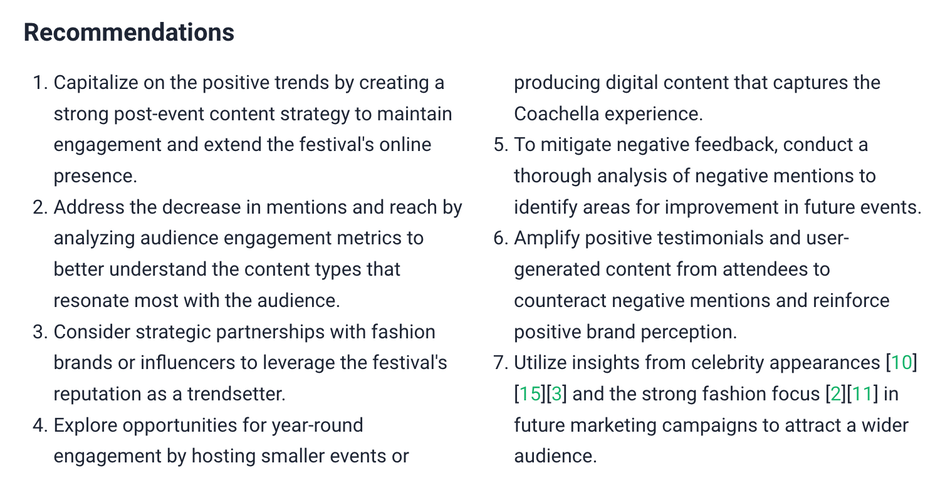
As you can see, AI Insights linked the largest activity peaks to live events and performances, spotted a rise in negative mentions on one of the festival days, and identified fashion, celebrity appearances, and performances as recurring themes in the conversation.
04 Turn the findings into your next move
AI Insights also turns patterns into concrete recommendations.
For Coachella, that meant considering partnerships with fashion brands or influencers and making better use of insights around celebrity appearances – for example, to identify people who could become faces of future campaigns or strong candidates to invite to the next edition.
More broadly, AI Insights can help you spot opportunities around trends, feedback, partnerships, and recurring topics worth exploring further.
Overall it offers:
- An overview of peak activities and when they occur.
- Insights into specific spikes or drops in social mentions and their possible reasons.
- Trends indicating significant changes in the number of mentions, including increases or decreases.
- Sentiment analysis showing fluctuations in positive and negative mentions over time.
- Recommendations for capitalizing on trends, addressing feedback, and strategic partnerships.
05 Dig deeper where you need to
Sometimes the automated summary gives you enough. Other times, it raises another question.
With the Coachella example, you might want to go beyond “celebrity appearances drove buzz” and ask which names generated the most attention, whether the conversation around them was positive, and which creators helped spread it further.
That’s the kind of insight you’d need for future editions of the festival.
At this point, you can either dig in further yourself by looking at separate charts or do what I did, and turn to the AI Brand Assistant.
Instead of browsing through the whole project again, you can ask it about a specific dataset or go straight to the question you want answered:
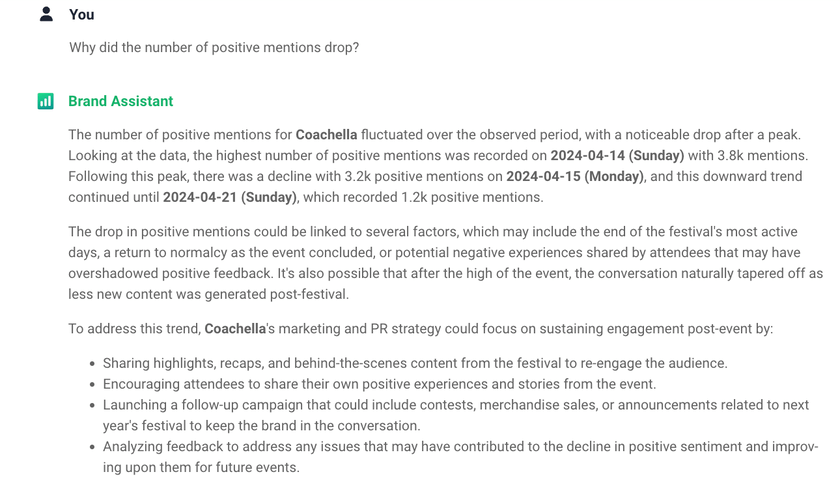
AI Brand Assistant can answer any questions regarding your data, for example, why negative sentiment increased, which topics dominated the conversation, which creators generated the most reach, or what changed compared with the previous period.
With this kind of tool at hand, you can fast-track to the essential conclusions and make informed decisions about your brand’s presence on TikTok.
Conclusion
So, which should you choose? Using just the app or external TikTok monitoring tools for mentions?
For smaller brands, native TikTok tools might suffice, but not without surprises, as you saw).
However, an advanced monitoring tool is invaluable for garnering thousands of mentions each month.
It automates the collection and analysis of media mentions and helps navigate the complexities of online brand presence.
Personally, I wouldn’t rely on direct @mentions alone if TikTok is an important channel for your brand. Too much of the useful context sits outside your notifications.
When I tried tracking Coachella manually on TikTok, the search results mostly showed me the official account and the most popular videos.
The listening data told a different story: 22K TikTok mentions in the festival period, plus a clear spike around Lana Del Rey’s performance and Billie Eilish’s surprise appearance. That’s when it became pretty clear to me that native tracking is useful for quick checks, but not enough to get the full picture.
Final thoughts:
- Respond while the conversation is still fresh. Nearly three-quarters of consumers expect brands to reply on social media within 24 hours, according to the 2025 Sprout Social Index study. Prioritize questions, complaints, and negative mentions first, using TikTok’s Mentions and tags filter or monitoring alerts to catch them quickly.
- Track the quantity and quality of mentions to fully understand your brand’s impact. Look at reach and sentiment alongside mention volume to see how far the conversation spreads and whether it’s working in your favor.
- Keep a shortlist of recurring names and themes. If the same creators, celebrities, products, or topics keep showing up, save them. They can point to future partnerships or campaign ideas.
- Look for ways to simplify your efforts. Perhaps using AI features is the way to go?
FAQ
A user types “@” followed by your username and selects your account. You receive a notification, and the mention becomes clickable.
You can see tagged mentions in your TikTok notifications. To find untagged brand mentions, you need a social listening tool.
You can’t delete a mention someone else has already added. But if you’re trying to avoid unwanted mentions in the future, you can control who is allowed to mention you in comments, Stories, photo posts, and video descriptions.
Go to Profile → Menu ☰ → Settings and privacy → Privacy → Mentions and tags → Mentions. From there, choose who can mention you: Everyone, People you follow, Friends, or No one.
They show who is talking about your brand in real time. Mentions help you track awareness, engagement, trends, and potential reputation risks.
You can monitor notifications manually in the app. For full coverage, including untagged mentions, use a social listening tool.
A mention uses “@username” in captions or comments. A tag usually refers to tagging someone directly in a video before posting.
Yes. Users can write your brand name without using “@”. These mentions do not trigger notifications.
Reply quickly and stay authentic. Thank users for positive mentions and address concerns clearly and professionally.
Yes. Mentions help you identify creators already talking about your brand. This makes it easier to find potential influencer partners.
You may miss untagged mentions, misspellings, or private account posts. Native notifications only show tagged mentions.
Yes, but not inside the TikTok app. You need a social media monitoring tool to track competitor brand mentions.
Yes. Both personal and business accounts can receive mentions if users tag them correctly.