Table of contents
The 10 Best YouTube Analytics Tools for 2026
The best YouTube analytics tools in 2026 help you track watch time, audience retention, subscriber growth, and many more. They go beyond YouTube Studio by offering deeper insights, AI-powered analysis, or cross-channel data.
Below, I prepared a comparison of the top YouTube analytics tools, including free options and advanced platforms for creators, brands, and agencies.
Top YouTube analytics tools compared
To make the differences easy to spot, this table breaks down what each tool does best:
| Tool | Best for | Top strengths | What could be better |
|---|---|---|---|
| Brand24 | Brand & YouTube mention monitoring, AI visibility tracking | Real-time mention tracking, sentiment analysis, AI insights | Not focused on video SEO or content optimization |
| YouTube Analytics / YouTube Studio | Native channel performance tracking | First-party data, retention reports, traffic sources | No competitor tracking or keyword research |
| Sprout Social | Enterprise reporting & multi-channel analytics | Cross-platform analytics, team workflows, advanced reporting | Less YouTube-specific SEO optimization |
| TubeBuddy | YouTube SEO & workflow optimization | Keyword research, A/B testing, bulk editing tools | Limited deep competitor benchmarking |
| Tubular Intelligence | Enterprise video intelligence & trends | Cross-platform insights, trend forecasting, creator benchmarking | Built more for large brands than solo creators |
| Unbox Social | Multi-platform YouTube reporting | Demographic insights, engagement tracking, clean dashboards | Limited competitive analysis depth |
| ChannelMeter | Influencer & collaboration management | Creator tracking, payout automation, campaign analytics | Not designed for SEO or search optimization |
| ViralStat | Trend discovery & competitor tracking | Trending video detection, cross-platform benchmarking | Limited in-depth retention or traffic analysis |
| Facelift Data Studio (Quintly) | Advanced benchmarking & KPI reporting | Custom dashboards, competitor comparisons, flexible metrics | Steeper learning curve, no built-in SEO tools |
| VidIQ | Growth-focused YouTube creators | SEO scoring, keyword research, competitor insights | Mostly YouTube-only focus |
⚠️ Research methodology
We created this ranking by reviewing feedback on review platforms like G2 and Capterra, looking at AI-generated overviews, and analyzing user discussions on Reddit. The result is a curated list designed to make it easier to choose the right YouTube analytics tool.
Combining two tools can sometimes provide a more complete view, so feel free to mix and match if it supports your workflow.
01 Brand24
4.6/5 – G2 (322 reviews)
4.7/5 – Capterra (253 reviews)
14-day free trial available
From $149/month
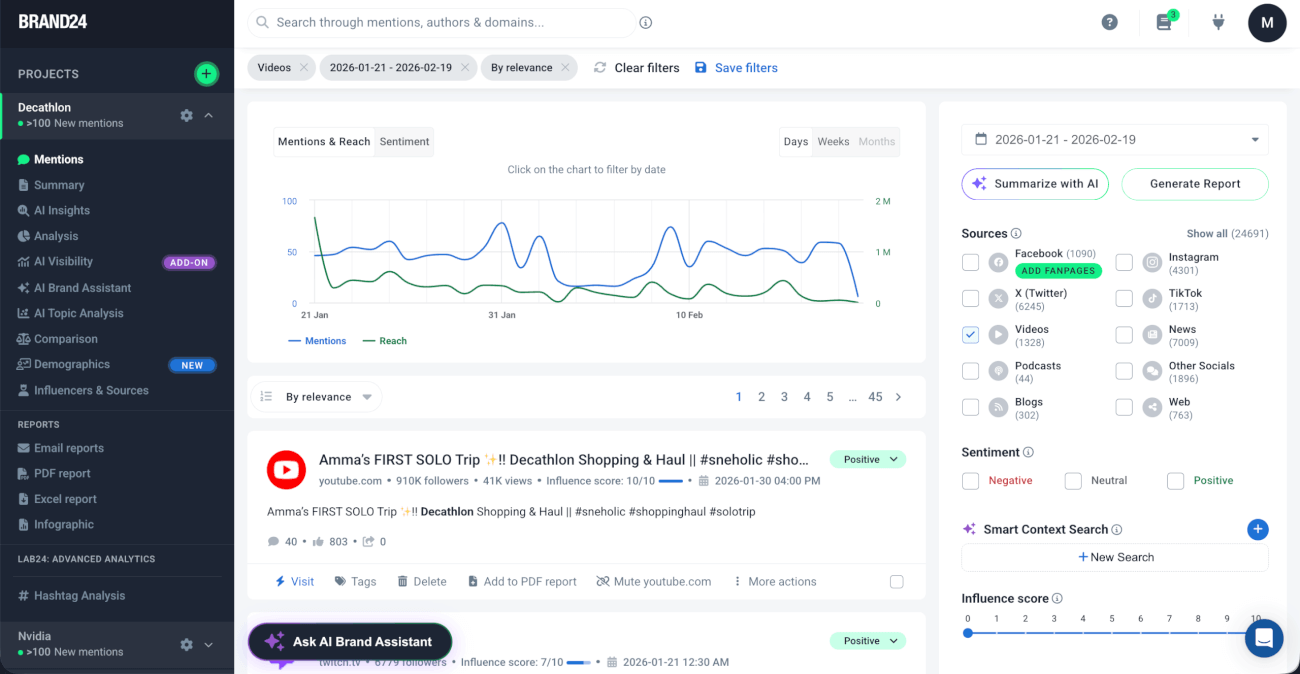
Brand24 is a social media monitoring tool that also offers YouTube analytics. The focus of this tool is on monitoring mentions of your channel’s name (or any other keyword) and tracking how it performs.
🔑 Key features
- AI Insights and AI Brand Assistant
- Sentiment analysis
- Real-time mention monitoring and spike alerts
- Presence Score
- Trending hashtags
- Top influencer and source identification
- Shareable reports for performance analysis
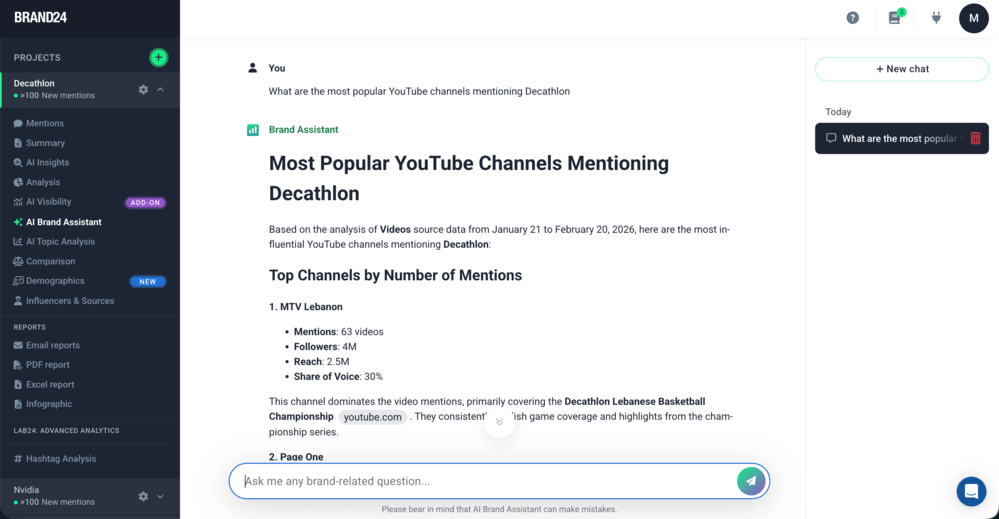
My personal favorite feature is AI Brand Assistant. YouTube marketers can use it to quickly pull tons of helpful insights, without manually digging through raw data:
- Who are the most popular YouTube channels mentioning [brand]?
- What was [brand]’s YouTube performance over the last 30 days?
- What channels should I consider for [brand]’s influencer marketing campaign?
- And much more!
⭐️ Overall verdict
Brand24 is the right tool for companies of all sizes that need analysis but don’t want to waste time doing it manually. It offers comprehensive AI analysis and includes many sources besides YouTube.
💪 Strengths
- AI features – Make analysis and insight-gathering easier and faster.
- Reports generation – Get personalized reports about your performance within seconds.
- Influencer & top voices identification – Easily find relevant people for potential YouTube collabs.
👎 What could be better
The main drawback is that the tool can only access up to 30 days of historical data.
02 YouTube Analytics (YouTube Studio)
Freemium
Freemium
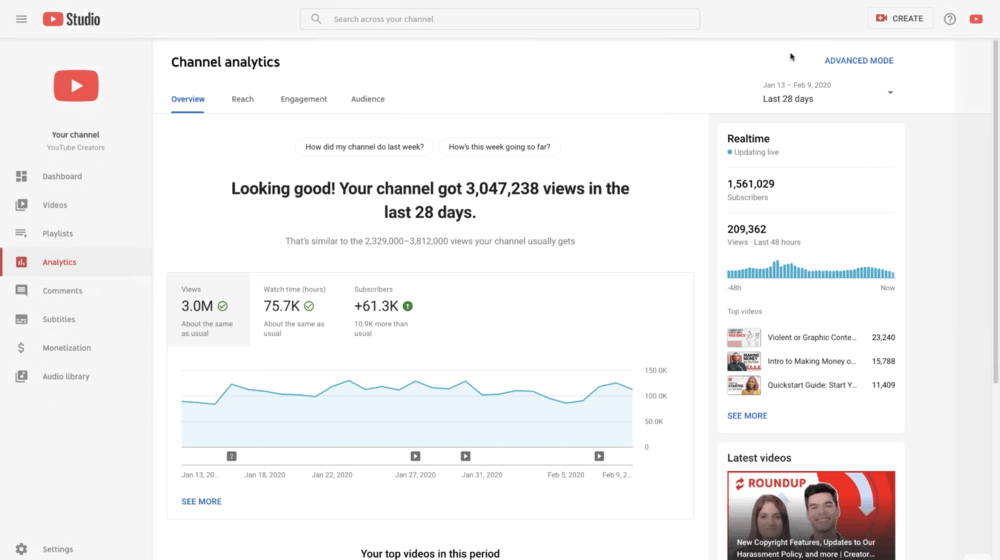
YouTube Analytics is a free reporting dashboard available inside YouTube Studio. It allows you to track yourchannel and video performance using native YouTube data.
It offers insights into key metrics like:
- Views and watch time
- Audience demographics and retention
- Subscriber growth
- Traffic sources and CTR
- Performance at channel/or individual video level
- Revenue (for monetized channels)
Because it’s built directly into YouTube, it offers the most accurate first-party data, but you need to remember that it only covers activity within your own channel.
⭐️ Overall verdict
YouTube Studio is a great choice for solo YouTube creators and small businesses. Since it’s built right into YouTube, it’s super easy to use and gives you a clear picture of your overall and specific YouTube video performance.
💪 Strengths
- Completely free – available to every YouTube creator
- In-depth performance metrics – you can analyze watch time, retention, CTR, traffic sources
- Detailed audience insights – demographics, viewer activity, returning vs. new viewers
- Advanced filtering and export options via Advanced Mode
👎 What could be better
- It only covers activity on your own channel – you can’t track untagged mentions or brand presence on other social media platforms.
- No sentiment analysis – you won’t know how people feel about your content unless they leave clear feedback in comments.
03 Sprout Social
4.4/5 – G2 (6,437 reviews)
4.4/5 – Capterra (604 reviews)
30-day free trial available
From ~$199/month per user
Sprout Social is a social media management platform that includes dedicated YouTube analytics through its YouTube Videos Report.
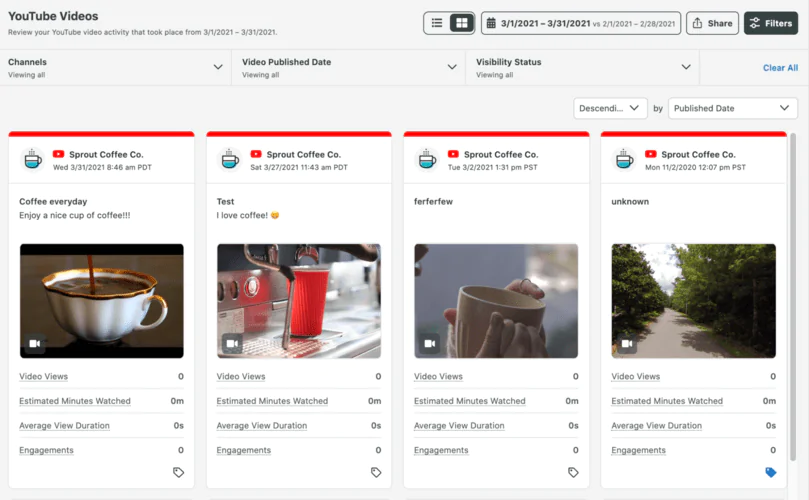
It provides a detailed breakdown of how each of your videos is performing, including key metrics such as views, estimated watch time, average view duration, and engagement.
One of the best features is the visual grid view, which shows video thumbnails right next to key performance metrics, so you can quickly identify your top-performing and underperforming content.
⭐️ Overall verdict
Sprout Social is a solid choice for brands and agencies managing multiple social channels and looking to include YouTube analytics as part of a bigger reporting and publishing workflow.
💪 Strengths
- Dedicated report with video- and channel-level metrics
- User-friendly visual grid view for comparing thumbnails
- Advanced filtering by date range, tags, and visibility status
- Cross-channel reporting across multiple social platforms
👎 What could be better
- Limited competitor analysis – some users lack more detailed competitor analysis
- Costs – the pricing for Sprout Social’s advanced analytics features is considered high
- YouTube data may have a 36–48 hour reporting delay
04 TubeBuddy
4.6/5 – G2 (44 reviews)
4.4/5 – Capterra (113 reviews)
Free limited version available
From $4.99/month per user
TubeBuddy is a tool that integrates directly into YouTube and helps you rank higher in the search results.
It provides you with optimization help, statistics review, and content scheduling.
Thanks to the search insights that TubeBuddy offers, you can boost your YouTube performance, reach new audiences, and get more engagement with your content.
🔑 Key features
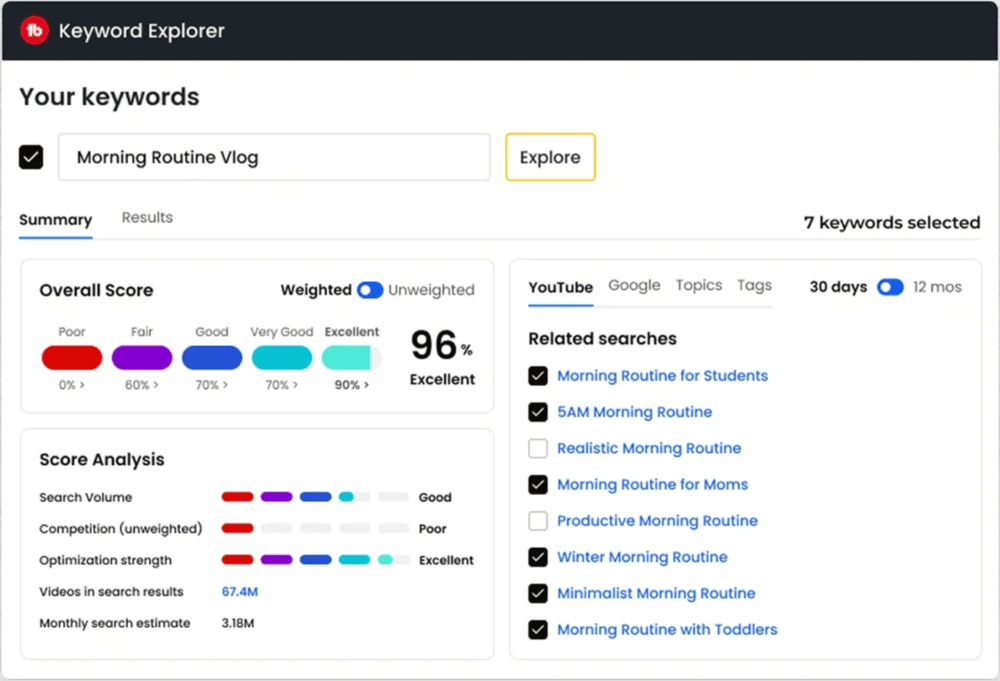
- SEO Studio & Keyword Explorer – analyzes search volume, competition, and tag performance to improve YouTube rankings
- A/B Testing – compare thumbnails, titles, and metadata to improve CTR
- Channelytics – provides channel-level analytics and competitor benchmarks
- Opportunity Finder – identifies trending and low-competition topic ideas
- Bulk Processing – update metadata, cards, and end screens across multiple videos
- Competitor Alerts – track uploads and performance changes from competing channels
⭐️ Overall verdict
TubeBuddy should be your go-to tool if you want to focus on YouTube SEO. It shows you which keywords to target, reveals what’s working for your competitors, and makes your videos more discoverable in search results.
💪 Strengths
- Strong YouTube SEO and keyword research tools
- Built-in A/B testing for performance optimization
- Useful competitor benchmarking features
- Direct integration inside YouTube
👎 What could be better
- Focused on optimization, not in-depth analytics – you won’t get advanced audience analysis or sentiment tracking.
- The interface can feel a bit overwhelming – especially with all the options available in the browser extension.
05 Tubular Intelligence
4.3/5 – G2 (22 reviews)
4.0/5 – Capterra (1 review)
Demo available
Custom pricing on request
Tubular Intelligence by Tubular Labs is a powerful social media analytics tool that includes YouTube analysis.
It’s designed to help users maximize the performance and social media engagement of their content across various platforms.
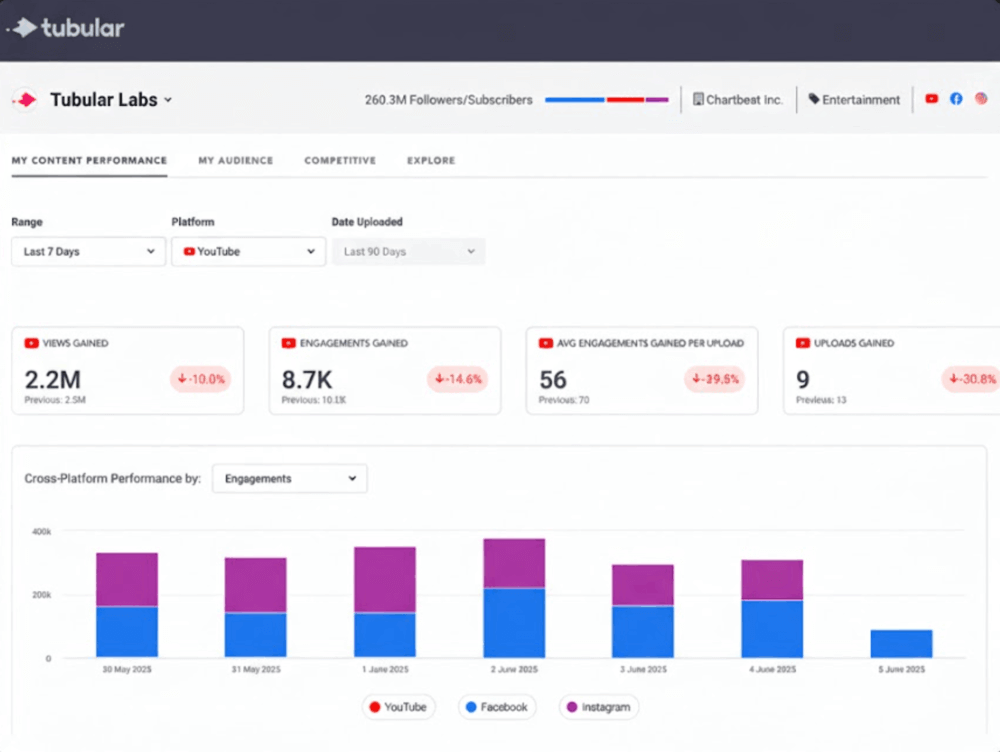
It provides detailed insights into a user’s video performance, audience size, and overall engagement.
The that you can see in Tubular Intelligence can be used to track the success of individual videos or to compare the performance of competitions in aggregate.
🔑 Key features
- Cross-platform video intelligence – analyze and compare video performance across social platforms
- Video Ratings (V30) – a 30-day metric for comparing videos
- Trend tracking – spot emerging content trends and rising topics early
- Creator intelligence – compare influencers by engagement, audience demographics, or growth
- Competitive benchmarking – see how you stack up against competitors
⭐️ Overall verdict
Tubular Intelligence is a great tool for serious video marketers, brands, and media companies that want deep insights into YouTube performance. It goes beyond your own channel, giving you a better view of what’s trending, what your audience is watching, and how your content performs.
💪 Strengths
- Audience insights (also beyond your channel) – great for understanding trends, competitors, and viewer behavior across YouTube.
- Customizable reports – you can personalize the metrics to fit your specific needs.
👎 What could be better
- Not designed for day-to-day creator optimization
- Higher pricing geared toward enterprise clients
- Can be too complex for smaller teams
06 Unbox Social
4.5/5 – G2 (1 review)
Free 14-day trial available
From $9/month
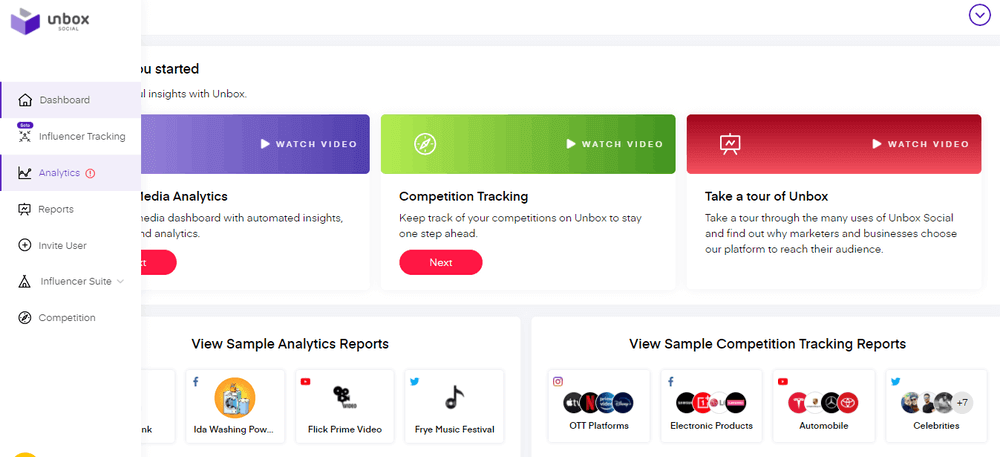
Unbox Social is an AI-powered social media analytics tool that includes dedicated YouTube analytics alongside Instagram, Facebook, and X (Twitter).
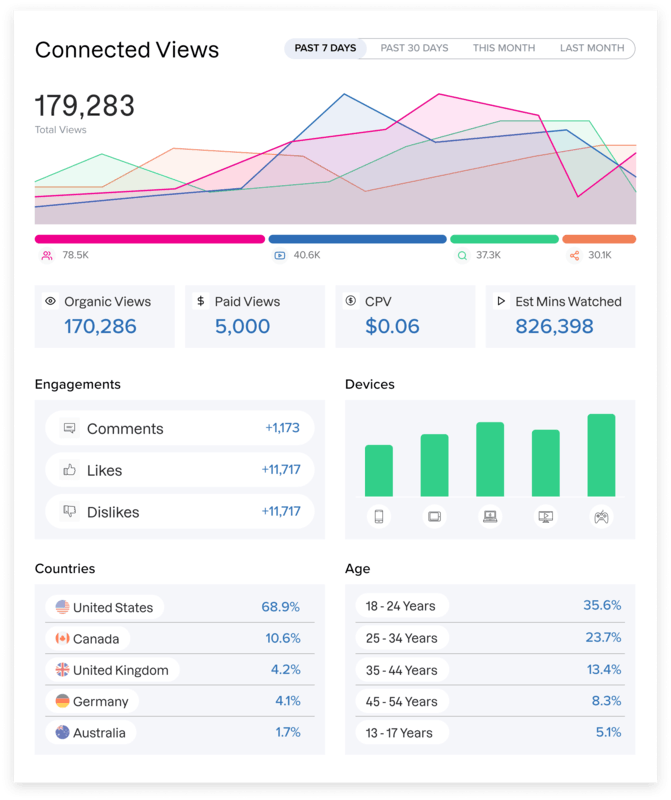
You can track metrics such as views, watch time, average view duration, engagement rate, audience retention, and subscriber growth.
The platform also analyzes keywords, tags, and competitor activity to help brands optimize content strategy.
🔑 Key features
- Video-level insights: views, likes/dislikes, comments, shares
- Subscriber dynamics: subscribers gained/lost (including per-video signals)
- Audience demographics: age, gender, and location breakdowns
- Optimization insights: “best time to post” and performance patterns
⭐️ Overall verdict
Unbox Social focuses more on streamlined reporting and cross-platform analysis than detailed content optimization, so it’s especially useful if you’re juggling multiple accounts and need to keep things simple and consistent.
💪 Strengths
- Channel- and video-level YouTube metrics
- Audience demographics and subscriber dynamics
- Multi-platform support in one dashboard
👎 What could be better
- Limited advanced YouTube SEO optimization tools
- Less granular competitor benchmarking than enterprise platforms
- May feel lighter compared to specialized YouTube-only tools
07 ChannelMeter
Free demo available
Custom pricing on request
ChannelMeter is a YouTube analytics and creator collaboration platform built for brands, agencies, and multi-channel networks (MCNs).
In addition to YouTube channel analytics, ChannelMeter helps monitor campaign performance, track subscriber growth, and manage payouts from a centralized dashboard.
🔑 Key features
- YouTube channel analytics
- Competitor tracking
- Payout automatization
- Video views statistics
- Various social media platforms in-depth analysis
- Subscriber gain/loss tracking
- YouTube analytics app
⭐️ Overall verdict
ChannelMeter works best for teams that prioritize influencer partnerships and creator management. It simplifies campaign tracking, ROI reporting, and payouts, so it feels more like a partnership management platform than a typical YouTube analytics tool.
💪 Strengths
- All creator collaborations in one centralized dashboard
- Real-time campaign performance tracking
- Built-in payout automation
👎 What could be better
- Limited YouTube SEO and content optimization tools
- Not ideal for solo creators focused on organic growth
- Less advanced cross-platform competitor analysis
08 ViralStat
Free 7-day trial available
From $29/month
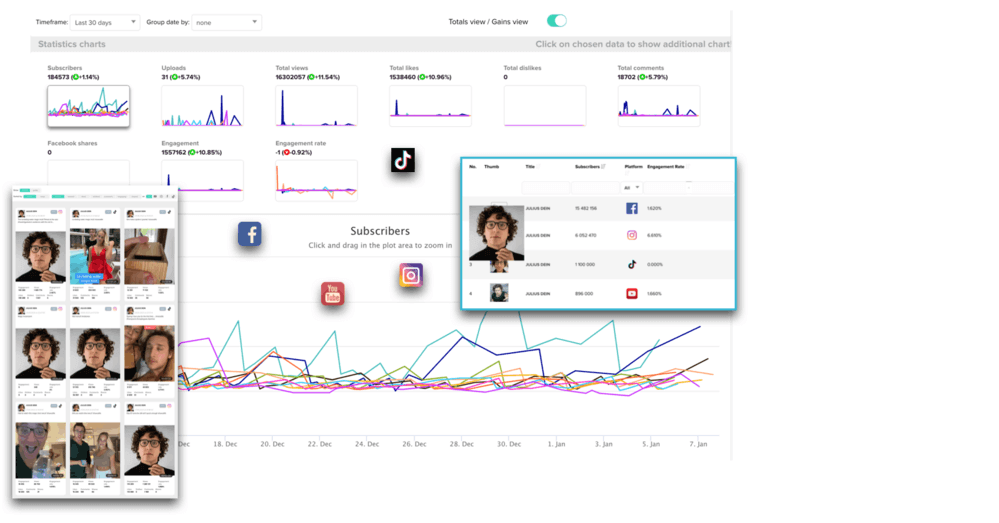
ViralStat is a video intelligence and social media analytics tool that helps you track, analyze, and compare YouTube channels and videos, along with TikTok, Instagram, and other platforms.
Unlike creator-focused optimization tools, ViralStat is built more for competitive intelligence, influencer research, and trend discovery.
🔑 Key features
- Content intelligence: Analyze engagement metrics (views, likes, comments, shares, subscriber growth) at scale
- Smart collections: Organize competitors, influencers, or brands into automatically updating folders
- High-frequency updates: Performance data refreshed multiple times per day
- Competitor tracking: Monitor any public YouTube channel or video to analyze growth, engagement rates, and top-performing content
⭐️ Overall verdict
ViralStat is a great fit for brands and agencies that want to keep an eye on competitors, spot industry trends, and research influencers across multiple platforms.
💪 Strengths
- Cross-platform insights across YouTube, TikTok, and Instagram
- Great for competitor benchmarking
- Helpful for finding influencers and researching campaigns
- Data is updated frequently
👎 What could be better
- Deeper analytics for your own channels are pretty limited (things like retention graphs, traffic sources, or advanced audience insights)
- Minimal SEO optimization tools
- Not built for thumbnail/title A/B testing or content-level optimization
09 Facelift Data Studio (formerly Quintly)
4.7/5 – G2 (68 reviews)
4.6/5 – Capterra (8 reviews)
Free 7-day trial available
Custom pricing on request
Quintly (rebranded as Facelift Data Studio) is a powerful social media analytics tool that works across YouTube, TikTok, Instagram, Facebook, and more.
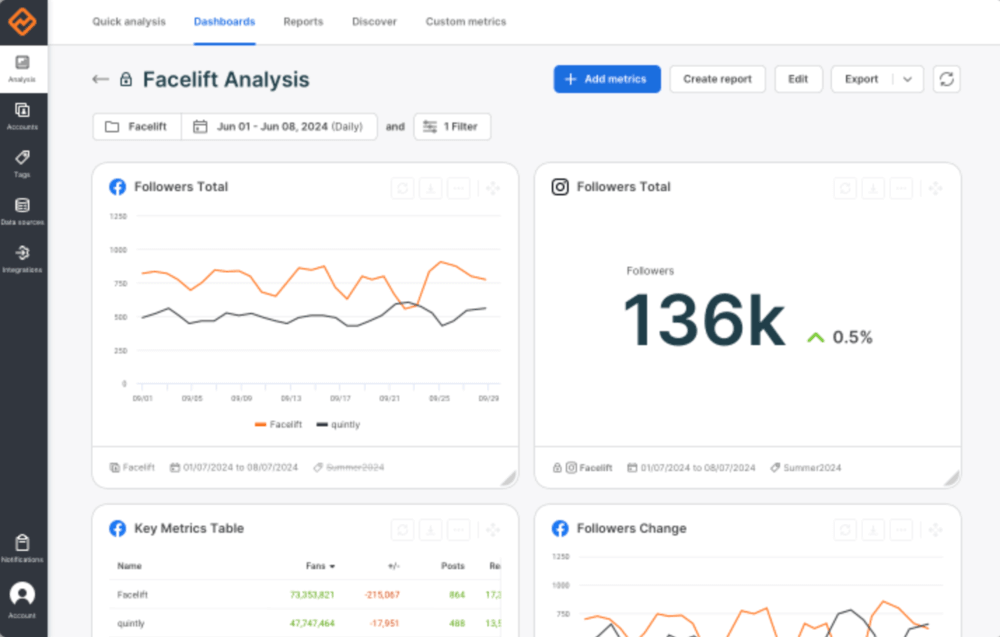
It’s definitely one of the more advanced tools on this list. If you love dashboards, custom reports, and digging deep into performance data, this one gives you a lot to work with.
Unlike SEO-focused tools, Facelift Data Studio is built for data-heavy analysis, KPI tracking, and scalable reporting across multiple channels.
🔑 Key features
- Advanced channel & video analytics: Analyze views, watch time, engagement rates, subscriber growth, and video-level performance.
- Customizable dashboards: Build fully tailored dashboards with 500+ available metrics.
- Competitive benchmarking: Compare your YouTube channel against competitors or industry benchmarks using public and private data.
- Quintly Query Language (QQL): Create custom metrics and datasets for advanced analysis
⭐️ Overall verdict
Quintly is great for teams that want full control over their data. If you’re serious about performance tracking and want to build reports around exactly the KPIs that matter to you, it’s a strong option. But it’s probably too complex if you just want quick optimization tips.
💪 Strengths
- Super customizable dashboards and reports
- Strong channel and competitor comparison
- Works across multiple platforms
- Great for data-driven strategy
👎 What could be better
- Steep learning curve for beginners
- No built-in YouTube SEO tools (keywords, tags, thumbnail testing)
- Overpowered for solo creators or small channels)
10 VidIQ
4.5/5 – G2 (33 reviews)
4.3/5 – Capterra (57 reviews)
Free limited version available
From $19/month
VidIQ is one of the most popular YouTube analytics and SEO tools designed to help creators grow their channels faster.
It works mainly as a Chrome extension that overlays data directly on YouTube, so you can see performance metrics, keyword scores, and competitor insights without leaving the platform.
VidIQ also has its own creators’ community that you can join after creating an account (20M+ creators).
🔑 Key features
- YouTube analytics overlay: Works as a Chrome extension that displays real-time performance metrics directly inside YouTube.
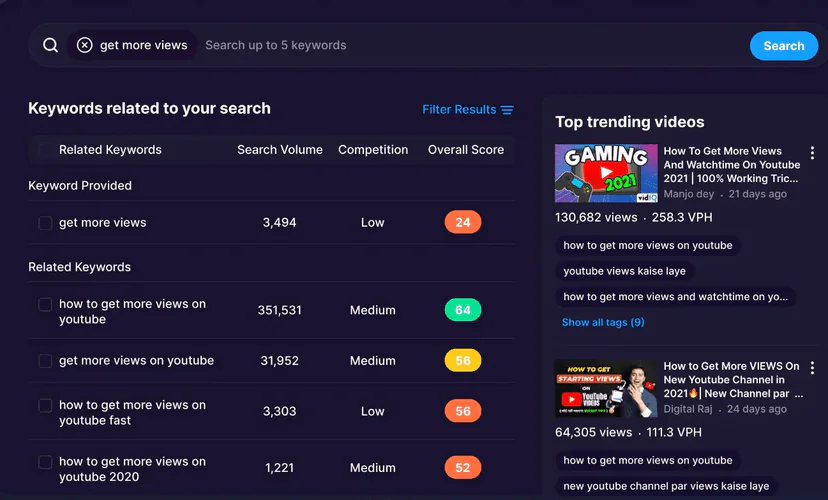
- Keyword research & SEO scores: Shows keyword volume, competition, and optimization scores for titles, tags, and descriptions.
- Competitor insights: Lets you analyze other channels and compare performance without leaving the platform.
- Channel & video audits: Automatically reviews your content and highlights areas for improvement.
⭐️ Overall verdict
VidIQ is a good choice if you want YouTube analytics plus built-in SEO and growth suggestions. It’s beginner-friendly but still powerful enough for more advanced creators who want competitor benchmarking and real-time tracking.
💪 Strengths
- Strong YouTube SEO tools (keywords, tags, optimization score)
- Real-time performance tracking
- Helpful competitor comparison features
- Shorts analytics support
👎 What could be better
- Focused almost entirely on YouTube (no deep cross-platform analytics)
- More growth-oriented than brand-level reporting
- Advanced features require paid plans
FAQ
What are YouTube analytics tools?
YouTube analytics tools help you track, understand, and boost your channel’s performance beyond what you get in YouTube Studio.
They give you a clearer view of:
- video performance
- audience behavior
- subscriber growth
- engagement and reach rates
- SEO/GEO/AI visibility
- competitor performance
- trending content
A lot of these tools also share optimization tips to help you reach more people and increase watch time.
What are YouTube analytics tools for?
The main purpose of YouTube analytics tools is to help you grow your channel strategically.
They allow you to:
- Identify which videos drive the most watch time and engagement
- Understand who your audience is and when they’re active
- Optimize titles, descriptions, and tags for better search visibility
- Benchmark your performance against competitors
- Spot trends and virals before they peak
What analytics metrics should I monitor on YouTube?
The most important YouTube metrics to track include:
- Watch time
- Average view duration
- Click-through rate (CTR)
- Audience retention
- Subscriber growth
- Traffic sources
- Sentiment and engagement rate (reach, likes/dislikes, comments, shares)
If you’re focused on channel growth, prioritize retention, CTR, and watch time, as they have the biggest impact on YouTube’s algorithm.
What is the best YouTube analytics tool?
The best YouTube analytics tool depends on your goals:
| Your goal | Recommended tool |
|---|---|
| SEO and optimization | VidIQ or TubeBuddy |
| Real-time brand monitoring, mention analysis, AI visibility | Brand24 |
| Competitor benchmarking | Quintly or ViralStat |
| Influencer and collaboration tracking | ChannelMeter |
| Simple multi-platform reporting | Unbox Social |
There’s no single “best” tool. The right choice depends on whether you need SEO support, benchmarking, reporting, or trend discovery.
How to choose the best YouTube analytics tool for your business?
Start by defining your main goal:
- 1 Do you want better SEO/GEO, AI visibility, and rankings?
- 2 Do you need competitor insights?
- 3 Are you managing multiple creators?
- 4 Do you need cross-platform reporting?
Then evaluate:
- 1 Features (real-time tracking, SEO/GEO tools, competitor analysis)
- 2 Ease of use
- 3 Reporting capabilities
- 4 Budget
Focus on the problems you’re trying to solve on YouTube (be it SEO, AI visibility, retention, competitor analysis, or reporting) and select a tool that supports that workflow.
What is the difference between YouTube monitoring tools and YouTube native analytics?
YouTube Studio provides first-party performance data for your own channel.
Third-party YouTube analytics tools go further by offering:
- Competitor tracking
- Keyword research, SEO scores
- AI visibility metrics
- Cross-platform analytics
- Automated reporting
- Brand and mention monitoring
If you want deeper insights or competitive benchmarking, external tools provide more flexibility than native analytics alone.

Article Reviewed by