Table of contents
2M Marketers

According to DemandSage, 2.7 billion people use YouTube every month. The conversation is growing faster than any team can keep up with by hand. That’s the job YouTube monitoring does.
In this guide, I will explain what it is, what it actually lets you do, and how to set it up properly.
Key takeaways
-
What it is.
YouTube monitoring is the practice of tracking and analyzing everything said about your brand on YouTube — mentions, comments, sentiment, and trends — so you can act on it.
-
Why you can't do it manually.
With 2.7 billion monthly users and 500+ hours of video uploaded every minute, the conversation grows faster than any team can read. You need a tool.
-
It's bigger than your own channel.
Monitoring covers untagged mentions, competitor activity, audience sentiment, influencer discovery, and cross-platform reach — not just your uploads.
-
Native analytics aren't enough.
YouTube Studio only measures your channel. A media monitoring tool shows the whole conversation, including what happens off your account.
-
The smart extras.
Tools like Brand24 add AI summaries, anomaly alerts, and even finds mentions via transcript monitoring to catch the ones most setups miss.
What is YouTube monitoring?
YouTube monitoring is the practice of tracking and analyzing mentions, comments, and interactions related to your brand on YouTube.
It tells you how your brand is perceived, surfaces emerging trends, gauges audience sentiment, and measures the real impact of your YouTube marketing.
Done well, it pulls from four layers of the platform:
- Video titles & descriptions — the easy stuff most tools catch.
- Comments — where audiences argue, praise, and complain.
- Channel mentions and tags — direct shoutouts and collaborations.
- Spoken words inside the video — the layer almost nobody monitors, and where the most honest mentions live.
Key fact: YouTube monitoring goes well beyond your own uploads. Most of what’s said about a brand happens on other people’s channels and in comment threads — exactly the part native analytics can’t see.
Why YouTube monitoring matters?
The scale is the whole argument. The video format makes mentions more persuasive than a tweet and far harder to find, and there’s simply too much of it to track manually.
- 1 2.7 billion monthly active users — the second-largest social platform after Facebook
- 2 1 billion+ hours of video watched every day
- 3 500+ hours uploaded every minute — about 720,000 hours of new video per day
- 4 ~70% of all watch time happens on mobile
- 5 YouTube reaches roughly 92% of internet users worldwide
Key takeaway: the conversation about your brand is growing faster than any human team can read — which is why monitoring has shifted from “nice to have” to a baseline.
What can you do with YouTube monitoring?
This is where a monitoring tool earns its place. A single setup gives you several jobs at once:
- Track brand mentions — see what’s being said about you across videos and comments, not just on your channel.
- Measure sentiment — know whether the conversation is positive, negative, or neutral, and watch it shift over time.
- Monitor competitors — conduct a competitor analysis and compare their reach, engagement, and audience reaction against yours.
- Spot emerging trends — catch the topics and keywords gaining traction in your niche before they peak.
- Find influencers — identify the creators already talking about you and their real reach.
- Catch crises early — get alerted to sudden spikes in mentions or negative sentiment.
- Measure performance — assess the effectiveness of your video marketing and video performance with YouTube monitoring tools. Check out Online Presence Score, Reputation Score, social media reach, and AVE.
- Summarize with AI — let AI features read your mentions and hand back the conclusions.
How to monitor YouTube?
There are three practical layers to a complete setup. Start at the top and add depth as you grow.
01 Track mentions with a monitoring tool
A media monitoring tool scans YouTube for your brand names, keywords, and hashtags, then organizes the results so you can see what’s being said and how people feel about it.
Brand24 monitors YouTube alongside Instagram, TikTok, X, Reddit, LinkedIn, Twitch, and the wider web, so you get a cross-platform view rather than a single-channel snapshot.
YouTube Transcripts monitoring
Alongside titles and descriptions, Brand24 also monitors video transcripts.
Like this video below. If Nike monitors the brand name only, they wouldn’t find the video below with most media monitoring tools, because it isn’t mentioned in the title.
So how did I find it? Easy – with Brand24 and its YouTube transcription monitoring.
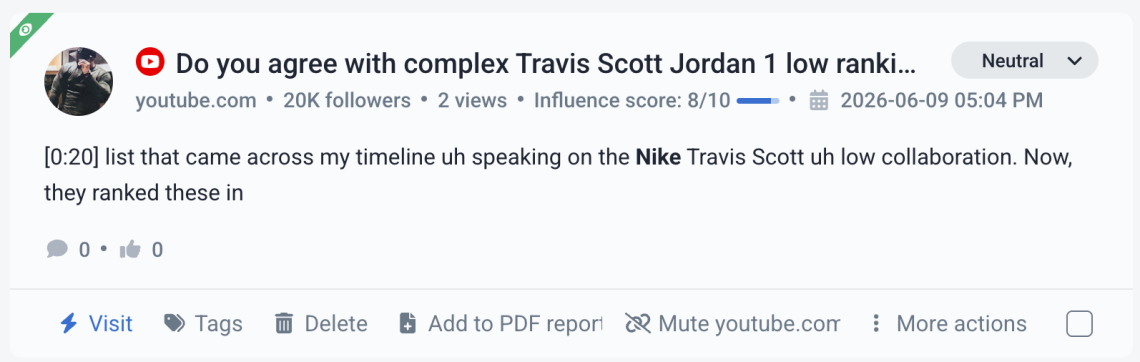
You can even see in which minute the keyword was mentioned. In this case, it was 0:20. Let’s double-check it.
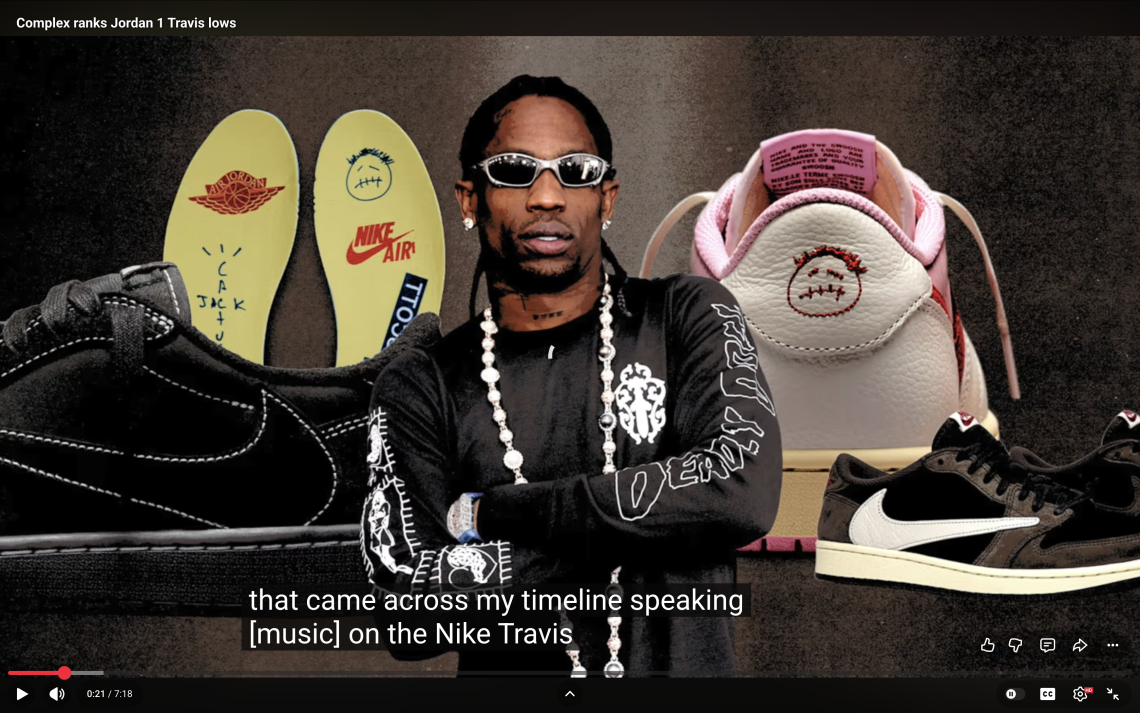
Yup, that’s correct.
AI Anomaly Detection
Anomaly Detection feature flags sudden swings in reach or sentiment and explains why they occurred, helping you spot a brewing PR issue before it spreads.
Like in this example below:
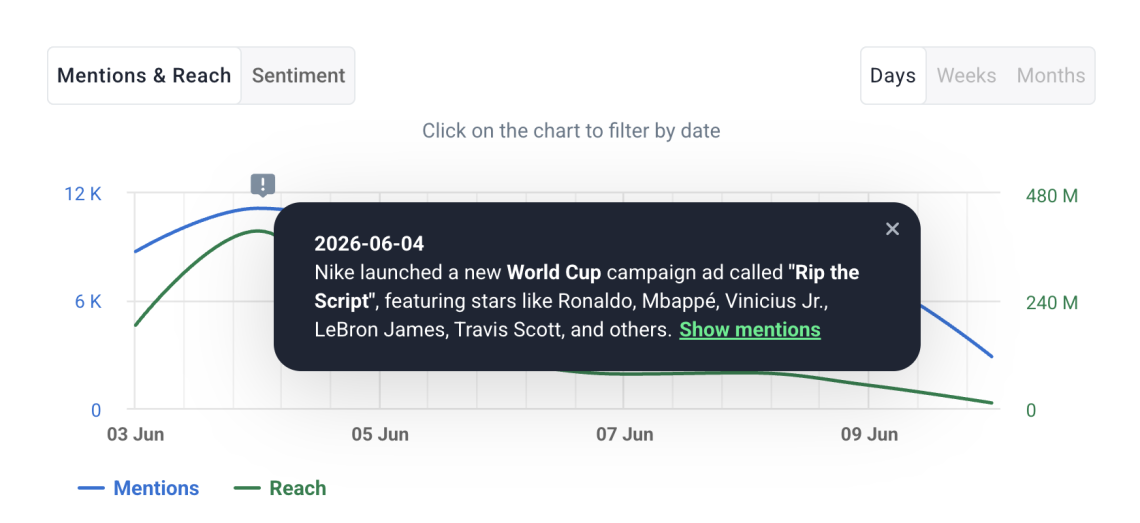
Clicking on “Show mentions” will redirect you to all the mentions that influenced the spike. Filter the YouTube.com domain, and you will gain a lot of insights about the spike and sentiment of creators who talked about it on YouTube.
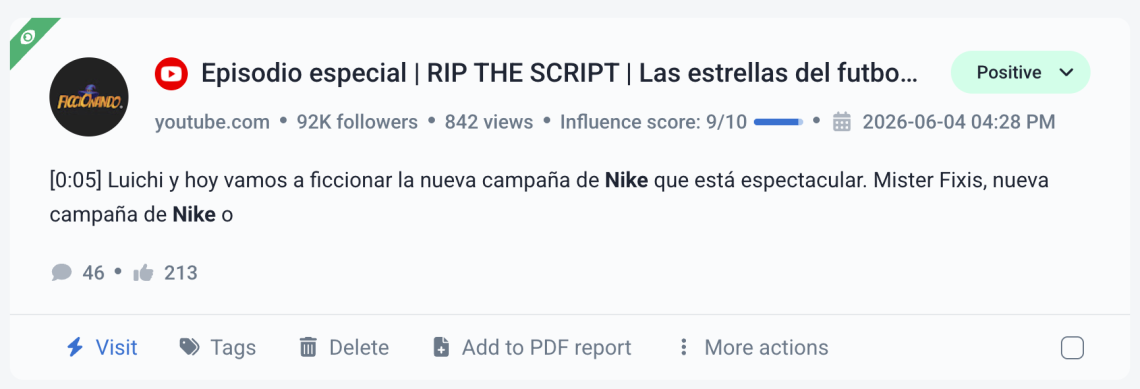
Btw, did you notice that Nike was again not mentioned in the title? Would be a shame to miss a mention with such high influence.
Comprehensive analysis
The good media monitoring tools don’t just collect mentions — they analyze them, calculate reach and sentiment, and flag what needs your attention.
Here is some data you get from Brand24.
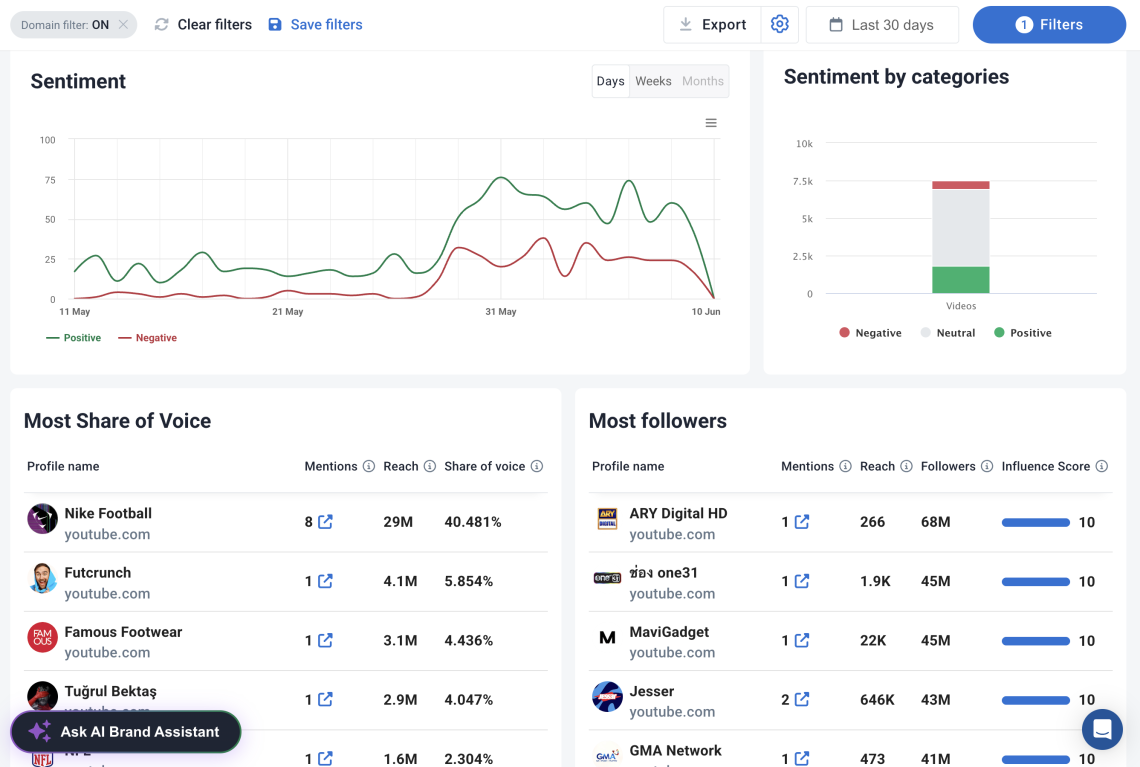
For the Nike project (with domain filtering ON), you can see:
- Sentiment analysis
- Most popular profiles
- Most popular authors
- Top mentions
- Reasons behind spikes
And more!
So, to sum up…
Monitoring YouTube is crucial for brands and content creators looking to understand their audience. It helps gauge sentiment and track the effectiveness of the YouTube presence.
By monitoring YouTube mentions, you gain valuable insights into how your brand or content is discussed. You can also identify emerging trends and measure the impact of your videos.
Real-life example
How 11 Bit Studios turned YouTube into an intelligence channel
The challenge: creators talk, but they don’t tag. Plenty of YouTubers and streamers cover games without ever @-mentioning the studio behind them — so those conversations stay invisible to standard tracking.
What they did: 11 Bit Studios (the team behind Frostpunk and This War of Mine) used Brand24 to track YouTube and Twitch creators covering their games — including the ones who never tagged the brand directly.
The result: YouTube went from a blind spot to a core intelligence channel, with a 100% increase in tracked brand discussion.
02 Explore YouTube native analytics
YouTube Studio provides metrics such as views, watch time, likes, comments, shares, and subscriber counts for your channel. It’s genuinely useful for understanding your content performance, and you can compare two videos or two time periods side by side.
But native analytics only see your own account.
They don’t track sentiment, share of voice, untagged mentions, or anything happening off your channel, which is exactly where most brand conversations live.
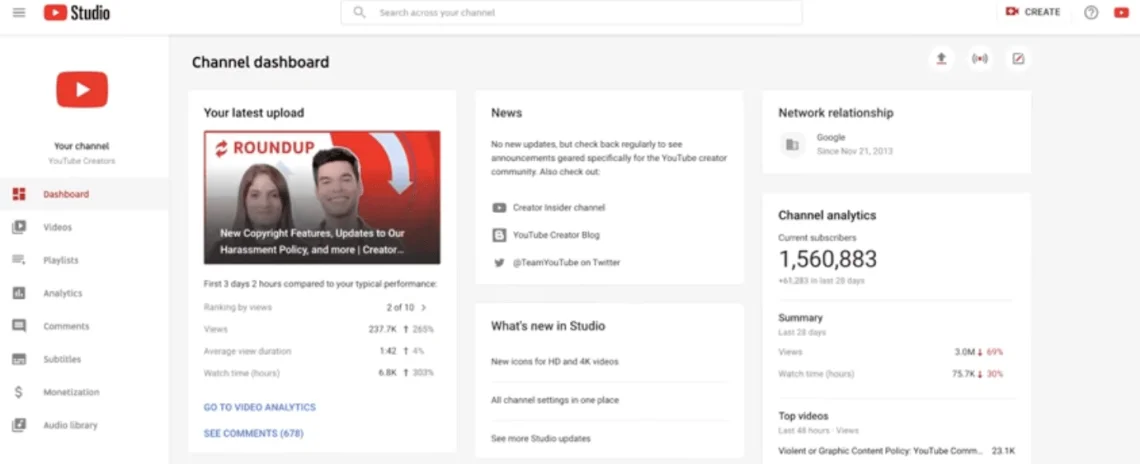
However, it’s important to note that YouTube’s native analytics have limitations. They do not track sentiment, share of voice, or untagged mentions as media monitoring tools do.
A quick side-by-side of what each one actually does:
| Capability | YouTube Studio (native) | Media monitoring tool |
|---|---|---|
|
Scope |
Your channel only |
All of YouTube + other platforms |
|
Untagged mentions |
No |
Yes |
|
Sentiment analysis |
No |
Yes |
|
Competitor tracking |
No |
Yes |
|
Trend & topic discovery |
No |
Yes |
|
Spike & crisis alerts |
Limited |
Yes |
|
Cross-platform view |
No |
Yes |
|
AI summaries & insights |
No |
Yes |
|
Transcript monitoring |
No |
Yes |
03 Monitor the progress of your YouTube videos
Growth shows up in trends, not single days.
YouTube Studio allows you to compare specific videos.
However, to analyze your overall reach and online presence, use Brand24.
This tool monitors not only YouTube but also your broader online performance. It allows you to select comparison periods and gain deeper insights into your channel’s growth and impact.
Let’s head to the Comparison Tab. In the right-hand upper corner, you will find the filtering feature. Choose the video category to see the statistics for video platforms alone.
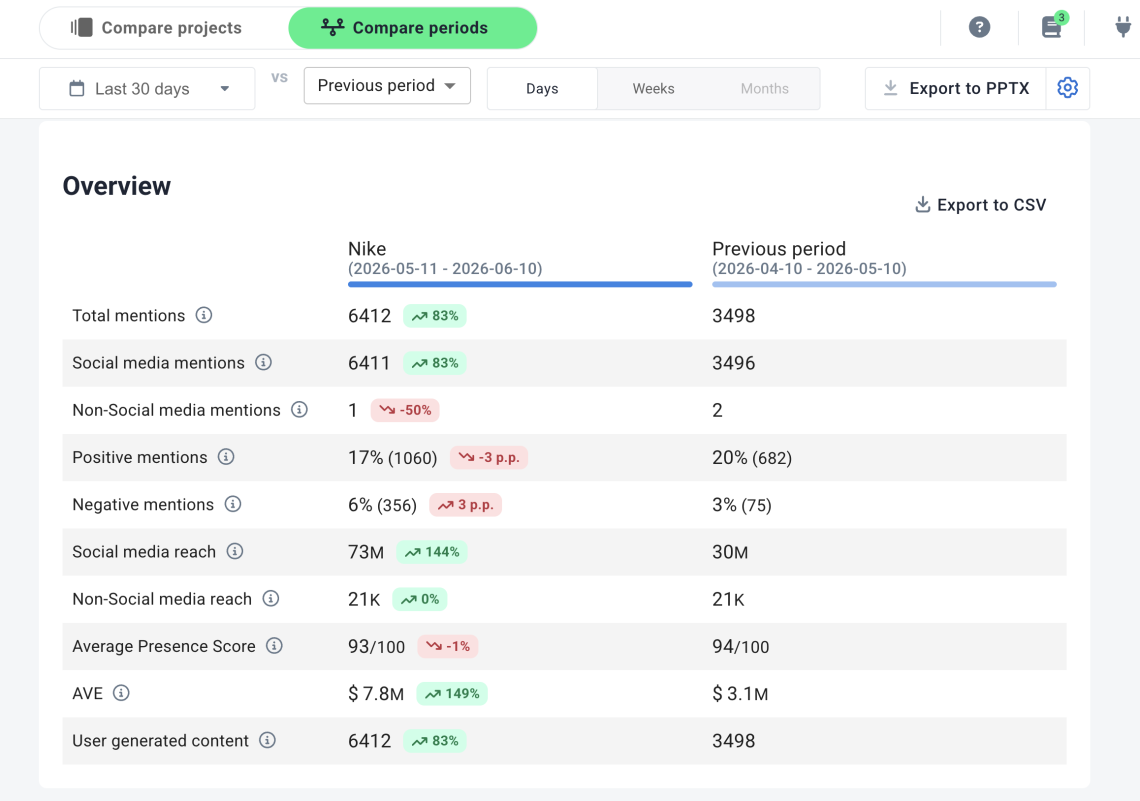
Nike’s current period shows a major spike in visibility: total mentions grew by 83%, social reach jumped 144%, and AVE rose 149% to $7.8M.
However, sentiment worsened slightly, with positive mentions dropping from 20% to 17% and negative mentions doubling from 3% to 6%, so the extra attention may include more criticism.
YouTube monitoring tips
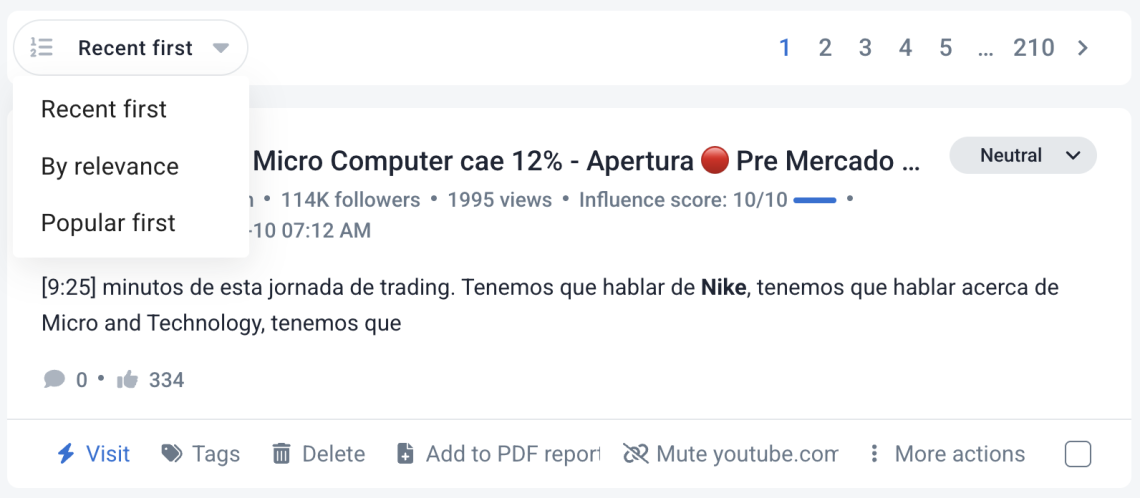
01 Find popular mentions
You can’t read everything. Filter mentions by popularity so the highest-reach videos and comments rise to the top — that’s where opinion actually forms.
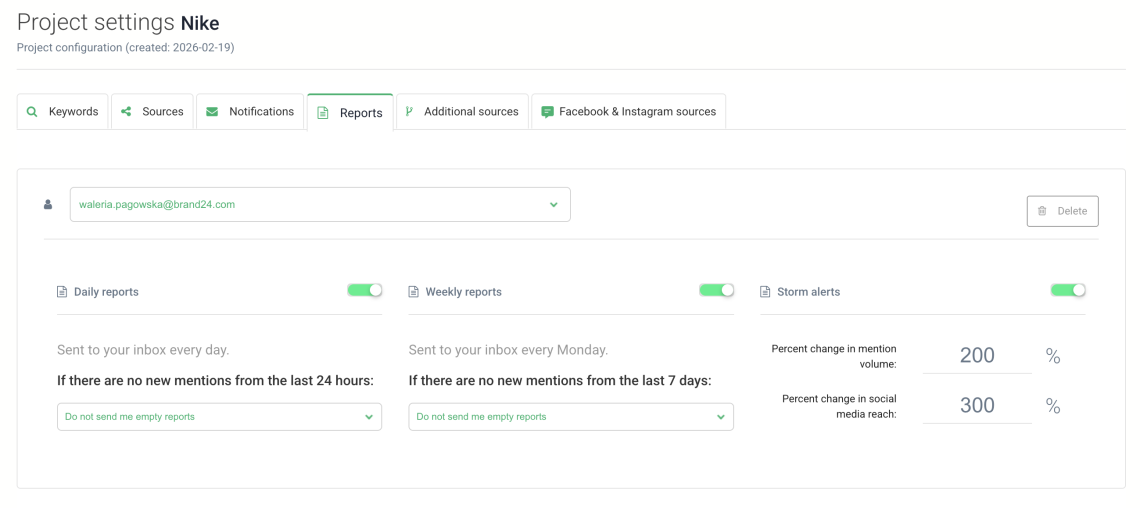
02 Set up alerts
Stay on top with personalized alerts that notify you of sudden changes in your project results. Beware of the negative mentions. Their sudden increase may herald a PR crisis. Act swiftly to prevent it.
03 Find the right influencers
Social media monitoring tools find your perfect influencers. Brand24 analyzes who is already talking online about your brand and identifies individuals with a high Influencer Score.
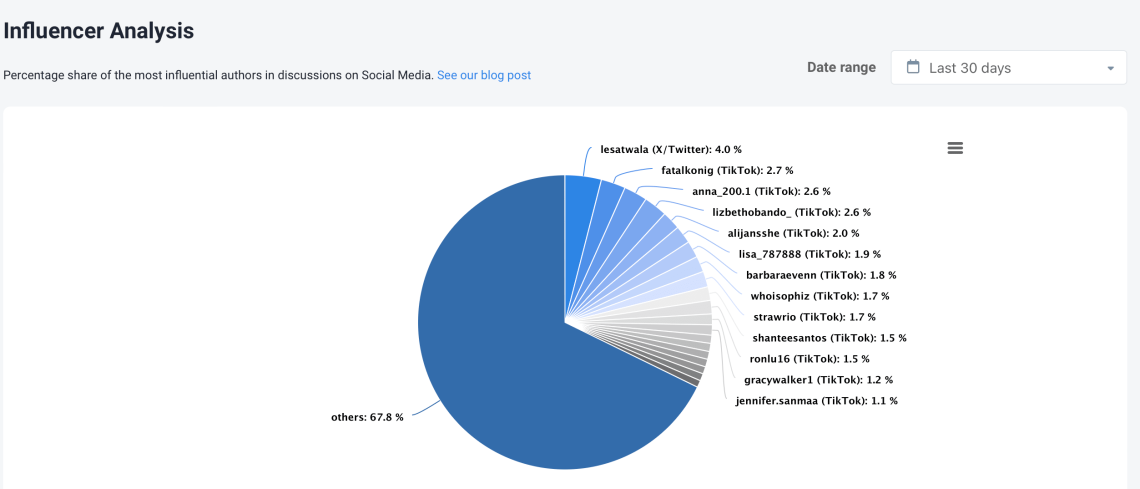
Media monitoring tools are a great solution if you want to start your influencer marketing journey.
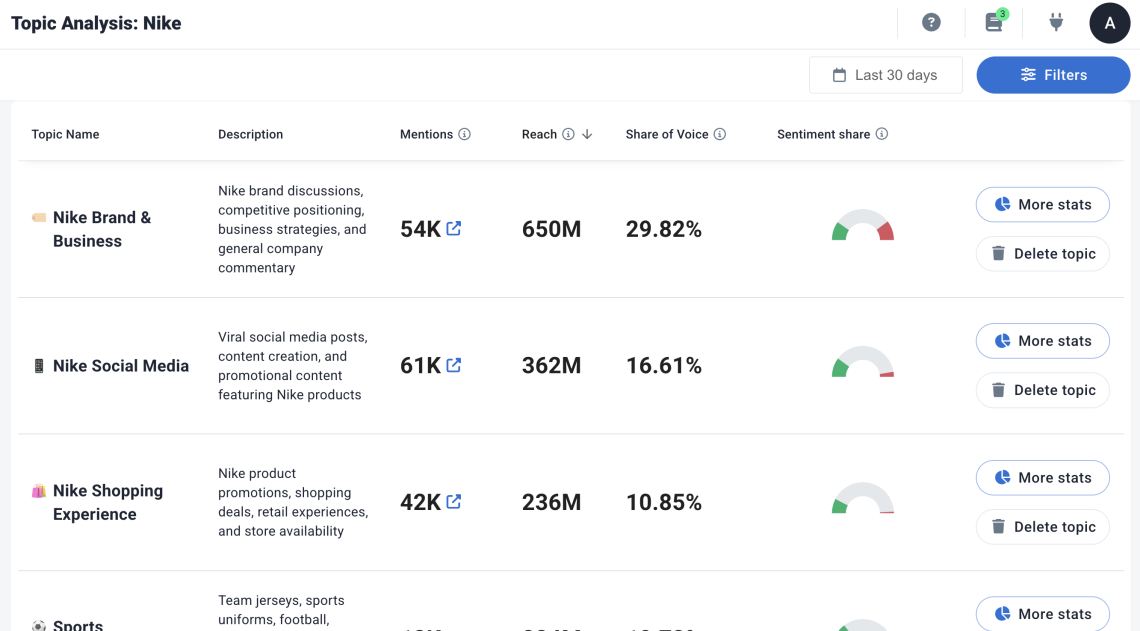
04 Leverage AI features
Some social media monitoring tools, like Brand24, leverage AI-powered features that analyze the collected data for you, providing the ultimate conclusions.
YouTube monitoring tools: how the options compare
Brand24 isn’t the only way to monitor YouTube, and a guide that pretends otherwise isn’t much of a guide. Here’s an honest read on where the main alternatives fit, and where each one stops.
| Tool | Best for | Monitors spoken content (transcripts)? |
|---|---|---|
|
Brand24 |
PR, comms, and brand teams that need spoken-mention coverage plus crisis alerts — across multiple brands and markets |
Yes — transcript monitoring built around PR/reputation use cases, at an in-house-team price point |
|
Talkwalker |
Enterprise teams that want visual listening — detecting logos and products on screen |
No — strong on visuals (image recognition), but doesn’t read what’s said |
|
Meltwater |
Large PR/comms teams needing broad, multi-channel media intelligence |
No — YouTube is one channel among many, with little in-video depth |
|
YouScan |
Image-led social listening with AI audio summaries |
Yes — one of the few that captures spoken mentions, framed as an AI/audio feature |
|
Awario |
Smaller teams and tighter budgets |
No — covers titles, descriptions, and comments, but not speech |
The gap most tools share is the same one: they read what’s written around a video — titles, descriptions, comments — but not what’s spoken inside it, which is exactly where the most honest brand conversations happen.
Talkwalker watches the screen; YouScan listens.
Brand24 reads the transcript and ties it to the PR signal that actually matters.
Conclusion: Your YouTube monitoring checklist
Native analytics tell you how your videos did. A monitoring tool tells you what the whole platform is saying about you. Here’s the short version to set up this week:
- 1 Add your brand name, products, and key terms as keywords to monitor.
- 2 Connect YouTube monitoring alongside your other channels for a full picture.
- 3 Turn on sentiment and reach alerts to catch spikes early.
- 4 Add a competitor or two and benchmark against them.
- 5 Review who's mentioning you to spot influencer opportunities.
- 6 Pull a monthly report and compare it to the period before.
You can’t act on a conversation you can’t see. YouTube monitoring turns 720,000 hours of daily video into a handful of decisions that actually matter for your brand.
FAQ
What is YouTube monitoring?
It shows how your brand is perceived, surfaces trends, measures sentiment, and helps you respond to conversations you’d otherwise never see.
How do I monitor mentions of my brand on YouTube?
You can supplement with manual checks in YouTube Studio for your own channel.
Can you monitor YouTube comments?
How is YouTube monitoring different from YouTube Studio analytics?
YouTube monitoring looks outward: it tracks what other people say about your brand across all of YouTube (and other platforms), including sentiment, untagged mentions, and competitor activity that Studio can’t see.
How can I monitor competitors on YouTube?
You’ll be able to compare their reach, engagement, and sentiment against yours, and spot when creators review or compare you head-to-head.
Is there a free way to monitor YouTube?
Most monitoring tools, including Brand24, offer a free trial so you can test full cross-platform tracking before committing.