Table of contents
2M Marketers

With over 3 billion monthly active users, Facebook generates massive volumes of brand mentions every day. Facebook sentiment analysis lets you cut through the noise and understand whether (and why) people love, criticize, or ignore your brand. Here’s a step-by-step guide to do it the right way.
Key takeaways
-
Facebook sentiment analysis sorts posts, comments, and mentions into positive, negative, or neutral
And the better tools go further, surfacing the emotions, emojis, and topics behind the score.
-
Your method depends on volume
Once you're handling hundreds or thousands of Facebook comments and brand mentions, like Red bull that gets 1,867 Facebook mentions in a single month. AI-powered social listening becomes the only practical option.
-
Social listening tools help you measure what actually matters: volume × sentiment × reach
By combining sentiment data with audience reach, brands can better monitor brand reputation and prioritize the conversations that matter most.
-
Treat it as continuous, not a one-off audit
that's what turns sentiment into early crisis detection and campaign measurement.
What is Facebook sentiment analysis?
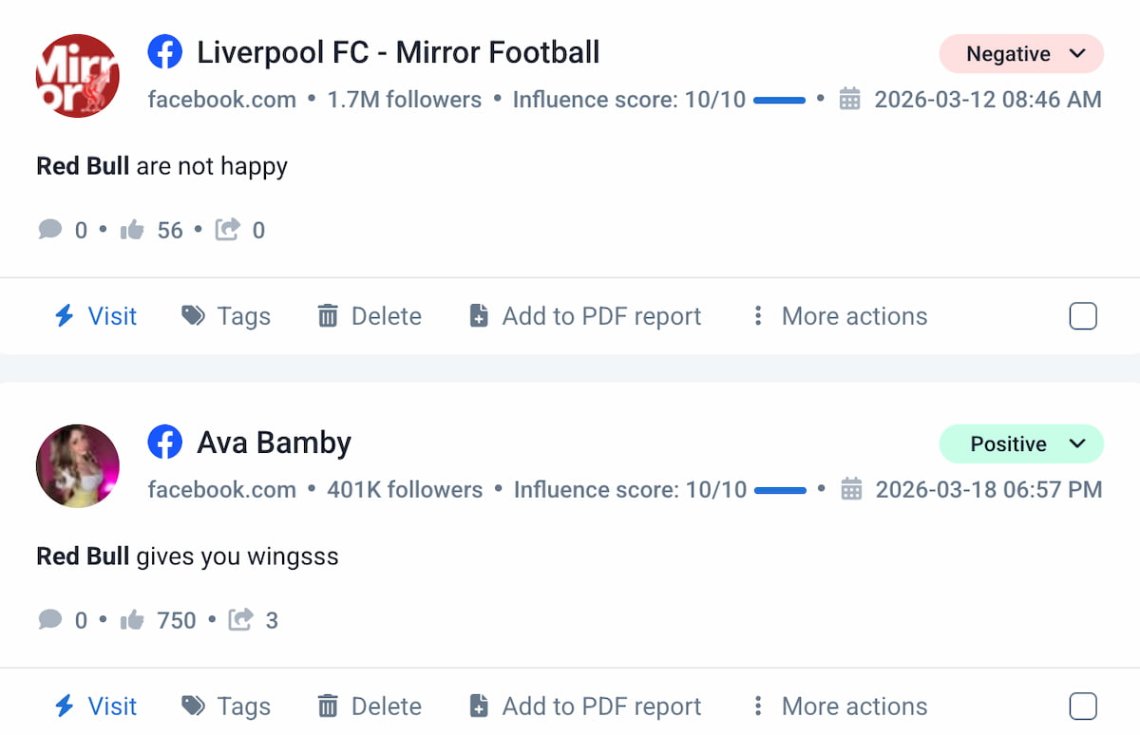
Facebook sentiment analysis is the process of analyzing posts, comments, and other user interactions to determine whether they express a positive, negative, or neutral attitude toward a topic, brand, or product.
Simply put, it answers the question: how do people really feel about you on Facebook?
On a deeper level, it helps determine public opinion, spot emerging trends, improve customer service, and track brand reputation over time.
With 3.07 billion monthly active users in 2026, even a small shift in Facebook sentiment can signal a big opportunity. Or an upcoming crisis.
How to do Facebook sentiment analysis?
There are only two ways to do the Facebook sentiment analysis: the basic one and the right one.
Okay, just kidding! Both methods can work well. It all depends on the size of your online presence.
Manual method
Create a spreadsheet, log every Facebook mention of your brand, and tag each one as positive, negative, or neutral. This works if you have a small online presence – say, under 100 mentions per month.
The downside?
You’ll surely miss untagged mentions, so the ones where people talk about your brand without tagging you. Those are often the most honest (and the most critical).
AI-powered sentiment analysis tools
For brands with a significant online presence, AI-powered sentiment analysis tools are basically the only practical option. They process thousands of mentions in seconds and classify sentiment automatically.
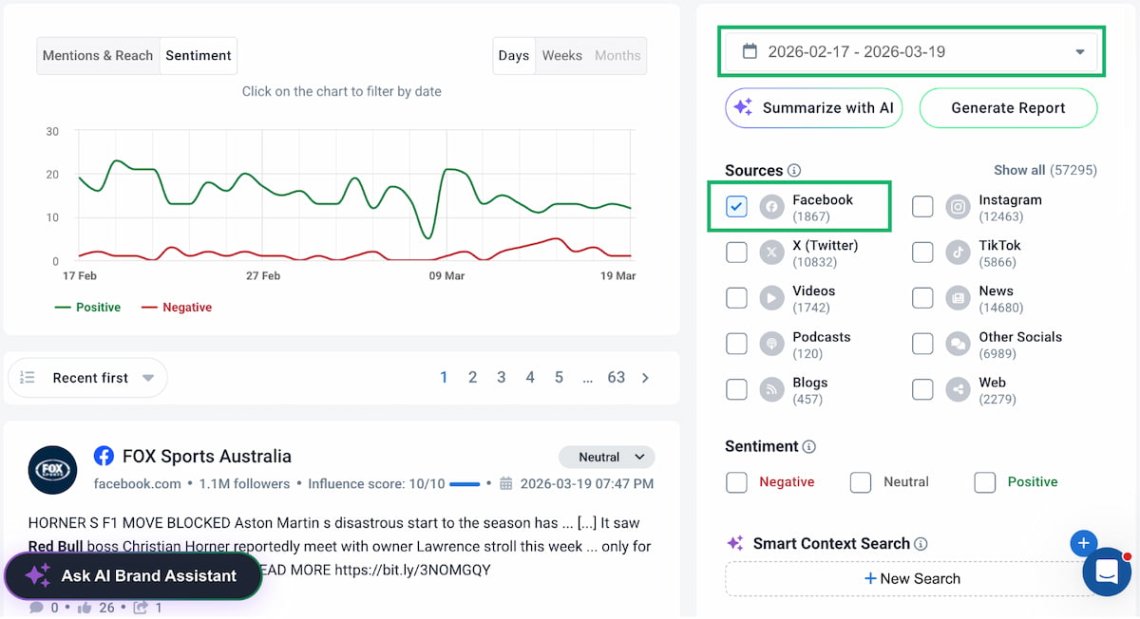
Plus, they offer either inside AI-based insights or API integration, so the process of sentiment analysis is even easier.
I compiled a list of pastable prompts – check them out (especially 4-7):

Consider Red Bull: with over 1,800 Facebook mentions per month, manual analysis would take days. An AI tool handles it in minutes.
| Feature | Manual method | AI sentiment analysis tool | ||
|---|---|---|---|---|
|
1
Speed
|
Hours/days |
Seconds |
||
|
2
Accuracy
|
Subjective |
AI-consistent + human review |
||
|
3
Untagged mentions
|
No |
Yes |
||
|
4
Scale
|
Up to 100 mentions / month |
Unlimited |
||
|
5
Sarcasm detection
|
|
|
||
|
6
Additional analytics
|
None |
|
||
|
7
Pricing
|
Free |
Paid |
No tool is perfect – sarcasm and contextual language can deceive AI. The best approach combines a mix of AI speed with human judgment.
Facebook sentiment analysis example [5 steps]
Now that you know the two methods of analyzing Facebook sentiment, you can decide which suits you best. If the manual method works for you, there’s no need to continue reading this article.
But if you’re curious about how to analyze Facebook sentiment using a sentiment analysis tool, sit back and relax. I’ll guide you through the step-by-step process using Brand24 as an example, however you can use any different media monitoring tool, like Brandwatch or Mention.
Brand24 is an AI-powered social listening tool designed to track and analyze your sentiment and, more broadly, monitor your brand’s reputation.
In addition to Facebook, it can perform sentiment analysis across various sources (or combine them for a complete overview):
- Social media platforms like Instagram, TikTok, YouTube, TikTok, X (Twitter), LinkedIn, Telegram, Reddit, and Twitch;
- News sites, blogs, video platforms, podcasts, review sites, newsletters, and other websites.
Are you ready to dive in? Great, let’s take the first step!
Step 1: Set up the monitoring project and collect data
Create a monitoring project by entering the keyword you want to track. This can be your brand name, a competitor, a hashtag, a campaign name, or any term relevant to your analysis.
Then let the tool collect mentions. Depending on your brand’s volume, you’ll start seeing data within minutes.
That’s an excellent time to brew coffee.
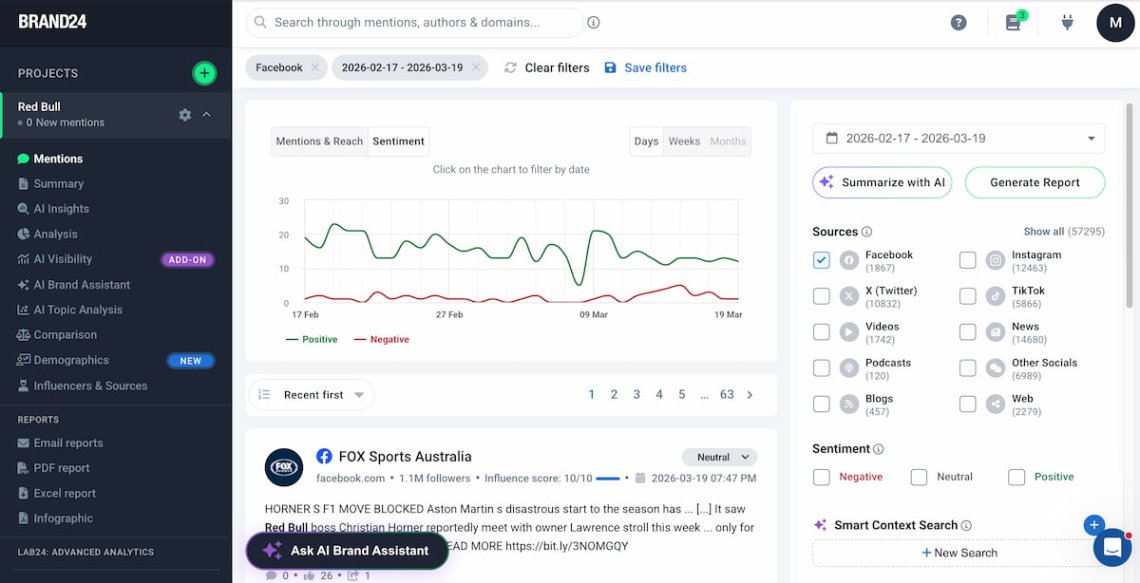
Once mentions are ready, apply the Facebook filter in the Sources panel to focus exclusively on Facebook data. You can also filter by sentiment, language, geolocation, and more.
Step 2: Check the sentiment breakdown
Okay, let’s dive into Facebook sentiment insights!
In the Mentions tab, switch the chart view to Sentiment. You’ll see green (positive) and red (negative) trend lines. They give you an instant visualization of how sentiment is trending.
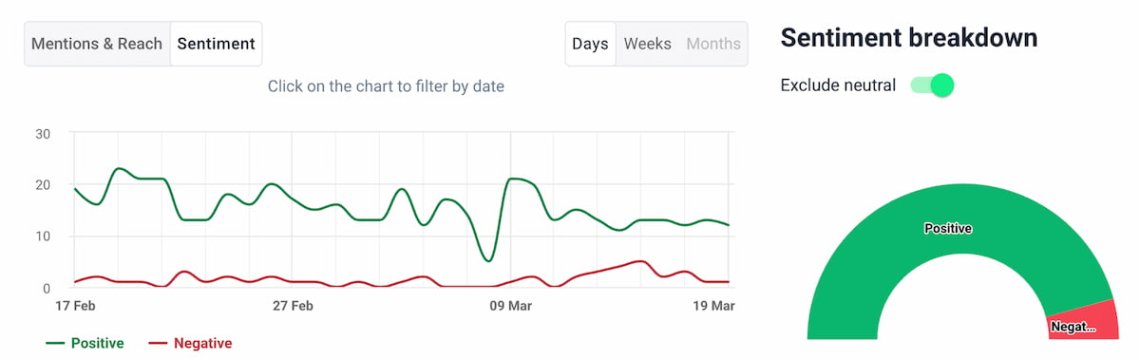
For a precise breakdown, go to the Analysis tab. Here’s what Red Bull’s data showed over 30 days:
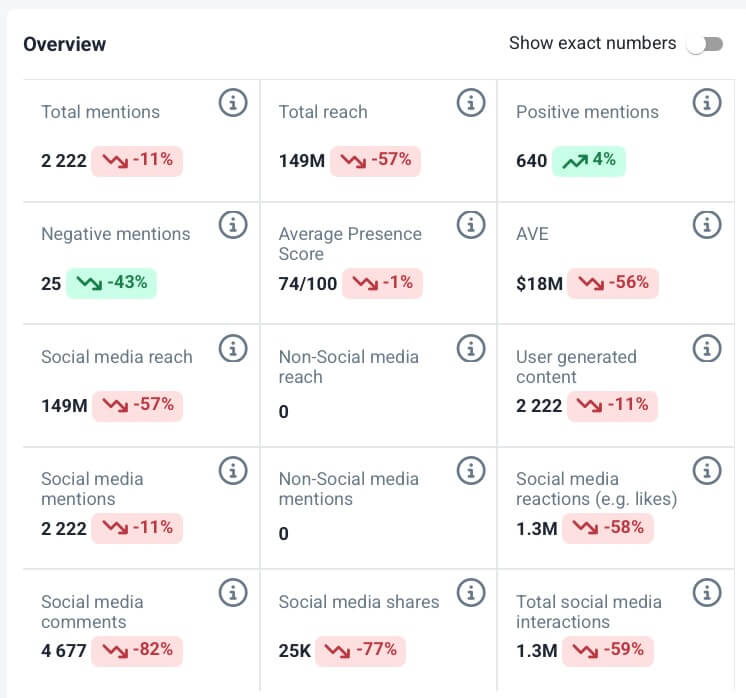
The first thing I checked was the sentiment split. Over the past 30 days, Red Bull was mentioned 2,222 times on Facebook (640 positive mentions and just 25 negative).
The takeaway? Red Bull enjoys overwhelmingly positive sentiment on Facebook, with only 1% negative mentions.
Step 3: Dive into topics
If you’re the type of person who loves a data-driven approach, I have great news! There’s even more you can uncover from sentiment analysis on Facebook.
The AI Topic Analysis identifies which themes or subjects are most frequently associated with your brand in Facebook conversations.
For each topic, you’ll see the number of mentions, reach, share of voice, and sentiment breakdown. All this data helps you understand which themes drive positive or negative perception.
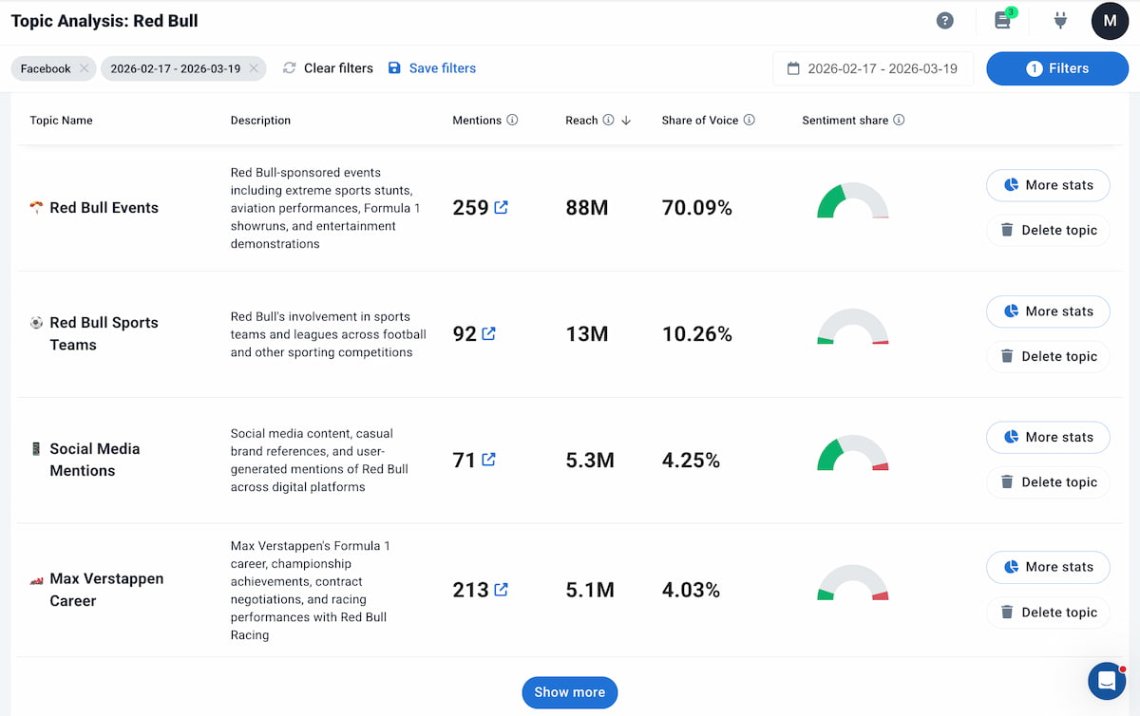
In the Red Bull case, sponsored events, sports teams, and user-generated content drive the most interest—especially in volume.
Actionable insight: Use topic data to guide your content strategy. If certain themes consistently drive positive sentiment, lean into them in future campaigns.
In Red Bull’s case, sponsored events, sports teams, and user-generated content generate the most positive response, which is why these topics should be given more attention in the next content calendar—they are already working in the brand’s favor.
In addition, monitor topics that are starting to gain popularity, as this gives you a great opportunity to outpace your competition.
Also keep an eye on topics with negative connotations (price changes, defective products, controversial ads) so you can address them before the situation worsens. It’s good practice to check monthly; a topic shifting from neutral to negative is your earliest warning sign.
Step 4: Detect influencers
Like other large social media networks, Facebook is home to its own influencers.
Media monitoring helps you identify these influential profiles and analyze their impact on your brand awareness, visibility, and reputation.
Simply, you can see who drives the most engagement, starts discussions, and extends your reach.
This feature helps you find the best candidates for collaboration or partnership, allowing you to reach people outside your current customer base.
With this information, you can build authentic relationships with the right people and increase your brand’s visibility on Facebook.
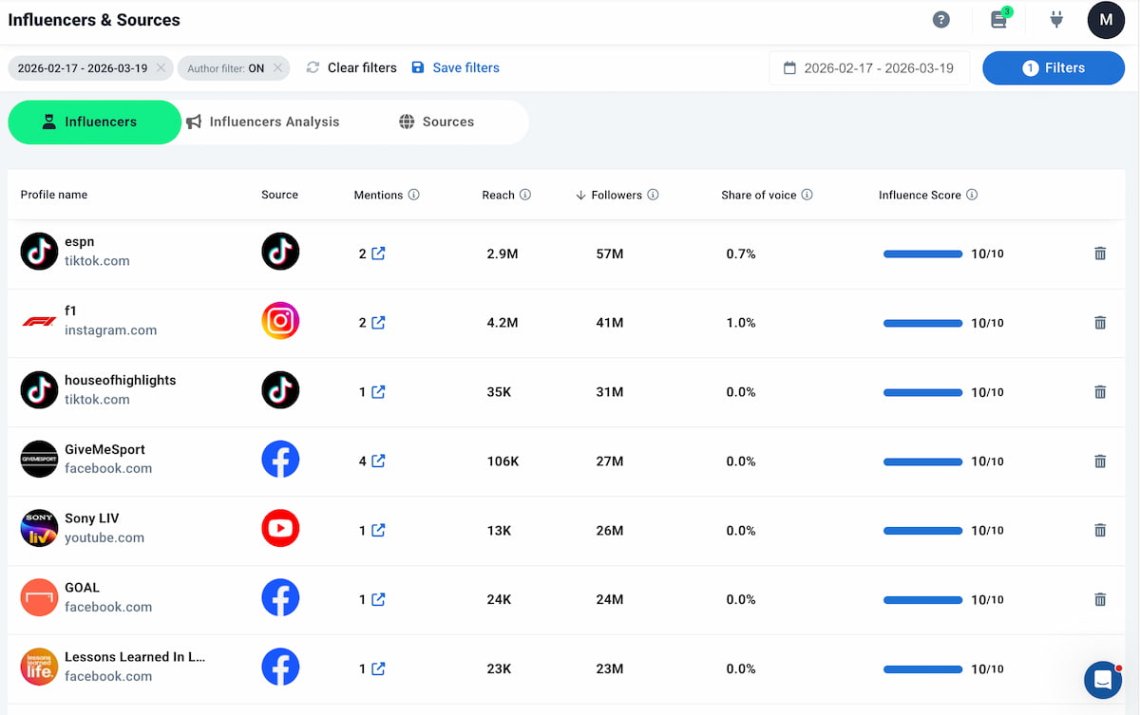
The magic happens when you put this data to work. Prioritize profiles based on sentiment and reach, not just the number of followers—a smaller account that consistently shares positive mentions of your brand is often a better partner because its content feels more authentic.
Before reaching out, carefully check three things: how they talk about you (positively, neutrally, or negatively), what their typical reach is, and whether their audience actually aligns with yours.
With these insights, you can build meaningful relationships with the right people to maximize your brand visibility on Facebook.
Next, make sure your message is personal. Refer to a specific post instead of sending a generic template—saying “we saw your mention of [topic]” sounds much better than a copy-paste message.
In the Red Bull case, for example, GiveMeSport generated an estimated 106K reach from just 4 mentions. That makes it a strong candidate for a closer look. Review the profile to understand the context of those mentions, the type of audience it attracts, and whether its content aligns with your brand. High reach combined with positive sentiment can reveal valuable partnership opportunities that aren’t obvious from follower numbers alone.
Step 5: Track the sentiment over time
You should treat sentiment analysis not as a one-time thing but as a continuous process of tracking and evaluating your communications strategy.
In other words, you should make doing your sentiment analysis a habit.
It’s important because even one negative comment (i.e., from an influencer) can harm your brand reputation on Facebook. Therefore, always keep your finger on the pulse.
To track and understand your Facebook performance, use Brand24’s “Compare periods” feature. It shows how your sentiment evolves week over week or month over month.
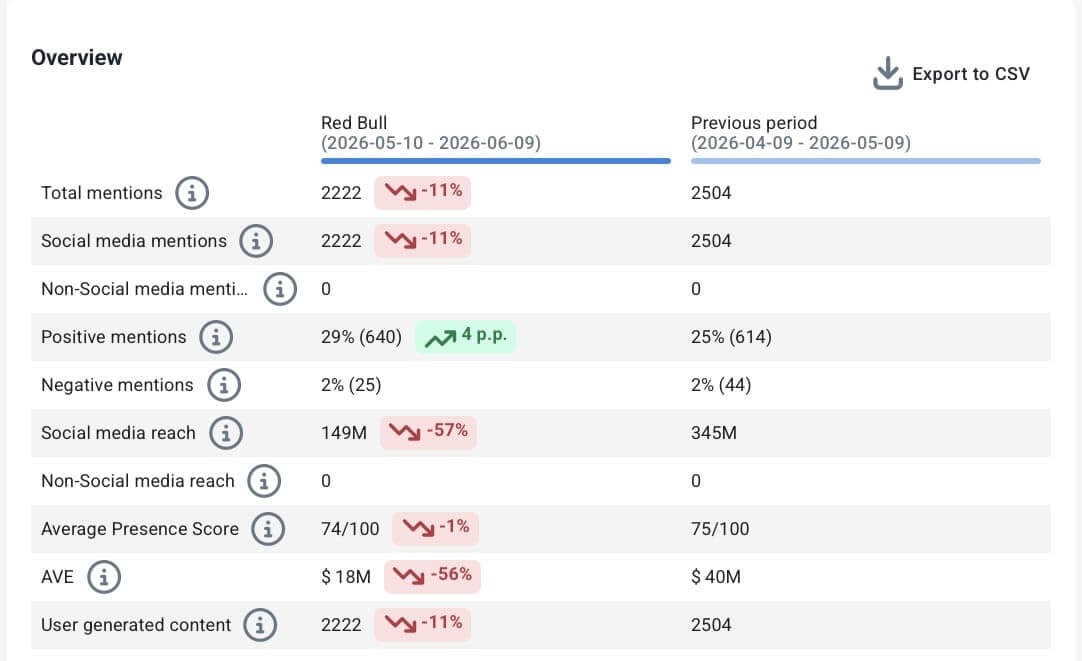
When I compared Red Bull’s last two periods, the overall results looked pretty poor, but the underlying sentiment painted a much better picture.
Mentions on Facebook dropped by 11% (2,222 compared to 2,504), and reach fell even more—by 57% (149 million compared to 345 million), while Advertising Value Equivalent (AVE) nearly matched that decline, falling by 56% ($18 million compared to $40 million). Looking solely at metrics for volume and reach, this is exactly the kind of month that causes concern.
However, when I looked at sentiment, the picture flipped. Positive mentions rose by 4 percentage points, from 25% to 29%, and even increased in absolute numbers (640 vs. 614), while negative mentions dropped to just 25 (from 44). So, people were talking less about Red Bull, and those conversations didn’t reach as far, but those who did talk about it were more positive.
This is a signal that really matters, and it can only be spotted by tracking sentiment over time, rather than focusing solely on reach and the number of mentions.
Why should you constantly monitor the sentiment of Facebook?
- You can see how positive, negative, and neutral mentions change over time and identify trends or anomalies.
- It helps you evaluate the effectiveness of your communications strategy or measure a particular PR campaign.
- You can spot potential issues early and respond to them quickly to protect your reputation.
FAQ
Why Facebook sentiment analysis matters?
Understand customer emotions by learning how people feel about your brand or content.
Improve communication by adjusting your tone and messaging based on audience feedback.
Spot problems early by detecting negative trends before they become bigger issues.
Boost engagement by focusing on topics and themes that resonate with your audience.
Strengthen brand reputation by addressing concerns and highlighting positive feedback effectively.
Does Facebook do sentiment analysis?
Can ChatGPT do sentiment analysis?
What replaced Facebook Analytics?
How accurate are AI sentiment analysis tools?
In practice, well-trained sentiment analysis models can achieve accuracy rates similar to human reviewers, who typically agree on a text’s sentiment around 80–85% of the time. For social media monitoring, that’s usually more than enough. The goal isn’t to classify every Facebook comment perfectly. It’s to identify patterns, shifts in customer sentiment, and emerging trends across thousands of mentions.
How often should you run Facebook sentiment analysis?
At a minimum, review sentiment data weekly and compare trends month over month. Increase monitoring during product launches, marketing campaigns, and PR-sensitive periods, when customer sentiment can shift quickly and impact brand reputation.